
Are you looking to organize your WordPress blog better and improve your site’s visibility? Tags might just be the secret tool you’ve been missing.
Imagine walking into a library where books are scattered all over the place. Frustrating, right? Well, your blog can feel like that without proper organization. That’s where WordPress tags come in. They’re like the labels that help your readers find exactly what they’re looking for.
But it doesn’t stop there. Using tags effectively can also boost your site’s SEO, making it easier for new visitors to discover your content. Intrigued? Let’s dive into how tags can transform the way you manage your WordPress site and connect with your audience.
Credit: kinsta.com
Understanding Tags
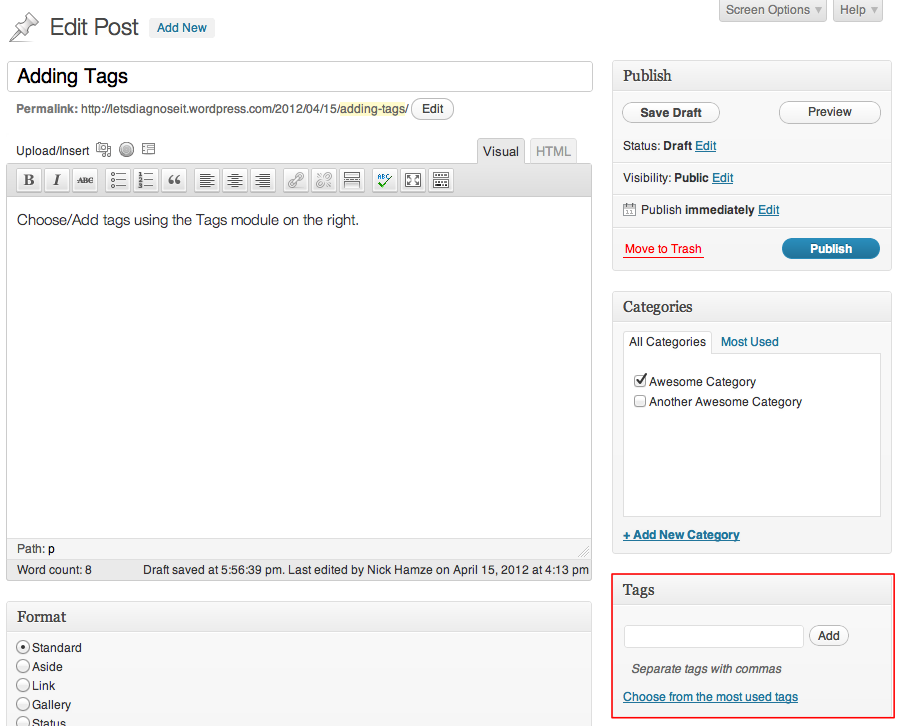
Tags are small pieces of information. They help organize your content. WordPress tags are like labels. They let readers know what your post is about. You can add many tags to one post. This makes it easier to find. Tags are not the same as categories. Categories are broad; tags are specific. For example, a category could be “Books.” A tag might be “Fiction” or “Mystery.”
Tags help with SEO too. Search engines use tags to find content. This means more people might see your post. Use clear and simple words for tags. Think about what words people will search. This helps your post show up in searches.
Purpose Of Tags
Tags help organize content on your WordPress site. They act like labels. These labels describe what your content is about. Readers find similar content using tags. This makes browsing easier.
Tags improve search results on your site. They also help search engines like Google. Good use of tags can boost your site’s visibility. Tags are simple words or phrases. They are not long sentences.
Each post can have many tags. These tags should be related to the post. Think of tags as the key topics. Use them wisely. Too many tags can confuse readers. Too few may not help your site.
Tags Vs Categories
Tags and categories help organize your WordPress posts. Categories are broad topics. They group posts into main subjects. Tags are more specific. They show details about the post. For example, a post in the “Travel” category might have tags like “Paris” or “Adventure”.
Categories are like big boxes. Tags are like labels on those boxes. You must have at least one category. But tags are optional. Use them to add extra info. Tags can be many. Categories should be few. This keeps your site neat and clear.
Creating Tags
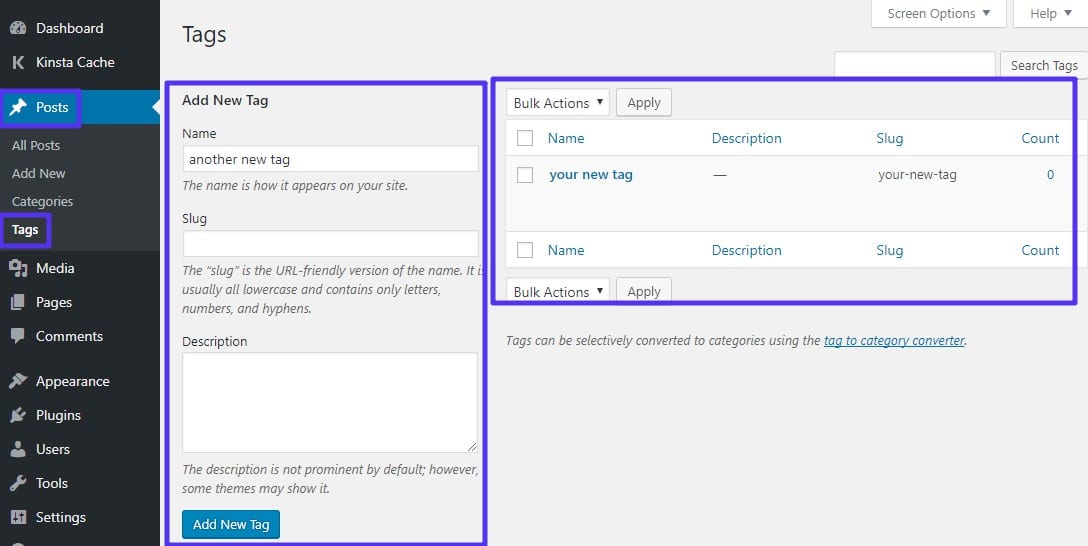
Accessing the Tag Editor is simple. Go to your WordPress dashboard. Find the “Posts” section. Then click on “Tags”. This opens the Tag Editor. Here, you can add new tags. You can also edit or delete old ones. Tags help organize your content. They make it easier to find.
Best Practices for Tag Creation are important. Use short and clear words. Only add tags that relate to your content. Avoid using too many tags. It can confuse readers. Think of tags like labels. They should fit the post well. This way, readers find what they need fast.
Managing Tags
Tags in WordPress help organize content by linking related posts. They act like keywords, enhancing user navigation and search functionality. Proper tag management simplifies website structure, improves user experience, and boosts SEO by categorizing topics effectively.
Editing Existing Tags
Editing tags is simple. Go to the tags section in WordPress. Click on the tag you want to edit. Change the name or description. Save the changes. The tag will update across your site. This helps in keeping tags organized.
Deleting Unused Tags
Unused tags can clutter your site. Visit the tags section. Look for tags that are not in use. Select them and click delete. This keeps your site clean. It improves the site’s navigation. Removing these tags helps your readers.

Credit: blog.hubspot.com
Tagging Strategies
Tags are words that describe your content. They help search engines understand your post. Use keywords that match your topic. Choose words that people search. This boosts your site’s visibility. Don’t use too many tags. It can confuse search engines. A few focused tags work best.
Tags make it easy to find related posts. They organize your content. This helps readers explore more. They keep users on your site longer. Use tags that make sense. Think about what readers would search. This makes your site user-friendly. Happy readers come back for more.
Common Mistakes
Tags help readers find posts. But using too many tags can be confusing. It makes your site look messy. Search engines might not like it. They may think you’re trying to trick them. Use tags wisely. Choose tags that fit your post. Three or four tags are enough.
Tags should match your post content. Irrelevant tags confuse readers and search engines. They don’t help your post. They can hurt your site’s ranking. Always pick tags that fit your main topic. Make sure they are meaningful. This makes your post easier to find. It keeps your site clean and clear.
Advanced Tag Usage
With WordPress, users can customize tag pages. This means you can change how your tag pages look. Make them pretty and useful. Add images, text, or even a special layout. This helps visitors find what they need. It also makes your site look neat. Good-looking pages keep visitors happy. They stay longer and explore more.
Tags help track how content performs. Use them in analytics tools. See which tags are popular. Find what topics people like. This helps you create better content. Content that people want to read. Improve your blog’s performance. Understand your audience better. Give them what they want.
Plugins For Tag Management
Tag management can be easy with the right plugins. Some plugins help to organize tags better. They keep everything neat. Others offer bulk editing. This means changing many tags at once. Useful for big websites. Some plugins even suggest new tags. These suggestions come from your content. They help to improve your website’s SEO. Choosing the right plugin depends on your needs. Always check the plugin’s reviews. Good ratings mean happy users. Don’t forget to update plugins. Updates fix bugs and add features. Make sure your website stays safe and fast.
Credit: make.wordpress.org
Faqs About Tags
Tags help organize content on WordPress. They work like labels for posts. Tags make it easy for readers to find related topics. If a post is about cats, you might use tags like “pets” or “animals”.
Use tags wisely. Three to five tags per post is best. More tags can confuse readers. They might also affect your site’s search ranking.
Categories group posts broadly. Tags are more specific. For example, a category could be “Food”. Tags under “Food” might be “pizza” or “salad”.
Frequently Asked Questions
What Are WordPress Tags Used For?
WordPress tags help categorize posts by specific topics. They enhance website navigation and improve user experience. Tags allow readers to find related content easily. They also contribute to SEO by organizing content. Proper tag usage can boost visibility and engagement.
How Do Tags Impact Seo?
Tags improve SEO by organizing content into relevant categories. They help search engines understand the content’s context. Well-chosen tags can enhance visibility on search engine results pages. They also aid in increasing user engagement. Proper use of tags can lead to better site rankings.
How Are Tags Different From Categories?
Tags are more specific than categories. Categories are broad, while tags are detailed. Tags help pinpoint specific topics within a category. They allow for more precise content organization. Using both enhances site navigation and user experience.
Can Tags Be Added To Pages?
Tags are primarily used for posts, not pages. Pages usually serve static content, while posts are dynamic. Tags are meant to organize dynamic content. Using tags on posts helps improve site navigation. It also enhances the user experience by grouping related content.
Conclusion
Tags on WordPress are essential for organizing content. They help users find relevant posts easily. Using tags improves website navigation and user experience. Tags also enhance SEO by categorizing content effectively. Choose relevant tags for each post to maximize benefits.
Avoid using too many tags on a single post. Keep tags concise and descriptive. This aids in better search engine indexing. Regularly update tags for optimal content organization. Understand your audience and their search habits. This ensures your tags remain effective.
Remember, well-chosen tags enhance your site’s visibility and user engagement.


