
Ever felt overwhelmed by the sheer volume of content on your WordPress site? You’re not alone.
Imagine trying to navigate a sea of information without a map or compass. That’s where tags come in. They’re your secret weapon for organizing content and helping readers find exactly what they’re looking for. But what are tags in WordPress posts, and why should you care?
This simple yet powerful feature can boost your site’s usability and SEO, making your content more accessible to readers and search engines alike. Ready to unlock the full potential of your WordPress posts? Let’s dive into how tags can transform your blogging experience, ensuring your readers keep coming back for more.
What Are Tags
Tags help you group your WordPress posts. They describe your content. Tags are keywords or phrases. They make your posts easy to find. They are like labels. People can click them. It takes them to similar posts.
Using tags can improve your site’s organization. Readers can navigate your site better. Tags are not the same as categories. Categories are broader. Tags are more specific. You can add many tags to a post. But use only a few. Too many tags can confuse. Keep tags simple and clear. It helps readers and search engines. Tags are a key part of SEO. They make your content more visible.
Importance Of Tags
Tags help people find what they need. They group similar content together. This makes it simple to explore. Users can click on a tag. Then, they see all related posts. This keeps readers on your site. They will find more of your content. This is why tags are useful.
Tags keep your blog neat. They sort posts into topics. This helps you manage your site. You know where everything is. Readers like a tidy site too. It is easier to navigate.
Tags can help with SEO. Search engines find your posts faster. They see the tags and know the topic. This boosts your chances of showing up in searches. More people can find your blog.
Tags Vs Categories
Tags and categories organize your content. Both help readers find posts. Categories are broad topics. They act like a table of contents. Use them for main subjects. A post can belong to one or more categories.
Tags are more specific. They describe details of a post. Think of them as index words. Tags are optional. They help with search and filter. Tags and categories work together. They create a better user experience.
Readers find what they need quickly. Search engines understand content better. This can improve your site’s visibility. Choosing the right tags and categories is important. It helps in organizing your blog effectively.
Credit: make.wordpress.org
How To Add Tags
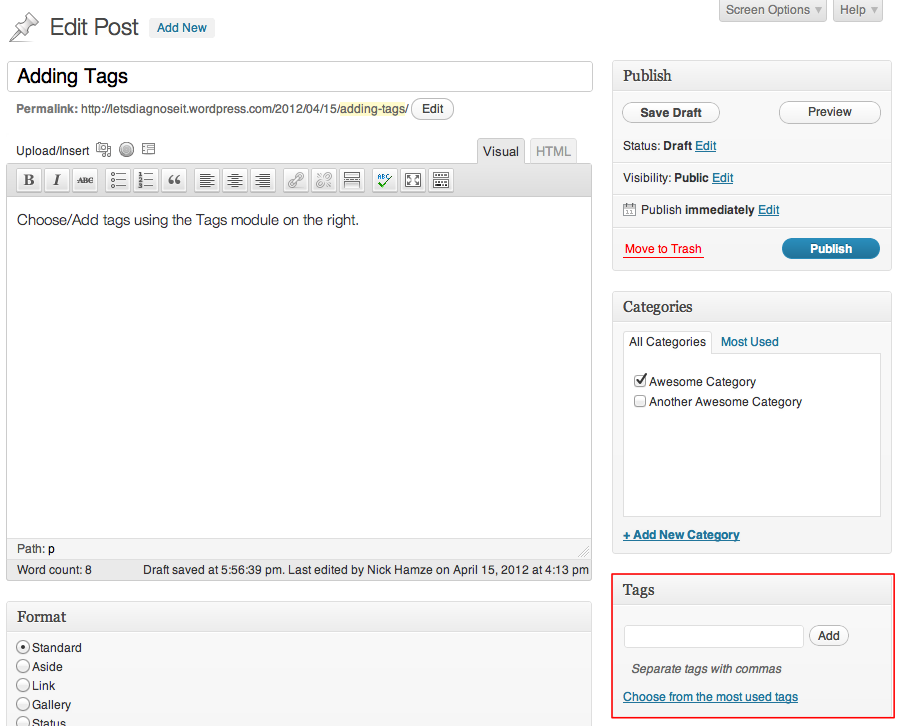
Tags help organize your posts. Open the WordPress editor. Find the box labeled “Tags.” Type a word that describes your post. Click “Add” to save it. You can add more tags by typing and clicking “Add” again. Tags make your post easy to find.
Go to your post list. Find the post you want to edit. Click “Quick Edit.” You will see a box for tags. Type in your tags here. Press “Update” to save. This is a fast way to add tags. Quick and simple.
Select posts you want to tag. Click on “Bulk Actions” and choose “Edit.” Type tags you want for all selected posts. Press “Update” to save changes. Bulk editing saves time. Useful for tagging many posts at once.
Best Practices For Using Tags
Tags in WordPress posts help organize content and improve searchability. Proper use enhances user experience and site navigation. Choose relevant tags that accurately describe the post’s content to attract the right audience.
Choosing Relevant Tags
Use tags that fit your post topic. Tags help readers find related posts. Keep tags specific. General tags can confuse users. For example, if a post is about chocolate cake, use “chocolate cake” as a tag. Avoid using broad tags like “food” or “recipes.” Specific tags make your post easier to find. This helps in organizing content better.
Avoiding Overuse
Too many tags can clutter your site. Use only a few tags. Choose the best ones for your post. Overusing tags can harm your site’s SEO. It can also confuse readers. Keep tags simple and few. Quality is better than quantity here. This keeps your site neat and tidy.
Maintaining Consistency
Tags should be consistent across posts. Use the same tags for similar topics. This helps in organizing posts well. Readers can find related content easily. Consistency helps in building a better user experience. This makes your site look professional. It also improves navigation for users.
Seo Benefits Of Tags
Tags help users find related posts. They also help search engines understand content better. Tags improve the site’s organization. This makes it easier to navigate. Search engines appreciate well-organized sites. It makes indexing faster. Tags can increase visibility in search results. They categorize content under relevant topics. This means more chances to appear in searches. Using tags wisely can attract more visitors. This means more engagement on your site. Remember, not too many tags. Use only necessary ones. Correct tagging is key to better SEO. It helps both users and search engines.
Common Mistakes With Tags
People often use too many tags. This makes posts hard to find. Tags should be specific and relevant. Avoid using similar tags for one post. This confuses readers. Tags should help users find content. Not make it harder.
Some think more tags attract visitors. Wrong idea. This leads to clutter. Only choose tags that fit the topic. Quality is better than quantity. Avoid stuffing tags in every post.
Tags need structure. Random tags look messy. Organize tags into categories. Helps users navigate easily. A neat tag system improves user experience. Keep tags simple and clear.
Managing And Editing Tags
Tags are like labels for your posts. They help users find related content. To manage tags, first go to your WordPress dashboard. Click on Posts and then Tags. You will see a list of all your tags. Each tag has an edit option. Click to change the tag’s name or description. Updating tags can make your posts more organized. Keep tags simple and clear. Avoid using too many tags. Too many tags can confuse readers. Tags should match your post’s content. Good tags improve search and navigation. They make your blog more user-friendly. Regularly check and update your tags. It helps keep content fresh.
Using Tags In WordPress Themes
Tags organize content effectively. They help users find related posts. By adding tags, posts become more visible. This increases traffic to the site. Tags make searching easier. Readers love easy navigation.
Adding tags is simple. Go to the post editor. Find the tags box. Type your tags there. Separate tags with commas. Hit save. Your post now has tags.
- Use relevant tags.
- Avoid too many tags.
- Keep tags short.
- Update tags regularly.
- Choose tags wisely.

Credit: www.youtube.com
Credit: searchwp.com
Frequently Asked Questions
What Are Tags In WordPress Posts?
Tags in WordPress are a way to organize content. They help categorize posts by specific topics or keywords. This improves site navigation and user experience. Tags also enhance SEO by making content more discoverable. They should be relevant, specific, and descriptive.
How To Add Tags To WordPress Posts?
To add tags, go to your WordPress dashboard. Select the post you want to edit. On the right side, find the “Tags” box. Enter relevant tags separated by commas. Click “Add” to save them. Tags help categorize and optimize your content for search engines.
Why Are Tags Important For Seo?
Tags improve SEO by organizing content and making it more discoverable. They help search engines understand your content’s context. Tags increase the chances of your posts appearing in relevant search results. They enhance user experience by providing related content suggestions.
Can Tags Improve User Experience?
Yes, tags improve user experience by organizing content effectively. They help users find related posts easily. Tags create a logical structure and enhance site navigation. This makes it simpler for visitors to discover more content. A well-organized site encourages users to stay longer.
Conclusion
Tags help organize your WordPress posts. They improve user experience. Readers find related content easily. Tags can boost your site’s SEO. Using relevant tags attracts more visitors. Choose descriptive tags for clarity. Avoid using too many tags. Quality over quantity matters.
Tags should complement categories. They offer a quick way to navigate. Consider your audience when creating tags. Keep tags consistent across posts. Well-chosen tags enhance your site’s structure. Efficient tagging leads to better content discovery. Explore different tag strategies. Experiment and see what works best.
Your content deserves the right tags.


