
Unlocking the full potential of your WordPress site can sometimes feel like a daunting task. But what if there was a way to simplify complex tasks with just a few keystrokes?
Enter short codes—your new secret weapon for enhancing your website’s functionality without breaking a sweat. Imagine having the power to add buttons, galleries, or forms to your pages in mere seconds. Short codes are like magic spells for your website, allowing you to transform your content effortlessly.
Ready to discover how these little snippets can make your life easier and your site more dynamic? Let’s dive into the world of WordPress short codes and see how they can revolutionize your web experience.
Shortcodes Basics
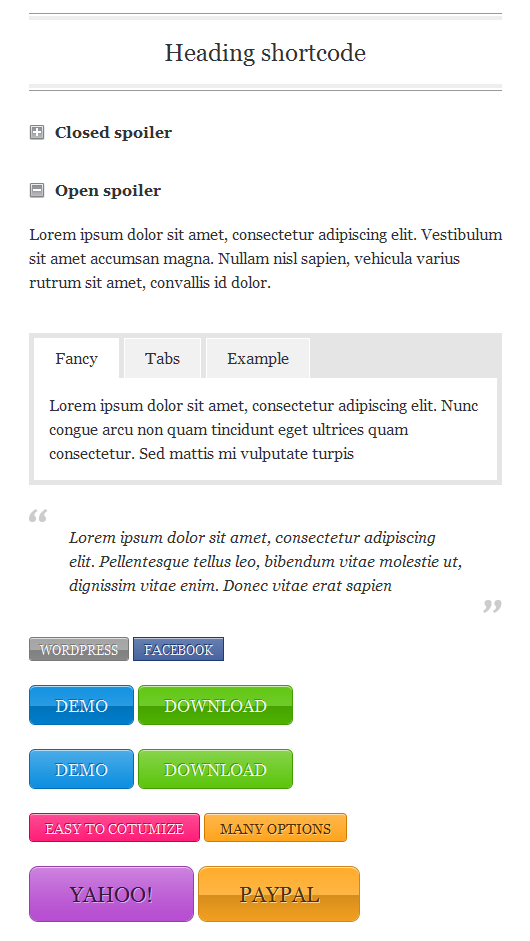
Shortcodes are like magic words for WordPress. They help users add features without coding. Use them to insert images, videos, or forms. Easy and quick. A shortcode looks like a word inside brackets. Example: .
WordPress introduced shortcodes in 2008. They made web design simple. Before, users needed to know HTML or CSS. Now, they don’t. Over the years, shortcodes grew popular. Many plugins use them. They make websites interactive. Developers keep adding new ones. Shortcodes change as WordPress grows.
How Shortcodes Work
Shortcodes in WordPress are simple and powerful. They help users add special features to a page. The basic syntax is easy to learn. Use square brackets to start. Inside, write the shortcode name. Sometimes, add extra details, called attributes. Attributes give more information. They make the shortcode work better. For example, can show pictures. Add attributes like for bigger images.
Understanding the structure is important. Shortcodes can be one word or have multiple parts. Always use square brackets. Some shortcodes close themselves. Others need an end bracket. Example: . This tells WordPress where it starts and stops.
Shortcodes have many uses. They can insert videos, galleries, or buttons. Want to add a contact form? Use a shortcode. Need a map on your site? Shortcodes do that too. They save time and make tasks easy. Just type the code, and WordPress does the rest.
Creating Custom Shortcodes
To create a custom shortcode, start by writing a simple function. This function should do a specific task. Next, use the add_shortcode function. This tells WordPress about your new shortcode. Provide a name for your shortcode and link it to your function. Your shortcode is ready now.
Keep your code clean and simple. Avoid using complex functions. They can make your code hard to read. Always test your shortcode. Make sure it works as expected. Use comments in your code. They help others understand what your code does.
Credit: www.smashingmagazine.com
Popular Shortcode Plugins
Shortcode Ultimate is a favorite. It has many features. Many people use it. Easy Shortcode is simple. It is for beginners. Shortcodes Ultimate has many options. It is very popular. These plugins make work easy. They save time.
| Pros | Cons |
|---|---|
| Easy to use | Can slow site |
| Saves time | May cause conflicts |
| Many features | Not all plugins free |
Shortcodes Vs. Blocks
Shortcodes are simple codes that make content display better. They are used for adding buttons or videos. Blocks are new in WordPress. They help create pages with sections like text, images, or lists. Blocks are visible and easy to move. Shortcodes are hidden in the editor.
Use shortcodes for quick changes. They are good for adding features like forms. Blocks are better for building pages. They make it easy to change layout. Choose shortcodes for small tasks. Pick blocks for designing large sections.
Troubleshooting Shortcodes
WordPress shortcodes simplify embedding features without coding. These handy snippets insert buttons, galleries, and more into pages effortlessly. Troubleshooting involves checking syntax, ensuring compatibility, and updating plugins for seamless functionality.
Common Issues
Shortcodes can sometimes break. One common issue is incorrect placement. They need to be inside the content area. Another problem is missing brackets. Shortcodes must have both opening and closing brackets. Plugins can also cause issues. Some plugins do not support certain shortcodes. Also, shortcodes might not work after an update. Always check after updates.
Solutions And Best Practices
Always double-check your shortcodes. Ensure brackets are in place. Use the preview feature to test them. If they break, check for plugin conflicts. Disable plugins one at a time. Find the conflicting plugin. Another tip is to use a shortcode manager plugin. This helps organize and manage shortcodes. Keep plugins and themes updated. This avoids compatibility issues.
Future Of Shortcodes
Shortcodes are small bits of code. They help add features to WordPress sites. These are evolving quickly. New trends and ideas are changing their use. People want more interactive elements. So, developers create new shortcodes. These shortcodes make websites look fresh and modern. They help sites stand out.
Trends And Innovations
Innovations in shortcodes focus on ease of use. Users want simple codes. Codes that are easy to add to websites. Developers focus on making shortcodes more flexible. They add more features to them. This makes websites more engaging. Trends show users love customizable options. Options that fit their needs.
Impact On WordPress Development
Shortcodes affect how WordPress is developed. They make building sites faster. Developers use them to save time. Shortcodes offer many features with a simple code. This helps build sites easily. Websites become more dynamic. They look better and work well. Shortcodes shape the future of WordPress.
Credit: www.smashingmagazine.com
Credit: www.wpbeginner.com
Frequently Asked Questions
What Are Short Codes In WordPress?
Short codes in WordPress are small code snippets. They allow users to add dynamic content easily. By using short codes, you can embed forms, galleries, and other elements. They simplify complex tasks for non-developers. Short codes enhance functionality without manual coding.
How Do I Use Short Codes In WordPress?
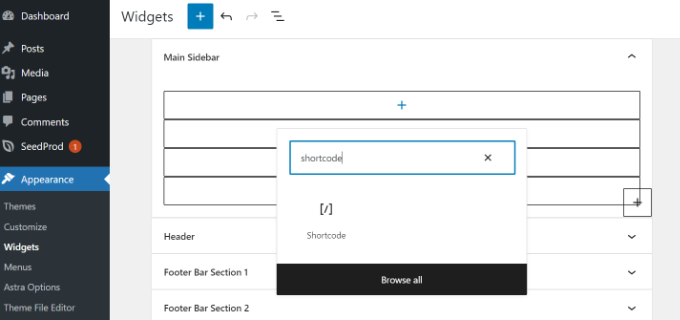
To use short codes, simply paste them into the post editor. Short codes typically appear within square brackets. Once added, they render the intended content or functionality. WordPress processes these codes automatically. This makes adding interactive elements straightforward.
Can Short Codes Be Customized In WordPress?
Yes, short codes can be customized in WordPress. Developers can create new short codes or modify existing ones. Customizing short codes allows for personalized functionality. This flexibility is valuable for tailoring websites to specific needs. It requires some coding knowledge.
Are Short Codes Seo-friendly?
Short codes themselves don’t impact SEO directly. However, the content they generate can affect SEO. Ensure that short codes produce accessible, relevant, and optimized content. This ensures improved user experience and search rankings. Use them wisely to maintain SEO integrity.
Conclusion
Short codes in WordPress simplify website customization. They save time and effort. Users can easily add features without coding skills. These codes enhance functionality and design. Beginners find them useful and straightforward. Short codes fit different needs and styles. They offer flexibility and convenience.
Bloggers and developers enjoy their efficiency. Explore various short codes to optimize your site. Experiment with different options. Tailor your WordPress experience. Make your website engaging and functional. Understand their potential and benefits. Short codes can transform your site. Keep learning.
Stay creative. Enjoy building your WordPress journey.


