
Are you looking for a simple way to design your WordPress site without spending hours on coding or layout? Patterns in WordPress might be exactly what you need.
These ready-made blocks let you build beautiful pages quickly and easily. Imagine having a toolbox filled with stylish sections that fit perfectly into your site, saving you time and effort. You’ll discover what WordPress patterns are, how they work, and why they can change the way you create your website for the better.
Keep reading to unlock a smarter, faster way to design your online space.
Credit: fullsiteediting.com
What Are WordPress Patterns
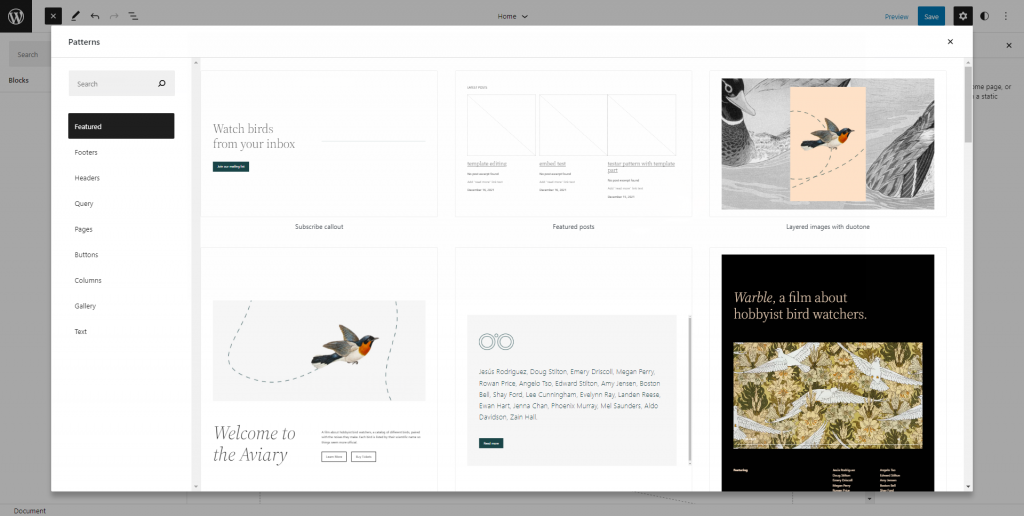
WordPress Patterns are ready-made block layouts you can add to your pages or posts. These patterns help you build content quickly without starting from scratch. They consist of groups of blocks arranged in a specific design. This makes creating beautiful pages easier and faster.
Patterns come in different styles and formats. They fit many needs, from simple text sections to complex multi-column layouts. You can customize them after adding to match your site’s look. Patterns save time and make your content look professional.
Types Of WordPress Patterns
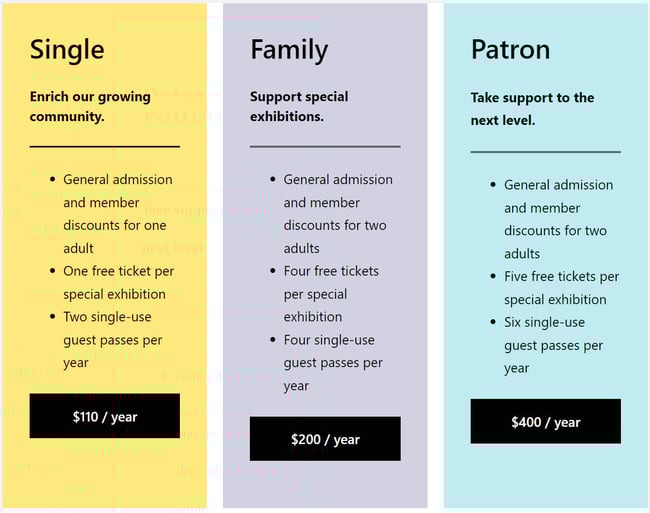
There are many types of WordPress Patterns. Common ones include text blocks, image galleries, and call-to-action sections. Some patterns combine text with images or buttons. Others create headers, footers, or testimonials. Patterns vary by theme and plugin support. You can find patterns for blogs, portfolios, shops, and more.
Benefits Of Using Patterns
Patterns speed up content creation. You do not need to design each part yourself. They keep your layout consistent and neat. Patterns work well on all devices, improving user experience. Using patterns also helps beginners build pages easily. They reduce errors and make editing simpler. Overall, patterns enhance your site’s look and save time.
Credit: blog.hubspot.com
Finding And Installing Patterns
Finding and installing patterns in WordPress is simple. Patterns are pre-designed blocks that help build pages quickly. They save time and improve design consistency. Using patterns, anyone can create a professional-looking website without coding.
Using The Pattern Directory
The Pattern Directory is a collection of ready-made patterns. It is built into WordPress, making access easy. Browse through different categories like headers, galleries, and footers. Preview each pattern to see how it looks before using it. You can search for patterns by keywords to find the right style fast.
Adding Patterns To Your Site
Adding patterns to your site takes just a few clicks. Open the block editor and select the pattern tool. Choose a pattern from the directory or your saved collection. Insert the pattern directly into your page or post. After adding, customize colors, text, and images to fit your brand. Patterns help create a polished look without extra effort.
Creating Custom Patterns
Creating custom patterns in WordPress lets you design unique layouts quickly. Patterns are reusable block groups you can insert into posts or pages. Custom patterns save time and keep your site’s design consistent.
You can craft patterns for headers, footers, call-to-action sections, or any layout piece. Building your own patterns gives you control over the look and feel of your content. It also helps you maintain a professional appearance across your website.
Tools For Building Patterns
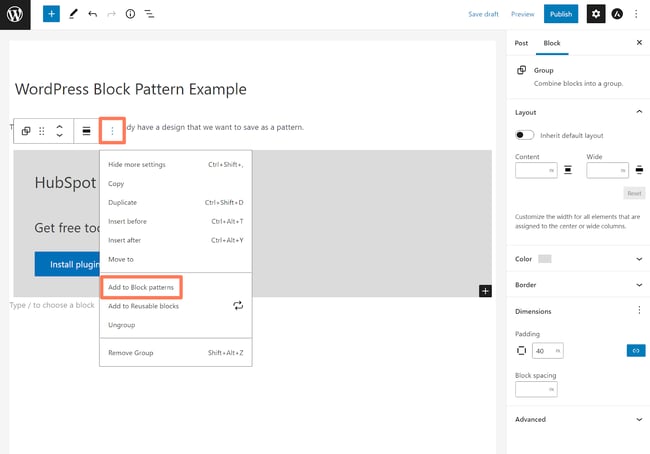
WordPress offers a built-in pattern creator in the block editor. You can select blocks, arrange them, and save the group as a pattern. This tool is easy to use and requires no coding skills.
For more advanced patterns, some plugins add extra features. Plugins like Block Pattern Builder or Lazy Blocks offer drag-and-drop interfaces. These tools help you create complex patterns with custom settings.
Developers can also create patterns using PHP code. Code-based patterns offer full control and flexibility. They allow you to register patterns in your theme or plugin files.
Best Practices For Custom Patterns
Keep your patterns simple and focused on a clear purpose. Avoid cluttering the pattern with too many blocks or styles. Simplicity improves usability and loading speed.
Use consistent colors, fonts, and spacing to match your website’s style. Consistency helps visitors recognize your brand easily. Test patterns on different devices to ensure they look good everywhere.
Name your patterns clearly for easy identification. Use descriptive titles that explain the pattern’s function. This helps you and your team find patterns fast.
Update patterns as your design evolves. Keep them fresh and aligned with your site’s look. Removing outdated patterns prevents confusion and clutter.
Credit: blog.hubspot.com
Using Patterns To Enhance Design
Using patterns in WordPress helps improve the design of your site. Patterns are pre-made blocks you can add easily. They save time and make your pages look neat. Patterns help keep your design clear and user-friendly.
Improving Layouts With Patterns
Patterns allow you to build layouts fast. You can place text, images, and buttons in a balanced way. This helps visitors find information quickly. Patterns also make your pages look professional without much effort.
Consistent Styling Across Pages
Using patterns keeps your style the same on all pages. Colors, fonts, and spacing stay uniform. This creates a smooth experience for visitors. Consistency makes your website look trustworthy and clean.
Boosting Site Performance With Patterns
Patterns in WordPress help improve your website’s speed and reliability. They provide ready-made blocks that fit well together. This reduces the need to build layouts from scratch. Using patterns saves time and ensures your site runs smoothly.
Patterns use clean code and optimized design. This cuts down on unnecessary elements that slow sites down. Your visitors get faster access to your content. A better experience keeps them on your site longer.
Optimizing Load Times
Patterns are designed with performance in mind. They use minimal scripts and styles. This means pages load quicker and use less bandwidth. Fast load times help your site rank better on search engines. Visitors appreciate sites that open fast and work well.
Reducing Design Errors
Patterns reduce mistakes in your site’s design. They are tested and consistent. This means fewer broken layouts or misaligned sections. A clean design looks professional and builds trust. Fixing errors takes less time, so your site stays updated and reliable.
Common Mistakes To Avoid
Patterns in WordPress help create beautiful page layouts quickly. Many users make mistakes that reduce their site’s effectiveness. Avoiding these errors ensures your site looks good and works well.
Overusing Patterns
Using too many patterns can make your site look messy. Visitors might feel confused by cluttered content. Keep your design simple and clean. Choose patterns that match your site’s style. Use patterns only where they add real value.
Ignoring Mobile Responsiveness
Many forget to check how patterns look on phones. Mobile users need easy navigation and fast loading pages. Patterns should adjust to different screen sizes. Test your site on mobile devices often. A responsive design improves user experience and keeps visitors engaged.
Future Of WordPress Patterns
WordPress patterns are evolving quickly. They shape how users build websites. The future of WordPress patterns looks bright and full of new possibilities. These patterns make website creation faster and easier. They help users design pages with fewer steps and less effort.
Developers and users both benefit from these improvements. Patterns are becoming more flexible and user-friendly. The WordPress community plays a key role in this growth. They help add new ideas and features every day.
Upcoming Features
WordPress plans to add more pattern options soon. These features will let users customize designs easily. Expect new blocks and layouts tailored for different needs. Patterns will support more dynamic content and interactive elements. This will improve site engagement and usability.
The editing experience will become smoother. Users can adjust patterns directly in the editor. This removes the need for extra coding knowledge. The focus stays on creativity and ease of use.
Community Contributions
The WordPress community actively shares new patterns. Developers create free and premium patterns for all users. This shared effort helps patterns grow faster. Users can choose from many styles and functions.
Community feedback guides future pattern updates. It ensures patterns meet real user needs. Collaborations between developers and users lead to better tools. This teamwork drives WordPress patterns toward a user-focused future.
Frequently Asked Questions
What Are Patterns In WordPress?
Patterns in WordPress are pre-designed block layouts. They help users create pages quickly without coding. Patterns improve design consistency and save time during site building.
How Do WordPress Patterns Improve Website Design?
WordPress patterns provide ready-made, professional layouts. They ensure design uniformity and reduce errors. Patterns let users focus on content, enhancing overall site appearance.
Can I Customize WordPress Patterns?
Yes, WordPress patterns are fully customizable. Users can modify colors, text, images, and block arrangement. This flexibility allows unique, tailored designs to match brand identity.
Where Can I Find WordPress Patterns?
WordPress patterns are available in the block editor under “Patterns. ” They can also be found in themes and pattern directories online for easy use and import.
Conclusion
WordPress patterns help create web pages quickly and easily. They save time by providing ready-made designs. You can mix and match patterns to fit your style. Patterns work well for beginners and experts alike. Using them improves your site’s look and feel.
They make building content less stressful and more fun. Try exploring different patterns to find what suits you best. This simple tool can boost your WordPress experience today.


