
Have you ever found yourself lost in the maze of WordPress settings, searching for that elusive page you need to edit or customize? If so, you’re not alone.
Understanding the intricacies of WordPress can sometimes feel like deciphering a complex code. But fear not! There’s a simple yet powerful tool at your disposal—Page IDs. Page IDs in WordPress are like the secret keys to your website’s kingdom. They can help you unlock hidden features and streamline your editing process.
Imagine having the ability to quickly locate and modify any page on your site without the usual hassle. Sounds intriguing, right? We’ll demystify Page IDs and show you how they can empower you to take control of your WordPress site like never before. So, if you’re ready to enhance your WordPress skills and make your life a whole lot easier, keep reading. Your website’s potential is just a Page ID away!

Credit: themesharbor.com
Understanding Page Ids
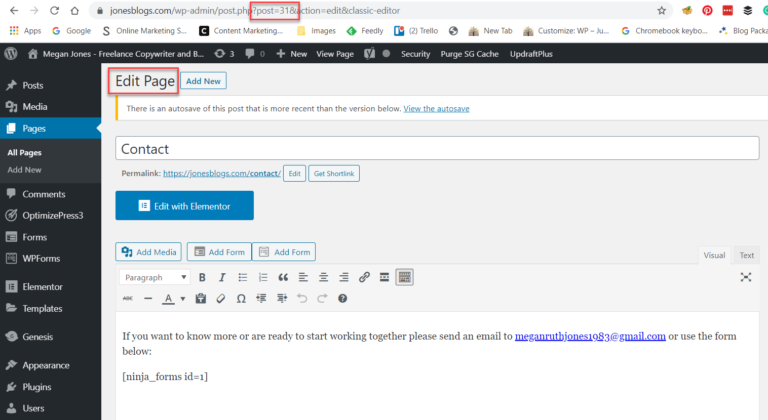
Page IDs are numbers that help identify pages in WordPress. They make sure each page is unique. This is very important for managing your site. It lets you find and edit pages easily. Page IDs are hidden from view. You can see them in the URL when you edit a page.
Every page has a unique ID. These IDs are used by WordPress to keep track of pages. When you create a new page, WordPress gives it a new ID number. This number is stored in the database. It helps WordPress know which page you are working on. Without Page IDs, pages might get mixed up.
Finding Page Ids
Page IDs are numbers. They help you find pages in WordPress. Go to your dashboard. Click on “Pages”. You will see a list. Hover over a page title. Look at the bottom of your screen. You will see a URL. The URL has a number. This number is the Page ID. It’s important. It helps you identify pages.
Plugins make finding Page IDs easy. Install a plugin like “Show IDs”. Once activated, go to your dashboard. The Page ID will appear next to the page title. Plugins save time. They are simple to use. You can find many plugins. Choose one that suits you. Plugins are helpful tools.
Common Uses Of Page Ids
Page IDs help in changing how a page looks. Developers use these IDs to add special styles. This makes each page unique. For example, a homepage can have one style. A contact page can look different. This makes your site look neat and organized.
Page IDs help control who sees what. Admins can set rules for each page. Some pages can be for members only. Others can be public. This keeps important content safe. It also makes sure only the right people see it.
Credit: athemes.com
Page Ids In Coding
Page IDs are like unique codes. Each page in WordPress has one. They help in coding and customizing websites. Developers use them for specific tasks. It makes the site work better. Page IDs are important for creating custom queries.
Page IDs help to find and display content. Custom queries use them to show specific pages. Developers use code to add these IDs. It helps in creating unique page displays. This makes the website more user-friendly.
Conditional tags check if conditions are true. Page IDs work with these tags. This helps show content only on certain pages. Developers use this for special features. It makes the website look unique.
Troubleshooting Page Id Issues
Page IDs in WordPress are unique numbers assigned to each page, helping identify and manage them efficiently. Troubleshooting Page ID issues involves understanding these identifiers to ensure smooth navigation and functionality within your site. Familiarity with Page IDs is essential for site maintenance and customization tasks.
Common Problems And Solutions
Page IDs might confuse beginners. Sometimes, pages don’t show up right. They can appear blank or missing. This often happens due to wrong settings. To fix this, check your permalink settings. Make sure they are correct. Sometimes, plugins cause trouble. Deactivate them one by one. Check if the problem goes away. If it does, the plugin is the issue. Update or replace it. Always keep WordPress up-to-date. This helps avoid bugs.
Best Practices For Maintenance
Regular updates keep your site healthy. Always back up your site before updates. This saves your work if something goes wrong. Use trusted plugins only. Bad plugins can harm your site. Check your site speed often. Slow sites lose visitors. Optimize images and use caching. This helps speed up your site. Monitor for broken links. Fix them quickly. They frustrate visitors. Always keep security strong. Use strong passwords and a security plugin. This helps protect your site from hackers.

Credit: www.fixrunner.com
Frequently Asked Questions
What Are Page Ids In WordPress?
Page IDs in WordPress are unique numerical identifiers. They help differentiate between different pages on your website. These IDs are crucial for developers when customizing or troubleshooting. They ensure that any changes apply to the correct page. You can find them in the URL or by viewing page details.
How To Find A WordPress Page Id?
To find a WordPress Page ID, go to the Pages section. Click on the page title to edit it. Check the URL in your browser’s address bar. The number after ‘post=’ in the URL is the Page ID. Alternatively, hover over the page title and see the ID in the status bar.
Why Are Page Ids Important In WordPress?
Page IDs are essential for specific customizations and plugin settings. They help target individual pages without affecting others. This is especially useful for developers and designers. It ensures that changes apply only to the intended page, maintaining website consistency.
Can Plugins Help Manage Page Ids?
Yes, several plugins can assist in managing Page IDs. They make finding and using Page IDs easier for users. Plugins often display IDs in the WordPress dashboard. This eliminates the need to manually check URLs. They simplify tasks for users, enhancing productivity.
Conclusion
Understanding page IDs in WordPress simplifies site management. These unique numbers help in identifying and organizing content. They are essential for applying specific settings or customizing pages. Using page IDs, you can easily target specific pages for updates or features.
This knowledge enhances your control over your WordPress site. It allows for more precise modifications. Explore more WordPress features to boost your site’s functionality. Keep learning to make your WordPress experience smoother and more efficient. Embrace the basics, and your website will thrive.


