

Wondering if WordPress is easy to use for your website? You’re not alone.
Whether you want to start a blog, build an online store, or showcase your portfolio, WordPress is one of the most popular tools out there. But how simple is it really? Can you set it up and manage your site without a tech background?
You’ll discover the truth about WordPress’s ease of use, what challenges you might face, and how to make the most of its features without getting overwhelmed. Keep reading to find out if WordPress is the right choice for you and your goals.
WordPress Basics
Understanding the basics of WordPress is key to deciding if it suits your needs. WordPress is a popular platform for building websites. It offers tools that help you create and manage content easily. Even beginners can start with simple tasks without much hassle.
This section covers what WordPress offers, how to set up your site, and how to use the dashboard. These basics form the foundation of your WordPress experience.
What WordPress Offers
WordPress provides a free and open-source content management system. It supports blogs, business sites, portfolios, and online stores. You can choose from thousands of themes to change your site’s look. Plugins extend your site’s functions, such as adding contact forms or SEO tools. The platform is flexible and works for small and large websites alike.
Setting Up Your Site
Setting up WordPress is straightforward. First, you need web hosting and a domain name. Many hosts offer one-click WordPress installation. After installation, you select a theme and customize it. Adding pages and posts is simple through the editor. Basic settings let you control site title, language, and user roles.
Using The Dashboard
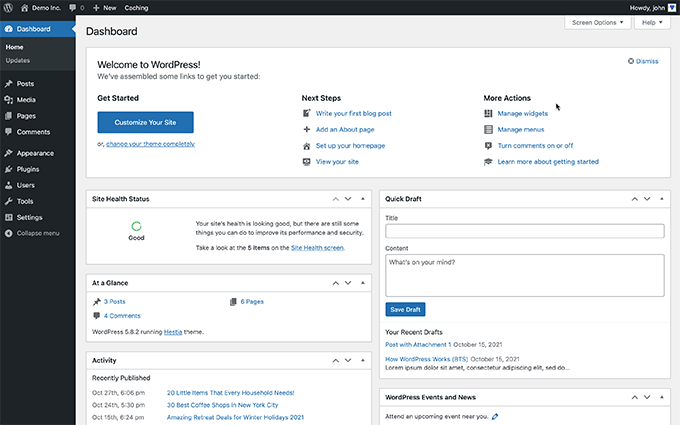
The WordPress dashboard is your control center. It shows menus for posts, pages, media, and plugins. You can add new content from the dashboard easily. It also displays site stats and updates. The interface is clean and user-friendly. Beginners find it easy to navigate and manage their site here.
Credit: www.one.com
Ease Of Use For Beginners
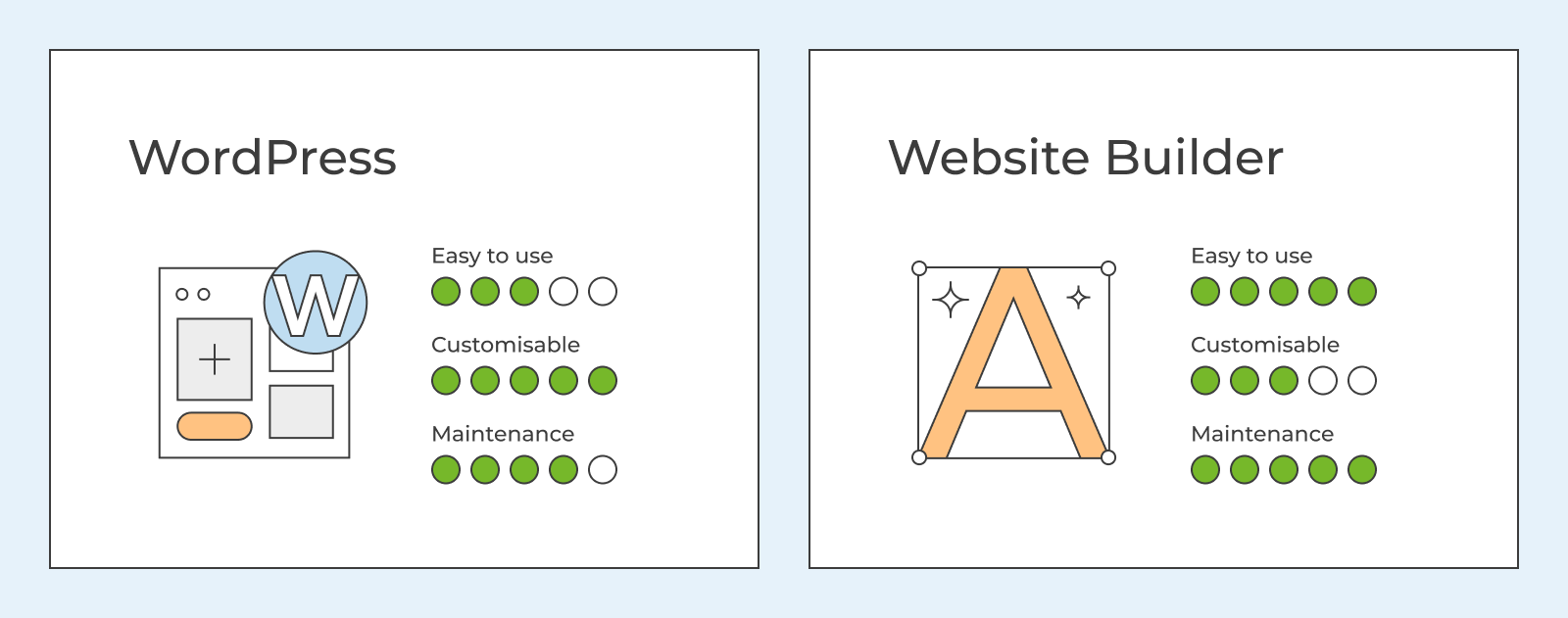
WordPress offers a user-friendly platform suitable for beginners. Its design aims to simplify website creation without needing coding skills. Many users find it easy to start and manage a website quickly. The dashboard is straightforward and allows access to important features with little effort.
Simple tasks like adding content, changing themes, and managing plugins are made clear. WordPress guides new users through these steps with intuitive menus. This ease of use helps beginners focus on building their site rather than technical details.
Adding Content And Pages
Adding new content is simple with WordPress’s block editor. Users can create posts or pages by typing text, adding images, or embedding videos. The editor shows exactly how content will appear on the site. It uses drag-and-drop blocks, so no coding is needed. Saving and publishing content is just a click away.
Choosing And Customizing Themes
Themes control the look of a WordPress site. WordPress offers many free and paid themes. Beginners can browse themes in the dashboard and preview them easily. Customizing themes requires no technical skills. Users change colors, fonts, and layouts through simple settings. Some themes offer extra options for more design control.
Managing Plugins
Plugins add new features to a WordPress site. Installing plugins is straightforward from the dashboard. Users search for plugins, click install, and activate. Managing plugins means updating or deleting them when needed. WordPress provides tools to keep plugins organized. Beginners can add contact forms, SEO tools, and more without coding.
Common Challenges
Using WordPress often feels simple at first. Basic tasks like creating posts or pages are straightforward. Yet, many users face challenges as they explore deeper features. These challenges can slow progress and cause frustration. Understanding common hurdles helps prepare for smoother use.
Learning Curve For Advanced Features
Basic features are easy to learn. Advanced options require more time and effort. Customizing themes or using plugins can be confusing. Some settings are hidden or not clearly explained. It takes practice to use these features well.
Technical Skills Needed
WordPress asks for some technical knowledge at times. Tasks like editing code or fixing errors need skills. Users must understand web hosting and security basics. Without this knowledge, managing a site can be hard. Many rely on tutorials or help from experts.
Troubleshooting Issues
Problems can occur with themes or plugins. Conflicts between plugins may break the site. Errors might appear after updates. Finding the cause often needs trial and error. Users must learn to troubleshoot or seek help quickly to avoid downtime.

Credit: www.tentononline.com
Security And Maintenance
Security and maintenance are key parts of managing a WordPress site. Without them, your site can face risks and run poorly. WordPress needs regular care to keep it safe and working well. Understanding these aspects helps users keep their sites secure and updated.
Risks From Plugins And Themes
Plugins and themes add features and style to your site. Some come from trusted sources, but others may contain harmful code. Bad plugins or themes can open doors for hackers. They might slow down your site or cause errors. Always choose plugins and themes carefully. Avoid those with poor reviews or no updates.
Importance Of Regular Updates
WordPress and its tools need frequent updates. These updates fix security problems and bugs. They also improve performance and add features. Skipping updates leaves your site open to attacks. Updates can sometimes break your site, so back up before updating. Staying current helps keep your site safe and fast.
Ongoing Site Maintenance
Running a WordPress site is not a one-time task. You must check for updates often. Backups protect your data from loss. Security scans find and fix threats early. Cleaning up unused plugins and themes keeps your site lean. Good maintenance prevents crashes and keeps visitors happy.
Performance Concerns
Performance concerns often arise when using WordPress. Website speed and smooth operation matter a lot. Slow websites lose visitors and rankings. WordPress sites can slow down due to many factors. Understanding these factors helps keep your site fast and efficient.
Impact Of Plugins On Speed
Plugins add features to WordPress sites. Too many plugins can slow down your website. Some plugins load extra scripts and styles on every page. This increases the time it takes to load pages. Poorly coded plugins cause more speed problems. Choosing lightweight and well-coded plugins improves performance.
Optimizing Load Times
Load time affects user experience and SEO rankings. Use caching plugins to store static copies of pages. This reduces server processing time. Compress images before uploading to save bandwidth. Use a content delivery network (CDN) to serve files faster worldwide. Minimize CSS and JavaScript files to reduce load size.
Handling Plugin Conflicts
Plugin conflicts happen when two plugins clash. This can cause errors or slowdowns. Conflicts often arise from overlapping functions or outdated code. Test new plugins on a staging site before going live. Keep all plugins updated to reduce issues. Disable plugins one by one to find conflicts if problems occur.
Costs And Support
Understanding the costs and support for WordPress is essential before starting your website. WordPress offers many features for free but also has premium options that add value. Support varies from community help to paid services. Knowing these details helps you plan your budget and find the right assistance.
Free Vs Premium Features
WordPress itself is free to use. You get access to basic themes and plugins without cost. Free features cover most needs for simple websites. Premium themes and plugins offer more design and functionality options. These come at a price but improve site appearance and performance. Premium plans on WordPress.com include hosting and advanced tools. Choosing between free and premium depends on your website goals.
Hidden Expenses
Some costs may not be obvious at first. Buying premium themes and plugins can add up quickly. Web hosting fees are necessary if you use the WordPress.org version. Domain names must be purchased annually. Maintenance tasks like backups and security scans may require paid tools. Hiring experts for custom work can increase expenses. Keep these hidden costs in mind when budgeting.
Where To Get Help
WordPress has a large user community ready to assist. Official forums offer answers to many questions. Tutorials and guides are available on many websites. Paid support comes from developers and agencies for complex issues. Hosting companies often provide technical support. Social media groups and YouTube channels share tips and tutorials. Help is accessible for users of all levels.
Platform Limitations
WordPress is a popular platform but it has certain limits users must know. These limits affect how you manage, change, and move your website content. Understanding these limits helps you decide if WordPress fits your needs.
Content Migration Issues
Moving content from WordPress to another platform can be tough. The format WordPress uses may not work well elsewhere. This can cause data loss or require extra work to fix.
Some plugins and custom features might not transfer correctly. This means you may need to redo parts of your site after moving. It takes time and technical skills to handle these problems.
Customization Boundaries
WordPress offers many themes and plugins for customization. But deep changes need coding knowledge. Without it, you may find limits in design and function.
Some plugins conflict with each other or slow down your site. Not all themes support every feature you want. These limits can stop you from making your site exactly as you wish.
Platform Lock-in Effects
Once you build your site on WordPress, switching platforms is hard. Your content and settings depend on WordPress tools. Leaving means extra work to adapt your site to a new system.
This lock-in can restrict your freedom to change later. It makes you rely on WordPress updates and policies. This dependency is a key point to consider before starting.
Credit: www.wpbeginner.com
Frequently Asked Questions
How Hard Is WordPress For A Beginner?
WordPress is fairly easy for beginners to start with basic tasks like installing and creating content. Advanced customization may require coding skills.
What Are The Disadvantages Of WordPress?
WordPress faces security risks from popular third-party plugins and themes. It requires frequent updates and maintenance. Performance can slow due to plugin overload. Advanced customization demands coding skills. Migrating content is difficult, and costs may rise with premium features and professional help.
Why Are People Moving Away From WordPress?
People move away from WordPress due to security risks, frequent updates, high maintenance, slow performance, plugin overload, and technical complexity.
Can I Learn WordPress In 3 Days?
Yes, you can learn WordPress basics in 3 days, including installation, dashboard use, and content creation. Advanced customization needs more time and coding skills.
Conclusion
WordPress offers a user-friendly way to build websites. Basic tasks like creating posts and pages are simple. Themes help change the look without coding. Some advanced features need technical skills. Regular updates and maintenance keep your site secure. Using too many plugins may slow your website.
Overall, WordPress balances ease and flexibility well. It suits beginners but grows with your skills. Many find it a practical choice for website creation.


