
Are you navigating the world of WordPress and wondering about the roles of Author, Contributor, and Editor? Understanding these roles is crucial for managing your site effectively.
Each role comes with its own set of permissions and responsibilities, which can impact how your content is created and published. By the end of this article, you’ll have a clear understanding of how these roles differ, empowering you to make informed decisions about your WordPress team.
Dive in to discover how the right roles can streamline your workflow and enhance your site’s performance. Keep reading to unlock the potential of your WordPress site!
Role Overview
The author writes and publishes content. They can edit their own posts. Authors cannot delete published posts. Authors cannot change site settings. Their role is focused on content creation. They do not have access to others’ drafts. They can view their own drafts only. Authors have limited power.
A contributor can write and edit their own drafts. They cannot publish content directly. Contributors need approval to publish. They cannot upload files or images. Contributors help in writing. They cannot manage site settings. Their drafts need review by editors. They have less power than authors.
The editor manages content. They can publish, edit, and delete posts. Editors can manage categories and tags. They can edit posts from others. Editors oversee contributors and authors. They ensure quality content. Editors have more power than authors and contributors. They help in site organization.
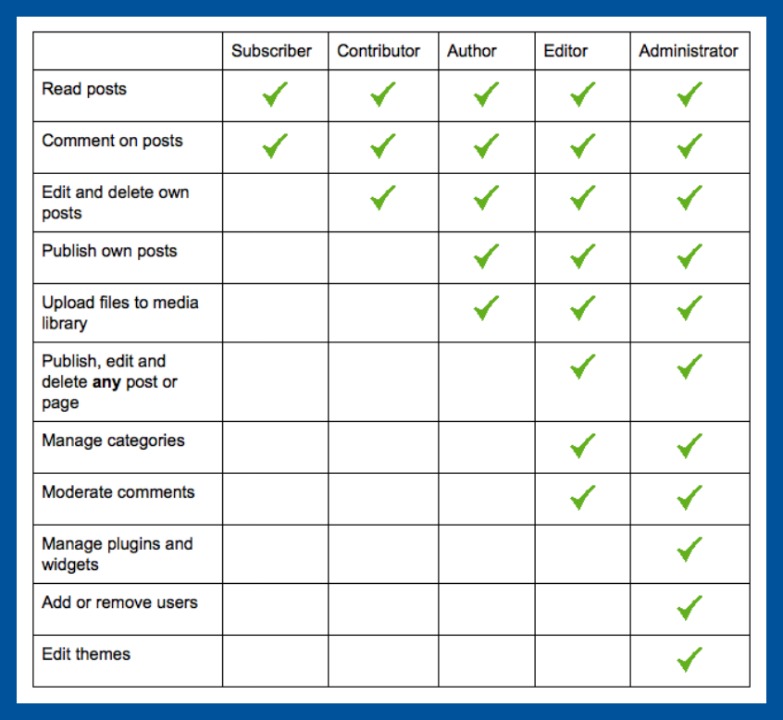
Credit: digitalcommunications.wp.st-andrews.ac.uk
Author Capabilities
Authors can write and edit their own posts. They focus on creating quality content. But they can’t edit other people’s posts. This keeps things organized. They use their own words to share ideas. Authors have fun with their writing. Their main job is to make new posts.
Authors have the power to publish their posts. They decide when their post goes live. This gives them control over their work. They can also unpublish their posts. This is helpful if they need to make changes. Authors must be careful with this power. It’s important to publish good content.
Authors can’t access everything on the site. They have no access to other authors’ posts. This helps keep the website safe. Only admins have full access. Authors focus on their own work. They can’t change site settings. This keeps the site running smoothly.
Contributor Capabilities
Contributors can write posts. They submit them for review. They can’t publish them. Their role is limited. They don’t have full control. They write and wait for approval. This keeps the blog safe.
Content Submission
They focus on writing. They can’t add images. They can’t format posts. They just provide text. Their job is simple. Writing is their main task. They submit and wait.
Approval Process
Editors review their work. Editors make changes. They decide if the post is good. Contributors can’t change it after submitting. This ensures quality. It also prevents errors.
Access Restrictions
They have limited access. They can’t see all posts. They can’t edit others’ work. Their access is restricted. This keeps things organized. It protects the blog from mistakes.

Credit: wpengine.com
Editor Capabilities
Editors have a big role in managing content. They can edit and delete posts. Also, they can create new posts. Editors often work with many pages. They help keep the website up to date.
Editors control what gets published. They decide if a post is ready. They can publish or unpublish posts. This power ensures high quality content. Editors check for errors before publishing.
Editors have more permissions than authors. They can edit other users’ posts. Editors can also manage categories and tags. They sometimes help authors with their posts. Editors also keep the site organized.
Comparative Analysis
Authors write and publish their own posts. They cannot edit others’ posts. Contributors can only write drafts. They cannot publish or edit posts. An Editor can edit, publish, and delete any post. Editors manage content on the site.
Authors have more access than Contributors. They can publish their work. Contributors have limited access. Editors have the highest access level. They can manage all posts and pages. Editors also oversee comments and categories.
Authors work independently. They don’t need approval to publish. Contributors rely on Editors to publish. This can slow down content creation. Editors streamline the workflow. They ensure content is accurate and timely. Editors also coordinate between Authors and Contributors.
Choosing The Right Role
Each site has different needs. Think about your site’s goals. Do you need someone to write content? Or someone to manage it all? Choose roles based on these needs. More roles can mean more control. But, they can also mean more work. Balance is key.
Understand the skills of your team. Some might be good at writing. Others might be better at editing. Give roles that match their skills. This way, everyone works better. And your site runs smoothly.
Security is very important. Each role has different access levels. Authors can add content. Editors can change it. Contributors can write but not publish. Think about who can do what. Protect your site by limiting access.

Credit: www.greengeeks.com
Frequently Asked Questions
What Roles Do Authors Have In WordPress?
Authors in WordPress can create, edit, and publish their own posts. They cannot modify or delete posts by others. This role is ideal for users who need to manage their own content. Authors have limited access to administrative features, ensuring focus on content creation without altering site settings.
What Can Contributors Do On WordPress?
Contributors can write and edit their own posts but cannot publish them. They need an editor or administrator to review and publish their work. Contributors can’t upload media files. This role is suitable for guest writers who need post submission capabilities without full publishing rights.
What Are Editor Capabilities In WordPress?
Editors have more access than authors and contributors. They can publish, edit, and delete any posts, including those by others. Editors manage categories, tags, and comments. They play a crucial role in maintaining content quality and ensuring adherence to site guidelines.
This role is essential for content oversight.
How To Choose The Right WordPress Role?
Choosing the right role depends on user responsibilities. Authors focus on their content, contributors submit drafts, and editors oversee site content. Assign roles based on trust, responsibility, and content management needs. Proper role assignment enhances workflow efficiency and site security.
Conclusion
Understanding roles in WordPress simplifies content management. Authors create posts. Contributors suggest content but can’t publish. Editors control content, manage drafts, and oversee authors. Each role has its own access level. This ensures security and organization. Assign roles wisely based on team skills.
Proper role assignment boosts productivity. It enhances workflow efficiency. Keeps content consistent and reliable. Choose roles that match your team’s needs. Balance creativity with control. Empower your team with the right access. Let WordPress roles guide your site’s success. Keep your content fresh, organized, and secure.


