
Are you ready to turn your expertise into a thriving online course business? The Enfold WordPress theme might just be your secret weapon.
Whether you’re a seasoned educator or a passionate hobbyist, selling courses online has never been more accessible. With Enfold, you have a powerful, user-friendly tool at your fingertips that can make your course content shine and attract eager learners. Imagine having a beautiful, fully functional online platform where your courses can reach a global audience.
Enfold isn’t just about aesthetics; it’s about delivering an intuitive experience for both you and your students. You don’t need to be a tech wizard to get started. In this guide, we’ll show you how to harness the full potential of Enfold to create and sell your courses effortlessly. Curious about how to make this happen? Keep reading, and you’ll discover the step-by-step process to set up your online course empire using Enfold. From customizing your site to integrating payment options, we’ve got you covered. Your journey to becoming a successful online educator starts here.
Choosing Enfold Theme
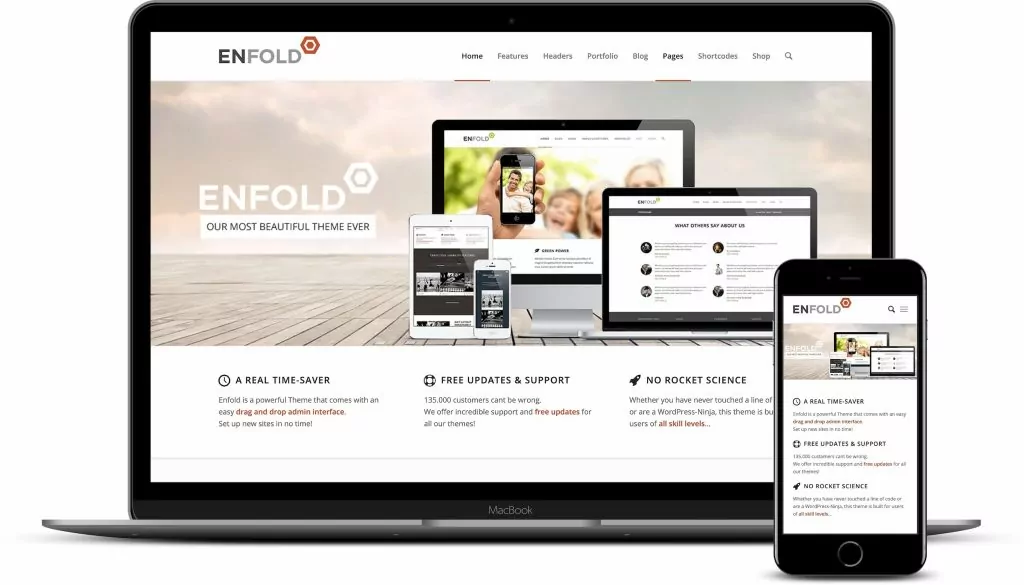
Enfold offers many useful features for online courses. It has a drag-and-drop editor, which makes designing easy. The theme is responsive, so it looks good on all devices. Users can customize layouts and colors. This helps in making the website unique. It also supports multilingual sites, which is great for reaching more students. Enfold is known for its fast loading speeds. This keeps visitors happy and engaged.
Enfold is perfect for selling courses online. It has integrations with popular plugins. This includes WooCommerce for selling courses directly. The theme is also SEO-friendly, which helps in attracting more students. With easy navigation, students can find courses quickly. Enfold offers a professional look, giving trust to potential buyers. The theme is simple to use, even for beginners.
Setting Up Your Website
Selling courses online becomes simple with Enfold WordPress theme. Customize easily, showcasing courses with flexible design options. Enhance user experience with built-in features, ensuring a seamless learning journey.
Installing Enfold
Start by installing the Enfold theme on WordPress. Visit the WordPress dashboard. Find the “Themes” option under “Appearance”. Click “Add New”. Search for Enfold. Click “Install” and then “Activate”. Your theme is now ready. Simple steps for a great start.
Customizing The Layout
Enfold offers many layout options. Choose the layout that fits your course. Customize using the “Enfold Theme Options”. Adjust colors, fonts, and backgrounds. Create a layout that is easy to navigate. Make sure it looks nice. Keep it simple.
Creating Course Content
Plan your course before starting. Think of the main topics. Break them into small parts. Make sure each part is clear. Keep language simple. Use pictures to explain ideas. Create videos if possible. Videos help people understand better. Write a summary for each lesson. Summaries remind people what they learned.
Design is important. Use colorful slides. Add fun activities. Activities make learning enjoyable. Include questions. Questions keep people thinking. Use bold text for key points. Bold text helps people remember. Make sure the design is easy to read. People should not struggle to see words.
Utilizing Enfold Features
The Page Builder in Enfold is easy to use. It helps create course pages. Drag and drop elements to design your page. You can add text, images, and buttons. Each element is customizable. This makes your page look unique. Save time with pre-made templates. They are easy to modify. They fit your course needs. Make changes quickly without coding skills.
Adding multimedia is simple. Use images, videos, and audio. They make courses engaging. Enfold supports different media formats. Upload files directly to your page. You can place media anywhere. Multimedia helps explain complex topics. It also makes learning fun. Students love interactive content. Keep lessons lively with multimedia.
Setting Up E-commerce
Payment gateways help you receive money online. They are safe and quick. Choose a gateway that fits your needs. PayPal and Stripe are popular choices. They are easy to set up. Make sure the gateway works with your theme. Read the instructions carefully. Test the gateway before using it. This ensures smooth transactions.
Transaction management keeps track of money. Use tools that show sales numbers. These tools help you see which courses sell well. Check your sales daily. This helps find any problems quickly. Update your records often. This keeps everything organized. Make sure your customers get receipts. This builds trust and shows professionalism.
Credit: themeforest.net
Enhancing User Experience
Smartphones are everywhere. People use them to learn too. Your course site must work on phones. The Enfold theme helps with that. It makes sites look good on small screens. Text stays clear. Buttons are easy to tap. Pages load fast. This keeps users happy. They will stay longer.
Happy users mean more sales. Users can learn anytime, anywhere. This flexibility is key. Everyone wants easy access. When a site is mobile-friendly, it helps. Enfold makes this possible.
Easy paths lead to success. Users like simple menus. They should find courses quickly. Enfold offers clean, clear navigation. Users don’t get lost. They find what they want. Quickly and without fuss.
Important links are easy to spot. This saves time. Time is valuable. Users can focus on learning. Not on searching. Enfold makes everything simple. Happy users come back. This boosts course sales.
Marketing Your Courses
Sell courses online using the Enfold WordPress theme effortlessly. Customize layouts to showcase your content. Engage students with visually appealing designs.
Seo Strategies
Optimize your course titles with keywords. Use words that learners search for. Create clear and simple URLs for course pages. Include keywords in URLs. Write meta descriptions for each course page. Make them informative and engaging. Use header tags wisely. Include keywords in headers. This helps search engines understand the content. Focus on writing quality content for course pages. Content should be helpful to learners. Ensure pages load fast. Fast-loading pages rank higher. Use images wisely. Include alt text with keywords. Build backlinks to your course pages. This improves page authority. Regularly update course content. Updated content ranks better. Monitor SEO performance. Adjust strategies based on results.
Social Media Promotion
Share course links on social media. Use platforms your audience uses. Create engaging posts about courses. Include images and videos. Use catchy captions to grab attention. Encourage followers to share posts. This increases course visibility. Host live sessions about courses. Answer questions during sessions. Create short videos about course benefits. Post them regularly. Collaborate with influencers. They can promote your courses. Run contests or giveaways. Offer free course access as prizes. Respond to comments and questions. Build a community around your courses. Regular engagement keeps interest alive. Track social media performance. Adjust strategies based on feedback.
Credit: translatepress.com
Analyzing Performance
Explore how Enfold WordPress theme helps sell courses online by analyzing performance. Understand features and tools for effective course presentation. Enhance online course sales with optimized layouts and user-friendly designs.
Tracking Sales
Tracking sales is crucial for understanding course success. Use tools to check sales numbers. Analyze which courses are popular. Find patterns in buying habits. Update courses based on feedback. Sales reports help improve course offerings.
Gathering Feedback
Feedback helps make courses better. Ask students for their opinions. Use surveys or forms. Check for common suggestions. Make changes to courses based on feedback. Happy students mean more sales. Improve courses regularly for better results.
Maintenance And Updates
Regular updates and maintenance keep your online course platform secure and efficient. Enfold theme simplifies the process. Ensuring your site runs smoothly enhances user experience and supports sales growth.
Regular Content Updates
Keeping your course content fresh is important. Students love new information. Update courses with the latest data. Add new lessons if needed. Fresh content keeps learners engaged. It also improves course value. Regular updates show you care. Students appreciate updated materials. It makes the learning experience better.
Ensuring Security
Security is a must for online courses. Protect your site from threats. Use strong passwords for safety. Update plugins and themes regularly. Security updates fix bugs and vulnerabilities. Backup your data often. This keeps your site safe if problems occur. Students need to feel secure. A safe site builds trust. Always prioritize security measures.
Credit: themeforest.net
Frequently Asked Questions
How To Integrate Payment Gateways In Enfold?
Integrating payment gateways in Enfold is straightforward. You can use plugins like WooCommerce or Easy Digital Downloads. These plugins offer seamless integration with various payment gateways, enabling secure transactions. Simply install the plugin, configure settings, and connect your preferred payment gateway to start selling courses online.
Can I Customize Course Pages In Enfold?
Yes, Enfold offers extensive customization options for course pages. You can use the drag-and-drop editor to design unique layouts. Customize fonts, colors, and images to match your brand. The theme’s templates are highly flexible, allowing you to create engaging and visually appealing course pages effortlessly.
Does Enfold Support Multimedia Content For Courses?
Absolutely, Enfold fully supports multimedia content. You can easily add videos, audio, and interactive elements to your courses. The theme is compatible with popular media plugins, enhancing content delivery. Multimedia content can enrich learning experiences, making courses more engaging and effective for students.
Is Enfold Suitable For Mobile Devices?
Yes, Enfold is mobile-responsive. It ensures your courses look great on all devices, including smartphones and tablets. The theme automatically adjusts layout and design for different screen sizes. This provides a seamless user experience, increasing accessibility and engagement for mobile learners.
Conclusion
Selling courses online with Enfold is straightforward and efficient. The theme offers user-friendly features. Customizing your site becomes simple. You can create engaging, attractive course pages. Enfold integrates smoothly with popular plugins. This enhances your site’s functionality. Secure payment options are available.
They ensure safe transactions for users. The responsive design looks great on all devices. Support and documentation are helpful. They guide you through any challenges. Start building your online course platform today. Make learning accessible to everyone. Enfold makes it possible.
Your teaching journey begins here.


