
Imagine the freedom of creating a website that truly reflects your vision. With WordPress, you have the power to design a blank theme that serves as a perfect canvas for your creativity.
Whether you’re a seasoned developer or a curious beginner, learning how to make a blank theme in WordPress can open up endless possibilities for customization. This guide is crafted to empower you with the knowledge and confidence to transform your ideas into a functional, stunning website.
You’ll discover simple, step-by-step instructions that are easy to follow, ensuring you can start building right away. Dive in, and let’s unlock the full potential of your WordPress site together.
Setting Up Your Environment
Picking the right tools is crucial. You need a text editor like Atom or Sublime Text. These help you write code easily. Use a local server like XAMPP or MAMP. They allow you to run WordPress on your computer. This setup lets you test themes safely.
Start by downloading WordPress from its official site. Next, unzip the file. Move the folder to your server’s root directory. Open your local server program. Run it to start the server. Now, you can access WordPress on your web browser. Follow the steps to set it up. Choose a database name and create it in your server. Finish the installation with basic info like site name and admin password. Now, WordPress is ready on your computer.
Creating A New Theme
The theme’s structure is important. A theme in WordPress has many files. These files work together. The main file is style.css. It holds the theme’s name and details. index.php is another key file. It helps display content. Themes also have functions.php. This file adds features to the theme. Understand these files well. They help create a theme that works.
Setting up files is simple. First, create a new folder. Name it after your theme. Inside, place the style.css file. Add the index.php file next. These files are essential. Also, include functions.php. These files make the theme function. Organize them properly. A well-organized theme works better. Structure is key for a functional theme.
Customizing The Stylesheet
Creating a blank theme in WordPress involves customizing the stylesheet to define unique styles. Start by setting up a basic CSS file, then adjust elements like fonts, colors, and layout. This approach allows for complete control over the theme’s visual appearance, providing a personalized touch to your WordPress site.
Creating Style.css
Start by creating a file named style.css in your theme folder. This file is essential. It holds all the styles for your theme. Inside, include a comment block at the top. This block has theme details like name and author. Add this code to begin:
        /
        Theme Name: Blank Theme
        Author: Your Name
        Description: A simple blank theme
        Version: 1.0
        /
Save the file once you add this code. Now, your theme has a basic style file ready. This helps WordPress understand your theme better.
Adding Basic Styles
Begin with some basic styles. These styles make your theme look clean. Use simple CSS rules. Set the body background color and font family. This ensures text is easy to read. Here’s an example:
        body {
            background-color: #f5f5f5;
            font-family: Arial, sans-serif;
        }
Add more styles as needed. Focus on making your theme look neat and user-friendly. Keep the styles simple and easy to manage.
Building Essential Templates
Creating a blank theme in WordPress simplifies customization. Start by setting up essential files and folders. This process provides a clean slate, perfect for building tailored designs.
Creating Index.php
The index.php file is the heart of your theme. This file connects all parts. It shows content on your site. The file must be in the theme folder. Start with an opening PHP tag. Add basic HTML structure inside. This file tells WordPress how to display your site.
Developing Header.php
Header.php is at the top of every page. It holds the site title. It also has the navigation menu. Open with PHP tag. Add HTML for the header. Include site title and navigation links. This file sets up the top part of each page.
Crafting Footer.php
Footer.php is at the bottom of your pages. It often shows copyright info. Add an opening PHP tag. Use HTML to craft the footer content. Include links and other info. Footer.php finishes each page.
Integrating WordPress Functions
The WordPress Loop is a powerful tool. It displays posts on your site. Start by opening the index.php file. Add the loop code inside it. The loop starts with if ( have_posts() ). Then, it uses while to display each post. The loop ends with endif. This is how WordPress shows content. Easy, right?
Navigation menus help users find pages. They appear at the top of the site. First, register a menu in the functions.php file. Use the register_nav_menu function. After that, open your theme’s header.php file. Add the wp_nav_menu function. This displays the menu. Users can now navigate easily. Try it out!
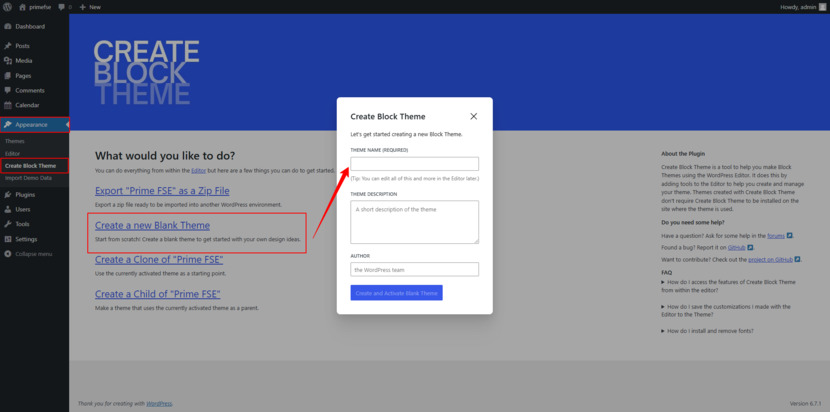
Credit: motopress.com
Testing Your Theme
Errors can break your theme. Check for missing files. Look for incorrect codes. Use debug tools. They help find mistakes. Fix any issues you see. Test your theme on different pages. This ensures everything works. Keep your theme error-free. Errors make sites look bad. Regular checks are essential. They keep your site strong. Always check your work twice.
Responsive design is crucial. Test on smartphones and tablets. Your theme should adjust to different screen sizes. Use tools like Google Mobile-Friendly Test. It shows how your site looks on mobile. Fix any layout issues you find. Make sure text is readable. Images should fit the screen. Responsive sites attract more visitors. They stay longer. A good experience is key. Keep testing responsiveness regularly.
Deploying The Theme
First, compress your theme folder. Use a ZIP file. This makes it easy to upload. Go to your hosting control panel. Find the file manager option. Click it. Upload the ZIP file to the themes directory. Extract the ZIP file. Now your theme files are on the server. Check if all files are there. Ensure no files are missing. This is important for the theme to work.
Go to your WordPress admin dashboard. Click on Appearance. Then, click on Themes. You will see your new theme. Click the Activate button. Your theme is now live. Visit your website to see the changes. Make sure everything looks good. If something is wrong, check your files again. You can always go back and fix any issues.

Credit: kinsta.com

Credit: seahawkmedia.com
Frequently Asked Questions
What Is A Blank Theme In WordPress?
A blank theme, also known as a starter theme, is a minimal framework for WordPress. It provides the essential structure for developing a custom theme. It comes with basic files and styles, allowing developers to build a unique design from scratch without unnecessary elements.
Why Create A Blank Theme In WordPress?
Creating a blank theme allows for complete customization. Developers can craft a unique design without limitations. It provides a clean slate to implement specific functionalities and styles. This approach is ideal for developers seeking control over every aspect of their WordPress site.
How Do I Start A Blank Theme?
To start a blank theme, create a new theme folder in your WordPress installation. Add essential files like style. css and index. php. Use WordPress’s Template Hierarchy to guide file structure. Begin coding your custom styles and functionalities from this foundational setup.
What Tools Are Needed For A Blank Theme?
You’ll need a code editor, like Visual Studio Code, for writing code. Familiarity with HTML, CSS, and PHP is essential. WordPress functions and hooks knowledge is also crucial. Tools like WP-CLI or local development environments can streamline the theme creation process.
Conclusion
Creating a blank theme in WordPress is straightforward. It allows customization from the ground up. You gain control over design and functionality. This flexibility helps tailor your website to specific needs. Remember to test your theme on various devices. It ensures a responsive and user-friendly experience.
Keep updating your theme for security and performance. With these steps, crafting a unique WordPress theme becomes manageable. Practice makes the process smoother. Start today and enhance your web development skills. Enjoy the journey and see your website come to life.


