
Are you ready to give your WordPress blog a fresh look? Installing a new theme can be an exciting way to express your style and enhance your site’s functionality.
You don’t need to be a tech wizard to do it—just follow a few straightforward steps. Imagine transforming your blog into a visually captivating space that resonates with your audience. Whether you’re looking to boost engagement or simply want a change, updating your theme can make all the difference.
Keep reading to discover how easy it is to install a theme in WordPress and unlock your blog’s potential.
Choosing The Right Theme
Every blog has a unique aim. Some blogs teach. Others share stories. Knowing your blog’s purpose helps in choosing a theme. A cooking blog needs food themes. A travel blog needs adventure styles. Themes should match your blog’s message. This makes readers happy. It builds trust.
Themes come in two types: free and premium. Free themes save money. They offer basic designs. Premium themes cost money. They have more features. They offer better support. Free themes can lack updates. Premium themes often update. Choose based on need and budget.

Credit: www.interserver.net
Preparing Your WordPress Blog
Updating WordPress is important. It keeps your blog safe. New versions fix bugs. They also add new features. Check the dashboard for updates. Click “Update Now” to start. Always use the latest version. It helps your blog run smoothly.
Always create a backup before making changes. Backups protect your data. Use a plugin like UpdraftPlus. It is easy to use. Save backups to the cloud. Options include Google Drive or Dropbox. Regular backups are a good habit. They keep your content safe.
Installing A Theme From The WordPress Repository
To find themes, go to your WordPress dashboard. Click on “Appearance” in the menu. Next, select “Themes.” Here, you will see many theme options. Take your time to explore them. Each theme is unique. Choose one that fits your blog style.
Use the search bar to find themes. Type in keywords like “modern” or “clean.” The search results will show you themes. Click on a theme to see a preview. The preview shows how your blog will look. Make sure you like the design. Check colors and layout carefully.
Once you find the perfect theme, click “Install.” Wait for the installation to finish. Now, press “Activate.” Your blog changes to the new theme. Review your blog to see the changes. Adjust settings if needed.
Uploading A Theme From A Zip File
Many websites offer free and paid themes. Find a theme you like. Click the download button. Save the ZIP file on your computer.
Open the WordPress dashboard. Go to Appearance and click Themes. Choose Add New option. Click Upload Theme.
Select the ZIP file from your computer. Click the Install Now button. Wait for the upload to finish.
After upload, click the Activate button. Your new theme is now live. Check your blog to see the changes.
Customizing Your Theme
Find the Theme Customizer in your dashboard. Click on ‘Appearance’. Then click on ‘Customize’. This opens the customizer. Here, you can see your site. You can make changes easily. Your changes are visible instantly. This helps you make your site look great.
Choose new colors and fonts. Make your site colorful. Pick colors that match your brand. Select fonts that are easy to read. This improves your site’s look. Keep your site simple yet attractive. Your site should look welcoming to visitors.
Change layout and widgets as you like. Place widgets in different spots. Add, remove, or move them around. Make your layout neat. A clean layout is pleasing to the eyes. This makes your site easy to navigate. Make sure your visitors find information quickly.
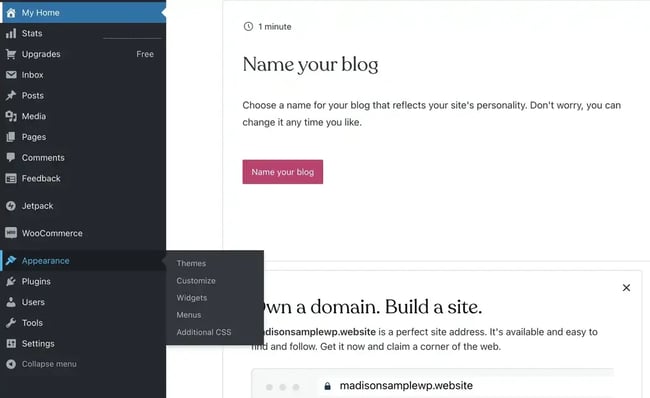
Credit: blog.hubspot.com
Troubleshooting Common Issues
Installation errors can be frustrating. First, check your internet connection. Sometimes, a simple refresh helps. Next, ensure your WordPress version is updated. Older versions may cause problems. Look at your file permissions. They should be set correctly. Check if the theme file is corrupted. Try downloading it again. Use an FTP client if needed. This can help upload files properly.
Compatibility issues arise often. First, ensure your plugins and themes are compatible. Check the theme’s documentation. It often lists compatible versions. Sometimes, a plugin causes a conflict. Disable plugins one by one. See if the problem goes away. Update all software to latest versions. This can fix many issues. Keep a backup before making changes.
Tips For Maintaining Your Theme
Explore helpful tips for maintaining your WordPress blog theme. Regularly update your theme for security and performance. Check compatibility with plugins to ensure smooth functionality.
Regular Theme Updates
Keeping your theme updated is very important. Updates fix bugs and improve security. They also make your site faster. Always check for theme updates in your dashboard.
Make it a habit to update regularly. This ensures your site runs smoothly. Backup your site before updating. It’s a safe step to protect your data.
Monitoring Performance
Your theme affects your site’s speed. Slow sites lose visitors. Check your site’s speed often. Tools like Google PageSpeed Insights help. Optimize images to load faster. Use fewer plugins to keep your site light.
Regularly test your site’s performance. This helps in maintaining a good user experience. Happy visitors stay longer on your site.

Credit: elements.envato.com
Frequently Asked Questions
How Do I Upload A Theme In WordPress?
To upload a theme, go to your WordPress dashboard. Click on “Appearance” and then “Themes. ” Select “Add New” and click “Upload Theme. ” Choose the theme file from your computer and click “Install Now. ” Once uploaded, click “Activate” to apply the new theme.
Can I Install Themes From The WordPress Directory?
Yes, WordPress offers a wide range of free themes. Go to “Appearance,” then “Themes,” and click “Add New. ” Browse through the themes available in the directory. Once you find one you like, click “Install,” and then “Activate” to apply it to your blog.
What Is A Child Theme In WordPress?
A child theme is a theme that inherits the functionality of another theme, called the parent theme. It allows you to modify or add features to the parent theme without altering its code. This ensures that your modifications are preserved even after the parent theme is updated.
How Can I Customize A WordPress Theme?
To customize a theme, navigate to “Appearance” and click “Customize” in your WordPress dashboard. The WordPress Customizer allows you to change site identity, colors, menus, and widgets. It’s a user-friendly interface, enabling you to preview changes in real-time before saving them.
Conclusion
Installing a theme in WordPress is simple and rewarding. First, pick a theme that suits your blog’s style. Next, upload it in the WordPress dashboard. Customize as needed to match your vision. Preview changes before activating the theme. This ensures everything looks perfect.
Remember, themes help express your blog’s identity. With practice, you’ll gain confidence. Enjoy exploring different themes and features. Your blog will reflect your unique personality. Keep learning and experimenting. Happy blogging!


