
Are you looking to enhance your web application’s real-time communication capabilities? Implementing Java Web Socket on a remote host might be exactly what you need.
Imagine having a seamless, instant connection between your server and clients, enabling dynamic data exchange without the usual delays. This guide is here to show you the ropes and help you leverage the power of Web Sockets in your Java applications, whether you’re aiming for improved interactivity or efficient data streaming.
You might wonder how challenging it could be to get Java Web Socket up and running on a remote host. Don’t worry; you’re about to discover practical steps to make it happen effortlessly. By the end of this article, you’ll gain the confidence to implement this technology and unlock new possibilities for your web services. Dive in, and let’s make your web application more interactive and responsive!

Credit: www.oracle.com
Setting Up Java Environment
Download the Java Development Kit (JDK) from Oracle’s website. Choose the version matching your system. Follow the installation steps. Accept the terms and conditions. After installation, confirm the JDK is installed. Open the command prompt. Type java -version. The version number should display. Now, your JDK is installed!
Go to your system settings. Find the Environment Variables section. Click on it. Add a new variable named JAVA_HOME. Set the path to your JDK folder. Next, update the PATH variable. Add %JAVA_HOME%bin to it. Click OK to save changes. Check if the variables are set. Open a new command prompt. Type echo %JAVA_HOME%. The JDK path should display.
Credit: www.tutorialspoint.com
Understanding Web Sockets
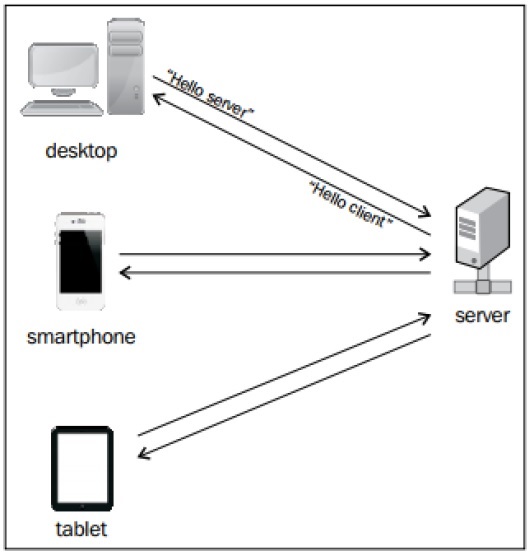
Web Sockets allow for real-time communication between a client and a server. This means messages can be sent and received instantly. Unlike traditional methods, Web Sockets are more efficient. They use less bandwidth and reduce latency. This makes them perfect for live data applications. Examples include online games and chat applications.
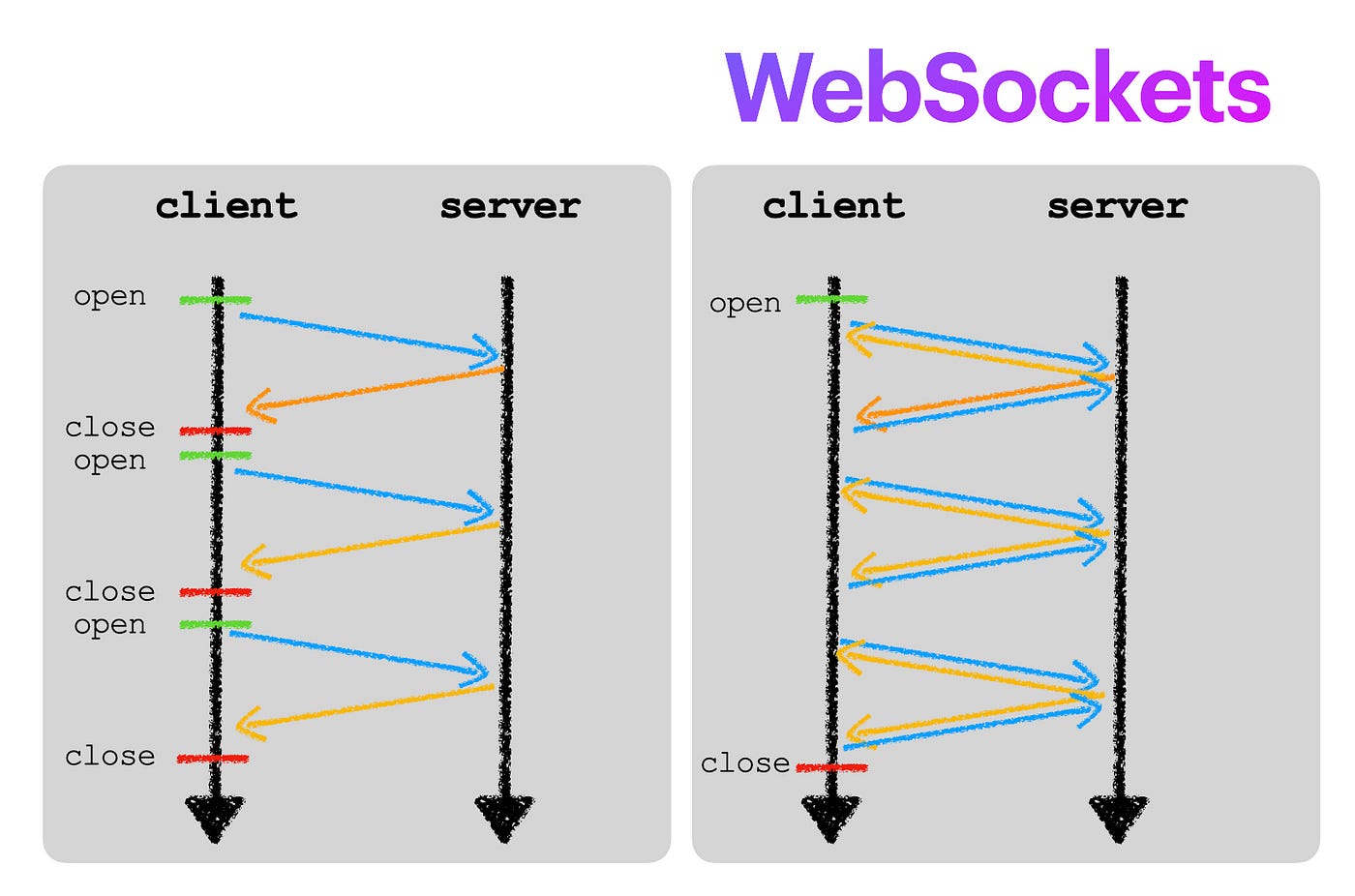
Web Sockets use a simple communication model. First, the client sends a request to the server. The server then accepts this request. Once connected, they stay open. This allows for continuous data exchange. Both can send messages anytime. This model is different from HTTP. It does not need to open and close connections for each message. This makes communication faster and smoother.
Creating Web Socket Application
Start with a basic server setup. Use Java to create your server. Ensure it’s compatible with WebSockets. Write a Java class for your server. Use libraries like Java-WebSocket. They help with connections. Focus on managing client requests. Respond quickly to avoid delays. Test your server. Make sure it can handle multiple users.
Create a simple client application. Use Java for building. Connect it to your server. Use WebSocket API for this. Send messages between client and server. Test communication regularly. Ensure messages are quick. Create a user-friendly interface. Make it easy to understand. Focus on simple design and functionality.
Deploying On Remote Host
Choose a reliable hosting provider. Check their uptime guarantees. Ensure they support Java applications. Look for good customer support. Compare prices and features. Read user reviews. This helps in making an informed choice.
Secure the server with a strong password. Update the server software regularly. Install necessary packages for Java. Configure the firewall. Open ports needed for Web Sockets. Test the server connection. Ensure everything works before deployment.
Testing And Debugging
Implementing Java Web Socket on a remote host involves testing and debugging to ensure seamless communication. Identify potential errors using console logs. Use debugging tools to pinpoint issues for smooth operation.
Testing Connectivity
Start by verifying the connection between the client and server. Use simple tools like telnet or ping to check if the server is reachable. Ensure the server port is open and ready to accept connections. Check firewall settings to avoid blocking the connection. Confirm the server’s IP address is correct. Logs can reveal successful or failed attempts. Review them carefully for any issues.
Troubleshooting Common Issues
Problems may arise due to incorrect configurations. Check the server’s settings thoroughly. Confirm that the WebSocket protocol is supported. Look for typos in the code. They can cause connection failures. Ensure the client and server speak the same protocol version. Verify the network settings. Incorrect network paths can disrupt communication. Use debugging tools to trace any errors. Logs are crucial in finding mistakes.
Security Considerations
Securing Java Web Socket on a remote host involves encryption and authentication. Regularly update security patches to prevent vulnerabilities. Implementing firewalls and using secure protocols like TLS can protect data during transmission.
Implementing Ssl/tls
To keep data safe, use SSL/TLS for your web sockets. This makes the connection secure and protects against eavesdropping. SSL/TLS encrypts the data, ensuring that hackers cannot read it. Ensure you have a valid SSL certificate from a trusted authority. This confirms the identity of your server. Use strong encryption protocols like TLS 1.2 or TLS 1.3. Older protocols are less secure. Regularly update your SSL/TLS settings for improved security. This helps block potential threats.
Protecting Against Common Vulnerabilities
Web sockets can have security risks. Use authentication to verify users. This means only trusted users can connect. Validate all data sent to the server. This prevents injection attacks. Keep your software updated to fix security holes. Use a firewall to block unwanted traffic. This keeps bad actors out. Regularly check your system for vulnerabilities. This helps find and fix weaknesses quickly.
Performance Optimization
Discover how to boost efficiency by implementing Java Web Socket on a remote host. Enhance real-time communication with seamless integration, ensuring swift data exchange and improved server performance.
Reducing Latency
Reducing latency is key for better performance. Network delays make systems slow. Use efficient protocols to cut delays. TCP is reliable but slow. UDP can be faster. Keep connections alive. Reduce handshakes. Buffer data wisely. Cache frequently used resources. Minimize round trips between client and server. Ensure data travels quickly.
Scalability Techniques
Scalability ensures systems handle more work. Load balancing spreads tasks. Use multiple servers to share load. Vertical scaling means adding more power. Horizontal scaling means adding more servers. Optimize code to handle more requests. Monitor performance regularly. Adjust resources as needed. Ensure efficient database queries. Avoid bottlenecks by checking system parts.
Credit: medium.com
Frequently Asked Questions
How To Connect Websocket To Server?
To connect WebSocket to a server, create a new WebSocket instance using the server’s URL. Implement event listeners for ‘open’, ‘message’, ‘error’, and ‘close’ to handle communication. Send data using the WebSocket’s send method once the connection is established. Ensure the server supports WebSocket protocol.
How Do You Implement A Websocket?
To implement a WebSocket, establish a connection using the WebSocket API. Use JavaScript to create a new WebSocket object. Handle events like open, message, and close with event listeners. Send and receive data in real-time, ensuring seamless communication between client and server.
What Is The Difference Between Webhook And Websocket?
Webhooks send data from one server to another when triggered. WebSockets maintain a continuous connection for real-time communication. Webhooks are event-driven, while WebSockets support bidirectional communication. Webhooks are ideal for periodic updates; WebSockets suit interactive applications needing instant data exchange.
Is Websocket Better Than Rest Api?
WebSocket excels in real-time communication, offering faster data exchange than REST API. It suits applications needing instant updates, like chat apps. REST API is ideal for simpler, stateless interactions, and broader compatibility. Choose WebSocket for speed and REST API for stability and ease of use.
Conclusion
Implementing Java Web Socket on a remote host enhances communication. It streamlines data flow between client and server. A seamless setup means efficient real-time interaction. Proper configuration ensures secure connections. Test thoroughly to avoid glitches. Use clear documentation for troubleshooting.
Java Web Socket boosts application performance. It supports dynamic features and user engagement. Explore additional resources to deepen understanding. Keep learning for better integration. Success lies in consistent practice. With patience, remote hosting becomes straightforward. Your web applications can thrive with Java Web Socket.
Embrace the potential of this technology. Make your web solutions stand out.


