
Have you ever wondered how to host your own web server on Unix but felt overwhelmed by the technicalities? You’re not alone.
Many people believe this is a task reserved for tech experts. But guess what? With the right guidance, you can do it too. Hosting your own web server gives you control, flexibility, and the satisfaction of running something entirely your own.
Imagine the freedom of managing your website without relying on third-party hosts. Curious to find out how? Dive into this guide where we’ll break down the process into simple, manageable steps. By the end, you’ll not only understand how to host a web server on Unix, but you’ll also feel confident doing it. Ready to take control? Let’s get started!
Setting Up The Environment
Picking a Unix version is important. Debian and Ubuntu are user-friendly. CentOS is stable and secure. Fedora has new features. Each has pros and cons. Think about your needs. Beginners like Ubuntu for its ease. Experts may prefer CentOS for stability. Research each option carefully.
Install packages to run your server. Use a package manager like apt or yum. Apache and Nginx are popular web servers. Install them with simple commands. Open your terminal. Type `sudo apt-get install apache2` or `sudo yum install nginx`. Follow the prompts. Check if the server runs. Type `http://localhost` in your browser. If it loads, your server is live.
Configuring Network Settings
Setting a static IP address is important. It helps your server stay at the same spot on the network. First, find your current IP using the command ifconfig. Next, open the network settings file. This file is usually located at /etc/network/interfaces. Add the new static IP details there. Make sure the IP is not in use. Always check with your network admin.
Firewalls keep your server safe. They stop unwanted access. Use iptables for Unix systems. This tool helps manage rules. To allow web traffic, use iptables -A INPUT -p tcp --dport 80 -j ACCEPT. Save your rules to keep them after a reboot. Use iptables-save for this. Always review your rules. Ensure only needed ports are open.
Installing Web Server Software
Begin with updating your system’s package list. Use the command sudo apt-get update. Next, install Apache. Type sudo apt-get install apache2. Wait for the installation to finish. Verify Apache is running. Type sudo systemctl status apache2. A green active status means success.
Start with updating the package list. Use the command sudo apt-get update. Install Nginx by typing sudo apt-get install nginx. Wait for the installation to complete. Check Nginx status by typing sudo systemctl status nginx. A green active status shows it is working.
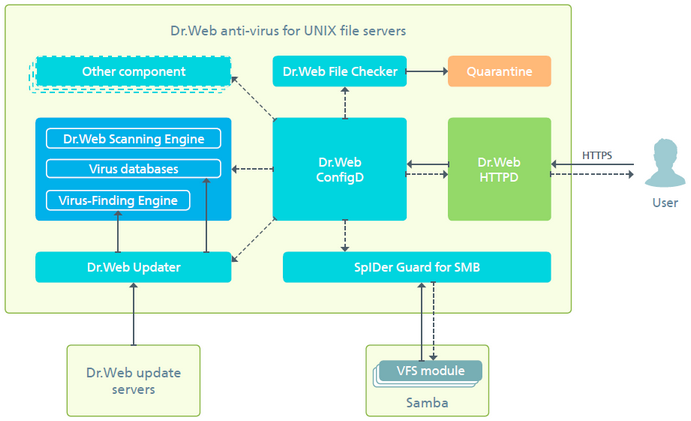
Open your web server configuration file. Use a text editor. For Apache, it’s /etc/apache2/apache2.conf. For Nginx, it’s /etc/nginx/nginx.conf. Adjust settings as needed. Save and close the file. Restart the server. Use sudo systemctl restart apache2 or sudo systemctl restart nginx.
Credit: download.geo.drweb.com
Managing Server Files
On a Unix system, the directory structure is very important. It helps keep server files organized. Use folders like /etc for configuration files. Place web files in the /var/www directory. This makes it easy to find files. Always create a backup directory. This protects against data loss.
File permissions control who can see or change a file. Use commands like chmod to set them. Give read, write, and execute permissions carefully. The owner usually has full control. Groups might have fewer permissions. Others should have the least access. This keeps the server safe.
Setting Up Virtual Hosts
Setting up virtual hosts on Unix allows multiple websites on a single server. This approach enhances organization by directing traffic based on domain names, making web management efficient and straightforward. Virtual hosts simplify hosting by segregating resources while maintaining seamless server operations.
Creating Virtual Host Files
Creating virtual host files is easy. Start by opening the terminal. Navigate to the server’s configuration directory. Use the command line to create a new file. Name it after your site. Edit the file using a text editor. Add necessary configurations. Include the ServerName directive. Specify the document root. Save and close the file. Repeat for multiple sites.
Testing Virtual Hosts
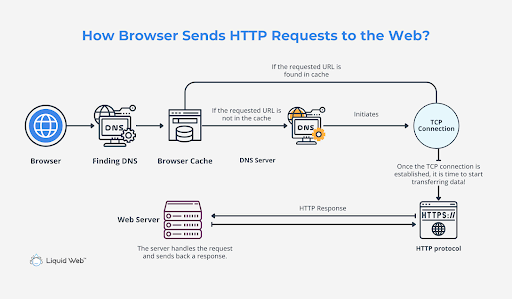
Testing virtual hosts ensures they work. First, restart the web server. This applies changes. Open a web browser. Type your site’s domain. Check if the site loads. If not, check the virtual host file. Look for typos or missing directives. Verify the document root path. Ensure it points to the right directory. Fix errors and restart the server. Test again to confirm.
Credit: www.liquidweb.com
Securing The Web Server
Setting up a web server on Unix involves installing necessary software and configuring server settings for security. Regularly update the system and applications to protect against vulnerabilities. Monitoring server activity can help identify and prevent unauthorized access.
Enabling Https
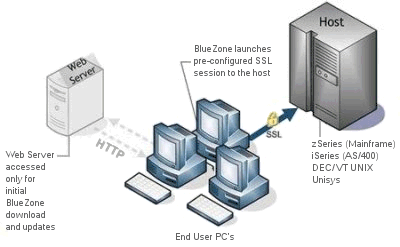
HTTPS is important for safety. It protects data between user and server. Use a SSL certificate to enable HTTPS. This certificate encrypts the data. Buy it from a trusted provider or get it free from Let’s Encrypt. After getting the certificate, install it on your server. Always check that the certificate is up-to-date. This helps keep the data safe and secure.
Regular Security Updates
Always keep your server software updated. Updates fix security problems. Hackers look for old software with weaknesses. Install updates as soon as they come out. Use a scheduler to automate updates. This ensures that you don’t forget. Regular updates make your server more secure. They protect against new threats.
Monitoring And Maintenance
Logs show what happens on your server. They help find errors and issues. Check logs every day. Look for strange patterns. These might be security threats. Tools can help with log analysis. Use them to save time. Logs can be big. Organize them well to find information fast. Keep logs safe and secure. They contain important data.
Make your server run fast. Check CPU and memory usage often. Fix high usage problems quickly. Update software to improve speed. Use caching to make pages load fast. Reduce server load with a content delivery network. Test server speed with online tools. Monitor the server’s performance regularly. This helps keep it running well.
Credit: www3.rocketsoftware.com
Frequently Asked Questions
What Is Web Hosting In Unix?
Web hosting in Unix involves storing website files on Unix-based servers. These servers ensure stability, security, and efficient resource management. Unix hosting supports various scripting languages and databases, offering flexibility for developers. Its robust nature makes it a preferred choice for many websites, especially those requiring reliability and scalability.
How To Setup A Unix Server?
Install Unix OS on the server. Configure network settings. Set up user accounts and permissions. Install necessary software and security patches. Test the server for functionality and performance.
What Is A Web Server In Unix?
A web server in Unix is software that serves web pages to users. It processes HTTP requests and delivers content. Popular Unix web servers include Apache and Nginx. They ensure efficient, secure, and reliable web page delivery. Unix web servers are known for their stability and performance.
How To Enable Http Server In Linux?
Install Apache using the command `sudo apt-get install apache2`. Start the server with `sudo systemctl start apache2`. Enable it to start at boot using `sudo systemctl enable apache2`. Access the server via `http://your-server-ip`. Ensure firewall permits HTTP traffic on port 80.
Conclusion
Hosting a web server on Unix can be straightforward. Follow these steps carefully. Ensure your software is compatible. Choose a reliable server. Keep security in mind. Regular updates are crucial. Monitor your server performance. Backup data frequently. Troubleshoot issues promptly.
Unix offers robust options for hosting. Its flexibility is a major advantage. With practice, you’ll gain confidence. Start small and grow gradually. Remember, patience is key. Experiment and learn from mistakes. Your Unix server can become a powerful tool. Stay committed to learning.
Happy hosting!


