
Are you ready to take your web application from your local machine to the world wide web? Hosting your application on a server is the essential step that ensures your hard work reaches users around the globe.
But where do you start, and how do you make sure everything runs smoothly? You might feel overwhelmed, but don’t worry. This guide is here to simplify the process and give you the confidence to successfully host your web application.
By the end of this article, you’ll have a clear roadmap that will turn your deployment fears into triumphs. So, let’s dive in and unlock the secrets to making your web application live!
Choosing The Right Hosting Provider
Cost matters. Look at what fits your budget. Speed is key. Fast hosts make users happy. Support helps when things go wrong. Choose hosts with friendly help. Security protects your app. Safe hosts keep data safe. Scalability lets you grow. Big hosts handle more users. Reliability means less downtime. Pick hosts with good reviews. Ease of use simplifies setup. Easy hosts save time. Location affects speed. Nearby hosts load faster. Features vary. Compare options carefully.
| Hosting Type | Description |
|---|---|
| Shared Hosting | Shares space with others. Good for small sites. |
| VPS Hosting | Private space. More control and power. |
| Dedicated Hosting | Owns server. Best for big sites. |
| Cloud Hosting | Uses many servers. Flexible and scalable. |
Credit: openclassrooms.com
Setting Up The Server Environment
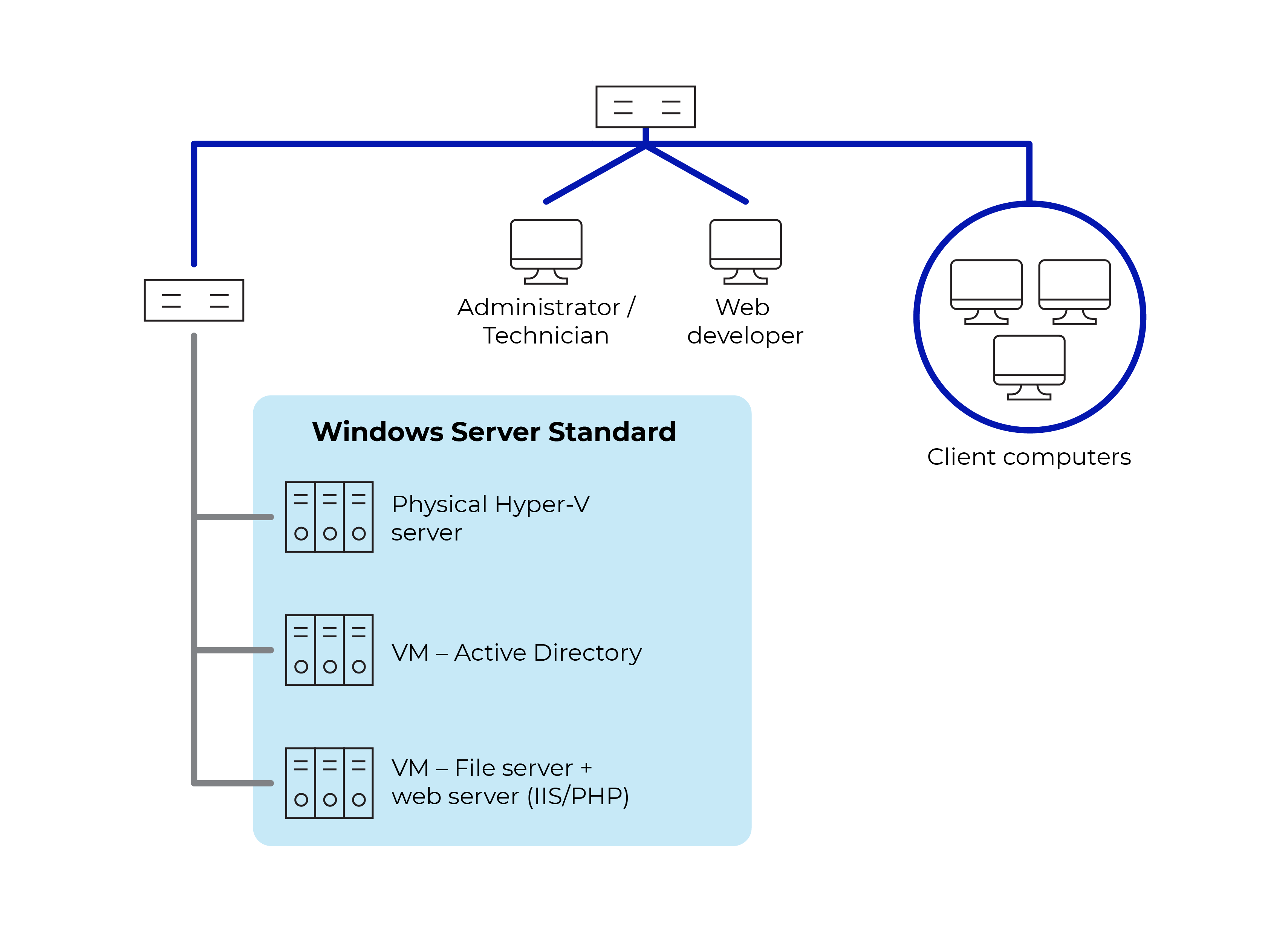
First, you need to install the right software. Operating systems like Linux or Windows are common. Choose one based on your needs. Next, install a web server. Apache and Nginx are popular choices. They help your web app run smoothly. After that, add a database. MySQL or PostgreSQL are good options. Finally, install programming languages like Python or PHP. These help your app talk to the server.
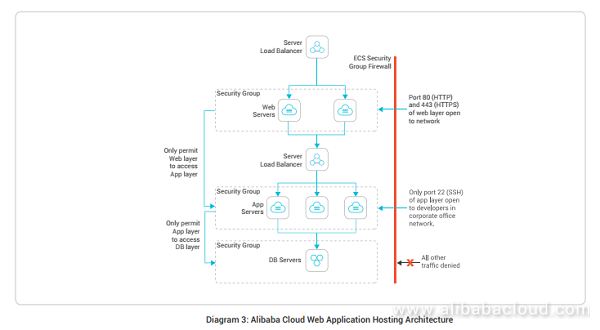
Keep your server safe from bad guys. Start by creating a firewall. This blocks unwanted traffic. Use strong passwords for all accounts. Avoid using simple words. Enable SSL certificates for your website. This encrypts data and keeps it private. Update your software often. New updates fix security holes. Check logs regularly for strange activity. This helps catch problems early.
Deploying The Web Application
First, collect all your web application files. These files include HTML, CSS, JavaScript, and any images. Use an FTP client like FileZilla to upload them. Enter your server’s host name, username, and password in the FTP client. Connect to your server. Now, choose the correct directory on the server. Upload all files to this directory. Ensure all files are uploaded correctly. Double-check to prevent any errors.
Your application might use a database. Set up your database on the server. Access the database management tool like phpMyAdmin. Create a new database. Name it wisely. Import your existing database files. Ensure all data is imported correctly. Update your application’s configuration file. Add the database name, username, and password. Save the changes. Test your application to check if the database is connected.

Credit: aws.amazon.com
Testing The Deployment
Ensuring Functionality is crucial after deploying your web app. First, check the basic features. Make sure every button works. Test the login process. Can users sign up easily? Look for errors. Fix them right away. It helps to have a checklist. Verify each item.
Next, test on different browsers. Try Chrome, Firefox, and Safari. Each browser can behave differently. Also, test on various devices. Use a phone, tablet, and computer. Make sure the app looks good everywhere.
Performance Testing
Check the app’s speed. A slow app frustrates users. Measure the loading time. Aim for less than 3 seconds. Test with many users at once. See if it handles traffic well. Use tools like Google PageSpeed. They give helpful tips. Improve the app as needed.
Look at the server response time. Fast response is key. Optimize the database queries. They affect speed. Regular testing ensures your app works smoothly.
Managing And Monitoring The Application
Hosting web applications on a server requires careful management and monitoring. Ensure the server runs smoothly by checking performance regularly. Address issues promptly to maintain optimal functionality and security.
Using Monitoring Tools
Monitoring tools are important for keeping web applications healthy. These tools watch and check how well the application runs. Alerts can notify when issues arise. Graphs show how the application is used. Logs help find problems. Many tools give real-time information. They help fix problems quickly. They keep the application running smoothly.
Handling Updates And Maintenance
Updates keep the application safe and fast. Maintenance ensures everything works well. Regular updates fix bugs and add features. Backups save important data. Maintenance tasks include checking for errors. Testing ensures updates do not break anything. Always plan updates during low traffic times. This avoids disruptions for users. Keep users informed about updates. They appreciate knowing about changes.
Credit: www.alibabacloud.com
Scaling The Application
Load balancing helps manage traffic. It splits user requests. Servers get equal work. This prevents overloading. It keeps your app fast. Users stay happy. Common load balancers are Nginx and HAProxy. These tools are popular. They direct traffic smoothly. Another method is round-robin. It gives each server a turn. Least connections is another way. It sends users to less busy servers.
Cloud solutions offer flexibility. Scale your app with ease. AWS and Azure are popular choices. They provide many tools. You pay only for what you use. This saves money. Auto-scaling helps manage traffic spikes. It adds more servers when needed. This keeps apps running smoothly. Cloud storage is also helpful. It stores your data safely.
Frequently Asked Questions
How To Host A Web Application On A Server?
To host a web application, first choose a suitable server. Install required software like a web server and database. Upload your application files using FTP or SSH. Configure domain settings and ensure the application runs smoothly. Finally, test everything to confirm successful deployment.
Can I Host My Website On My Server?
Yes, you can host your website on your server. Ensure your server is reliable and secure. You’ll need technical skills to manage and maintain the server. Consider factors like bandwidth, storage, and uptime. Hosting on your server gives full control but requires regular maintenance.
How Do I Run An Application On A Server?
To run an application on a server, install the required software and configure server settings. Upload application files, set permissions, and execute them. Ensure the server meets system requirements. Regularly monitor and maintain the server for optimal performance and security.
What Is The Best Hosting For A Web Application?
Choose a hosting provider with excellent uptime, scalability, and security features. Popular options include AWS, Google Cloud, and DigitalOcean. Compare pricing and support options before deciding. Ensure the hosting environment meets your application’s specific requirements for optimal performance.
Conclusion
Hosting a web application on a server is essential. It involves choosing the right server and platform. Understand the basics and follow step-by-step guides. Make sure your application is secure and optimized. Regular updates keep it running smoothly. Remember, testing is crucial before going live.
This ensures everything works as expected. Seek help if you face any issues. Hosting might seem daunting, but practice makes it easier. With patience and effort, you’ll master it. Enjoy creating and deploying your web applications with confidence.


