
Are you a developer looking to expand your skills by hosting a .Net Core Web API on Linux? You’re in the right place.
Whether you’re a seasoned pro or just starting out, this guide is designed to make the process straightforward and accessible. Imagine the freedom and flexibility of running your. Net applications on a Linux server, tapping into the power and efficiency that comes with it.
Don’t let the technical jargon intimidate you—our step-by-step instructions break down each part of the process, ensuring you can confidently deploy your applications. Ready to unlock new possibilities and enhance your development toolkit? Keep reading to discover how simple it can be to host your. Net Core Web API on Linux.

Credit: aws.amazon.com
Linux Environment Setup
Start by updating your package list. Use the command: sudo apt-get update. Next, install .Net Core SDK. Run: sudo apt-get install dotnet-sdk-6.0. Check the installation. Type: dotnet --version. This shows the installed version. Ensure the number is correct.
Some packages are required for .Net applications. Install these by typing: sudo apt-get install libssl-dev and sudo apt-get install libcurl4-openssl-dev. These help with security and network requests. Missing packages can cause errors. Always check for missing packages. Ensure each package is up to date.
Web Api Project Preparation
First, open your terminal or command prompt. Navigate to your project folder. Type the command dotnet new webapi to create a new project. This command sets up the basic project structure. Check that all files are created. You should see files like Program.cs and Startup.cs. Now, your project is ready to edit and run.
Open the Startup.cs file. Ensure all settings are suitable for Linux. Check your port settings. Use Kestrel for hosting in Linux. Set your environment to production. This makes sure the app runs smoothly. Check if your dependencies are compatible with Linux. Update them if needed. Now, you can test your project on a Linux server.
Deployment Strategy
Start by picking a deployment method. Docker is a popular choice. It helps to manage applications in containers. Kestrel is another option. It acts as a web server for .Net Core apps. Apache or Nginx can be used as a reverse proxy. Each method has its own benefits. Choose what fits your needs best. Think about the server environment. Also, consider ease of setup and maintenance.
First, make sure your application is ready. Build your app in Release mode. This makes it faster and smaller. Next, check all dependencies. Ensure they are compatible with Linux. Create a folder for deployment files. Include all necessary DLLs and configurations. Test your app locally. Make sure it works without errors. Fix any issues before deploying. This step saves time and avoids problems later.
Linux Hosting Options
Nginx is a popular web server for hosting. It is very fast and uses low resources. Install Nginx on your Linux machine. Configure it to serve your .Net Core Web API. Use reverse proxy to direct requests. This will improve performance. Nginx is good for handling many connections.
Apache is another choice for hosting. It is widely used and has many features. Install Apache on your Linux server. Use mod_proxy to forward requests to your app. This helps in managing traffic. Apache can serve static files too. It is reliable and has many plugins.
Application Configuration
Environment variables are important for your app. They store settings that your app needs. You can set them in your Linux system. Use the command line to do this. You can use the export command. For example, export ASPNETCORE_ENVIRONMENT=Production. This sets the environment to production mode. Remember to set variables for database connections too.
Logging helps you see what your app is doing. It records events and errors. You can use Serilog or Log4Net for this. These tools are good for logging. Monitoring checks if your app is healthy. Use tools like Prometheus for monitoring. Keep your app running smooth and safe with these tools.
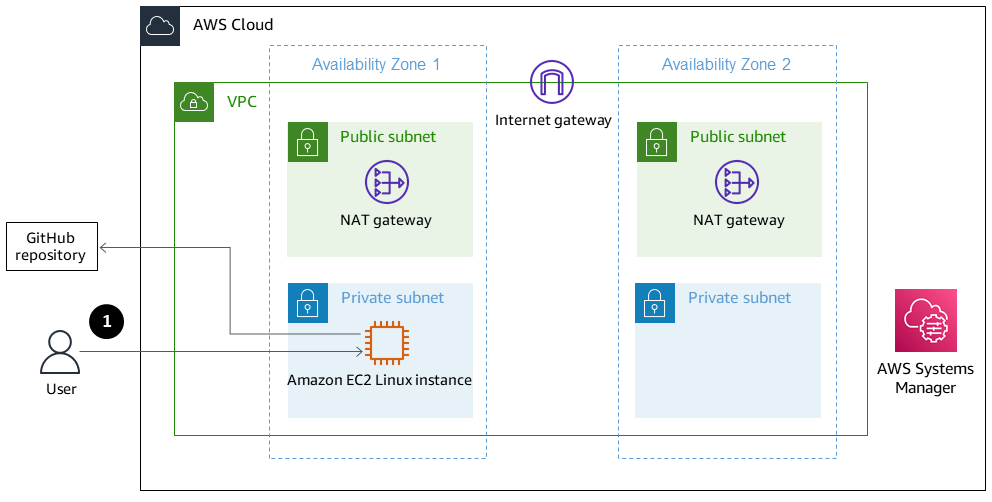
Credit: docs.aws.amazon.com
Security Measures
Ensure robust security by configuring firewall rules and using SSL certificates. Regularly update software to protect your. Net Core Web API on Linux. Encrypt sensitive data to safeguard against unauthorized access.
Implement Https
HTTPS keeps your data safe. It protects users from hackers. It encrypts the data. So, only the receiver can read it. Install an SSL certificate. This will make your website secure. Also, it builds trust with users. Most browsers show a lock icon for HTTPS. This shows the site is safe. Users like safe sites. Always choose HTTPS for security.
Set Up Firewall Rules
Firewalls act like a gatekeeper. They block unwanted traffic. This keeps your server safe. Only allow trusted IPs. Block others to stop attacks. You can use tools like UFW or Firewalld. These tools help in setting rules easily. Make sure to update firewall rules regularly. Regular updates protect against new threats. Safety is important for web APIs.
Troubleshooting And Maintenance
Learn how to host. Net Core Web API on Linux by troubleshooting common issues and performing regular maintenance. Ensure smooth operation with easy-to-follow steps for configuration and monitoring. Keep your web service running efficiently with these straightforward tips.
Common Issues And Solutions
Many times, web APIs face problems. Server errors often occur. Check the logs for clues. Logs show what went wrong. Permissions are another issue. Ensure proper access rights for files. Network issues can block API calls. Test network settings to fix this. Sometimes timeout errors happen. Increase the timeout setting if needed. Dependency conflicts may appear. Verify all libraries are compatible. Regular checks help keep the API smooth. These steps solve many common problems.
Regular Updates And Monitoring
Update your API often. New updates fix bugs. They add new features too. Use monitoring tools to track your API. These tools show if the API is slow. They alert you about errors. Monitor traffic patterns for unusual spikes. Watch for security alerts. Security is crucial. Regular updates and monitoring keep your API healthy. They ensure everything works well.
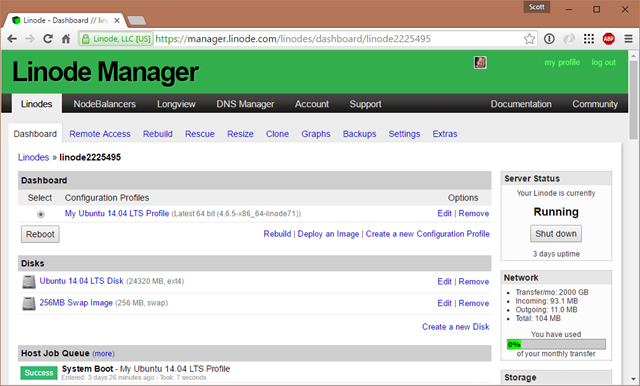
Credit: www.hanselman.com
Frequently Asked Questions
How Do I Install .net Core On Linux?
To install .Net Core on Linux, first update your package index. Then, download the Microsoft package and install it. Finally, run the command `sudo apt-get install -y dotnet-sdk-` to complete the installation. Ensure the version number matches the desired .Net Core version.
Can I Run .net Core Api On Ubuntu?
Yes, you can run a. Net Core API on Ubuntu. First, ensure that. Net Core SDK is installed. Then, publish your application using the `dotnet publish` command. Deploy the published files to the server and use a web server like Nginx to host it.
What Web Server Is Best For .net Core On Linux?
Nginx is a popular choice for hosting. Net Core applications on Linux. It is lightweight, fast, and efficient. You can configure it as a reverse proxy server for your. Net Core API. This setup helps handle incoming requests and improves performance and security.
How To Deploy .net Core Api Using Docker?
To deploy using Docker, first create a Dockerfile for your. Net Core API. Build the Docker image using `docker build` command. Then, run the image using `docker run`. This encapsulates your application and its dependencies, ensuring consistent deployments across different environments.
Conclusion
Hosting. NET Core Web API on Linux is simpler than you think. Start by choosing the right Linux distribution. Install the necessary dependencies. Set up your environment. Test your API thoroughly. Remember, practice makes perfect. Troubleshooting is part of the learning journey.
Keep exploring and experimenting with configurations. Stay updated on new developments. Share your experiences and solutions. Your journey might inspire others. Hosting on Linux offers flexibility and robustness. Embrace the challenge with confidence. Happy coding!


