
Are you ready to take your Java web application to the next level? Hosting it on Google App Engine could be the game-changer you need.
Imagine your application scaling effortlessly, handling traffic spikes, and being accessible to users worldwide. Sounds exciting, right? By choosing Google App Engine, you are opting for a platform that offers robust infrastructure, seamless deployment, and a worry-free maintenance experience. In this guide, we’ll break down the steps you need to follow, making the process straightforward and manageable.
So, let’s dive in and unlock the potential of your Java web application with the power of Google App Engine. Keep reading, and you’ll see how easy it is to get started!
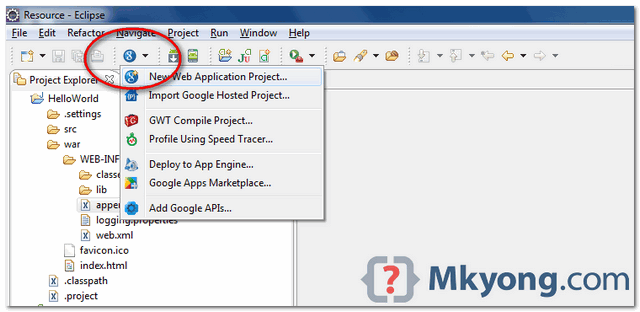
Credit: mkyong.com
Setting Up Your Environment
First, you need the Java SDK. It helps run Java programs. Download the latest version from the official site. Follow the installation steps. It’s easy and quick. After installing, check if Java is working. Open your terminal or command prompt. Type java -version. If you see the version number, it’s ready.
Next, set up the Google Cloud SDK. This tool lets you talk to Google Cloud. Download it from the Google Cloud website. Follow the guide to install it. After installing, open the terminal again. Type gcloud init. This will start the setup process. Answer the questions it asks. Now you can use Google Cloud tools.

Credit: mkyong.com
Creating A Java Web Application
Building a Java web application starts with a good project structure. The structure includes directories for source code, resources, and configuration files. Keep everything organized. Use meaningful names for folders and files. It helps in understanding the project easily.
Use a standard layout for web applications. This includes a main package for Java classes, a web package for servlets, and a resources folder for images and CSS. Structuring correctly aids in code management.
Use Maven or Gradle for building Java applications. Both tools help manage dependencies. They automate the build process. Maven uses XML files to configure projects. Gradle uses scripts written in Groovy or Kotlin.
Choose one based on project needs. Maven is more popular but Gradle is flexible. Both handle libraries and plugins well. They simplify building and deploying applications.
Configuring App Engine
Creating configuration files is important. They help Google App Engine understand your app. The two main files are app.yaml and web.xml. These files tell the app how to run. They also tell it where to find resources. Make sure to save these files in the right place. Keep them updated with any changes.
The app.yaml file tells App Engine about your app. It includes details like the runtime and version. Also, it lists the handlers for your app. Handlers tell the app how to respond to requests. Write clear and simple rules in this file. This helps your app run smoothly.
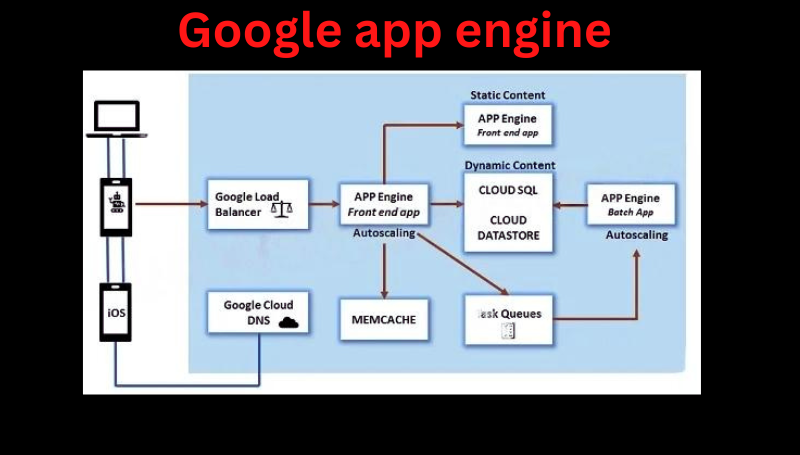
Credit: medium.com
Deploying To App Engine
Make sure your Java app is ready. Check for any errors. Fix them all. Create a project directory for your app. This helps in organizing files. Add a web.xml file in the right place. This file helps in managing web requests. Don’t forget to include the App Engine SDK in your project. This is important for deployment.
First, log into the Google Cloud Console. It’s the main dashboard for your app. Choose your project. Make sure it’s the right one. Navigate to the App Engine section. This is where you deploy. Click on the Deploy button. Follow the steps provided. Your app will be live soon. Check the logs for any issues. Fix them if needed.
Managing Your Application
Watch your app closely. Use Google App Engine’s tools to track it. Check how fast your app runs. Speed is important. Ensure your app does not crash. Crashes make users unhappy. Be sure to fix errors quickly. Errors can slow your app. Slow apps lose users. Your app should work well all the time. Monitor it daily for best results.
Make sure your app can grow. Google App Engine helps with scaling. It supports many users at once. Load balancing shares the work. It stops servers from crashing. Balance loads to keep your app fast. Fast apps make users happy. Scaling means adding more power when needed. Your app grows as users increase. Balance and scale carefully.
Troubleshooting Common Issues
Hosting Java web applications on Google App Engine can present challenges. Common issues include environment configuration and deployment errors. Troubleshooting involves checking logs, verifying the app. yaml file, and ensuring proper SDK usage.
Debugging Deployment Errors
Deployment errors can be tricky. Check your project settings first. Ensure your Java version matches Google App Engine’s supported versions. Verify the app.yaml file is correct. It should be in the root directory. Look at the console logs for specific error messages. They often point to the problem. Review your dependencies. Outdated or incompatible libraries may cause errors. Use the Google App Engine documentation. It offers solutions for common issues.
Handling Runtime Exceptions
Runtime exceptions happen during app operation. Log all exceptions for easy tracking. Use try-catch blocks to handle exceptions gracefully. Check for null values in variables. This prevents null pointer exceptions. Inspect your database connections. Ensure they are not closed unexpectedly. Review API calls. Ensure they return expected values. Test your app locally before deploying. It helps catch issues early.
Optimizing Application Performance
Deploying Java web applications on Google App Engine enhances performance and scalability. Google App Engine simplifies hosting with powerful cloud infrastructure. Developers benefit from seamless integration and efficient resource management.
Caching Strategies
Caching helps make web apps run faster. It saves data for later use. This means less work for the server. Data is stored close to the user. This reduces wait times. Data caching can be done in different ways. Use memory-based caches like Redis. These are fast and reliable. Another option is disk-based caching. It is slower but stores more data. Choose the right cache for your needs. Adjust caching settings for best results. This keeps the app running smoothly.
Database Connections
Database connections are important for web apps. They help retrieve and store data. Too many connections can slow down the app. Limit the number of connections. Use a connection pool to manage them. It reuses existing connections. This saves time and resources. Optimize queries to speed up data retrieval. Simple queries run faster. Avoid complex queries if possible. Keep database schema clean and organized. This improves performance greatly.
Frequently Asked Questions
How To Deploy A Java Application In Gcp?
Deploy a Java application in GCP by using Google Cloud Console. Upload your application code to Google Cloud Storage. Use Google App Engine, Compute Engine, or Kubernetes Engine for deployment. Configure environment variables and dependencies. Finally, deploy your application and monitor using Google Cloud’s tools.
How To Host A Java Web Application?
Host a Java web application by choosing a reliable hosting provider. Install necessary software like Apache Tomcat. Deploy your application files and configure server settings. Use a domain name for accessibility. Ensure security measures are in place for safe hosting.
Regularly monitor performance and update software.
How Do I Run A Java Program In Google?
Install Google Cloud SDK, set up Java environment, and use Cloud Shell to run Java programs online.
How To Connect To Gcp Using Java?
To connect to GCP using Java, install the Google Cloud Client Library. Configure authentication with a service account. Use the library to interact with GCP services. Ensure your project has necessary APIs enabled and permissions granted. Use Java code to initiate connections and manage resources effectively.
Conclusion
Hosting a Java web application on Google App Engine is straightforward. Follow simple steps for setup and deployment. Start by creating your project. Then, configure your environment. Google App Engine supports Java well. It offers scalability and reliability. Use App Engine’s dashboard for easy management.
Troubleshoot any issues efficiently. The platform provides helpful resources. Always test your application thoroughly. Ensure smooth performance. Keep your application updated for security. Google App Engine is a good choice for Java applications. It simplifies hosting tasks effectively. Start hosting your Java application today.
Enjoy seamless web experiences.


