
Have you ever dreamed of having your own corner of the internet? Hosting a personal web server is your ticket to creating that space.
Imagine having complete control over your content, without relying on external hosting services. Whether you want to showcase your portfolio, share your thoughts through a blog, or even host a small business website, running your own server gives you the freedom to do it all.
But here’s the catch: setting up a personal web server might seem daunting at first. You might wonder about the costs, the technical skills required, and the security challenges. Don’t worry—this guide is here to simplify the process for you. You’ll find easy-to-follow steps and tips that will make hosting your own server not only possible but surprisingly straightforward. As you read on, you’ll discover how you can gain control, enhance your digital presence, and possibly even save money by hosting your own web server. Get ready to unlock your potential and explore the digital world on your terms. Dive into the article and see how easy it can be to bring your ideas to life online.
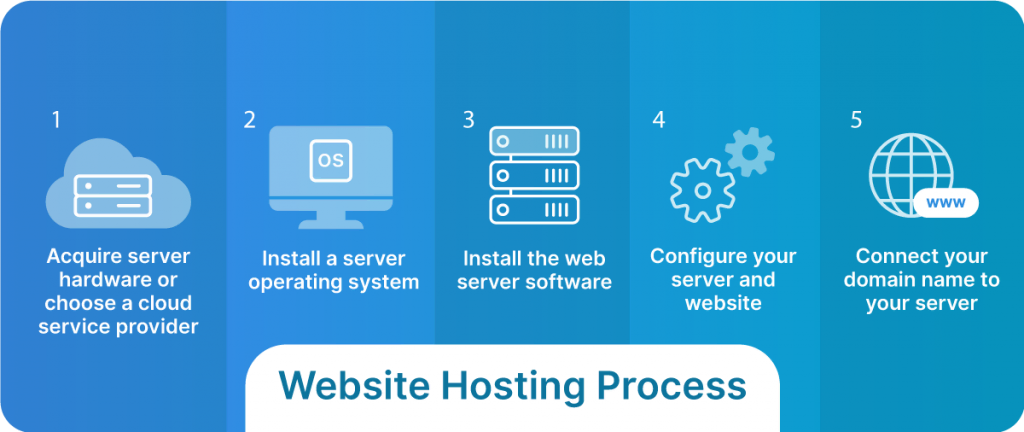
Credit: www.liquidweb.com
Choosing The Right Hardware
Desktops can work as servers for small projects. They are cheaper and easy to set up. But they might not handle heavy traffic well. A dedicated server is built for hosting. It is more powerful and reliable. But it costs more money.
Performance is key for any web server. A fast server keeps users happy. Choose hardware with a strong CPU and lots of RAM. This helps run tasks smoothly. Also, consider SSD storage over HDD. SSDs are faster and make websites load quickly.
Selecting The Operating System
Choosing the right operating system for your personal web server is crucial. Consider compatibility with your software and hardware. Linux often offers flexibility and security, while Windows provides user-friendly interfaces. Make sure your choice supports the server applications you plan to use.
Linux Vs. Windows
Linux is often chosen for web servers. It is free and open-source. You can change and share it. Many people around the world use it. They help fix problems quickly. This makes it very reliable.
Windows is another option. It is easy to use, like on your home computer. But, it costs money. Many schools and offices use it. It has good support and many features.
Open Source Options
Open source means you can see and change the code. Linux is a popular open-source choice. It gives you freedom to customize. You can make your server just right for your needs. Many users love open-source because it is free. It also has a big community to help you.
Setting Up Network Configuration
Assigning an IP address to your web server is important. Your computer needs a unique number. This number helps it talk to others. Use your router settings to do this. Find the DHCP settings. Set a static IP address. This means it will not change. Make sure the address is not used by others. Use an IP address like 192.168.1.100. Write it down for later.
Port forwarding lets outside computers connect to your server. Without it, your server stays hidden. Open your router settings. Look for port forwarding options. Enter your server’s IP address. Choose a port number like 80 or 443. These are common ports for web servers. Save your changes. Now your server can be seen by others.

Credit: www.youtube.com
Installing Web Server Software
Apache and Nginx are popular web server tools. Apache is known for its flexibility. It supports many features and modules. Nginx is fast and uses fewer resources. It is great for high traffic. Both have unique strengths.
Keep your server software updated. Use strong passwords for security. Enable HTTPS for safe data transfer. Check logs regularly for errors. Optimize your server for better speed. Use caching to load pages faster. Limit access to server files. This keeps your data safe.
Securing Your Web Server
A firewall is very important for your web server’s safety. It acts as a strong wall between your server and the internet. Make sure to only allow necessary traffic. Block all other traffic that is not needed. This helps keep unwanted visitors away. Set up rules to control the data that comes and goes. This will protect your server from bad people. Check and update your firewall often. This ensures your server stays safe.
SSL certificates make your website secure. They create a safe link between your server and visitors. This means all information stays private. To get an SSL, you need to buy it from a trusted source. Install it on your server. This shows visitors your site is safe. A secure site has a green padlock icon. This gives visitors trust in your site. Renew your SSL before it expires. This keeps your website always protected.
Managing Your Web Server
Keep your server safe and fast with monitoring tools. These tools watch your server all the time. They check if it is working well or if there are any problems. Some good tools are Nagios, Zabbix, and Prometheus. They are easy to use and help you a lot. With these tools, you can see how much CPU or memory your server uses. You can also know if your server is too hot or too slow. Always keep an eye on your server’s health. This way, you can fix problems quickly and keep your website running smoothly.
Updating your server is very important. Regular updates keep your server safe. Updates fix bugs and make your server better. Always install updates for your software and security patches. This will protect your server from hackers. Set your server to update automatically. This way, you won’t forget to update. Keeping your server updated is like giving it a health check. It helps your server stay strong and secure.
Troubleshooting Common Issues
Facing difficulties with personal web server hosting is common. Ensure your computer’s firewall settings allow server access. Verify your internet connection and IP address configurations to prevent connectivity issues.
Connectivity Problems
Web servers can face connectivity issuesnetwork cables. Are they connected properly? If cables are fine, restart the router. Sometimes, routers need a reset. Check IP settings on the server. Ensure it matches the router’s settings. Use the ping command to test connections. Are you able to ping other devices? If not, there may be a network issue. Check your firewall settings. Firewalls can block necessary connections. Adjust settings to allow server access.
Server Downtime Solutions
Downtime can be frustrating. First, ensure the server is turned on. Check for power issues. Is the server plugged in? Inspect the server for hardware problems. Fans should be running smoothly. Overheating can cause shutdowns. Monitor server logs for errors. Logs can show why the server is down. Use backup power supplies. They help during power outages. Regularly update server software. Old software can cause crashes. Ensure all updates are installed promptly.

Credit: www.youtube.com
Exploring Advanced Features
Virtual hosts allow multiple websites on one server. Each website gets its own name. You can use different ports for each website. Virtual hosts save money and resources. They make server management easier. You don’t need separate servers for each site. Configure virtual hosts with simple files. Edit these files to add new sites. Use the Apache or Nginx web server. Both support virtual hosts well. This feature helps when sites are small. It works best for personal projects or small businesses.
Load balancing shares traffic across servers. It keeps sites fast and reliable. Use it to prevent server overload. It helps during busy times. There are several methods for load balancing. Round-robin is one simple way. Each request goes to the next server in line. Least connections is another method. It sends requests to the server with the fewest connections. Load balancing improves user experience. It keeps sites running smoothly. Use this technique to manage traffic efficiently. It is important for growing websites.
Frequently Asked Questions
Can I Host My Own Website Server?
Yes, you can host your own website server. It requires hardware, software, and technical knowledge. Ensure a reliable internet connection and consider security measures. Alternatively, opt for a hosting provider for ease and support. Hosting your own server provides control but involves maintenance and costs.
How Do I Create My Own Web Server?
To create a web server, choose a server operating system like Linux. Install a web server software, such as Apache or Nginx. Configure server settings and secure your server. Deploy your website files and test functionality.
Can I Host My Personal Website For Free?
Yes, you can host your personal website for free using platforms like GitHub Pages, WordPress. com, or Wix. These platforms offer basic plans without cost, suitable for personal or small-scale projects. Upgrading to paid plans provides additional features and customization options.
Can I Turn My Pc Into A Web Server?
Yes, you can turn your PC into a web server by installing server software like Apache or Nginx. Ensure your PC has a static IP address, and configure firewall settings for security. Hosting files and websites is possible, but performance might be limited compared to dedicated servers.
Conclusion
Setting up a personal web server can be rewarding. You gain control and flexibility. Start with basic hardware and software requirements. Follow security practices to protect your data. Regular updates keep your server running smoothly. Troubleshooting helps solve common issues quickly.
Hosting your own server enhances your web skills. Use this knowledge to explore more advanced hosting options. Practice makes perfect. Keep learning, and you’ll improve over time. Enjoy the journey of managing your own web server.


