
Are you looking to host your own website and want the reliability and flexibility of a Linux web server? You’re in the right place.
Setting up a Linux web server might sound daunting, but it doesn’t have to be. Imagine having complete control over your website’s environment, ensuring it’s optimized just the way you want. By the end of this article, you’ll know exactly how to host a Linux web server without feeling overwhelmed.
Whether you’re a tech enthusiast or a business owner, mastering this skill can empower you to take charge of your online presence. So, let’s dive in and discover the steps you need to take to bring your website to life with a Linux web server.
Choosing The Right Linux Distribution
Ubuntu is loved by many. It is user-friendly and well-supported. CentOS offers stability and security. It is great for servers. Debian is another choice. Known for its reliability and large community support. Fedora brings the latest technology. It is perfect for those who like new features.
Think about your server needs. Do you need strong security? Or perhaps ease of use? Choose a Linux version that fits your needs. Also, check the support and community. A good community can help fix problems. Consider the software compatibility as well. Some software works better on certain Linux versions.

Credit: www.cloudpanel.io
Setting Up The Server Hardware
A good server needs strong hardware. You need a fast processor. At least 8GB of RAM is essential. Storage should be SSD for speed. Stable internet is crucial. Ensure your power supply is reliable. Cooling keeps the server safe. Fans or AC work well. Backup power can save you in a storm.
Performance matters for a web server. Use efficient software. Keep your system updated. Remove software you don’t use. Load balancing helps traffic flow. Check your network speed often. Monitoring tools can spot issues early. Your server should run smoothly and fast.
Installing Linux Operating System
First, choose a Linux distribution like Ubuntu or CentOS. Download the ISO file and burn it to a USB or DVD. Insert the USB or DVD into your computer. Restart the computer and boot from the USB or DVD. Follow the on-screen instructions. Choose the installation language. Select your timezone and keyboard layout. Create a username and password. Decide on disk partitioning. Let the system install the files. Remove the USB or DVD when prompted. Restart your computer to finish.
After installation, open the terminal. Update the system with the command sudo apt-get update. Install necessary software with sudo apt-get install. Set up a firewall for security. Use sudo ufw enable to start. Configure network settings if needed. Use the command ifconfig to check. Set the hostname using sudo hostnamectl. Adjust user permissions with sudo usermod. Reboot to apply changes. Your Linux server is now ready.
Configuring Network Settings
Assigning an IP address is essential. It helps your server connect to the internet. Choose a static IP for stable access. Dynamic IPs change often. This can cause issues. Use Linux commands to set your IP. You might use ifconfig or ip. Check your settings to ensure it’s correct. Don’t forget to save changes. Restart your network service after you assign the IP. This helps apply new settings.
DNS helps translate domain names into IP addresses. It’s like a phone book for the internet. You need to configure DNS for your server. Use the resolv.conf file in Linux. Add the nameserver IP there. This file is crucial. Double-check your entries. Wrong settings can block access. You can use online tools to verify DNS settings. These tools help find errors easily. Remember to save all changes.
Securing Your Linux Web Server
Firewalls protect your server from unwanted traffic. Use iptables to set rules. Only allow necessary ports. Block others. This reduces risk. Regularly update firewall settings. Check logs for suspicious activity. Keep your server safe.
Manage users carefully. Limit access to important files. Use strong passwords for all users. Remove unnecessary accounts. Set permissions wisely. Regularly review user activities. This keeps your server secure. Always stay alert.
Credit: www.ubuntumint.com
Installing Web Server Software
Apache and Nginx are popular web servers. Both are great choices. Apache is older and has more features. It uses more resources than Nginx. Nginx is faster and uses less memory. It handles more traffic easily. Choose based on your needs.
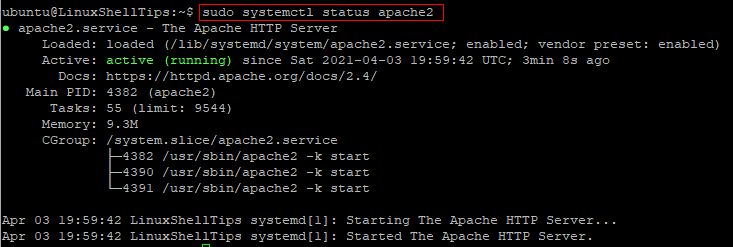
First, open the terminal on your Linux system. Use sudo apt-get update to update packages. For Apache, type sudo apt-get install apache2. For Nginx, type sudo apt-get install nginx. Wait for the installation to complete. Check if the server is running. Type sudo systemctl status apache2 or sudo systemctl status nginx.
Configuring Web Server
Setting up virtual hosts is key for managing multiple domains on a single server. Each domain needs a separate configuration file. This file tells the server where to find the website files. Use the Apache or Nginx web server. Create a new configuration file for each site. Set the DocumentRoot to the folder holding the site files. Assign a unique ServerName to each site.
SSL certificates keep sites secure. Users trust sites with SSL certificates. Install SSL certificates using Let’s Encrypt. It’s free. Use the command line to request a certificate. Follow the instructions given. Update your configuration files to enable SSL. Ensure the server listens on port 443. This port is for secure connections. Test the site to confirm SSL is working.
Testing And Monitoring
Performance testing checks how fast your server runs. It finds any problems or slowdowns. Use tools like Apache JMeter to test speed. Look at how many users your server can handle. Check the response time for each request. Make sure the server stays stable. Load testing helps see how the server acts under pressure. Monitor server’s CPU and memory usage. Keep the server running smoothly. Regular testing keeps everything in top shape.
Monitoring tools help watch server activity. Tools like Nagios or Zabbix are popular. They check server health. You can track uptime and downtime. Get alerts if something goes wrong. Monitoring helps fix issues fast. It shows server load and performance. Keep an eye on network traffic. Watch the server’s disk space. Use these tools to keep your server safe and sound.
Regular Maintenance Tasks
Keeping your software updated is very important. New updates fix bugs and add features. Use the package manager for updates. Commands like sudo apt-get update are helpful. Always read what the update includes. This ensures your server runs smoothly.
Check for updates every week. It keeps your server secure. This prevents hackers from finding weak spots. Regular updates mean fewer problems later.
Backups are like safety nets. If something breaks, backups save the day. Use tools like rsync to create backups. Schedule backups daily. This ensures you don’t lose data.
Store backups in a safe place. Not on the same server. Try using cloud services for backups. This keeps your data safe from disasters. Test your backups often. Make sure they work when needed.

Credit: www.veeble.com
Frequently Asked Questions
How To Host A Web Server In Linux?
Install a Linux distribution like Ubuntu. Use the package manager to install Apache or Nginx. Configure server settings in configuration files. Test the server by accessing your IP address or domain. Ensure firewall allows HTTP/HTTPS traffic. Regularly update and secure your server to protect against vulnerabilities.
How To Create A Virtual Server In Linux?
Install virtualization software like VirtualBox or VMware. Create a new virtual machine. Choose Linux OS, allocate resources, and install the operating system. Configure network settings and security. Manage the virtual server using terminal commands. Regularly update software for optimal performance.
Which Linux Os Is Best For Web Servers?
Ubuntu Server is the top choice for web servers due to its reliability, extensive support, and user-friendly interface. It offers regular updates, robust security features, and a vast community. CentOS is also popular for its stability and enterprise-level capabilities. Both are excellent options for web hosting needs.
How Much Does A Linux Server Cost?
Linux server costs vary based on specifications and providers. Prices start from $5 monthly for basic plans. High-performance servers can reach hundreds monthly. Consider factors like storage, RAM, and support when choosing. Always compare providers to find the best deal.
Conclusion
Hosting a Linux web server can be simple. Follow the steps carefully. Choose the right Linux distribution. Install necessary software. Configure your server settings. Secure your server with firewalls. Regularly update your software. Backup your data to avoid loss. Monitor server performance for issues.
Address them quickly. With practice, you’ll gain confidence. You’ll enjoy managing your web server. It’s rewarding to see your site online. Keep learning and improving. Your web server journey is just beginning. Stay curious. Explore more about Linux servers. Happy hosting!


