
Are you tired of using the same generic WordPress themes that everyone else seems to have? Do you want your website to stand out with a unique look that truly represents your brand or personality?
Creating your own WordPress theme might be easier than you think. Imagine having complete control over your site’s appearance, without being constrained by the limitations of pre-made themes. This guide will walk you through the steps to design a theme that’s as unique as you are.
Whether you’re a tech enthusiast or a beginner, you’ll discover how empowering it is to craft a website that feels authentically yours. Let’s dive in and transform your WordPress site into a masterpiece that captures attention and keeps your visitors coming back for more.
Getting Started With WordPress Theme Development
Creating your own theme for WordPress involves understanding basic coding skills. Start with HTML, CSS, and PHP. Use WordPress’s template hierarchy to structure your theme. Experiment with different styles and layouts to personalize your design. Test your theme thoroughly to ensure compatibility and functionality across various devices and browsers.
Essential Tools And Resources
Start with a simple text editor. Popular choices are Visual Studio Code or Atom. These tools help you write code easily. You also need a web browser like Google Chrome to test your theme. Use WordPress Codex for theme guidelines. It’s a great help. Also, check out WordPress Developer Resources. These resources provide step-by-step guides. Finally, join WordPress forums. They are useful for solving problems.
Setting Up A Local Development Environment
Install XAMPP or MAMP on your computer. These tools create a local server. It helps you test your theme offline. Next, set up a local WordPress site. Download WordPress from its official site. Unzip and place it in the XAMPP or MAMP directory. Then, create a database using phpMyAdmin. Follow the setup instructions. Now, you can begin theme development without internet. This setup is safe and easy to manage.
Understanding WordPress Theme Structure
A WordPress theme has many template files. Each file has a unique role. The style.css file is very important. It holds the theme’s design rules. The index.php file is the main template. It controls how pages look.
The header.php file shows the top part of the page. The footer.php file shows the bottom part. The sidebar.php file is for side menus. These files make up the theme’s layout.
The functions.php file adds extra features. It is like a toolbox for the theme. These template files work together. They create a unique design. Understanding them helps you make your own theme.
Creating The Basic Theme Files
Start with two simple files. First, make an index.php file. This is your main template file. It tells WordPress how to show your site. Then, create a style.css file. This file will control how your site looks. Use it to change colors, fonts, and more. You need both files to make your theme work.
The functions.php file adds features to your theme. It helps you add new functions. You can change settings here too. This file is like your theme’s toolbox. It can add menus, widgets, and more. Every theme should have a functions.php file. It makes your theme powerful and flexible.
Designing The Theme Layout
Start with a simple HTML structure. It is the skeleton of your page. Use tags like
Make your site responsive. It should work on all devices. Use media queries in CSS. They adjust styles based on screen size. Flexbox and Grid are great tools. They help with layout flexibility. Test on phones, tablets, and desktops. Ensure everything looks good.
Adding Dynamic Content With Php
The WordPress Loop is key to showing posts and pages. It lets you display content from the database. Start with php if ( have_posts() ) : while ( have_posts() ) : the_post(); ?. This checks if there are posts.
Use php the_title(); ? to show the title. Then php the_content(); ? shows the content. To end the loop, use php endwhile; endif; ?. This stops the loop when done.
The loop is flexible. It works for pages, too. Just change the query. This makes WordPress themes dynamic and useful.
Credit: smashballoon.com
Customizing Theme With Widgets And Menus
Create your own WordPress theme by customizing with widgets and menus. Enhance site functionality with easy-to-use widgets. Organize navigation using simple menu settings for a personalized look.
Registering Custom Widgets
Widgets add special features to your theme. To create a custom widget, use WordPress functions. First, define your widget in the functions.php file. This file holds your theme’s main functions. Next, register the widget using the register_widget function. This makes your widget available in WordPress. Finally, add your custom code to make the widget unique. Widgets can show text, images, or links.
Creating Navigation Menus
Menus guide users through your site. To make a new menu, use the register_nav_menus function. Add this function to your functions.php file. This registers a new menu location. After that, create the menu in the WordPress admin area. Drag and drop items like pages and links to the menu. Save the menu and assign it to your theme’s menu location.
Enhancing Theme Functionality
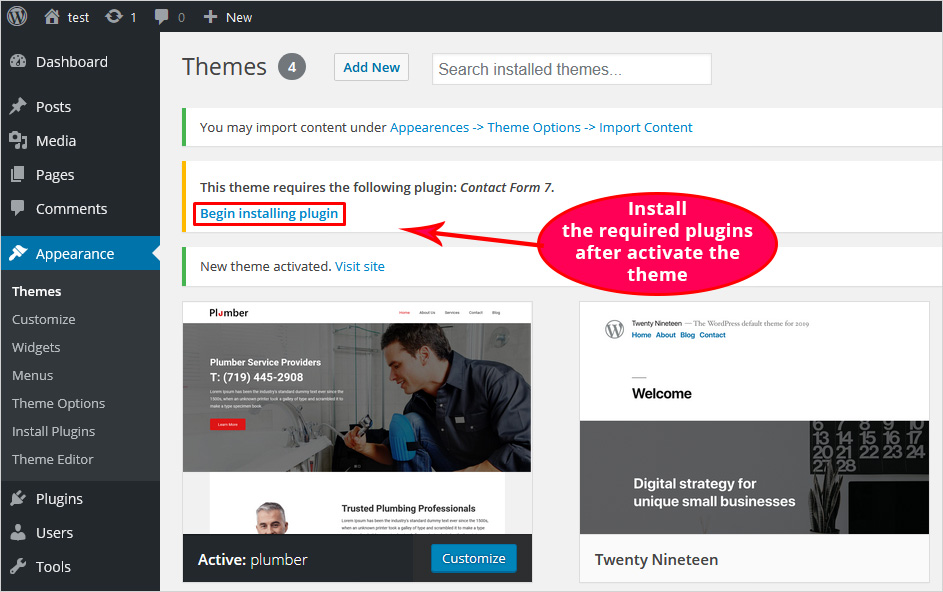
Integrating Plugins can make your theme more powerful. Plugins add new features to your website. For example, a contact form plugin lets visitors contact you easily. Choose plugins that fit your theme’s style. Not all plugins are needed. Too many can slow down your site. Always check plugin reviews before adding them. They should be compatible with your theme.
Adding Custom Post Types helps organize your content. Different post types can include portfolios, testimonials, or products. This makes your site look neat. Use WordPress functions to create these types. It requires some coding knowledge. Follow tutorials to learn how. Custom post types make your theme unique. They allow users to find content easily.
Credit: blog.templatetoaster.com
Testing And Debugging The Theme
Crafting your own theme for WordPress involves testing and debugging to ensure functionality. Check for errors using tools like error logs and browsers’ developer consoles. Fix layout issues by inspecting code and running tests, ensuring the theme works seamlessly across devices.
Checking For Code Errors
Always review your code for errors. Small mistakes can break your theme. Use tools like Lint to find errors quickly. Fix them as you go. Double-check your code for syntax mistakes. An error-free code is the goal. Run your theme in debug mode. Look for warnings and notices. These help you find hidden issues. Keep the code clean and organized. Errors can hide in messy code.
Ensuring Cross-browser Compatibility
Test your theme in different browsers. Each browser may show your theme differently. Check with Chrome, Firefox, and Safari. Compare how they display your design. Ensure your theme looks good everywhere. Use tools like BrowserStack. They help test across many browsers. Compatibility is key for user experience. Fix any display issues you find. Consistency in all browsers builds trust. Happy users mean a successful theme.
Preparing Theme For Launch
Crafting your own WordPress theme involves designing and coding. Begin by understanding basic HTML, CSS, and PHP. Tools like theme frameworks can simplify this process.
Optimizing For Performance
Fast themes keep users happy. Compress images to save space. Minify CSS and JavaScript files. Remove unnecessary code. Use caching to speed up load times. Test theme speed with tools like Google PageSpeed Insights. Improve slow areas for better performance. Fast websites rank higher on search engines. Users stay longer on speedy sites.
Ensuring Security Best Practices
Security is important for all themes. Update themes regularly. Old versions may have bugs. Use secure coding practices. Validate all inputs to avoid attacks. Keep WordPress core updated. Strong passwords protect admin accounts. Limit login attempts to prevent hacking. Use security plugins for extra protection. Backup data often to prevent loss.
Submitting Theme To WordPress Repository
Crafting a WordPress theme involves creativity and coding skills. Start by designing the layout, then code using PHP, HTML, and CSS. Once ready, submit your theme to the WordPress repository for others to use.
Meeting WordPress Theme Guidelines
Creating a theme for WordPress is exciting. To share it, follow rules. WordPress has guidelines to keep themes safe and useful. These rules ensure themes are secure and work well. Read them carefully before submitting. Make sure your theme is easy to use and understand. It should look nice and function smoothly. Check your theme for errors and fix them. WordPress checks themes for problems. A clean theme meets guidelines.
Submitting And Maintaining The Theme
Once your theme meets guidelines, you can submit it. Go to the WordPress theme repository. Fill out the form and upload your theme. Wait for review. It might take some time. If approved, your theme is live. Users can download and use it. Maintain your theme regularly. Update it for new WordPress versions. Fix bugs and improve features. Keep your theme fresh and secure. Regular updates help users trust your theme.

Credit: www.youtube.com
Frequently Asked Questions
What Is A WordPress Theme?
A WordPress theme is a collection of files that dictate the design and functionality of a WordPress site. Themes control layout, color schemes, font choices, and more. They are customizable, allowing you to create a unique look for your site.
Themes can be created from scratch or modified from existing ones.
How Do I Start Creating A Theme?
Start by learning HTML, CSS, and PHP. Then, install WordPress locally and create a new theme folder. Develop essential files like style. css and index. php. Use WordPress functions and hooks to customize. Finally, test your theme for responsiveness and compatibility.
What Tools Are Needed For Theme Development?
You’ll need a code editor like Visual Studio Code or Sublime Text. Install a local server environment like XAMPP or MAMP. Familiarize yourself with WordPress Codex for documentation. Use browsers for testing and debugging. Version control systems like Git can help manage your theme development.
Can I Sell My Custom WordPress Theme?
Yes, you can sell your custom WordPress theme. Ensure it’s unique, well-coded, and adheres to WordPress standards. Platforms like ThemeForest and Creative Market allow you to list and sell themes. Provide documentation and support for buyers to enhance your theme’s marketability.
Conclusion
Creating your own WordPress theme is a rewarding experience. You gain control over design and functionality. Start with a basic structure. Customize styles to match your vision. Use coding to add unique features. Test your theme for errors. Make sure it looks good on all devices.
Keep learning and improving your skills. Share your creation with the community. This journey enhances your web development skills. Your new theme will showcase your creativity. Enjoy the process and watch your ideas come to life. Building a theme is an achievement to be proud of.


