
Are you struggling to connect your WordPress theme with a database? You’re not alone.
This task can seem daunting, especially if you’re new to WordPress or database management. But don’t worry, you’re about to learn how to bridge this gap with ease. Imagine transforming your WordPress site into a well-oiled machine that runs smoothly and efficiently, captivating your audience and keeping them engaged.
In this guide, we’ll break down the process into simple, actionable steps that you can follow without feeling overwhelmed. Get ready to unlock the potential of your WordPress site and enhance your user experience like never before. Stay with us, and let’s make your website shine!

Credit: www.youtube.com
Setting Up A WordPress Theme
First, download the theme file. It usually comes as a ZIP file. Go to the WordPress dashboard. Click on Appearance, then Themes. Click Add New and then Upload Theme. Choose the ZIP file and click Install Now. Wait for the installation to finish. A message will appear once done.
After installation, you need to activate the theme. Go back to Appearance, then Themes. Find your theme in the list. Click on the Activate button. Your theme will now be live on your site. Check to see if it looks right.
Customize your theme to make it unique. Click on Appearance, then Customize. Use the options to change colors, fonts, and layout. Save your changes often. Preview them to see how they look. Make your site look just the way you like.
Understanding WordPress Database Structure
WordPress uses core tables to store important data. wp_options keeps site settings. wp_users holds user information. wp_posts contains posts and pages. These tables are essential for WordPress functions. They help manage site data efficiently.
User data is stored in the wp_users table. It holds user names and passwords. wp_usermeta stores extra user details. These tables keep track of user activity. They help understand user interactions.
Posts and pages are stored in the wp_posts table. wp_postmeta keeps extra details for them. This includes custom fields. These tables help organize content. They are crucial for displaying site information.
Connecting To The Database
The database configuration files are important. They help WordPress connect to your database. You find them in the WordPress folder. They hold the database name, username, and password. These files must be correct. Errors here can stop your site from working.
The wp-config.php file is key. It holds database details. Ensure the DB_NAME, DB_USER, and DB_PASSWORD are correct. These settings help WordPress talk to your database. Without this, your site will not work. Always keep a backup of this file.
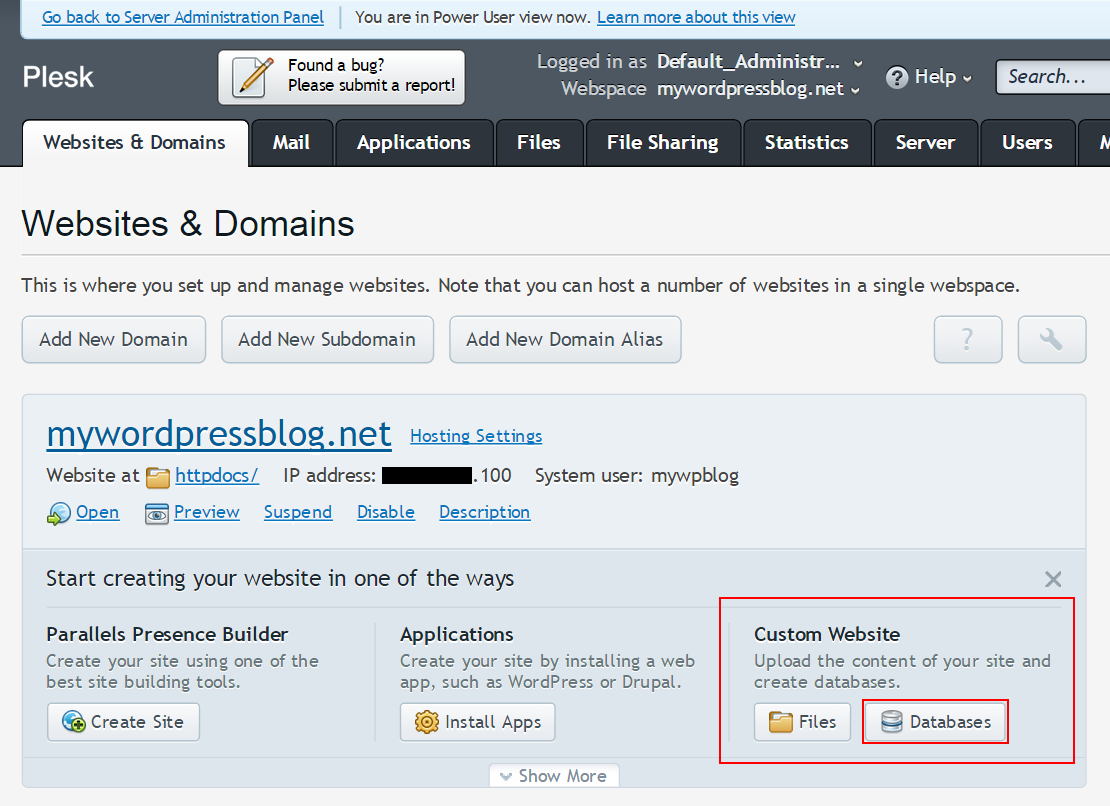
Check your database connection often. Use phpMyAdmin or a similar tool. Look for errors in the connection. Fix them fast. Make sure the server name is right. This keeps your site running smoothly. A good connection means a good website.
Credit: codex.wordpress.org
Integrating Theme With Database
Themes need data to show content. PHP helps fetch this data. It connects to the database. Themes use SQL queries for this task. These queries pull data from tables. All posts and pages come from these tables. WordPress functions make it easier. They simplify the process. Functions like get_post() and get_page() are useful. They fetch the right data quickly.
Themes show data in a nice way. HTML and CSS help in styling. They make the data look pretty. Data fits into templates. Templates have placeholders. These placeholders get filled with real data. Themes use loops to show lists. Each post or page appears one by one. This method helps in showing many items. The design stays clean and organized.
Users change data through themes. They use forms to update content. PHP scripts handle these forms. The scripts talk to the database. They update the old data with new values. This process keeps data fresh. Validation checks make sure data is correct. They prevent errors. Themes use feedback messages. Messages confirm if updates are successful. This keeps users informed.
Using WordPress Functions
WP_Query helps get data from the database. It’s great for custom needs. You can fetch posts with certain tags or dates. This makes your site more dynamic and interesting. Always remember to reset queries using wp_reset_postdata().
get_option fetches saved settings from the database. Use it to get theme settings or plugin options. update_option saves new settings to the database. These functions are simple and safe for storing options.
Always check user input before using it. Use sanitize_text_field() for text inputs. For URLs, use esc_url() to clean them. These functions keep your site safe and secure from bad data.
Troubleshooting Connection Issues
Connecting a WordPress theme to a database can sometimes be tricky. Start by checking the database settings in the wp-config. php file. Ensure the database name, username, and password are correct for a seamless connection.
Common Database Errors
Many users face database connection errors. These can be due to wrong credentials. Always check your username and password. Ensure they match the database settings. Another issue is the database server down. Confirm the server is running. Sometimes, the database is corrupted. Use tools to repair it.
Debugging Techniques
Start with enabling debugging mode in WordPress. This helps find errors. Look for the wp-config.php file. Set define('WP_DEBUG', true);. This shows you the error messages. Also, check the error logs. They provide clues. Sometimes plugins conflict with the database. Try deactivating all plugins.
Checking Server Configuration
Server settings can affect database connections. Make sure the database host is correct. Usually, it is localhost. Check the PHP version. It should be compatible with WordPress. Also, review the memory limit. Low memory can cause issues. Adjust settings in the php.ini file. This helps improve performance.
Best Practices For Database Integration
Keep database queries simple and efficient. Use indexed fields to speed up search. Avoid fetching more data than needed. Limit the number of queries per page. Minimize load on the database. Test your queries for speed. Optimize them for better performance.
Protect data from unauthorized access. Use strong passwords and update them often. Encrypt sensitive information for security. Regularly check for software updates. Fix any vulnerabilities quickly. Monitor database access and keep logs. Ensure only authorized people can access data.
Back up your database frequently. Store backups in multiple locations. Check backups for errors regularly. Automate the backup process if possible. Ensure backups are secure and accessible. Restore backups periodically to test them. Keep your data safe and sound.
.jpeg&w=3840&q=75)
Credit: quantumitinnovation.com
Frequently Asked Questions
How Do I Link WordPress Theme To A Database?
To link a WordPress theme to a database, you need to configure the `wp-config. php` file. This file contains the database name, username, password, and host information. Ensure these details are correct to establish a successful connection between your WordPress theme and the database.
What Database Does WordPress Use?
WordPress uses MySQL as its primary database management system. MySQL is open-source and widely supported, making it a popular choice. It stores all your website data, including posts, pages, user information, and settings, efficiently. This database system ensures fast data retrieval and smooth website performance.
Can I Change The Database For WordPress?
Yes, you can change the database for WordPress. To do this, update the database details in the `wp-config. php` file. Ensure the new database has the required tables and data. Backup your existing data before making any changes to avoid data loss.
Is It Safe To Connect WordPress To A Database?
Yes, it’s safe to connect WordPress to a database if you follow security best practices. Use strong passwords and update them regularly. Ensure your database server is secure and limit access permissions. Regularly update WordPress, themes, and plugins to protect against vulnerabilities.
Conclusion
Connecting your WordPress theme to a database is essential. It ensures smooth data management and site functionality. With these steps, you can achieve a seamless connection. Always back up your data to avoid unexpected issues. Regular updates keep your site secure and efficient.
Practice makes perfect, so don’t hesitate to try again. Remember, a connected theme enhances user experience and site performance. Take your time to understand each step. With patience, you’ll master the process. Your WordPress site will run effectively, pleasing both you and your visitors.
Happy connecting!


