
Are you ready to unlock the secrets of creating your very own WordPress themes? Imagine the satisfaction of customizing your website exactly how you want it, with every element designed to fit your unique style and needs.
Whether you’re looking to start a new hobby, improve your web development skills, or simply want more control over your website, learning how to code WordPress themes can open up a world of possibilities for you. In this guide, you’ll discover step-by-step instructions that will transform complex coding concepts into easy-to-follow steps.
We’ll break down each part of the theme-building process so you can confidently create a theme from scratch. As you dive deeper, you’ll learn tips and tricks that will save you time and help you avoid common pitfalls. By the end of this article, you’ll not only understand the technical aspects but also feel empowered to bring your creative vision to life. So, are you ready to start coding your perfect WordPress theme? Let’s dive in and make your website truly yours.
Getting Started
Learning to code WordPress themes involves understanding HTML, CSS, and PHP basics. Start by exploring WordPress structure and functions. Practice creating simple themes to build skills and confidence.
Essential Tools
To code a WordPress theme, start with basic tools. A code editor is important. It helps you write and edit code. Some popular ones are VS Code and Sublime Text. You also need a web browser to test your theme. Chrome and Firefox are good choices. Install XAMPP or WAMP. These tools create a local server on your computer. This helps in testing without going online. Lastly, know how to use FTP software. This transfers your files to the WordPress server. FileZilla is a reliable choice. With these tools, you’re ready to start coding.
WordPress Theme Anatomy
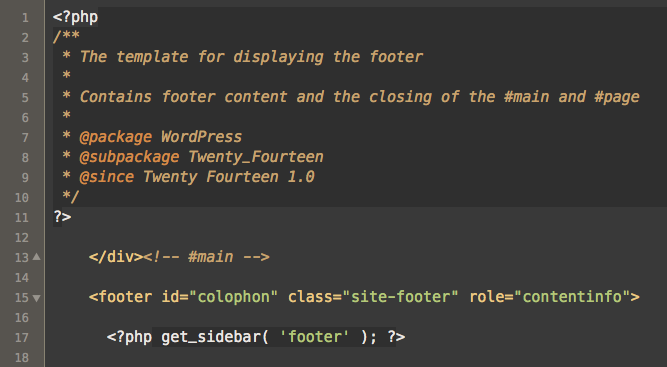
A WordPress theme has many parts. The style.css file is like its clothes. It decides how the theme looks. The index.php file is the main page. It shows content on your site. Next, the header.php file. It has the top part of your theme. The footer.php file is at the bottom. It often shows contact info or links. The functions.php file is like the brain. It tells your theme how to behave. Understanding these files is key. They work together to make your theme complete.
Setting Up Development Environment
A local server helps test your theme. Download and install a local server software like XAMPP or MAMP. These tools run on your computer. Open the software. Start the Apache and MySQL services. These services are crucial for WordPress. Once running, you can create a new database. This database is vital for storing your website data.
Download the WordPress files from the official website. Unzip the files. Move them to the local server’s folder. This folder is usually named “htdocs” or similar. Open your browser. Type “localhost” in the address bar. Follow the setup instructions. Fill in the database information. Choose a username and password. Complete the installation. WordPress is now ready on your local server.
Creating A Basic Theme
Every WordPress theme starts in a folder. This folder holds all theme parts. Naming the folder is important. It should match your theme’s name. Inside the folder, keep it neat. Use different folders for images and CSS. This keeps things tidy and easy to find. Think of it as a theme’s home. Everything should be in its place.
There are essential files for a WordPress theme. index.php is the main one.
It shows your site’s content. style.css gives your theme style.
functions.php adds extra features. These files are like the theme’s backbone.
Without them, the theme won’t work. Each file has a special job. They work together to make your theme complete.
Credit: artbees.net
Customizing Theme Appearance
CSS helps make your WordPress theme look nice. You can change colors, fonts, and layouts. With CSS, you can make your website unique. Use simple codes to alter the theme’s appearance. Changing the background color is easy. Just find the right code section. Then, replace the color code with your choice. Want to change the font size? Find the font-size code. Change the number to make it bigger or smaller. Little changes make a big difference. Your theme will feel new and fresh.
The Theme Customizer is a helpful tool in WordPress. It lets you see changes live. You can change the site title, colors, and more. You don’t need to know code. Just use the customizer options. It’s like painting on a canvas. Click on what you want to change. Then choose new options. You can preview your changes. If you like it, save it. The customizer makes theme changes fun and easy.
Incorporating Php Functions
WordPress Template Tags are helpful. They let you pull data easily. Use them to display the site title. They show the post date, too. Tags are shortcuts for common tasks. They save time and effort.
Creating Custom Functions adds power. Write functions for special needs. Use them in themes to add features. Custom functions increase flexibility. They help with unique site designs. Make sure they work well with your theme.
Adding Dynamic Content
The Loop is a special code in WordPress. It helps display posts and pages on your site. Think of it as a magic wand. It fetches the latest content from your database. You only need a few lines of code. This makes creating dynamic pages easy. Every page can show new content. It makes your site feel alive. Users see fresh content each time. This keeps them coming back. The Loop is powerful and simple. It is a core part of WordPress themes.
Custom Post Types are like regular posts. But they are special. They help organize different content. Imagine having books, movies, and recipes. Each needs a special type. Custom Post Types make this possible. You can create as many as you need. This keeps your site neat and tidy. Users find what they need easily. Developers love using these. They add flexibility to WordPress themes. With them, your site can grow. It can handle any content you dream of.
Enhancing User Experience
A good navigation menu helps users find what they need. Place important links at the top. Use clear words for each link. Keep the menu simple and tidy. Users can get confused with too many options. A clean menu makes a site easy to use. Add a search bar for extra help. Users love finding things fast.
Widgets add extra features to your site. Sidebars hold these widgets. You can show recent posts, ads, or contact forms. Choose widgets that fit your site’s theme. Too many widgets can slow down a site. Pick only what is useful. A tidy sidebar keeps users happy. They can find info quickly. Remember, less is more.
Ensuring Theme Responsiveness
Make sure your theme works on all devices. Use flexible layouts that adjust to different screens. Media queries help change styles based on screen size. This ensures your site looks good on small and big screens. Fluid grids are also important. They help in resizing content smoothly. Images should be responsive too. Use percentages instead of fixed sizes. This way, they fit any screen.
Check your theme on various devices. Try it on phones, tablets, and computers. Make sure it looks right on all. Use online tools to see how it behaves. These tools show how your site appears on different devices. Don’t forget to test on different browsers too. Each one can show your site differently. Testing ensures everyone has a good experience.
Optimizing For Performance
Minifying scripts helps make your website faster. It removes extra spaces and comments. This makes the file smaller. Smaller files load quicker. Quicker loading means better performance. Use tools like UglifyJS or Closure Compiler. They make this process easy.
Large images slow down your site. Optimize them for faster loading. Use tools like TinyPNG or ImageOptim. They reduce image size without losing quality. Smaller images load faster. This improves user experience. Always save images in the right format. JPEG for photos, PNG for graphics.
Ensuring Security
Inputs from users can be dangerous. They might contain harmful codes. Sanitizing inputs helps prevent attacks. It cleans data before use. Always check and filter user inputs. Use functions to remove bad parts. This keeps your site safe. It’s important to do this always.
Themes need updates often. Updates fix bugs and improve security. Always use the latest version. Updates make themes work better. They protect against new threats. Check for updates regularly. Keep your theme updated for better safety.
Publishing Your Theme
Submitting your theme to the WordPress Theme Directory is important. First, ensure your theme meets the required guidelines. This makes it safe for users. Check your code for any errors or warnings. Use tools like Theme Check. It helps find mistakes.
Once ready, submit it to the directory. Upload your theme files. Fill in the needed details. Wait for the review process. Reviewers check your theme carefully. They ensure it follows all rules. After approval, your theme becomes available for others to download.
Your theme must be under the GNU General Public License (GPL). This license is free for all to use. It protects your work. Ensures others can share and change it. Follow the WordPress coding standards. Keep your theme clean and organized. This helps others understand your code. Makes it easier to fix or improve.
Credit: thethemefoundry.com

Credit: www.dummies.com
Frequently Asked Questions
What Are The Basics Of Coding A WordPress Theme?
To code a WordPress theme, start with HTML, CSS, and PHP knowledge. Understand WordPress functions and template hierarchy. Design a layout and structure your files within the theme folder. Use WordPress hooks and filters for customization. Test your theme for responsiveness and compatibility.
How Do I Set Up A Local Environment?
To set up a local environment, install a software like XAMPP or MAMP. Create a new database and download WordPress. Move WordPress files to the server’s root directory. Run the WordPress installation script. You can now develop and test your theme locally.
What Tools Are Essential For Theme Development?
Essential tools include a code editor like Visual Studio Code, and a local server like XAMPP. Use browser developer tools for debugging. Version control systems like Git are vital. Consider using a CSS preprocessor like Sass. These tools streamline and enhance the development process.
How Can I Ensure My Theme Is Responsive?
To ensure responsiveness, use flexible grid layouts and media queries. Test your theme on various devices and screen sizes. Implement responsive images and use relative units like percentages. Prioritize a mobile-first design approach. These practices ensure your theme adapts smoothly across devices.
Conclusion
Coding WordPress themes unlocks creativity. It empowers you to create unique designs. With these skills, customization becomes easy. You gain control over your site’s appearance. Experiment with colors, layouts, and fonts. Dive into coding challenges and learn continuously. Enjoy the satisfaction of building something yourself.
Remember, practice is key. Start small, then explore advanced techniques. Engage with the WordPress community for support. Share your creations and gather feedback. Coding opens endless possibilities. Your journey with WordPress themes is just beginning. Embrace the process and watch your skills grow.
Happy coding and designing!


