

Have you ever landed on a website and wondered if it’s built with WordPress? Knowing this can help you understand how easy it might be to manage or customize that site.
Whether you’re planning your own website or just curious, checking if a site uses WordPress is simpler than you think. You’ll discover quick and effective ways to find out if a website is powered by WordPress—no tech skills needed. Keep reading, and you’ll be able to spot a WordPress site like a pro in no time.
Credit: www.sitesaga.com
Spotting WordPress Features
Spotting WordPress features can help you identify websites built with this popular platform. WordPress has unique elements that make it easy to recognize. These clues appear in the URL, footer, and design.
Look For Common Url Patterns
Many WordPress sites use specific URL structures. Check for “/wp-content/” or “/wp-admin/” in the address bar. These parts often appear in image links or admin pages. URLs with “?p=” followed by numbers show WordPress’s default post format. Such patterns strongly suggest a WordPress site.
Check The Footer For Clues
The footer often reveals the website’s platform. WordPress sites may display “Powered by WordPress” or similar text. Some themes add a credit link to WordPress.org. Look for small print or copyright lines mentioning WordPress. This is a quick and clear sign.
Identify Typical WordPress Themes
WordPress themes have distinct styles and layouts. Themes like Twenty Twenty-One or Astra are common and easy to spot. They often include simple menus, clean fonts, and widget areas in the sidebar or footer. If the design looks familiar or minimalistic, it might be WordPress.
Using Browser Tools
Browser tools provide a quick way to check if a website is built on WordPress. These tools are built into most modern browsers. They let you look behind the scenes of any webpage. You can see the code that runs the site without needing extra software.
Using browser tools, you can find clues in the page source and in the files the site uses. These clues often reveal the content management system behind the website. WordPress sites have certain markers that stand out in the code.
Inspect The Page Source
Right-click on the webpage and select “View Page Source” or “Inspect.”
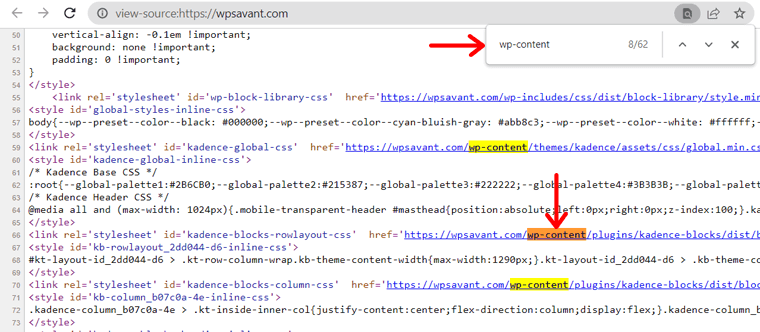
Look for common WordPress terms in the source code. Examples include “wp-content,” “wp-includes,” or “wp-admin.”
These terms usually appear in URLs pointing to images, scripts, or stylesheets.
The presence of these words strongly indicates a WordPress site.
Explore The Css And Javascript Files
Open the browser’s developer tools and go to the “Network” or “Sources” tab.
Check the file names and paths of CSS and JavaScript files loaded by the page.
Files containing “wp-” in their names often belong to WordPress themes or plugins.
This method helps confirm if the website runs on WordPress by analyzing its resources.
Online Tools To Detect WordPress
Online tools make it easy to find out if a website uses WordPress. These tools scan the site’s code and structure. They check for specific signs of WordPress, like themes, plugins, or meta tags. Using these tools saves time and effort. No need to dig through the source code yourself.
Using Builtwith
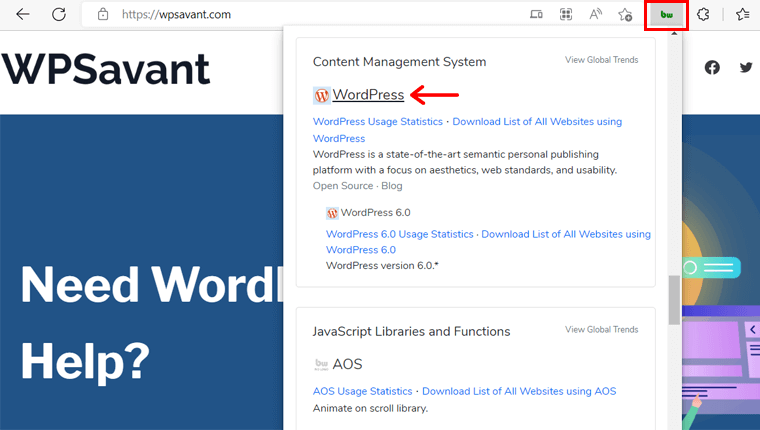
BuiltWith is a popular website profiler. Enter the website URL, and it shows the technology behind the site. It identifies WordPress if the site uses it. You can also see other tools the site runs. BuiltWith is free for basic use. It gives a quick and clear report.
Try Isitwp
IsItWP is a simple tool made for WordPress detection. Just paste the website link and click the button. It tells you if the site runs on WordPress or not. IsItWP also points out the theme and plugins used. This tool is very user-friendly for beginners.
Other Reliable Detectors
Several other tools help find WordPress sites. Wappalyzer shows the content management system and more. WhatCMS is another detector that reveals website platforms. These tools offer free and paid options. They provide detailed and accurate results fast.
Verifying WordPress Plugins
Verifying WordPress plugins helps confirm if a website uses WordPress. Plugins add features and change how a site works. Many WordPress sites rely on popular plugins. These plugins often leave clues that you can find. Recognizing these clues can show if WordPress runs the site.
Spotting Popular Plugin Signatures
Some plugins add visible elements to a website. For example, contact forms or social share buttons might appear. These features often have unique styles or text. They can hint at certain plugins. You might see footer credits mentioning plugin names. Also, some plugins load special JavaScript or CSS files. Checking the page source code can reveal these files. Names like “woocommerce,” “jetpack,” or “contact-form-7” stand out. These clues suggest the site uses WordPress plugins.
Using Plugin Detection Tools
Several online tools identify WordPress plugins. These tools scan the website for plugin signatures. They check scripts, styles, and meta tags. Tools like WPScan or BuiltWith provide detailed reports. They list detected plugins and versions. Using these tools saves time and effort. They are useful for beginners and experts alike. Just enter the website URL and wait for the results. These tools help confirm if WordPress plugins are active.
Checking The Login Page
Checking the login page is a quick way to see if a website uses WordPress. Many WordPress sites use a standard login URL. This makes it easier to spot WordPress sites just by visiting their login page. The login page also reveals clues about the site’s platform and security.
Common WordPress Login Urls
WordPress sites usually have a few common login URLs. The most popular one is /wp-login.php. Typing this after the main site address often opens the login page. Another common URL is /wp-admin. This URL also leads to the login page if not logged in. Some sites may use custom login URLs, but most keep the default ones.
What The Login Page Reveals
The login page shows if a site runs on WordPress by its design and features. WordPress login pages have a simple form with username and password fields. The page usually shows the WordPress logo or branding. Sometimes, the URL or page source code shows “wp-login.php” or “wp-admin”. These hints confirm the site uses WordPress.
Credit: www.sitesaga.com

Credit: www.youtube.com
Frequently Asked Questions
How Can I Quickly Identify A WordPress Website?
Look for common WordPress indicators like “/wp-content/” in the URL. Check the page source for “wp-” file names or meta tags showing WordPress. Browser extensions like Wappalyzer can also detect WordPress sites instantly.
What Tools Help Detect If A Site Uses WordPress?
Use online tools like BuiltWith, Wappalyzer, or IsItWP. These tools analyze website code and reveal if WordPress powers the site. They provide quick, accurate insights without manual inspection.
Can I Tell If A Website Uses WordPress By Its Design?
Some WordPress themes have distinct looks, but design alone isn’t reliable. Many sites customize heavily, making it hard to identify WordPress by appearance only. Use source code or detection tools for accuracy.
Is Viewing The Page Source Effective For WordPress Detection?
Yes, viewing page source helps find WordPress-specific files and tags. Look for URLs containing “/wp-content/” or “wp-includes” directories. This method is simple and effective for tech-savvy users.
Conclusion
Checking if a website uses WordPress is simple and useful. You can spot WordPress sites by looking for common signs. Tools and quick checks make this task easier. Knowing the platform helps you understand the site better. Use these tips anytime you want to learn about a website.
Practice a few times, and it will become natural. Stay curious and keep exploring different websites online. This skill helps with web research and learning new things.


