
Have you ever Googled your website and found that the description or title appearing in the search results doesn’t quite represent what you’re all about? You’re not alone.
Many website owners face this issue and wonder how to change what their website says in Google Search. If you’re using WordPress, you’re in luck. Changing this information is not only possible but also relatively simple. This guide will walk you through the steps to ensure your website appears exactly how you want it in search results.
Imagine attracting more visitors just by tweaking a few words — it’s like turning a key to unlock more traffic and engagement! Stay with us, and let’s dive into the world of optimizing your website’s appearance on Google.
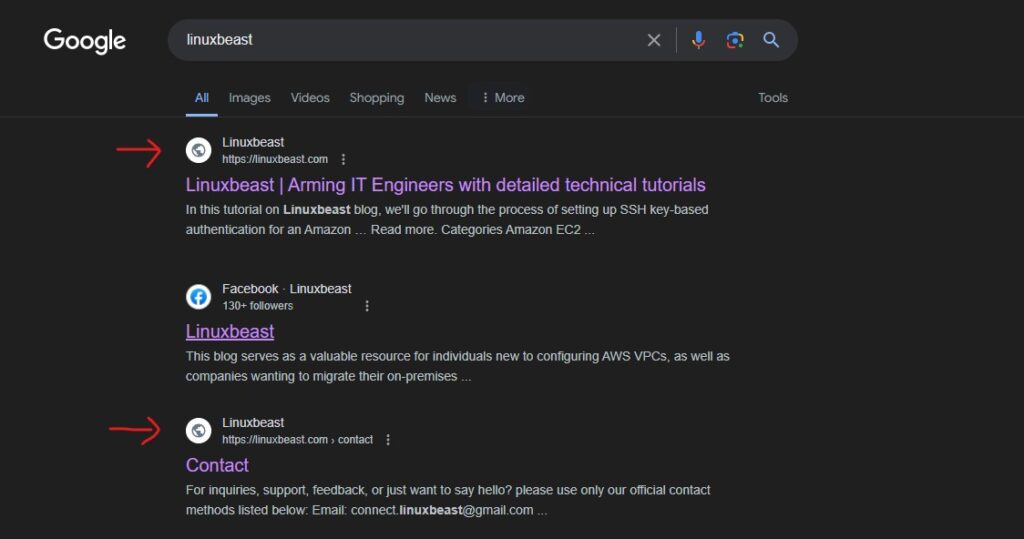
Credit: linuxbeast.com
Understanding Meta Tags
Meta tags help search engines understand your webpage. They provide key information about the page content. Search engines use meta tags to display snippets in search results. This affects how users see your site on Google.
Meta tags play a crucial role in SEO. They help improve search visibility. Proper meta tags can boost your ranking. Use relevant keywords in meta tags. Avoid keyword stuffing. Keep meta descriptions under 160 characters. This ensures clear and concise information.
Editing meta tags in WordPress is simple. First, install an SEO plugin. Popular choices are Yoast or All in One SEO. Navigate to your page or post editor. Locate the SEO settings box. Enter your title and description in the fields provided. Save your changes.
Utilizing Seo Plugins
Many plugins help with SEO for WordPress. Yoast SEO is very popular. It helps with keywords and meta tags. All in One SEO Pack is another good choice. It offers similar features. Rank Math is also loved by many users. Each plugin has unique tools. They help make your site better for search engines. Pick one that fits your needs.
Setting up SEO plugins is important. First, install the plugin. Then, go to its settings page. Enter your site’s main keyword. Use the meta description box. Write a brief description of your site. Check other settings. Enable features like XML sitemaps. They help search engines find your pages. Save changes when done.
Customizing Snippets
Title tags show the page’s name in search. They are important. They should be clear and catchy. Use keywords that match what people search for. Keep them short. Aim for 60 characters or fewer. This helps your site look good in search results.
Meta descriptions tell more about the page. They appear under the title in search. Write them so they catch attention. Use simple words. Explain what the page is about. Keep them under 160 characters. Make sure it is interesting to read. This can help get more clicks.

Credit: www.youtube.com
Improving Content Relevance
To change what your website says in Google Search, update the meta descriptions and titles in WordPress. Focus on keywords and clear language to improve content relevance. Use SEO plugins to make these changes easily and enhance your site’s search visibility.
Keyword Optimization Techniques
To make your content more relevant, use keywords wisely. Place them in the title, headings, and throughout the text. This helps search engines understand your topic. Use synonyms to avoid keyword stuffing. It’s important to keep the text natural. Your readers should not notice the keywords.
Enhancing Content Quality
Quality content keeps readers happy. Write clear and simple sentences. Use short paragraphs for easy reading. Include facts and helpful information. Check for spelling errors. Use images to make content interesting. A good picture can explain more than words. Keep your content updated. Old information is not useful. Your content should answer the reader’s questions. This makes it valuable to them.
Testing And Monitoring Changes
Updating website information in Google Search using WordPress involves testing and monitoring changes. Begin by editing the SEO settings in your WordPress dashboard. Check for updates in Google’s search results after making adjustments. Regular monitoring helps ensure accurate information is displayed.
Using Google Search Console
Google Search Console helps check website changes. Start by adding your site to the console. Verify ownership with the given options. The tool shows how your site appears in search results. Look at the reports for details. Check the performance report for clicks and impressions. Find out which keywords bring traffic. Inspect URLs to see any problems. The console alerts you about issues. Solve them to keep your site healthy. Monitor changes regularly for better results.
Analyzing Search Results
Search results show what people see. Use tools to compare your site with others. Check the title and description of your pages. Make sure they match the content. The content should be clear and helpful. Update info to keep it fresh. Test different keywords for better visibility. Observe changes in ranking. Adjust strategies if needed. Track progress for continuous improvement.

Credit: www.youtube.com
Frequently Asked Questions
How To Change Website Title In Google Search?
To change your website title in Google Search, modify the title tag in WordPress. Go to your WordPress dashboard, navigate to “Settings,” then “General. ” Update the “Site Title” field. Alternatively, use an SEO plugin like Yoast SEO to customize your title tags for individual posts and pages.
Why Is My Website Description Wrong On Google?
Google may display a different description if your meta description is missing or irrelevant. Update it using an SEO plugin like Yoast or All in One SEO. Ensure it’s relevant, concise, and includes primary keywords to guide search engines and improve your website’s visibility.
How To Update Meta Description In WordPress?
To update the meta description in WordPress, use an SEO plugin like Yoast SEO. Install the plugin, then edit your post or page. Scroll down to the Yoast SEO section, and enter a custom meta description. Ensure it’s concise, relevant, and includes primary keywords for better search engine visibility.
Can I Customize Page Titles With Plugins?
Yes, plugins like Yoast SEO or All in One SEO allow you to customize page titles. Install your preferred plugin, then edit your page or post. Use the plugin’s interface to modify the title tag, ensuring it is concise and includes your primary keywords for optimal search engine visibility.
Conclusion
Changing what your website says in Google search is essential. It helps attract more visitors. Keep content updated and relevant. Use SEO best practices consistently. This ensures your site ranks well. Make sure your meta descriptions are clear and concise.
Keywords should be natural and not forced. Regularly check and refine your SEO strategy. This way, your website remains competitive. Understanding these basics boosts your online presence. Happy optimizing!


