
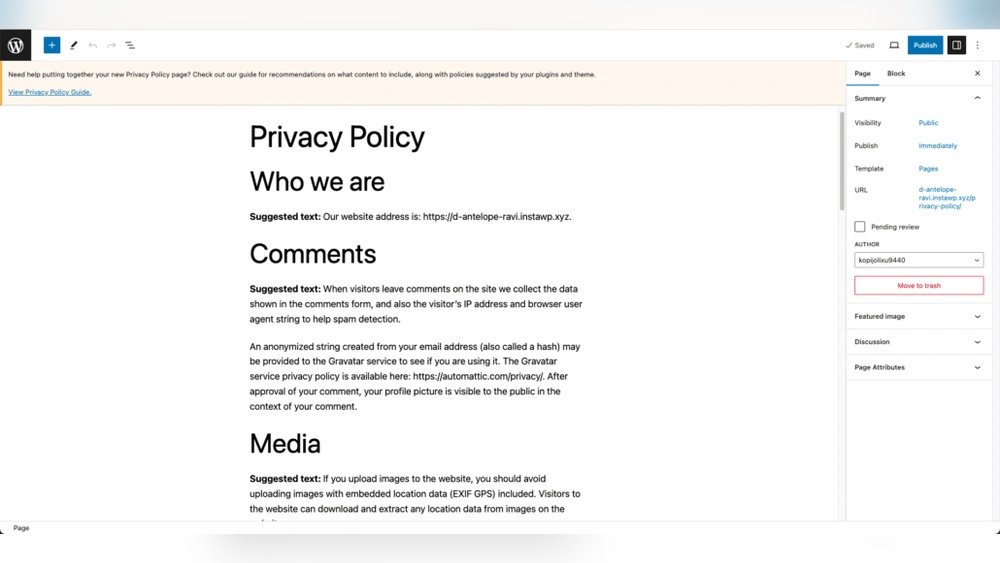
If you run a WordPress website, adding a clear privacy policy is not just a good idea—it’s essential. You might wonder why this matters or how to do it quickly without technical hassle.
This article will guide you step-by-step to add a privacy policy that protects your visitors and builds trust. By the end, you’ll have a professional, easy-to-find privacy page that keeps your site compliant and your audience confident. Ready to make your website safer and more credible?
Let’s get started.
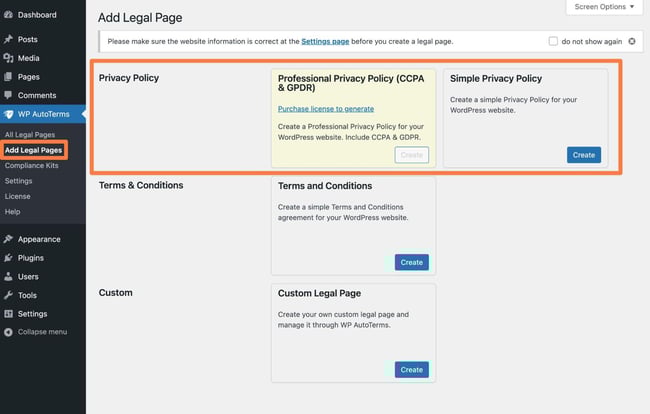
Credit: blog.hubspot.com
Why Privacy Policy Matters
A privacy policy is a must-have for every WordPress website. It explains how you collect, use, and protect visitor data. Visitors feel safer when they see a clear privacy policy. It also helps you follow the law and avoid fines. Understanding why a privacy policy matters helps you run your website better.
Legal Requirements
Many countries require websites to have a privacy policy. Laws like GDPR and CCPA protect user data. These laws say you must tell visitors what data you collect. You must also explain how you use and store that data. Without a privacy policy, your site can face penalties or legal trouble.
Building User Trust
Visitors want to know their information is safe. A clear privacy policy shows you respect their privacy. It builds confidence in your website and brand. Trusted sites get more visitors and keep them longer. Trust leads to better relationships and more sales.
Preparing Your Privacy Policy
Preparing your privacy policy is an important step for your WordPress website. This document explains how you collect, use, and protect visitor information. It builds trust and helps you follow the law. Take time to create a clear and complete privacy policy before adding it to your site.
Key Elements To Include
Start by listing what data you collect from users. Include types like names, emails, and payment details. Explain how you collect this data, such as through forms or cookies. Describe how you use the data, for example, to improve services or send newsletters.
State if you share data with third parties, like partners or service providers. Mention how you protect the data with security measures. Include user rights, such as accessing or deleting their information. Add contact details for privacy questions or concerns.
Using Privacy Policy Generators
Privacy policy generators can help you create a basic document quickly. They ask simple questions about your website and data practices. Then, they produce a draft privacy policy tailored to your answers.
These tools save time and ensure you cover key points. Still, review the generated policy carefully. Make sure it fits your website and local laws. Edit any parts that seem unclear or incomplete.
Adding Privacy Policy Page In WordPress
Adding a privacy policy page to your WordPress website is important. It tells visitors how you collect and use their data. This builds trust and helps you follow legal rules. WordPress makes it easy to create and publish this page.
Creating A New Page
Start by logging into your WordPress dashboard. Go to the “Pages” section. Click “Add New” to create a new page. Name the page “Privacy Policy” so visitors know its purpose. Keep the page simple and easy to find.
Inserting Your Privacy Policy Content
Write or paste your privacy policy text into the page editor. Use clear and simple language. Break the content into short paragraphs or bullet points. This helps readers understand your policy quickly. After adding the content, click “Publish” to make the page live.

Credit: termly.io
Linking Privacy Policy In Website Footer
Linking your Privacy Policy in the website footer is important for transparency. Visitors expect to find it easily. The footer is a common place for legal links. It stays visible on every page. This helps build trust and meets legal requirements.
Using WordPress Customizer
Open your WordPress dashboard and go to Appearance > Customize. Find the section labeled Footer or Widgets. Look for an option to add links or text. Enter the title as “Privacy Policy.” Paste the URL of your Privacy Policy page. Save and publish your changes. Check your website footer to confirm the link appears. This method is quick and does not need coding skills.
Editing Footer Widgets
Go to Appearance > Widgets in your WordPress dashboard. Locate the Footer widget area. Add a new Text or Custom HTML widget. Type “Privacy Policy” as the link text. Insert the link to your Privacy Policy page using simple HTML: Privacy Policy. Save the widget and refresh your site. The link will now show in your footer widgets. This gives more control over link style and placement.
Displaying Privacy Policy During User Registration
Displaying a privacy policy during user registration builds trust. It shows users that their data is safe. WordPress allows adding this step easily. This helps meet legal requirements and protect your site.
Users must agree to your privacy policy before creating an account. This step makes users aware of how their data is used. It also helps you avoid legal issues.
Enabling Privacy Policy Checkbox
Start by enabling a privacy policy checkbox on your registration form. This checkbox asks users to agree to your policy before continuing. WordPress has built-in support for this feature.
Go to your WordPress dashboard. Navigate to Settings > Privacy. Here, you can create or select your privacy policy page. Then, go to Settings > General and enable the registration checkbox. This step ensures users see and accept your policy.
Using Plugins For Consent
Plugins can simplify adding privacy consent options. Many plugins add checkboxes with customizable text. They help you track user consent easily.
Search for privacy policy or GDPR plugins in the WordPress plugin directory. Install and activate the plugin that fits your needs. Most plugins allow you to link your privacy policy page and add a required checkbox to registration forms.
Plugins also offer extra features like storing consent logs. This helps in case of audits. Choose plugins that are regularly updated for security and compatibility.
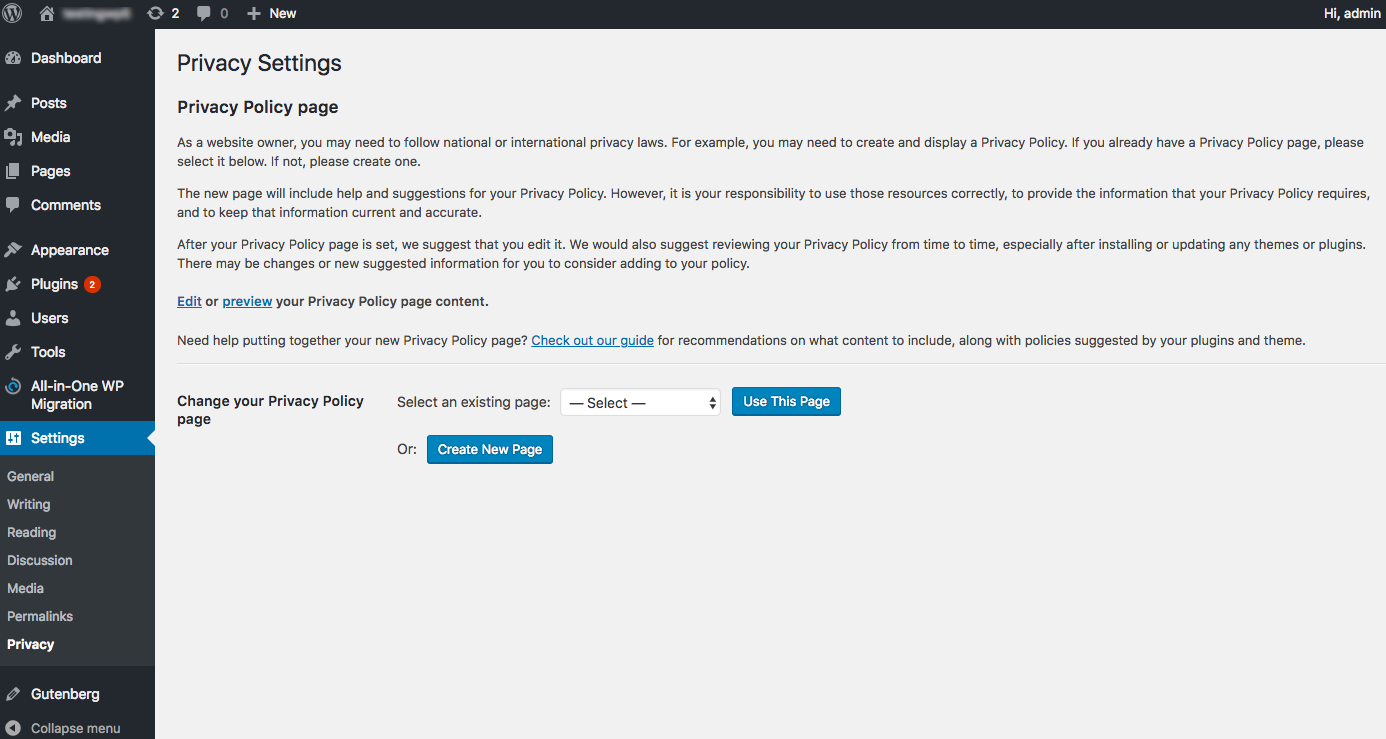
Credit: www.iubenda.com
Keeping Your Privacy Policy Updated
Keeping your privacy policy updated is important for your WordPress website. Laws and rules change often. Your site may collect new kinds of data. An outdated policy can confuse visitors. It can also cause legal troubles. Regular updates build trust and keep your site safe.
Reviewing Policy Regularly
Check your privacy policy at least twice a year. Look for new laws or changes in data use. Update details about the types of data collected. Make sure your policy matches your current website practices. Use clear and simple language to explain changes.
Notifying Users Of Changes
Tell your visitors when you update the policy. Use a pop-up or banner on your site. Send an email to users if possible. Explain what changed and why it matters. This helps users stay informed and builds trust.
Frequently Asked Questions
What Is A Privacy Policy In WordPress?
A privacy policy informs users how your site collects and uses their data. It builds trust and meets legal requirements. WordPress offers a built-in privacy policy template for easy setup and customization.
Why Is Adding A Privacy Policy Important?
Adding a privacy policy protects your website legally and complies with data laws like GDPR. It informs visitors about data handling, enhancing transparency and credibility.
How To Create A Privacy Policy Page In WordPress?
Go to WordPress Dashboard > Settings > Privacy. Use the suggested template or create a custom page. Publish it and add a link in your website footer or menu.
Can I Customize The Default WordPress Privacy Policy?
Yes, WordPress allows you to edit the default privacy policy template. Tailor it to your site’s specific data collection and processing practices for accuracy and compliance.
Conclusion
Adding a privacy policy to your WordPress site protects your visitors. It builds trust and shows you care about their data. The process is simple and quick to follow. Keep your policy clear and update it when needed. This helps you stay safe and legal online.
Start today and make your website better for everyone.


