

Are you ready to make your WordPress site speak to a wider audience? Adding multiple languages to your website can boost your reach, attract more visitors, and keep users engaged longer.
But you might be wondering, where do you start? This guide will walk you through simple, step-by-step methods to add multiple languages to your WordPress site—no technical jargon, just clear instructions you can follow right away. Keep reading, and by the end, you’ll have the tools to turn your site into a multilingual hub that welcomes visitors from all over the world.
Choosing The Right Multilingual Plugin
Choosing the right multilingual plugin is important for your WordPress site. It helps you offer content in many languages. The right plugin makes your site easy to use and manage. It also improves visitor experience and SEO. Different plugins offer various features, so pick one that fits your needs and budget.
Popular Plugins Comparison
Several plugins help add multiple languages. WPML is popular and supports many languages. Polylang is free and easy for beginners. TranslatePress offers a visual translation interface. Weglot provides automatic translation but costs more. Each plugin has strengths and weaknesses. Check user reviews and compatibility with your theme.
Free Vs Premium Options
Free plugins provide basic translation tools. They work well for small sites or blogs. Premium plugins offer more features and support. They include SEO tools, automatic translation, and better compatibility. Premium options save time but cost money. Decide based on your site size and growth plans. Free versions can be enough for simple needs.

Credit: www.youtube.com
Setting Up Your WordPress Site For Multiple Languages
Setting up your WordPress site for multiple languages helps reach a wider audience. It allows visitors to read content in their preferred language. This setup improves user experience and boosts your site’s accessibility.
Start by choosing the right tools and settings. Prepare your site structure to manage different languages smoothly. A clear plan makes content management easier and more effective.
Configuring Language Settings
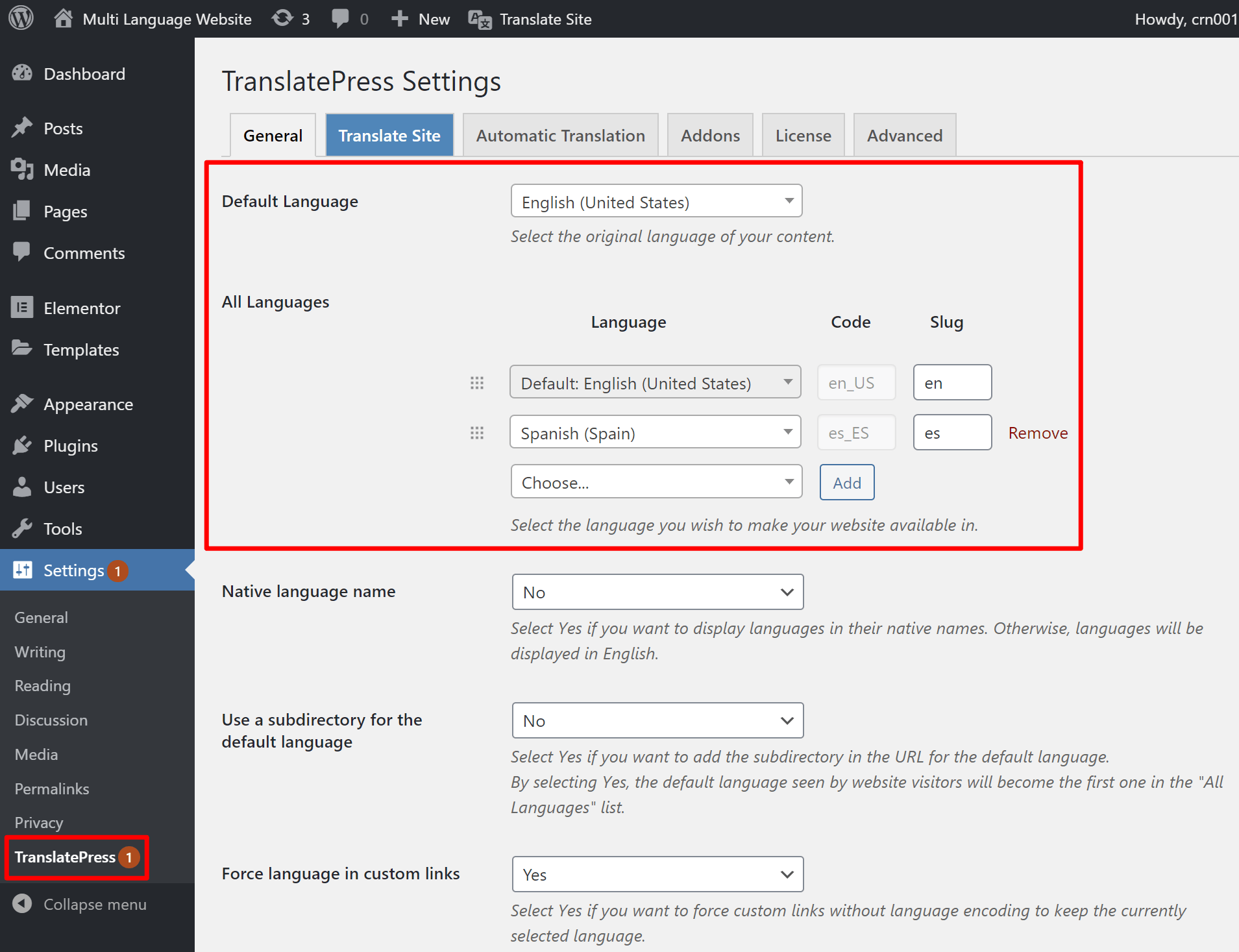
Begin by installing a multilingual plugin like WPML or Polylang. These tools help manage languages in WordPress easily. Next, go to your site’s dashboard and open language settings.
Select the main language of your website. Then, add the additional languages you want to support. Set the default language and choose how visitors switch languages. Options include language switchers in menus or widgets.
Check that your theme supports multilingual features. Some themes handle translations better than others. Ensure URLs are clean and SEO-friendly for each language version. This helps search engines index your content properly.
Creating Language-specific Content
Each language needs its own version of your pages and posts. Use your multilingual plugin to duplicate content for translation. This keeps your site organized and easy to update.
Translate titles, descriptions, and body text carefully. Avoid machine-only translation for better quality. Add images and media that fit each language culture if possible.
Review all content to maintain consistent style and tone. This builds trust with readers across languages. Publish each version separately but keep links between them clear. This helps users find the right language quickly.
Translating Pages And Posts
Translating pages and posts in WordPress lets you reach a wider audience. It helps users read your content in their own language. This improves user experience and boosts your site’s traffic.
Two main ways exist to translate content. You can do it manually or use automatic tools. Each method has its own benefits and challenges.
Manual Translation Methods
Manual translation means you or a translator rewrite content in another language. This method gives you full control over the quality. You can ensure the message stays clear and accurate.
Use plugins like WPML or Polylang for manual translation. These tools let you create separate versions of each page or post. You can switch between languages easily in your WordPress dashboard.
This method takes more time. But it gives better results for complex or important content. Manual translation fits businesses wanting precise and natural language.
Automatic Translation Tools
Automatic tools use machine translation to convert content quickly. They save time and effort. Popular plugins include Google Language Translator and Weglot.
These tools translate your pages instantly. They work well for simple content or testing multiple languages fast. You can edit translations afterward to improve accuracy.
Automatic translation may have mistakes or sound unnatural. It suits blogs or sites with frequent updates. It helps reach many readers without much delay.
Credit: wpzone.co
Managing Menus And Widgets In Different Languages
Managing menus and widgets in different languages is key for a multilingual WordPress site. It improves user experience by showing content in the visitor’s language. This helps visitors navigate the site easily and find what they need quickly.
Menus and widgets must match the language of the page. This keeps the site consistent and professional. Setting up separate menus and widgets for each language is a smart way to handle this task.
Customizing Navigation For Each Language
Create a unique menu for every language you add. WordPress lets you build separate menus under Appearance > Menus. Assign the right menu to each language using your multilingual plugin. This way, visitors see navigation links in their language only.
Use clear and simple menu titles. Avoid long phrases that can confuse users. Translate menu items carefully to keep the meaning accurate. This makes navigation smooth and user-friendly.
Handling Widgets And Sidebars
Widgets and sidebars also need language-specific versions. Many multilingual plugins offer widget options for different languages. Choose which widgets show on each language version of your site. This keeps sidebars relevant and useful to visitors.
Translate widget content like text, links, and buttons. Keep the design consistent across languages. Use widgets to highlight important info in each language. This helps visitors get the most out of your site.
Optimizing Seo For Multilingual Sites
Optimizing SEO for multilingual WordPress sites helps search engines find and show the right language version. It improves user experience and increases traffic from different regions. Proper SEO setup prevents duplicate content and helps your site rank better in local search results.
Using Hreflang Tags
Hreflang tags tell search engines which language and region a page targets. They guide Google to serve the correct version to users. Add hreflang tags to each page’s header or use SEO plugins that support multilingual sites. This avoids confusion and improves search accuracy.
Creating Language-specific Sitemaps
Create separate sitemaps for each language version of your site. Submit these sitemaps to search engines via Google Search Console or Bing Webmaster Tools. Language-specific sitemaps help search engines crawl and index pages properly. This ensures better visibility for every language on your site.
Credit: translatepress.com
Testing And Maintaining Your Multilingual Site
Testing and maintaining your multilingual WordPress site keeps it user-friendly and reliable. Check every language version often. Fix problems early to avoid visitor frustration. A smooth experience helps keep readers engaged and improves site reputation.
Checking Language Switchers
Language switchers must work correctly on all pages. Test switching languages on desktop and mobile devices. Confirm the switcher shows all available languages. Make sure it directs users to the right translated page. Broken or missing switchers confuse visitors and lower site quality.
Regular Content Updates
Update content in all languages regularly. Keep translations accurate and current. Fix typos and outdated information quickly. Sync updates across languages to maintain consistency. Fresh content improves SEO and attracts repeat visitors.
Frequently Asked Questions
How Do I Add Multiple Languages To WordPress?
You can add multiple languages using multilingual plugins like WPML, Polylang, or TranslatePress. These plugins allow easy translation and language switching on your site.
Which Is The Best Plugin For Multilingual WordPress?
WPML is the most popular plugin with robust features. Polylang is free and user-friendly. Choose based on your budget and needs.
Can I Translate WordPress Themes And Plugins?
Yes, most multilingual plugins support translating themes and plugins. This ensures your entire site content is available in all languages.
How To Switch Languages On A WordPress Website?
Multilingual plugins add language switchers to menus, widgets, or shortcodes. Visitors can easily select their preferred language.
Conclusion
Adding multiple languages to your WordPress site helps reach more people. It makes your content clear and easy to understand. Choose the right plugin or tool for your needs. Keep translations simple and accurate for the best user experience. Regularly update all language versions to stay consistent.
Multilingual websites grow your audience and improve engagement. Start now to connect with visitors worldwide.


