

If you want your WordPress homepage to stand out in search engines, adding a meta tag is one of the simplest and most effective steps you can take. But if you’re not sure where to start or worried about messing up your site’s code, don’t worry—you’re in the right place.
This guide will walk you through the exact steps to add a meta tag to your WordPress homepage quickly and easily. By the end, you’ll have a stronger, more visible website that attracts the right visitors. Ready to boost your site’s performance?
Let’s dive in.
Why Meta Tags Matter
Meta tags play a key role in your website’s success. They help search engines understand your site’s content. They also guide users about what to expect before clicking. This small piece of code can make a big difference.
Impact On Seo
Search engines use meta tags to index your pages correctly. Clear and relevant tags improve your site’s rank. They help your homepage appear in the right searches. Better rankings mean more visitors to your site.
Improving Click-through Rates
Meta tags show the page title and description in search results. Well-written tags attract more clicks from users. They give a quick summary that encourages visits. Higher click-through rates lead to more traffic and potential customers.
Credit: kinsta.com
Types Of Meta Tags
Meta tags play a key role in how search engines understand your website. They give information about your page content. Different types of meta tags have different purposes. Knowing these types helps you improve your site’s visibility and ranking.
Meta Title
The meta title is the main headline shown in search results. It tells both users and search engines what your page is about. A clear and concise title can attract more clicks. Keep it under 60 characters for best display on search engines.
Meta Description
The meta description provides a short summary of your page. It appears below the title in search results. A good description encourages users to visit your site. Aim for 150 to 160 characters to ensure the full text shows up.
Meta Keywords
Meta keywords list important words related to your page. They were used by search engines long ago. Now, most search engines ignore them. Still, some use keywords for minor ranking help. Use relevant and specific words if you choose to add them.
Adding Meta Tags Without Plugins
Adding meta tags to your WordPress homepage helps improve SEO and site visibility. You can do this without using plugins. This method keeps your site fast and clean. It also gives you more control over your site’s code.
This section shows two simple ways to add meta tags manually. Both methods involve editing theme files. Always back up your site before making changes. Small errors in code can cause site problems.
Editing Header.php File
The header.php file controls the head section of your WordPress theme. You can add meta tags directly here. To start, open your theme folder and find header.php.
Insert your meta tags between the and tags. For example:
Save the file and refresh your homepage. The meta tags should now appear in the page source.
Using Functions.php For Custom Meta Tags
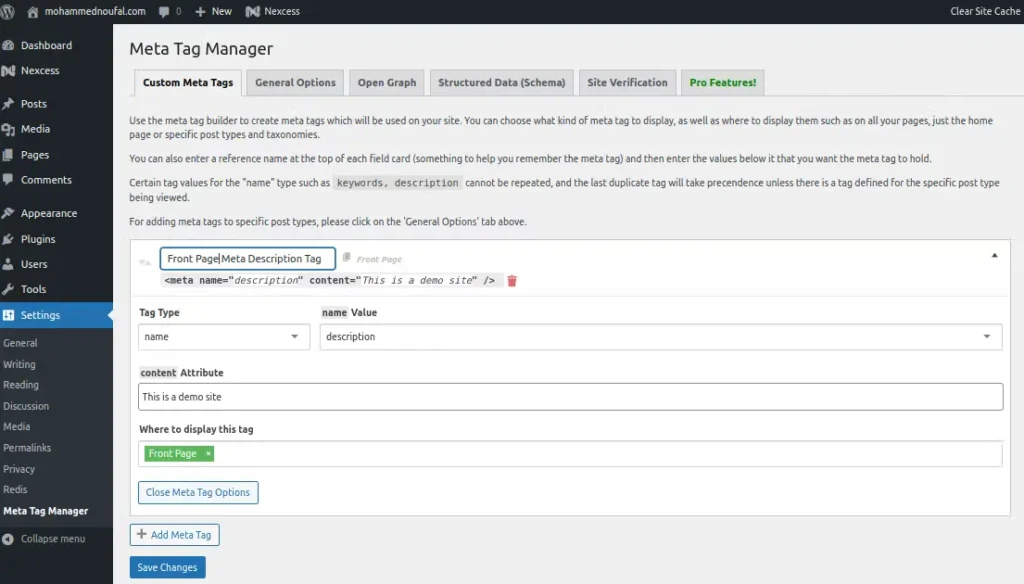
Another way is to add meta tags via your theme’s functions.php file. This method keeps your header.php clean and organized.
Open functions.php and add a function to print meta tags. Use the wp_head action hook to insert your tags.
function add_custom_meta_tags() { echo ''; } add_action('wp_head', 'add_custom_meta_tags');Save the file and reload your homepage. The meta tags will now be included in the head section automatically.
Credit: www.liquidweb.com
Using Seo Plugins For Meta Tags
Using SEO plugins is a simple way to add meta tags to your WordPress homepage. These tools help manage meta titles and descriptions without coding. They make your site more visible in search engines and improve click rates. Most SEO plugins offer easy interfaces to customize meta tags quickly. Choose a plugin that fits your needs and follow its steps to set up meta tags.
Yoast Seo Setup
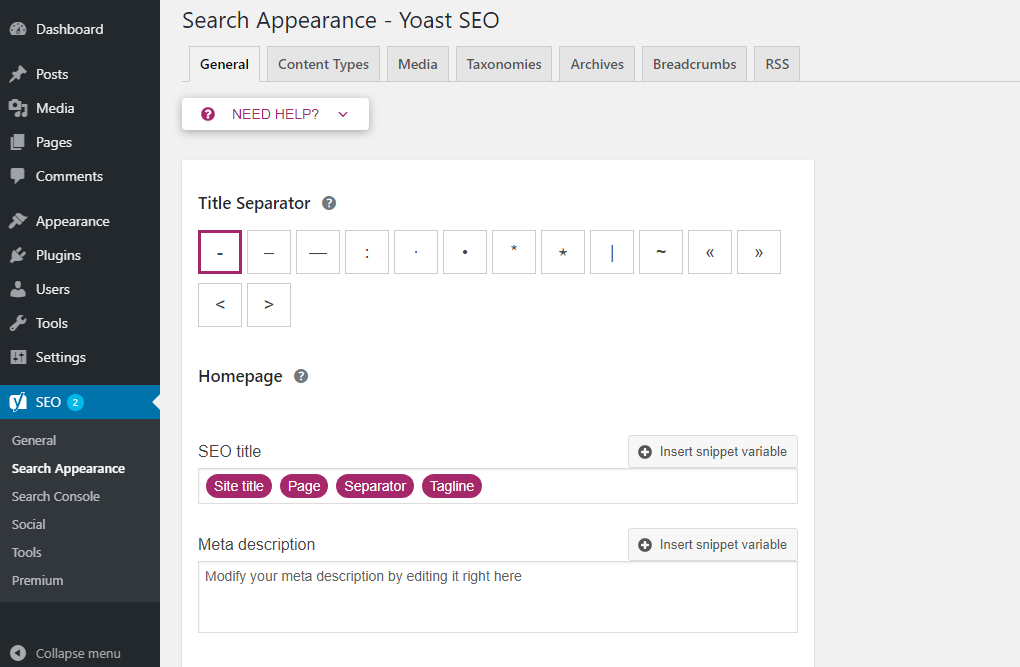
Yoast SEO is a popular plugin for WordPress. After installing, go to the SEO menu in your dashboard. Select “Search Appearance” and then “General.” Here you can edit the homepage meta title and description. Yoast also shows a preview of how your page looks in search results. It guides you to write better meta tags with simple tips. Save your changes and clear any cache to see updates.
All In One Seo Pack
All in One SEO Pack is another trusted plugin. After activation, open the plugin settings. Find the “Home Page Settings” section. Enter your meta title and description for the homepage here. This plugin offers options for social media tags too. It works well for beginners and advanced users alike. Remember to save your settings to apply the meta tags.
Rank Math Features
Rank Math is a newer SEO plugin with many features. It offers an easy setup wizard to configure your site. In the Titles & Meta section, you can set the homepage meta tags. Rank Math provides suggestions to improve your meta descriptions. It also supports rich snippets for better search results. Using Rank Math helps keep your meta tags organized and effective.
Testing Meta Tags On Homepage
Testing meta tags on your WordPress homepage is an important step. It helps verify that search engines and browsers read your tags correctly. Proper testing ensures your website shows the right information in search results.
Testing is simple and takes only a few minutes. It confirms your meta tags work as intended. Below are two easy methods to check your homepage meta tags.
Using Browser Inspect Tool
Open your homepage in any modern browser. Right-click on the page and select “Inspect” or “Inspect Element.” This opens the developer tools panel.
Look for the section in the HTML code. Find your meta tags inside this section. Check if the tags appear correctly and contain the right content.
This method shows live code as the browser reads it. It helps spot errors or missing tags immediately.
Online Meta Tag Analyzers
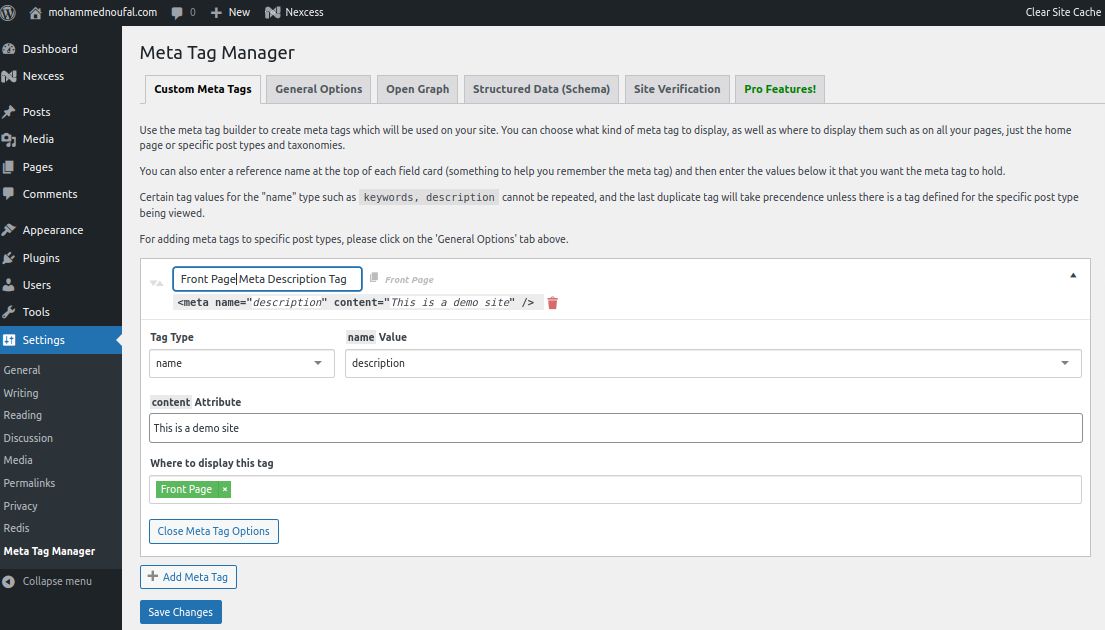
Use free online tools to test your homepage meta tags. Enter your website URL into a meta tag analyzer. The tool scans your page and displays detected meta tags.
These analyzers highlight missing or incorrect tags. They also show how search engines view your page. Some tools give suggestions to improve your meta tags.
Regular use of these tools keeps your homepage optimized for better search results.
Credit: www.skomed.com
Common Mistakes To Avoid
Adding meta tags to your WordPress homepage helps improve search engine visibility. Many beginners make simple errors that reduce their site’s effectiveness. Avoiding these mistakes saves time and boosts SEO results. Below are common errors to watch for.
Duplicate Meta Tags
Using the same meta tags on multiple pages confuses search engines. It lowers your site’s ranking. Each page needs unique meta tags to describe its content clearly. Check your homepage meta tag does not repeat tags from other pages.
Overstuffing Keywords
Filling meta tags with too many keywords looks spammy. Search engines may penalize your site for keyword stuffing. Use only a few relevant keywords in your homepage meta tag. Write naturally and focus on main topics.
Ignoring Mobile Optimization
Many users visit sites from phones or tablets. Meta tags should include mobile-friendly information. Ignoring mobile optimization can hurt your search ranking. Make sure your meta tags support responsive design and fast loading on mobile devices.
Frequently Asked Questions
How Do I Add A Meta Tag To My WordPress Homepage?
To add a meta tag, access your WordPress dashboard. Navigate to Appearance > Theme Editor. Edit the header.php file and insert the meta tag within the
section. Save changes, and the meta tag will appear on your homepage.Can I Add Meta Tags Using WordPress Plugins?
Yes, plugins like Yoast SEO or All in One SEO allow easy meta tag addition. They offer user-friendly interfaces to insert meta tags without coding, making it simple for beginners to optimize their homepage metadata effectively.
Why Are Meta Tags Important For WordPress Seo?
Meta tags improve search engine understanding of your site content. They help enhance click-through rates by providing relevant descriptions in search results. Proper meta tags boost your homepage’s visibility and ranking on search engines.
Where Should Meta Tags Be Placed In WordPress?
Meta tags must be placed inside the
section of your homepage’s HTML. This ensures search engines detect and use them correctly. Editing the header.php file or using SEO plugins can achieve this placement efficiently.Conclusion
Adding a meta tag to your WordPress homepage improves site visibility. It helps search engines understand your content better. You can do this easily with a plugin or by editing your theme files. Always double-check your code to avoid errors.
Regular updates keep your site optimized for search engines. Start adding meta tags today to enhance your website’s performance. Simple steps can make a big difference. Keep your site clear and easy to find online.


