
Are you looking to make your WordPress site compliant and build trust with your visitors? Adding a cookie consent notice is a simple yet powerful way to do that.
It helps you respect your users’ privacy and stay on the right side of the law. In this post, you’ll discover easy steps to add cookie consent to your WordPress site—no technical skills needed. Keep reading, and you’ll have your site ready in minutes, protecting both your visitors and your business.

Credit: www.youtube.com
Why Cookie Consent Matters
Cookie consent is important for every website owner. It helps protect user privacy and ensures website compliance. Adding cookie consent to your WordPress site shows respect for visitors’ data. It builds trust and keeps your site safe from legal problems.
Legal Requirements
Many countries have laws about using cookies. These laws require websites to get permission before storing cookies. The EU’s GDPR and California’s CCPA are examples. Not following these rules can lead to fines. Cookie consent helps your site follow these laws easily.
User Trust And Transparency
Users want to know how their data is used. Clear cookie consent informs visitors about tracking. It shows honesty and respect for privacy. This openness makes users feel safe on your site. Trust encourages visitors to stay longer and return often.
Choosing A Cookie Consent Plugin
Choosing the right cookie consent plugin is important for your WordPress site. The plugin helps you follow privacy laws and build trust with visitors. Not all plugins are the same. Some offer more features, while others are simple and easy to use. Picking the best one depends on your needs and site setup.
Popular Plugins For WordPress
Several plugins are popular for cookie consent. “Cookie Notice” is simple and free. It shows a banner and lets users accept cookies. “Complianz” offers more options and supports many privacy laws. “CookieYes” is another choice with easy customization and automatic cookie scanning. These plugins have good ratings and regular updates.
Key Features To Look For
Choose a plugin that is easy to set up. It should allow you to customize messages and styles. Look for options to block cookies before consent. The plugin should support multiple languages if your site has global visitors. Check if it works well with your theme and other plugins. Regular updates and good support are also important.
Installing The Plugin
Configuring cookie settings is a key step in adding cookie consent to WordPress. It helps control how cookies behave on your site. This ensures visitors understand and manage their data preferences. Proper setup builds trust and follows privacy laws.
Customizing Consent Messages
Write clear and simple consent messages. Explain why cookies are used and what data is collected. Avoid technical terms. Use friendly language to make visitors comfortable. Customize the message to fit your website’s style and tone.
Setting Cookie Categories
Group cookies by purpose. Common categories include necessary, preferences, statistics, and marketing. Label each category clearly. Explain what each type does. This helps users decide which cookies to allow or block.
Managing User Preferences
Provide easy options for users to accept or reject cookies. Allow changes anytime through a settings panel. Save their choices securely. Respect their decisions to improve user experience and comply with privacy laws.
Credit: www.ketch.com
Configuring Cookie Settings
Adding cookie consent to your WordPress site is important. It helps you follow privacy laws and build trust with visitors. A clear cookie consent banner informs users about cookies your site uses. It also lets them accept or reject cookies before browsing.
Adding this feature is simple with the right tools. You can use plugins or custom code to show the banner. This section explains how to place the consent banner and test its functionality.
Placing The Consent Banner
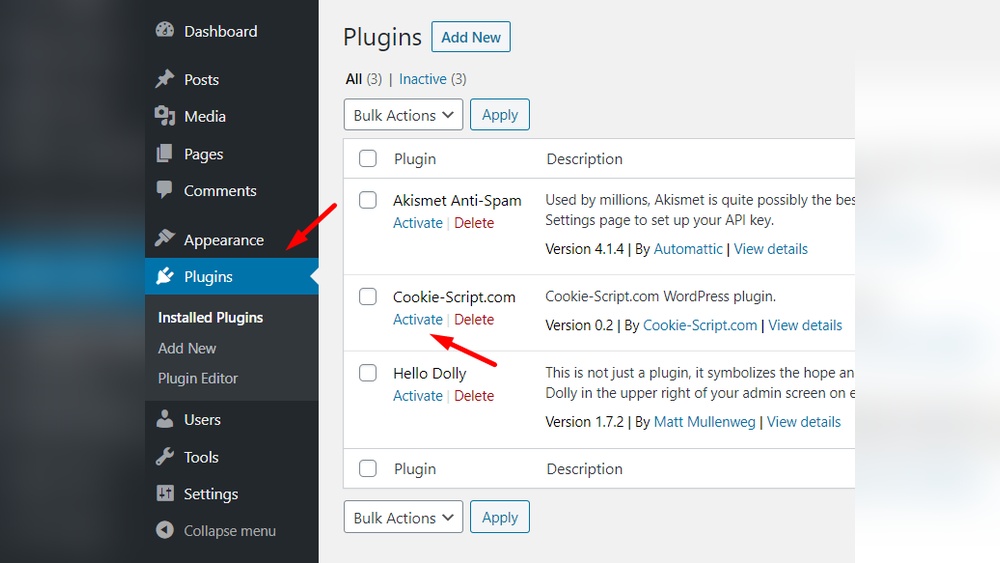
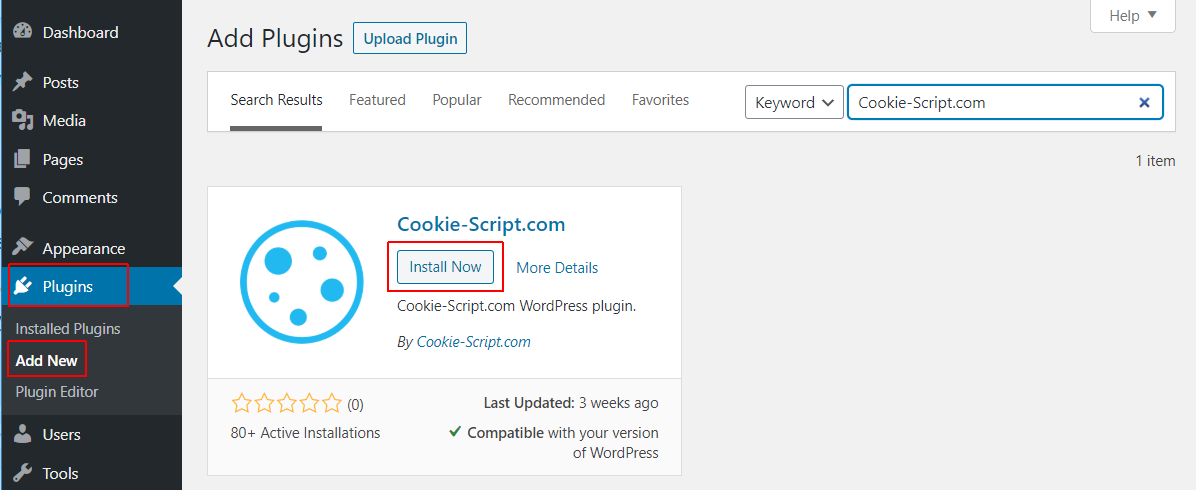
Choose a plugin or method that fits your site’s needs. Install and activate the plugin through your WordPress dashboard. Then, customize the banner text and style to match your brand.
Place the banner in a visible spot, usually at the bottom or top of the page. Make sure it does not block important content. The banner should be easy to read and simple to close or accept.
Testing Banner Functionality
After placing the banner, check if it appears on every page. Clear your browser cache to see the latest changes. Test the accept and reject buttons to ensure they work.
Verify the banner disappears after consent is given. Refresh the page to confirm it remembers the user’s choice. Use different devices and browsers to check consistent behavior.
Adding Cookie Consent To Your Site
Maintaining cookie consent on your WordPress site is an ongoing task. Compliance rules can change, and your tools need to keep up. Staying compliant protects your visitors’ privacy and avoids legal trouble. Regular checks and updates help your site stay safe and trustworthy.
Regular Plugin Updates
Always keep your cookie consent plugin updated. Developers release updates to fix bugs and add new features. Updates ensure compatibility with the latest WordPress version. They also improve security and compliance with privacy laws. Set a reminder to check for updates often. Activate automatic updates if the plugin offers this option.
Monitoring Changes In Privacy Laws
Privacy laws change in many countries. These changes may affect your cookie consent requirements. Follow reliable sources to track updates in privacy regulations. Adjust your cookie consent settings based on new rules. Review your privacy policy regularly to match the law. Staying informed helps avoid fines and builds visitor trust.
Ensuring Ongoing Compliance
Troubleshooting common issues helps keep your cookie consent working well. Problems can stop the banner from showing or block consent from being saved. Fixing these issues keeps your site safe and legal.
Banner Not Displaying
Check if the cookie consent plugin is active in your WordPress dashboard. Sometimes, a plugin conflict can hide the banner. Deactivate other plugins one by one to find the conflict.
Clear your browser cache. Old files may stop the banner from appearing. Also, review your theme settings. Some themes may block the banner from showing.
Make sure your site uses HTTPS. Some plugins require a secure connection to show the banner. Finally, check the plugin’s display rules. The banner may be set to hide on some pages.
Consent Not Being Recorded
Verify your plugin settings for cookie storage. Consent must be saved in cookies or your database. If storage is off, the consent won’t be recorded.
Clear site cache if you use caching plugins. Cache can prevent new consent from being saved. Also, check if JavaScript is enabled in your browser. Consent often relies on JavaScript to work.
Check for errors in your browser console. JavaScript errors can stop consent from recording. Update your plugin and WordPress to the latest versions. Updates fix bugs that may cause problems.
Credit: cookie-script.com
Frequently Asked Questions
What Is Cookie Consent In WordPress?
Cookie consent in WordPress is a legal requirement to inform users about data collection. It ensures compliance with privacy laws like GDPR and CCPA. Adding cookie consent helps protect user privacy and builds trust by requesting permission before storing cookies on their devices.
How To Add Cookie Consent To WordPress Site?
To add cookie consent, use a WordPress plugin like Cookie Notice or Complianz. Install and activate the plugin, then customize the message and consent options. Finally, save settings, and the cookie banner will appear for visitors automatically.
Are Cookie Consent Plugins Free For WordPress?
Many cookie consent plugins offer free versions with basic features. Some advanced options require premium plans for detailed customization and compliance tools. Free plugins are sufficient for most small to medium websites to meet legal requirements.
Can I Customize The Cookie Consent Banner Design?
Yes, most WordPress cookie consent plugins allow customization. You can change colors, text, button styles, and placement to match your website’s design. Customizing ensures the banner fits seamlessly with your site’s look and improves user experience.
Conclusion
Adding cookie consent to your WordPress site protects user privacy. It also helps you follow legal rules. The process is simple with the right plugin or code. Take time to customize the message for your visitors. Test the consent banner on different devices.
Keep your site trustworthy and user-friendly. This small step can make a big difference in user trust. Start today and keep your website compliant.


