
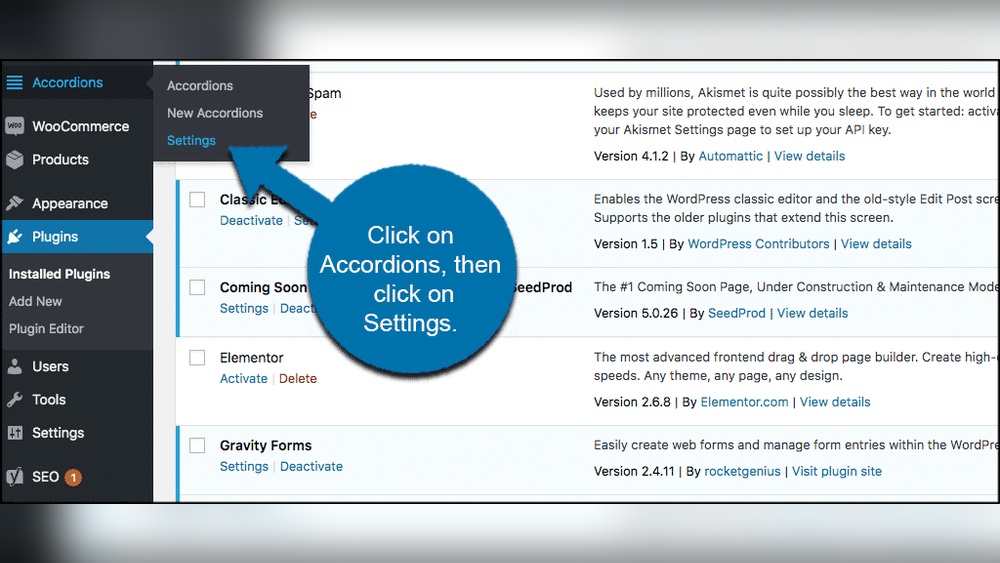
Are you looking to make your WordPress site more organized and user-friendly? Adding an accordion is a simple way to do just that.
Imagine giving your visitors the power to click and reveal only the information they want, keeping your pages clean and easy to navigate. You’ll learn exactly how to add an accordion to your WordPress site—step by step. By the end, you’ll have a sleek, professional-looking feature that improves your site’s usability and keeps your readers engaged.
Ready to make your content more interactive? Let’s dive in!
Credit: herothemes.com
Why Use Accordions
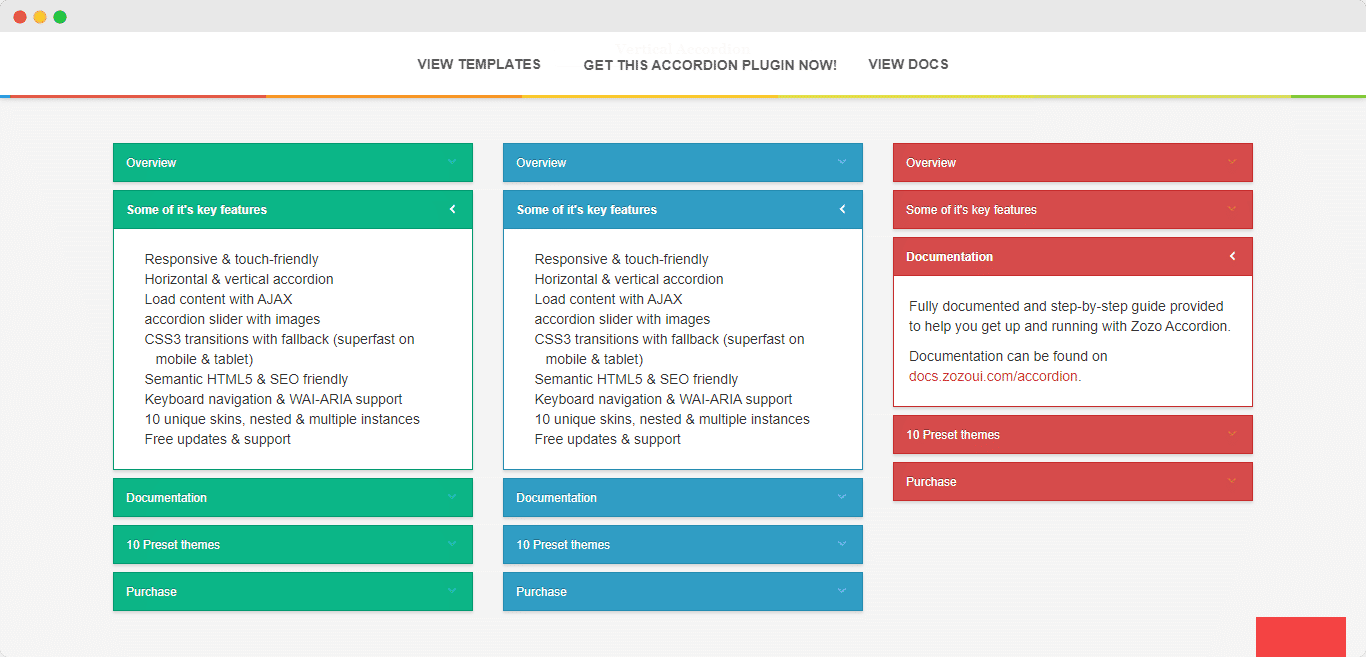
Accordions help display content in a clean and simple way. They let users see only the information they want. This keeps pages tidy and easy to read. Using accordions can improve how visitors interact with your site.
Enhance User Experience
Accordions make websites easier to use. Visitors find information faster without scrolling too much. They can open or close sections with one click. This keeps users happy and reduces frustration.
Organize Content Neatly
Accordions group related content in small boxes. This stops pages from looking crowded or messy. Visitors can focus on one topic at a time. It helps keep your website clean and clear.
Boost Page Speed
Accordions load content only when needed. This lowers the amount of data shown at once. Pages load faster and use less bandwidth. Faster sites keep visitors longer and reduce bounce rates.
Credit: essential-blocks.com
Choosing The Right Plugin
Choosing the right plugin for your WordPress accordion is important. It affects your site’s speed, look, and ease of use. Picking a plugin that fits your needs saves time and avoids frustration. Focus on features, ease of use, and how well it works with your theme.
Many plugins offer different styles and functions. Some are simple, others have advanced options. Your choice depends on your site’s purpose and your skills. Let’s explore some popular options and key points to consider.
Top Accordion Plugins
Several plugins stand out for building accordions. “Accordion” is simple and popular for beginners. “Elementor” has built-in accordion widgets for page building. “WPB Accordion Menu” helps create menus with collapsible sections. Each offers unique features that suit different needs and budgets.
Free Vs Premium Options
Free plugins offer basic accordion functions and work well for small sites. Premium plugins come with more styles, animations, and support. Paid versions often have better updates and extra customization. Choose free if you need simple accordions. Opt for premium if you want advanced features.
Plugin Compatibility
Check if the plugin works well with your WordPress version. Make sure it fits your current theme and other plugins. Compatibility avoids site crashes and slowdowns. Test the plugin on a staging site before adding it live. Regular updates from the developer ensure long-term compatibility.
Manual Accordion Creation
Creating an accordion manually in WordPress lets you control every detail. You build it step by step using code. This method works well for simple or custom designs. It also helps you learn how accordions function behind the scenes.
Start by writing the HTML and CSS. Then add JavaScript to make it interactive. Finally, customize the look to fit your site’s style. This approach avoids extra plugins and keeps your site light.
Using Html And Css
First, write the HTML structure. Use or tags for accordion headers. Place the content inside hidden sections. Add CSS to hide content by default. Style headers with background colors and padding. Use CSS to show content when the header is active.
Adding Javascript For Interaction
Add simple JavaScript to toggle content visibility. Write a function that opens or closes accordion sections. Attach click events to the headers. Change the CSS class to show or hide content. This script makes the accordion interactive and user-friendly.
Customizing Styles
Adjust fonts, colors, and spacing with CSS. Use transitions for smooth opening effects. Change icons or arrows to indicate open or closed states. Customize styles to match your website’s design. Keep styles clean and simple for easy reading.
Adding Accordion With Gutenberg
Adding an accordion in WordPress using Gutenberg is simple. This method helps organize content neatly. Visitors can click to expand or hide sections. It keeps pages clean and easy to read.
Gutenberg offers tools to create accordions without extra coding. You can use built-in blocks or install plugins. Both ways let you customize the look and function.
Using Built-in Blocks
Gutenberg has several blocks suitable for creating accordions. The “Group” block and “Toggle” block work well. You can stack content inside these blocks. Then, set them to open or close on click.
This method needs no extra plugins. It is perfect for simple accordion needs. You control how much content to show initially. Visitors click headers to reveal hidden text.
Third-party Block Plugins
Some plugins add ready-made accordion blocks to Gutenberg. Plugins like “Ultimate Addons” or “Kadence Blocks” offer this feature. They provide more styles and options than built-in blocks.
Installing a plugin is easy. Go to Plugins, search for accordion blocks, and activate. Then, add the new block to your post or page. Customize colors, fonts, and icons to fit your site.
Editing And Styling
After adding an accordion, you can edit the content. Change text, add images, or insert links inside each section. You control how the accordion behaves on mobile devices too.
Styling options include colors, fonts, and spacing. Use the block toolbar or sidebar settings to adjust looks. Proper styling improves user experience and site design.
Configuring Accordion Settings
Configuring accordion settings is key to creating a smooth user experience. These settings control how your accordion behaves and looks. Adjusting them correctly helps visitors find information quickly. Focus on three main areas: opening and closing options, animation effects, and responsive design.
Opening And Closing Options
Choose how many accordion panels open at once. Allow multiple panels open or only one at a time. Set whether the first panel opens automatically when the page loads. Decide if users can close all panels or must keep one open. These options guide user interaction clearly and simply.
Animation Effects
Pick animation styles for opening and closing panels. Smooth sliding or fading effects make transitions pleasant. Adjust animation speed to keep user attention without delay. Subtle animations improve readability and keep visitors engaged longer.
Responsive Design
Ensure your accordion works well on all devices. Test on phones, tablets, and desktops. The accordion should resize and adapt to smaller screens. Touch-friendly controls improve navigation on mobile devices. Responsive design keeps content accessible everywhere.
Best Practices For Accordions
Accordions help organize content neatly on WordPress sites. They keep pages clean and easy to read. Using accordions smartly improves user experience and site performance. Following best practices ensures your accordions work well for all visitors.
Content Length Tips
Keep accordion content short and focused. Long blocks of text can overwhelm readers. Use bullet points or short paragraphs inside each section. Make information easy to scan and understand quickly. Avoid cramming too much detail inside one accordion.
Accessibility Considerations
Ensure accordions are keyboard-friendly. Users should open and close sections using the keyboard. Use clear labels for each accordion header. Screen readers must identify and read content properly. Test your accordion with accessibility tools before publishing.
Seo Benefits
Accordions help show more content without clutter. Search engines can index hidden content inside accordions. Use relevant keywords naturally in your accordion text. Proper HTML structure with headings improves SEO ranking. Well-structured accordions increase page relevance and user engagement.
Troubleshooting Common Issues
Troubleshooting common issues with WordPress accordions helps keep your site smooth. Problems can stop your accordion from working well or looking right. Understanding key issues saves time and improves user experience. This section covers the most common problems and easy fixes.
Plugin Conflicts
Plugins sometimes clash with each other. This can break your accordion or stop it from opening. Disable other plugins one by one to find the conflict. Clear your cache and test the accordion again. Look for updates for all your plugins. Keeping plugins updated reduces conflicts.
Display Problems
Accordions may not show correctly on mobile or desktop. Check your theme’s CSS styles. Some themes hide or change accordion design by default. Use custom CSS to fix colors, fonts, or spacing. Test your site in different browsers to spot display errors. Adjust settings in your accordion plugin for better look.
Performance Optimization
Slow loading accordions hurt site speed and user patience. Use lightweight accordion plugins that load fast. Avoid adding too many accordions on one page. Compress images and scripts to reduce load time. Use caching plugins to speed up your site. Keep your WordPress and plugins updated for best performance.

Credit: herothemes.com
Frequently Asked Questions
What Is An Accordion In WordPress?
An accordion in WordPress is a collapsible content section. It helps organize content into expandable panels. This improves user experience and saves page space. Accordions are great for FAQs, menus, and detailed information.
How Do I Add An Accordion Without Plugins?
You can add an accordion using custom HTML, CSS, and JavaScript. This method requires coding knowledge but avoids plugin use. It offers more control but may be complex for beginners.
Which WordPress Plugin Is Best For Accordions?
Popular plugins include Accordion, Elementor, and WPB Accordion Menu. These plugins are user-friendly and customizable. They offer drag-and-drop interfaces and responsive design features.
Can I Customize Accordion Styles In WordPress?
Yes, most plugins allow style customization. You can change colors, fonts, and animation effects. Custom CSS can also be applied for advanced styling.
Conclusion
Adding an accordion to your WordPress site improves content organization. It helps visitors find information quickly and keeps pages tidy. You can use plugins or code to create accordions easily. Test your accordion on different devices for best results. Keep your design simple and user-friendly.
This small change can make your site look more professional. Try it today and see the difference it brings to your content.


