
Have you ever felt like accessing your web server is akin to finding your way through a maze? Especially when it’s tucked safely behind a bastion host?
You’re not alone. Navigating the layers of security can seem daunting, but it’s crucial for protecting your data and ensuring your server remains safe from prying eyes. Imagine a simple, step-by-step guide that empowers you to confidently access your web server, without compromising on security.
This article is designed to be that guide. By understanding the role of a bastion host and how to maneuver through it, you’ll unlock the door to your server with ease and peace of mind. Don’t let the complexity deter you. Dive into the insights below and discover how you can access your web server securely and efficiently. Your server is your digital asset, and mastering this process is the key to safeguarding it. Are you ready to unravel the mystery and gain control? Let’s get started!
Credit: docs.aws.amazon.com
Bastion Host Basics
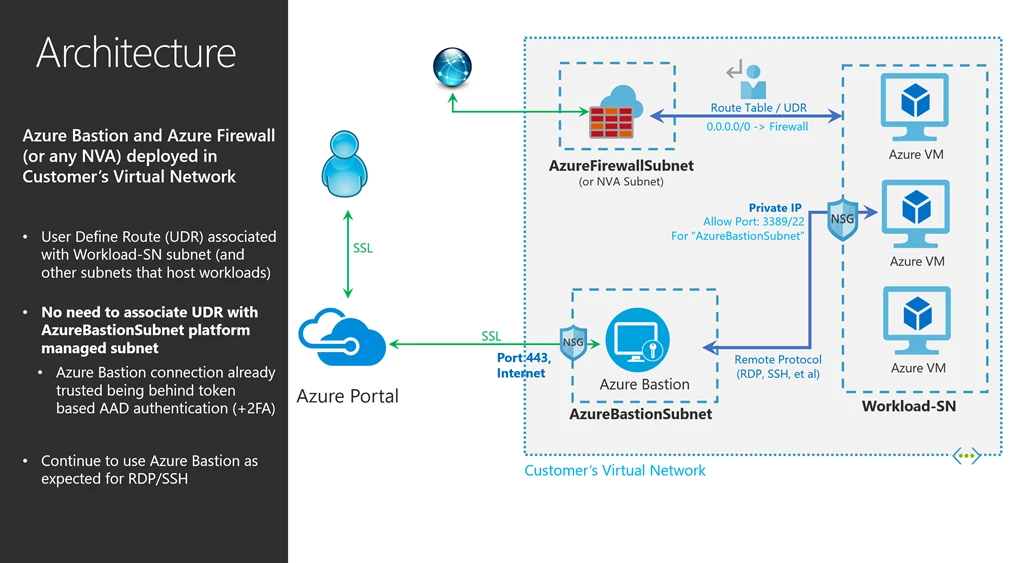
A bastion host is like a security guard for your network. It stands between the internet and your private servers. The main job is to let only authorized users through. It acts as a gateway to access your web server. This makes sure that your important data is safe. Bastion hosts often use strong passwords and multi-factor authentication. This adds an extra layer of security. They help in managing network traffic effectively. The design is simple and secure, with limited services running on it.
Using a bastion host adds strong security to your network. It reduces the risk of unauthorized access. This host checks and logs every connection attempt. If someone tries to break in, you will know. It helps in preventing attacks before they reach your web server. By limiting entry points, it makes hacking hard. This keeps your data protected and safe. Bastion hosts often have less software. This means fewer bugs and security holes. This makes it a safe choice for many companies.
Credit: azure.microsoft.com
Setting Up A Bastion Host
To set up a bastion host, start by choosing a secure location. Install only necessary software on this host. Next, create a new user with limited permissions. This user can access the web server. Set up SSH keys for added security. This step helps protect sensitive data. Make sure to configure the firewall. Allow only trusted IPs to access the bastion host.
Update all software regularly to prevent vulnerabilities. Monitor traffic to spot unusual activity. Keep logs of access attempts for review. Regular audits can help maintain security. A bastion host acts as a gatekeeper. It ensures only safe connections reach your web server.
Begin with a clear network plan. Place the bastion host in a separate subnet. This provides an extra layer of security. Ensure the network is segmented. This limits access points to the bastion host. Use a VPN for secure connections. It encrypts data and protects from intruders.
Regularly check network configurations. Keep settings updated to match security policies. Minimize open ports to reduce risks. Every open port is a potential entry point. Run network scans to find vulnerabilities. Fix these issues quickly to maintain safety.
Accessing Web Servers
A bastion host keeps servers safe. It is like a guard. All connections go through it. This means it keeps bad guys out.
Encryption makes the link safe. Data stays private. No one can read it. This is very important for security.
SSH stands for Secure Shell. It is a secure way to connect. SSH creates a tunnel. This is like a secret path. It hides data from others.
To use SSH, you need a key. This key is like a password. It lets you in. Without the key, you cannot enter. Always keep your key safe.
Key Considerations
Adjusting the firewall is crucial. Ensure it allows traffic through specific ports. These ports connect the bastion host and the web server. Block unnecessary ports to keep the system safe. Only allow the essential ones. Regularly check the firewall rules. Make sure they align with your security needs. Always use a strong firewall policy. It helps protect against cyber threats.
User permissions are very important. Grant access only to trusted users. Check permissions often. Make sure they are up-to-date. Limit permissions to what is necessary. This reduces the risk of unauthorized access. Use unique credentials for each user. Never share passwords. Always follow security protocols. This keeps your server safe and secure.
Best Practices
Keeping a close eye on server activities is important. This helps in spotting any unusual actions. Set up logging tools to record every access attempt. Logs show who accessed the server and when. This is helpful for troubleshooting and maintaining security. Use simple dashboards for easy data view. Regularly check the logs to stay informed.
Updating the system regularly is vital. It ensures security patches are up-to-date. This keeps the server safe from threats. Always update software and tools used. This includes the operating system and security software. Set reminders to check for new updates often. Regular updates help in maintaining a healthy system.

Credit: repost.aws
Troubleshooting
Accessing a web server behind a Bastion Host involves secure tunneling. Set up an SSH tunnel to connect safely. Follow security protocols to ensure data protection during access.
Common Issues
Accessing a web server can be tricky. Some common issues occur often. First, check the network connection. Make sure cables and Wi-Fi work. Next, verify the bastion host settings. These settings must be correct. Also, ensure the firewall rules are set right. Firewalls block unwanted traffic. This can stop access.
Solutions And Tips
Start with simple steps. Double-check all credentials. Wrong passwords cause problems. Use SSH keys for extra security. These keys help in safe access. Another tip is to update software. New updates fix bugs. If trouble continues, ask for expert help. Experts can solve tricky issues. Always keep backup plans. Backups save time and effort.
Frequently Asked Questions
How To Connect To An Instance Through Bastion Host?
To connect through a bastion host, first SSH into the bastion server. Then, from the bastion, SSH into the target instance using its private IP. Ensure necessary security group rules and SSH keys are configured. Use SSH agent forwarding for seamless connection.
How To Connect Through Bastion?
To connect through a bastion, use SSH with the command: `ssh -J user@bastion-host user@target-host`. Ensure you have the necessary permissions and credentials. Configure your SSH client to use the bastion as a proxy for secure access.
How To Connect To Rds From Bastion Host?
First, SSH into the bastion host using your key. Next, use port forwarding to connect to RDS. Finally, access the database using the forwarded port. Ensure security groups allow connections from the bastion host to RDS.
How To Access A Web Server Via Ssh?
Access a web server via SSH by using a terminal or SSH client. Enter `ssh username@hostname` and input your password. Ensure SSH is enabled on the server. Check your firewall settings to allow SSH connections. Use port 22 unless otherwise specified by the server.
Conclusion
Accessing a web server behind a bastion host is straightforward. Follow the steps carefully. Secure connections are crucial. Prioritize safety and efficiency. A bastion host acts as a protective gateway. It ensures safe access to your servers. Understanding the setup improves security.
Always keep security protocols updated. Regular checks prevent unauthorized access. Embrace these practices for safer server management. With practice, accessing servers becomes second nature. Stay informed and adaptable. Your data’s safety depends on it. Keep learning and refining your skills.
This approach ensures a secure and efficient network environment.


