
Are you thinking about building a website with WordPress but unsure how much it will cost? You’re not alone.
Many people want to create a professional site without breaking the bank. The truth is, WordPress offers flexible options that can fit different budgets. But how do you know what to expect? You’ll discover the real costs behind using WordPress to build your website.
By the end, you’ll have a clear idea of what you need to invest to get your site up and running—without any surprises. Keep reading to find out how to make the most of your budget and avoid common money traps.
Credit: www.isitwp.com
WordPress Pricing Models
WordPress offers different pricing models for building websites. Each model fits different needs and budgets. Understanding these models helps you choose the right plan. WordPress pricing depends on features, hosting, and support options.
Free Vs Paid Plans
WordPress provides a free version with basic features. It includes limited themes and storage. Free plans often show WordPress ads on your site. Paid plans remove ads and add more tools. Paid plans offer more themes, plugins, and custom domains. Choosing between free and paid depends on your website goals.
Self-hosted WordPress.org Costs
Self-hosted WordPress.org is free to download and use. You need to pay for web hosting and domain names. Hosting costs vary, starting around $3 to $10 per month. Domain names usually cost about $10 to $15 per year. You can choose from many hosting providers. Extra costs may include premium themes and plugins. This model offers full control and flexibility over your site.
Hosted WordPress.com Plans
WordPress.com offers all-in-one hosting and website management. Plans range from free to business and e-commerce options. Free plan has basic features but limited customization. Paid plans start around $4 to $45 per month. Higher plans include custom domains, more storage, and support. Business plans allow installing third-party plugins and themes. Hosted plans suit users who want easy setup and maintenance.
Domain And Hosting Expenses
Domain and hosting expenses are key parts of building a WordPress website. Without a domain name and hosting service, your site cannot be found or accessed online. These costs vary depending on your choices and needs. Understanding these expenses helps you plan your website budget clearly.
Domain Name Costs
A domain name is your website’s address on the internet, like www.example.com. Buying a domain usually costs between $10 and $20 per year. Some domains may cost more due to popularity or special extensions. You must renew the domain yearly to keep ownership. Choosing a simple and clear domain helps visitors remember your site.
Web Hosting Options
Web hosting stores your website files and makes them available online. Hosting prices range from $3 to $15 per month for basic plans. Shared hosting is the cheapest, where many sites share one server. It suits small websites or beginners. More traffic or complex sites need better hosting with higher prices. Hosting providers often offer easy WordPress installation.
Managed WordPress Hosting
Managed WordPress hosting is a premium service designed for WordPress sites. It costs between $20 and $60 per month. This hosting manages updates, security, and backups for you. It ensures fast loading and reliable performance. Managed hosting suits businesses or users who want less technical work. The extra cost offers peace of mind and better support.
Themes And Design Costs
The cost of themes and design plays a big role in building a WordPress website. Themes control the look and feel of your site. Design costs depend on what style you want and how much work is needed.
You can choose from free themes, pay for premium ones, or hire custom design services. Each option has different prices and benefits. Understanding these helps plan your budget better.
Free Themes
Free themes come with no cost. WordPress offers many free themes in its directory. These themes work well for simple websites. They are easy to install and use. Free themes often have limited features. Support may be minimal or community-based. Ideal for small projects or beginners.
Premium Themes
Premium themes cost between $20 and $100. They offer more features and design options. Premium themes include regular updates and support. Many come with built-in tools for customization. These themes help create professional-looking websites. Good for businesses or serious bloggers. The price depends on the developer and features.
Custom Design Services
Custom design services tailor your site’s look to your needs. Designers build unique themes or modify existing ones. Costs vary widely, starting around $500 and going up. Custom design suits brands wanting a special style. It ensures your website stands out. Hiring a designer can save time and effort. This option is best for complex or large websites.
Credit: wpmet.com
Plugins And Functionality Fees
Plugins add features to your WordPress website. They help improve design, speed, and security. Some plugins are free, while others require payment. These costs are part of building your website.
Free Plugins
WordPress offers many free plugins. These cover basic needs like contact forms and SEO tools. Free plugins suit small sites or beginners. They often have fewer features than paid versions.
Premium Plugins
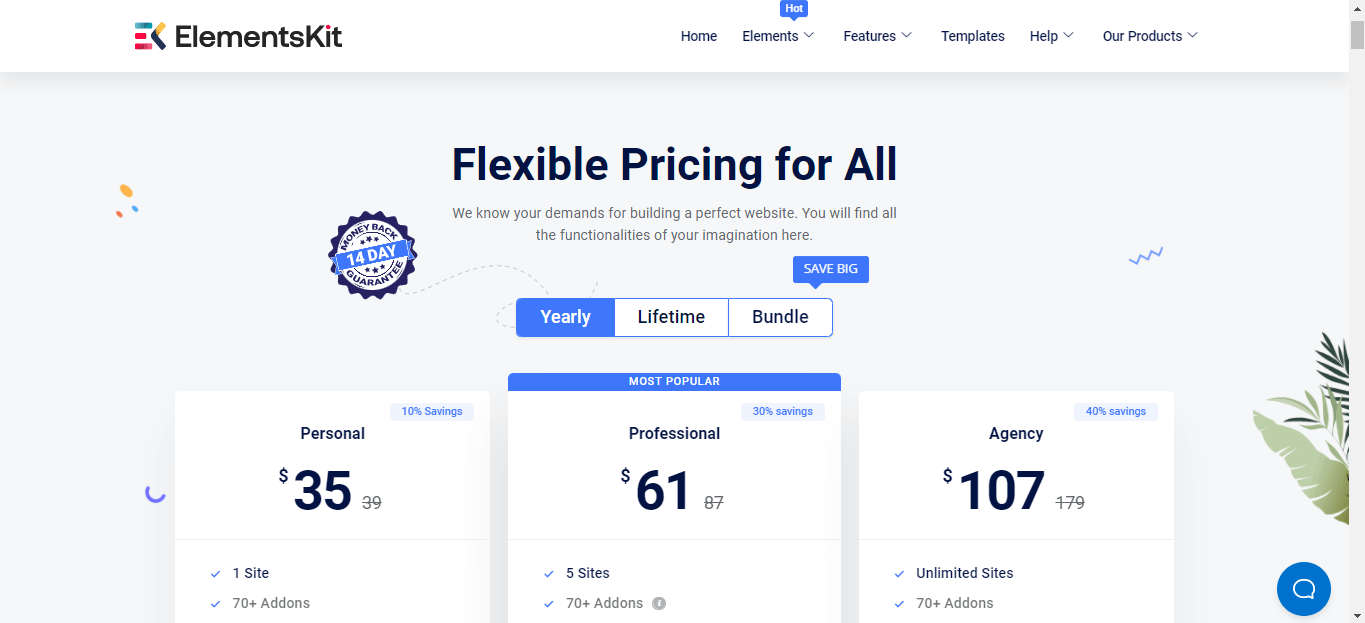
Premium plugins come with advanced features. These require a one-time fee or subscription. They provide better support and regular updates. Premium options fit bigger websites with special needs.
Essential Plugin Categories
Key plugin types include security, SEO, and backups. Security plugins protect your site from attacks. SEO plugins help your site rank higher in search. Backup plugins save your data in case of problems.
Development And Maintenance Costs
Building a WordPress website involves costs beyond the initial setup. Development and maintenance expenses can vary widely. These costs depend on your choices and the website’s needs. Understanding these costs helps you plan your budget better.
Diy Vs Hiring Developers
Choosing between building the site yourself or hiring developers affects costs greatly. Doing it yourself means you save money on labor. You only pay for themes, plugins, and hosting. However, it requires time and technical skills.
Hiring developers costs more but offers professional design and custom features. Developers can fix problems quickly and ensure your site runs smoothly. Prices vary by experience and project complexity. Expect to pay a few hundred to thousands of dollars.
Ongoing Maintenance Expenses
Websites need regular updates and fixes to stay secure and fast. Maintenance includes updating WordPress core, themes, and plugins. These updates prevent bugs and security risks. You can do maintenance yourself or hire a service.
Hiring maintenance services costs around $50 to $200 per month. The fee depends on the level of support and services included. Regular maintenance saves time and avoids costly repairs later.
Security And Backup Services
Security is crucial to protect your website from hackers and data loss. WordPress offers basic security, but extra measures are wise. Security services include malware scanning, firewall, and spam protection.
Backup services save copies of your site data regularly. This helps restore your site quickly if something goes wrong. Some plugins offer free backups, but premium services cost $5 to $50 monthly. Investing in security and backups protects your website and your visitors.
E-commerce Setup Costs
Setting up an e-commerce store on WordPress has some costs. These costs cover different tools and services needed to sell online. Understanding these helps you plan your budget well.
Woocommerce Fees
WooCommerce is a popular plugin to create online stores. It is free to use for basic features. Some advanced functions need paid extensions. These extensions cost between $30 and $300 each. Choose only what your store needs to keep costs low.
Payment Gateways
Payment gateways let customers pay safely. Some gateways are free to install but charge fees per transaction. These fees usually range from 2% to 3.5% of each sale. Popular gateways include PayPal, Stripe, and Square. Compare fees and features before choosing.
Additional E-commerce Tools
Extra tools improve your store’s function and sales. Examples include email marketing, shipping calculators, and security features. Some tools are free, but many have monthly fees. Expect to pay $10 to $50 per tool each month. Pick tools that match your store’s goals and budget.
Cost-saving Tips
Building a website on WordPress can be affordable with smart choices. Saving money is possible by planning carefully and using the right tools. This section offers tips to reduce costs while creating a great website.
Choosing The Right Plan
WordPress offers various plans for different needs. Pick a plan that fits your website size and goals. Avoid paying for features you do not need. Start with a basic plan to save money. Upgrade only when your website grows or needs more tools.
Leveraging Free Resources
Many free themes and plugins are available on WordPress. Use these to build and customize your site. Free tools often cover basic needs well. Avoid buying expensive plugins at the start. Explore WordPress’s official library for trusted free options.
Budgeting For Growth
Plan your website expenses over time. Keep some budget for future upgrades and improvements. Track your spending to avoid surprises. Invest in important features step by step. This approach keeps your website costs under control.
Credit: blog.sagipl.com
Frequently Asked Questions
How Much Does WordPress Charge For Website Building?
WordPress itself is free, but costs come from hosting, themes, and plugins. Hosting ranges from $3 to $30 monthly. Premium themes cost $30 to $100. Plugins may be free or paid. Overall, building a WordPress site can cost from $50 to several hundred dollars yearly.
Are There Any Hidden Fees With WordPress Websites?
WordPress has no hidden fees, but third-party services may charge. Hosting, premium themes, and plugins often require payments. Domain registration also adds cost. Always check pricing details before purchase to avoid surprises. WordPress core software remains free and open-source.
Can I Build A WordPress Site For Free?
Yes, you can build a WordPress. com site for free with limitations. Free plans include basic features and WordPress ads. Custom domains and advanced features need paid plans. Self-hosted WordPress. org requires hosting and domain costs but offers full control and customization.
What Affects The Total Cost Of A WordPress Website?
Costs vary due to hosting choice, premium themes, and plugin needs. Custom design or developer help increases expenses. E-commerce sites require additional plugins or services. Maintenance and security also add to ongoing costs. Budget depends on your site’s complexity and goals.
Conclusion
WordPress offers flexible options to build websites at various costs. You can start with free tools and upgrade as needed. Themes, plugins, and hosting add to the price depending on your choices. Planning your budget helps avoid surprises later. This platform suits both beginners and experts.
Choosing wisely ensures a website that fits your needs and budget. WordPress remains a popular choice for affordable, customizable websites.


