
Wondering how much it really costs to build a WordPress website? You’re not alone.
Whether you want a simple blog or a full-featured online store, knowing the true expenses upfront can save you time and money. You’ll discover the key factors that affect the price, from hosting and themes to plugins and custom design.
By the end, you’ll have a clear picture of what to expect and how to plan your budget wisely. Keep reading to unlock the secrets behind WordPress website costs and avoid surprises down the road.
WordPress Pricing Basics
Understanding WordPress pricing basics helps plan your website budget. WordPress offers different options. Each has its own cost and benefits. Choosing the right one saves money and fits your needs.
Free Vs Paid Options
WordPress provides free and paid versions. The free version offers basic features and limited themes. It works well for simple blogs or small sites.
Paid options include premium themes, plugins, and extra support. These costs vary based on what you select. Paid plans give more control and better design choices. They also improve site performance and security.
Self-hosted Vs WordPress.com
Self-hosted WordPress requires buying web hosting and a domain. This option gives full control over your website. You can install any theme or plugin. Costs include hosting fees and domain registration.
WordPress.com hosts your site for you. It offers free and paid plans. The free plan has limits on customization and ads. Paid plans remove ads and add features. This option suits beginners who want easy setup.
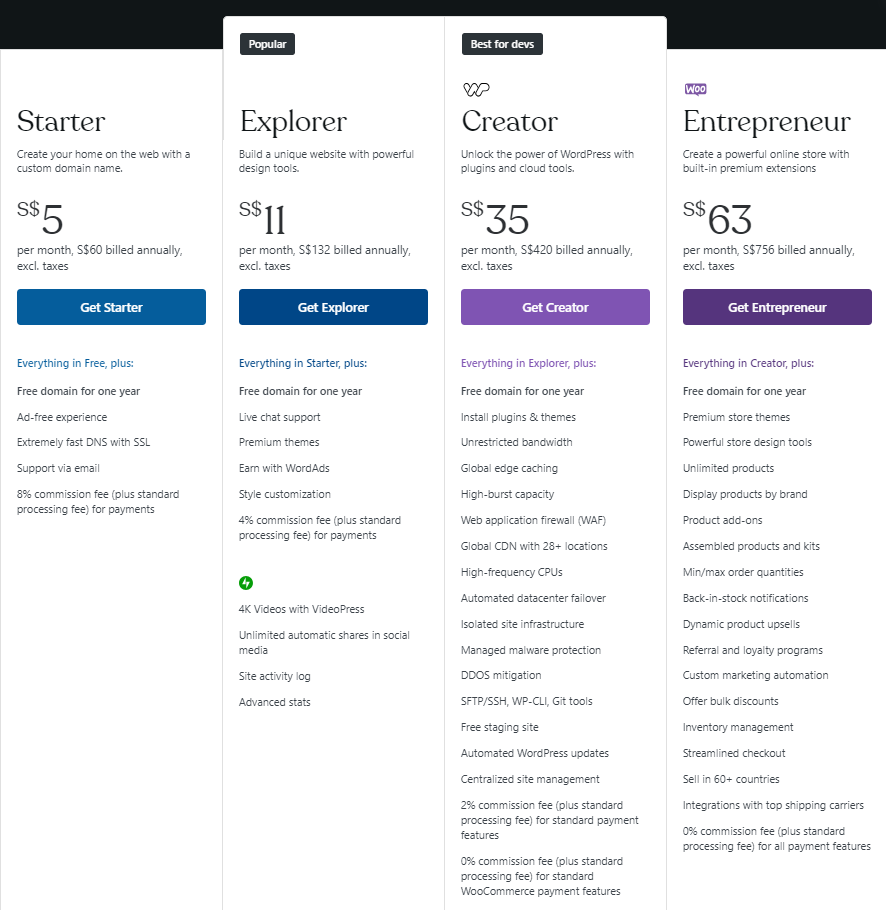
Credit: www.hostinger.com
Domain And Hosting Costs
Starting a WordPress website needs two main things: a domain and hosting. These costs form the base of your website budget. Understanding these helps you plan better.
A domain is your website’s address on the internet. Hosting is where your website lives online. Both come with different costs based on choices you make.
Choosing A Domain Name
A domain name should be short, clear, and easy to remember. Common domain endings include .com, .net, and .org. Prices for domains vary, usually between $10 and $20 per year.
Some special domain names cost more. Check availability before buying. Renew your domain yearly to keep your website online.
Types Of Hosting Plans
Hosting plans differ by speed, storage, and user limits. Shared hosting is the cheapest and good for small sites. VPS hosting offers more power and control. Dedicated hosting is for large, high-traffic websites.
Managed WordPress hosting focuses on WordPress sites. It includes updates and security help. Choose based on your website needs and budget.
Estimated Hosting Prices
Shared hosting plans usually cost $3 to $10 per month. VPS hosting ranges from $20 to $80 per month. Dedicated hosting starts around $80 and can go much higher.
Managed WordPress hosting starts near $10 and can reach $50 monthly. Look for plans with good uptime and customer support. Remember, cheap is not always best for hosting quality.
Themes And Design Expenses
The design and theme of your WordPress website shape how visitors see your brand. Choosing the right theme affects your site’s look, feel, and usability. Themes and design costs vary widely. Some themes cost nothing while custom designs can be expensive. Understanding these costs helps you plan your budget well.
Free Themes
WordPress offers many free themes in its official directory. These themes cover basic needs and are easy to install. Free themes work well for simple websites or blogs. They have limited features and fewer customization options. Free themes are a good start for beginners or small projects.
Premium Themes
Premium themes come with extra features and support. Prices usually range from $30 to $100 per theme. These themes offer more design options and better performance. They often include updates and customer service. Premium themes suit businesses wanting a professional look without custom work.
Custom Design Costs
Custom website design offers full control over your site’s appearance. Designers create unique layouts tailored to your brand. Costs vary greatly, starting around $500 and going up to thousands. Custom design suits businesses needing specific features or a unique style. It takes more time and money but creates a distinct online presence.
Credit: elementor.com
Essential Plugins And Their Costs
Plugins are key to making a WordPress website work well. They add new features and improve the site’s performance. Knowing the costs of essential plugins helps plan your budget. Some plugins are free, while others come with a price. The choice depends on your needs and the website’s purpose.
Free Vs Premium Plugins
Many plugins in WordPress are free to use. They cover basic needs like contact forms and SEO tools. Free plugins often have fewer features and limited support. Premium plugins offer more options and regular updates. They cost money, usually a one-time fee or a subscription. Picking between free and premium depends on your site’s goals and budget.
Must-have Plugins For Functionality
Some plugins every site needs. Security plugins protect your site from attacks. SEO plugins help improve search engine rankings. Backup plugins save your data in case of problems. Speed optimization plugins make your site load faster. Contact form plugins let visitors send messages easily. These plugins may be free or premium, depending on features.
Plugin Subscription Models
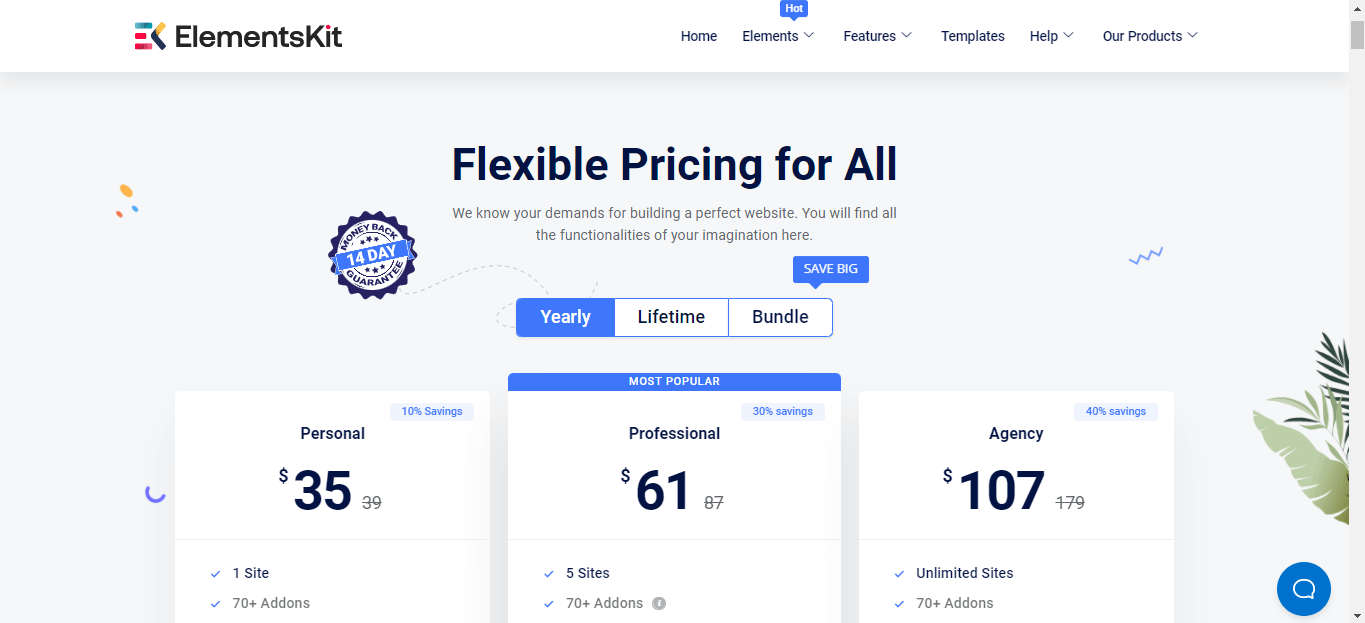
Many premium plugins use subscription models. You pay monthly or yearly for access and updates. Subscriptions often include support and new features. Some plugins offer lifetime licenses with one payment. Check what the subscription covers before buying. Choose the model that fits your budget and needs best.
Development And Maintenance Fees
Creating a WordPress website involves costs beyond just setting it up. Development and maintenance fees play a big role in the total expense. These fees cover building the site and keeping it running smoothly over time. Understanding these costs helps plan your budget clearly.
Diy Vs Hiring Professionals
Building a website yourself cuts down initial costs. You pay for hosting and themes mostly. But, it takes time and some tech skills. Errors can happen, causing delays or extra fixes.
Hiring professionals costs more upfront. Experts build faster and with fewer errors. They create custom designs and add needed features. This option suits complex or business sites well.
Ongoing Maintenance Costs
Maintenance keeps your site updated and fast. Updates include WordPress core, themes, and plugins. Without updates, the site may break or slow down. Maintenance can be monthly or yearly fees.
Regular checks fix bugs and improve performance. These tasks avoid bigger issues later. Maintenance costs depend on site size and complexity.
Security And Backup Services
Security protects your site from hacks and malware. Backup services save copies of your site data. These copies help restore your site if problems occur.
Many security plugins cost money. Backup services may charge per month or per use. Investing in security and backups avoids costly damage to your website.
E-commerce Integration Costs
E-commerce integration is a key part of many WordPress websites. It allows you to sell products or services online. This feature comes with extra costs that you must plan for. Understanding these costs helps you budget better for your website project.
These costs vary depending on the tools and features you choose. Basic setups are affordable, but advanced options can increase expenses. Let’s explore the main cost areas involved in e-commerce integration.
Woocommerce Setup
WooCommerce is the most popular e-commerce plugin for WordPress. It is free to install, but setup may require paid themes or extensions. You might pay for professional help to customize your store. Costs depend on store size and complexity.
Payment Gateway Fees
Payment gateways process customer payments securely. Most gateways charge a fee per transaction. Fees often include a percentage and a small fixed amount. Choose gateways that fit your budget and customer preferences.
Additional E-commerce Plugins
Extra plugins add features like shipping, marketing, or customer support. Some are free, but many require a purchase or subscription. Each plugin adds to your total e-commerce cost. Pick only necessary plugins to keep costs low.
Hidden And Miscellaneous Costs
Building a WordPress website often comes with extra costs you may not expect. These hidden and miscellaneous expenses can add up fast. Understanding them helps you plan your budget better. Some costs are small but necessary for a smooth and effective website.
Seo And Marketing Tools
SEO tools help your site rank higher in search results. Many good plugins and tools cost money. Free versions exist, but paid plans offer more features. Marketing tools like email services also charge monthly fees. Ignoring these can limit your site’s growth and reach.
Content Creation Expenses
Good content attracts visitors and keeps them engaged. Writing, editing, and designing content often need outside help. Hiring writers or designers costs money. Even photos and videos might require buying licenses or professional services. Budgeting for content ensures your website looks professional.
Website Performance Optimization
Fast-loading sites improve user experience and SEO. Performance optimization tools and services may require payment. Caching plugins, image compressors, and security services often have premium versions. Regular updates and backups also take time or money. These small investments keep your site running smoothly.
Credit: wpmet.com
Budgeting Tips For WordPress Sites
Creating a WordPress website requires careful budgeting. Knowing how to manage costs helps build a site that fits your needs and wallet. Smart budgeting keeps your project on track and avoids surprises.
Prioritizing Features
Start by listing what your website must have. Focus on essential features first. Extra features can wait until you have more budget. This approach saves money and keeps your site simple. Basic functions like a contact form and clear navigation come first.
Scaling Costs Over Time
Plan your website’s growth in steps. Begin with a small site and add more features later. This spreads out costs and reduces upfront spending. Upgrading hosting or adding plugins can happen as your site grows. Scaling lets you control expenses and improve slowly.
Finding Cost-effective Solutions
Use free or low-cost themes and plugins. Many options offer good quality without high prices. Choose tools that match your needs but don’t overspend. Also, consider DIY tasks like content creation. This cuts costs and gives more control over your site.
Frequently Asked Questions
How Much Does A Basic WordPress Website Cost?
A basic WordPress website typically costs between $100 and $500. This includes domain registration, hosting, and a premium theme. Additional features or custom designs may increase the price.
What Factors Influence WordPress Website Costs?
Costs depend on hosting quality, theme choice, plugins, and customization. Professional design and development services also add to expenses. Regular maintenance is another cost factor.
Is WordPress Free To Use For Websites?
WordPress software itself is free and open-source. However, domain registration, hosting, premium themes, and plugins usually require payment. These elements contribute to overall website costs.
Can I Build A WordPress Site Without Coding Skills?
Yes, WordPress offers user-friendly themes and drag-and-drop builders. This allows non-coders to create websites easily. Hiring a developer is optional for advanced customization.
Conclusion
Building a WordPress website has many cost options. Prices depend on your needs and choices. Hosting, themes, and plugins affect the total price. DIY sites cost less but need time and effort. Hiring a developer costs more but saves time.
Plan your budget carefully before starting. This helps avoid surprises later. Take your time to compare prices and features. A clear plan leads to a website you like. Start small, then grow as needed. Your website’s cost can fit your budget well.


