
Want to boost your WordPress site’s visibility and attract more visitors? Adding the right keywords is the key.
But how do you do it effectively without getting lost in technical details? This guide will show you simple, step-by-step ways to add keywords to your WordPress site. By the end, you’ll know exactly how to make your content stand out and reach the right audience.
Ready to unlock the power of keywords and grow your site? Let’s dive in!
Credit: www.wpbeginner.com
Choosing The Right Keywords
Choosing the right keywords is key to making your WordPress site easy to find. Good keywords help attract visitors who want what you offer. Picking words that match your content and audience will bring better results. Focus on terms that your potential readers or customers use in searches. This section covers tools and strategies to find those perfect keywords.
Research Tools To Use
Use free tools like Google Keyword Planner to discover popular search terms. Ubersuggest gives ideas and shows keyword difficulty. AnswerThePublic reveals questions people ask around your topic. These tools provide data on search volume and competition. Choose keywords that balance popularity and ease of ranking.
Long-tail Vs Short-tail Keywords
Short-tail keywords are broad and have high search volume. They are harder to rank for due to competition. Long-tail keywords are longer phrases with lower volume but more specific. They attract visitors ready to take action. Combining both types creates a strong keyword strategy.
Analyzing Competitor Keywords
Check keywords used by websites similar to yours. Tools like SEMrush show which keywords bring them traffic. Spot gaps where you can rank easier. Understanding competitor keywords helps you find new ideas and improve your content focus.
Adding Keywords To WordPress Content
Adding keywords to your WordPress content helps search engines find your site. It also improves your chances of ranking higher in search results. Keywords connect your content with what people search for online. Using them wisely can bring more visitors to your website.
Focus on placing keywords naturally. Avoid stuffing too many keywords in one place. Balance is key to keep your content readable and helpful.
Optimizing Blog Posts
Start by choosing relevant keywords for each blog post. Include these keywords in the first 100 words of your content. Spread keywords throughout the post but keep sentences clear and simple. Use variations of your keywords to avoid repetition. This helps both readers and search engines understand your topic.
Using Keywords In Titles And Headings
Place your main keyword in the blog post title. This makes your content more visible in search results. Also, add keywords to headings and subheadings. Headings organize your content and signal important topics. Keep titles and headings short and precise.
Incorporating Keywords In Meta Descriptions
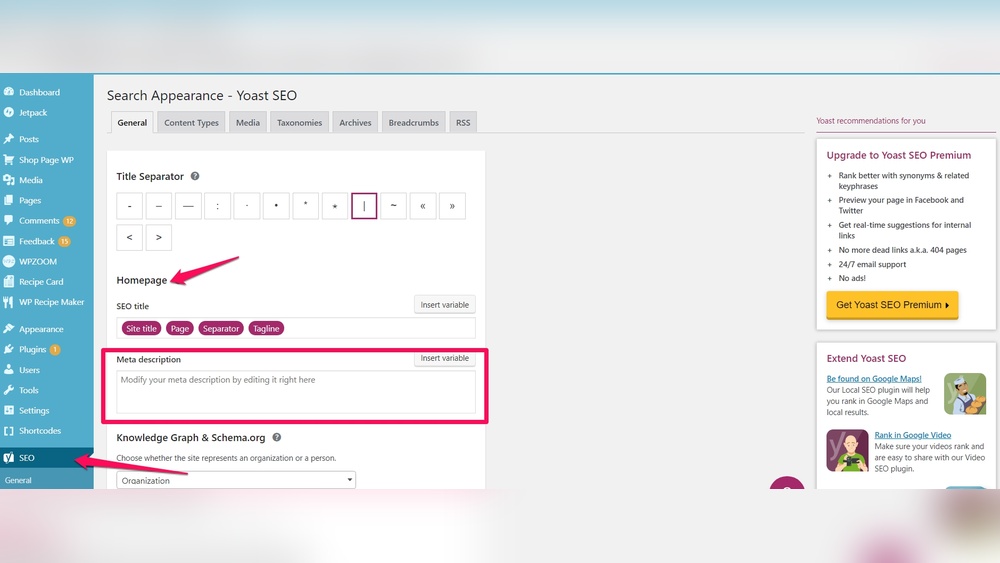
Meta descriptions show a summary of your page in search results. Include your main keyword here to catch attention. Write clear and inviting descriptions under 160 characters. Good meta descriptions improve click rates and bring more visitors to your site.
Using Seo Plugins For Keywords
Using SEO plugins makes adding keywords to your WordPress site easier. These tools guide you through the process. They help you pick the right keywords and show where to place them. SEO plugins save time and improve your site’s visibility on search engines.
Installing Popular Seo Plugins
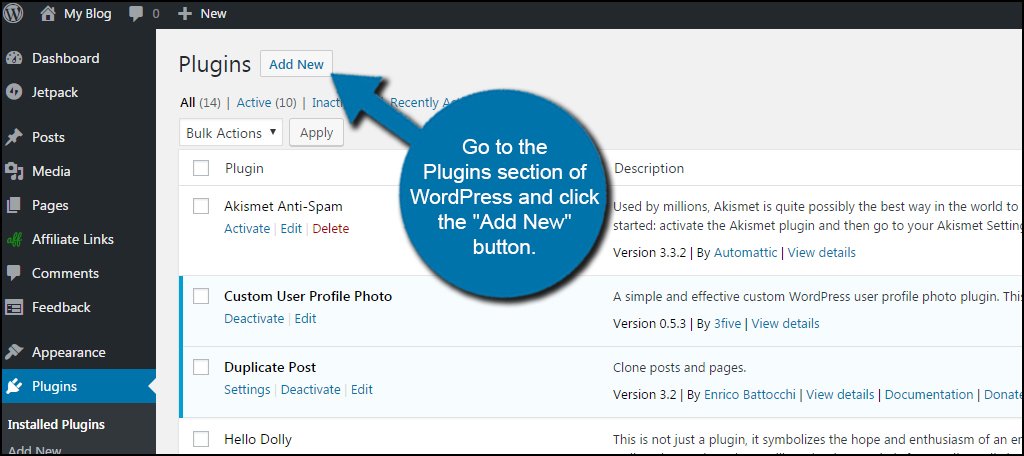
Start by choosing a popular SEO plugin. Yoast SEO and Rank Math are top choices. Go to your WordPress dashboard. Click on “Plugins” and then “Add New.” Search for the plugin name. Click “Install Now” and then “Activate.” The plugin will add new options to your dashboard.
Setting Focus Keywords
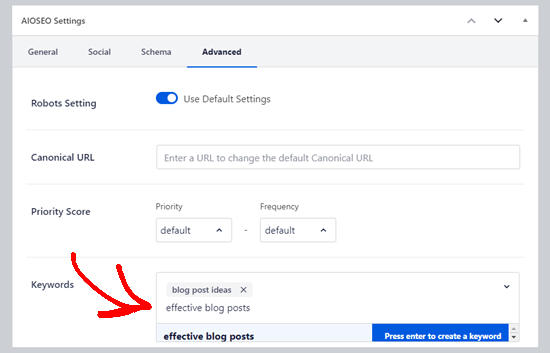
Focus keywords tell search engines what your page is about. Open the post or page editor. Scroll down to the SEO plugin box. Enter your main keyword or phrase in the focus keyword field. The plugin will check if you use the keyword well. It also suggests improvements to make your content clearer.
Analyzing Keyword Usage With Plugins
SEO plugins analyze how you use keywords in your content. They check titles, headings, and body text for keyword presence. Some plugins score your content and give tips. These tips help you use keywords naturally. Avoid keyword stuffing. Good plugins show you where to add or remove keywords.
Credit: www.greengeeks.com
Optimizing Images And Urls
Optimizing images and URLs improves your WordPress site’s SEO and user experience. Search engines read image details and URLs to understand your content better. Proper keywords in these areas help your site rank higher in search results.
Adding Keywords To Image Alt Text
Image alt text describes the image for search engines and users with disabilities. Use clear, simple phrases that include your main keywords. Avoid keyword stuffing. Write descriptions that match the image content and your page topic.
Creating Seo-friendly Urls
URLs should be short, clear, and contain keywords relevant to the page. Use hyphens to separate words, not underscores. Avoid numbers or random characters. A clean URL helps search engines and visitors understand the page quickly.
Naming Media Files Strategically
Name your media files with descriptive words before uploading. Use keywords that fit the image or file content. Replace spaces with hyphens. This practice helps search engines index your files and improves your site’s SEO.
Monitoring Keyword Performance
Monitoring keyword performance is key to improving your WordPress site’s SEO. It helps you see how well your keywords attract visitors. Tracking these results lets you make smart changes. This keeps your site relevant and competitive.
Tracking Rankings With Tools
Use tools like Google Search Console and SEMrush. They show how your keywords rank in search results. Track changes over time to spot trends. This data helps you know what works best for your site.
Adjusting Keywords Based On Data
Use the data from tracking tools to adjust keywords. Drop keywords that don’t perform well. Add new keywords that match what people search for. Keep your focus on terms that bring visitors.
Keeping Content Updated
Update your content often to keep it fresh. Add new information and improve old posts. This boosts your chances to rank higher. Search engines favor websites that stay current and useful.

Credit: www.crazyegg.com
Frequently Asked Questions
How Do I Add Keywords To WordPress Posts?
To add keywords, include them naturally in your post title, headings, and content. Use keywords in meta descriptions and image alt texts for better SEO.
Where Should I Place Keywords On My WordPress Site?
Place keywords in titles, headings, URLs, meta descriptions, and throughout your content. Also, add them to image alt tags and SEO plugin settings.
Can I Use Plugins To Add Keywords In WordPress?
Yes, SEO plugins like Yoast and All in One SEO help you add keywords easily. They guide keyword placement and optimize your content for search engines.
How Many Keywords Should I Add Per WordPress Page?
Focus on 1-3 primary keywords per page. Overusing keywords can harm SEO. Use related keywords naturally to improve content relevance.
Conclusion
Adding keywords to your WordPress site helps improve its visibility online. Use keywords naturally in titles, headings, and content. Don’t overload pages with too many keywords; keep it balanced. Focus on relevant words your visitors might search for. Regularly update your content to stay current.
This simple practice can boost your site’s traffic over time. Keep learning and adjusting your keywords as needed. Small steps lead to better search rankings and more visitors.


