
Have you ever come across a stunning website and wondered, “What WordPress theme are they using?” You’re not alone.
Discovering the theme behind a beautifully designed site can unlock a world of inspiration for your own projects. It’s like finding the secret ingredient to a recipe you can’t wait to try yourself. You’ll learn simple yet effective ways to uncover the WordPress theme of any site.
Imagine being able to replicate the look and feel of those sites you admire, enhancing your own web presence with ease. Let’s dive into the techniques that will turn this curiosity into actionable insights, elevating your web design game to new heights.

Credit: www.hostinger.com
Why Identify A WordPress Theme
Discovering a website’s theme can spark new ideas. It can help in creating your own site. Themes determine the look and feel. They affect how content is displayed. A good theme can make a site look professional. Some themes offer special features. These can be useful for your own site.
Knowing the theme can save time. It helps in finding similar themes. This is useful when building your site. You can also learn what works well. This helps in making better choices. Some themes are easier to use. They offer better support and updates. Finding a theme is a great starting point.
Common Tools And Extensions
Browser extensions are handy for finding a site’s theme. WordPress Theme Detector is a popular choice. It is easy to use. Install it from the browser’s store. Visit a site and click the extension. It will tell you the theme name. Wappalyzer is another useful tool. It shows the technologies a site uses. That includes WordPress themes too.
Online theme detectors work without installing anything. WhatWPThemeIsThat is a simple tool. Type the website URL and click “Search.” It will show the theme details. IsItWP is another online detector. Enter the site link, press “Analyze,” and wait. It will display the theme and plugins used. These tools are free and fast.
Manual Inspection Techniques
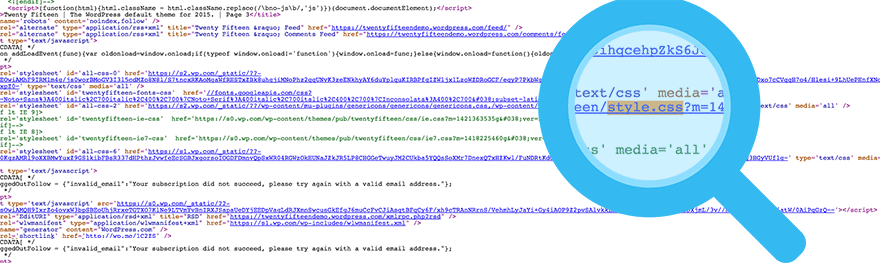
Many websites use WordPress themes. To find which one, you can check the source code. Right-click on the webpage and select “View Page Source”. This opens a new window with lots of code. Look for words like “wp-content/themes”. This will show the theme’s name. Sometimes, the name appears in the code comments. It may be tricky, but it’s helpful.
Another way is using browser developer tools. Press F12 on your keyboard. A new panel will open. Click on the “Elements” tab. Search for “theme” in the code. This may show the theme name. Sometimes, you can see it under “CSS” or “JS” files. Finding the theme name helps in understanding the website better.
Credit: winningwp.com
Analyzing Css And Html Files
Stylesheets hold important details. You can find the theme name here. Open the CSS file. Look at the top. Often, it shows the theme name. This helps identify the theme quickly. Developers use stylesheets for customizing. So, they add theme names for reference. It helps in organizing code.
HTML files show theme structure. Check the HTML tags. They can hint at the theme. Look at the class and ID names. Many themes have unique names. This helps in recognizing the theme. Sometimes, the theme name is in the footer. It’s usually in the credit section. Exploring the HTML structure helps in theme identification.
Examining WordPress Theme Directory
Finding a WordPress theme can be easy. Start by checking the theme directory. This directory lists all themes used on a site. Look for the style.css file. It tells the theme name and version. Use your browser’s inspect tool. Right-click on the page and choose “inspect”. This tool shows the theme used.
You can also use online tools to find themes. Websites like “What WordPress Theme Is That?” are helpful. They scan sites and tell you the theme name. These tools are simple and free. They save you time and effort.
Limitations And Challenges
Some websites use custom themes. These themes are not available online. They are made from scratch. This makes it hard to know what theme it is. Many sites change their theme’s original code. These changes make them look different. It hides the original theme’s identity. Some sites use obfuscated code. This is a way to hide their code. It makes it hard to read and understand. Obfuscation is like a secret code. Only the creator knows the real theme.
These challenges make theme detection difficult. But tools can help sometimes. They give hints about the theme. But they are not always right. Some sites are just too tricky.
Legal And Ethical Considerations
Checking a site’s theme must be done carefully. Respect the site’s privacy. Avoid using tools that hack or break into sites. Always ask for permission if needed. Many tools can help without breaking rules. Ethical behavior is important. It shows respect for others’ work.
Some sites may have custom themes. These might be hard to identify. Using simple tools is often best. Respect the site’s rules. Never share theme details without asking. This keeps everything fair and legal. Everyone wins when rules are followed.

Credit: www.greengeeks.com
Frequently Asked Questions
How To Identify A WordPress Theme?
You can identify a WordPress theme by using online tools like WPThemeDetector. These tools scan websites to reveal theme names and details. Alternatively, inspect the site’s source code for theme-related information. Look for ‘wp-content/themes’ in the code to find the theme directory and name.
Can I Find A Theme Without Tools?
Yes, you can find a theme manually. Inspect the site’s source code using browser tools. Look for ‘wp-content/themes’ in the code. This section often contains the theme’s name and directory. Understanding basic HTML can help you identify the theme details more easily.
Why Know What Theme A Site Uses?
Knowing a site’s theme can help replicate its design or features. It provides insights into the site’s functionality and layout. Additionally, understanding the theme can inspire your own site design choices. It’s especially useful for web developers and designers seeking inspiration.
Are Theme Detectors Always Accurate?
Theme detectors are generally accurate but not foolproof. They might miss custom or heavily modified themes. Some sites use plugins to hide theme details. Manual inspection can confirm theme information. Always cross-reference results for accuracy, especially when dealing with complex sites.
Conclusion
Discovering a WordPress theme can be simple. Tools and techniques simplify the process. Knowing a site’s theme helps in design inspiration. It also aids in understanding website features. Many online tools offer quick theme detection. Some require just the website URL.
Others involve more detailed steps. Remember to respect site privacy policies. Learning about themes can enhance your web development skills. It also broadens your design perspective. Start exploring now and enjoy the learning journey. With practice, identifying WordPress themes becomes second nature.
Keep experimenting and learning. Your website knowledge will surely grow.


