
Are you curious about how your WordPress site keeps tabs on visitors? Understanding whether WordPress tracks your audience—and how it does so—can help you make smarter decisions for your website.
Knowing who visits your site, where they come from, and what they do can unlock powerful insights to grow your audience and boost your success. You’ll discover exactly what WordPress tracks, how it works, and what it means for your privacy and site performance.
Keep reading to find out how to take control of your visitor data and turn it into a real advantage.

Credit: www.activecampaign.com
WordPress And Visitor Tracking
WordPress is a popular platform for building websites. Many people wonder if WordPress tracks visitors. Tracking visitors means knowing who visits your site and what they do. This helps website owners understand their audience. WordPress offers some basic tools and options to see visitor activity. It also supports plugins that add more detailed tracking features.
Built-in Tracking Features
WordPress itself has limited tracking features. It shows simple stats like the number of comments and posts. Some themes and hosting services may add basic visitor counters. These built-in tools do not give detailed visitor data. They cannot show where visitors come from or what pages they visit most.
Role Of Plugins In Analytics
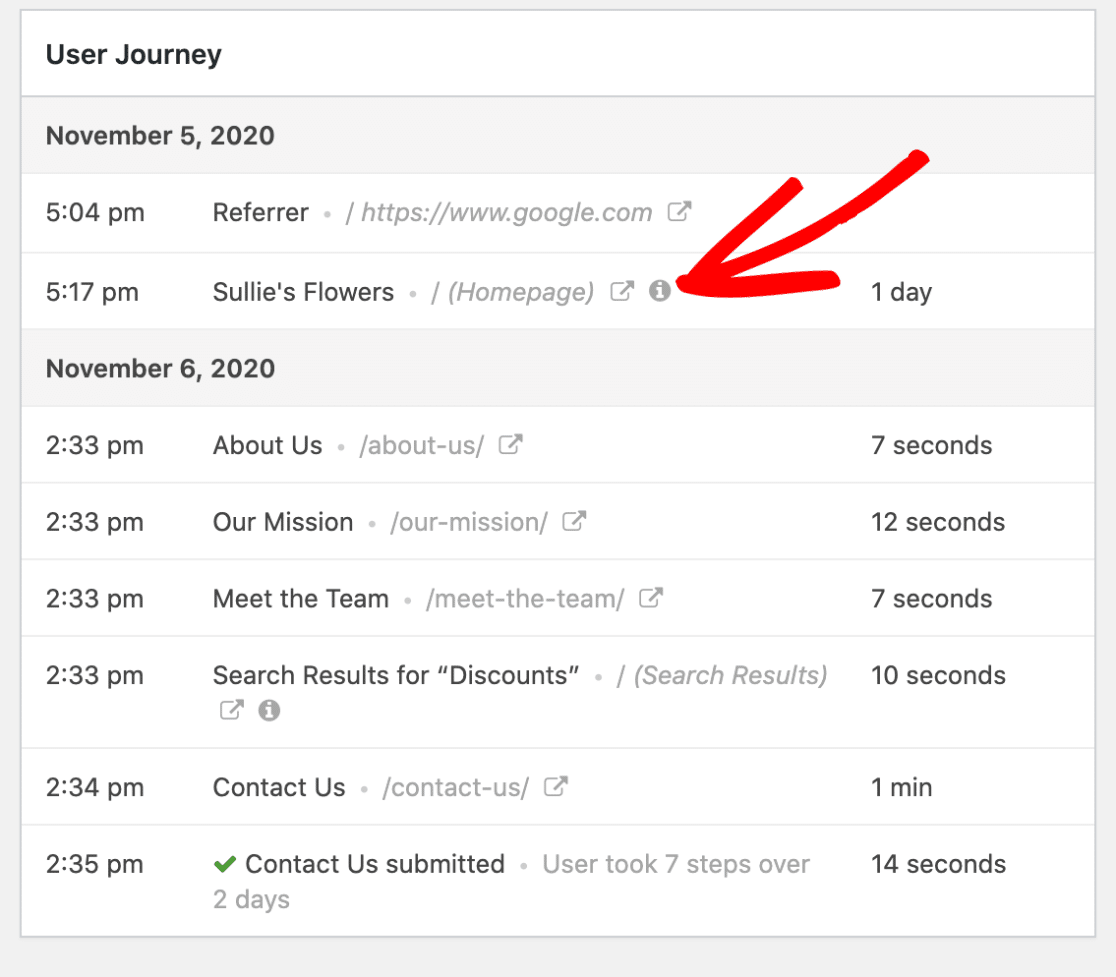
Plugins play a big role in visitor tracking on WordPress. Many plugins connect your site to popular analytics services. For example, Google Analytics plugins help track visitor behavior in detail. Plugins can show page views, visitor locations, and time spent on pages. They offer easy ways to collect and view visitor data without coding.
Default Data Collection
WordPress collects some basic data by default. This includes IP addresses, user agents, and login information. This data helps manage site security and user accounts. WordPress does not track detailed visitor activity without extra plugins. Privacy settings control how much data is stored and shared.
Credit: wpforms.com
Popular Analytics Tools For WordPress
Tracking visitors is essential for any WordPress site owner. It helps understand who visits your site and what they do there. Many tools exist to make visitor tracking simple and clear. These tools offer different features to suit various needs and skill levels. Below are some popular analytics tools used with WordPress.
Google Analytics Integration
Google Analytics is a top choice for many WordPress users. It provides detailed reports on visitor behavior. You can see how many people visit, what pages they like, and how long they stay. Integrating Google Analytics with WordPress is easy using plugins or manual code. It is free and very powerful for tracking all types of traffic.
Jetpack Site Stats
Jetpack Site Stats is a simple tool made for WordPress users. It offers basic visitor stats right in your dashboard. You can check page views, popular posts, and traffic sources quickly. Jetpack is easy to set up and works well for small to medium sites. It does not provide as much detail as Google Analytics but is user-friendly.
Other Third-party Plugins
Several other plugins offer visitor tracking for WordPress. Examples include MonsterInsights, Matomo, and WP Statistics. These plugins vary in features and ease of use. Some focus on privacy, while others give deep insights. Choosing the right plugin depends on your specific needs and comfort with analytics.
How Visitor Data Is Collected
Understanding how WordPress collects visitor data helps website owners improve their sites. Data collection happens through different tools and methods. These tools gather information about visitors to analyze site performance and user experience.
Cookies And Tracking Scripts
Cookies store small pieces of data on a visitor’s device. They help remember user preferences and login details. Tracking scripts run in the background to collect browsing information. These scripts often come from plugins or third-party services like Google Analytics. They track pages visited, time spent, and clicks.
Ip Address And Location Data
WordPress can capture the visitor’s IP address. This number identifies the visitor’s internet connection. IP addresses help estimate visitor location by city or country. Location data guides content customization and security measures. It also helps detect suspicious activity or spam.
User Behavior Metrics
User behavior metrics measure how visitors interact with the site. Data includes clicks, scroll depth, and navigation paths. These metrics show what content visitors like or ignore. They help improve site layout and user experience. Tracking user actions aids in making data-driven decisions.

Credit: independentwp.com
Privacy Concerns And Compliance
Privacy concerns are important when tracking visitors on WordPress sites. Website owners must follow laws that protect user data. These laws set rules for collecting, storing, and using personal information. Staying compliant helps avoid legal issues and builds trust with visitors.
Gdpr And Ccpa Impact
The GDPR protects data for people in the European Union. It requires clear permission before tracking visitors. The CCPA applies to California residents and gives users control over their data. WordPress site owners must meet both laws if their audience includes these regions.
User Consent Mechanisms
Consent means getting permission from visitors to track them. WordPress sites often use pop-ups or banners to ask for consent. Users can accept or decline tracking cookies. This process helps sites follow legal rules and respect visitor privacy.
Data Anonymization Practices
Data anonymization hides personal details from collected visitor data. WordPress plugins can remove or mask user identifiers. This practice lowers privacy risks and supports compliance with data laws. It allows site owners to analyze traffic without exposing personal information.
Managing Analytics Settings
Managing analytics settings in WordPress helps control how visitor data is tracked and used. Proper settings protect user privacy and improve site performance. Adjusting these options lets you keep data collection clear and respectful.
Configuring Privacy Options
WordPress offers privacy settings to limit data collection. You can decide what information to gather from visitors. Some plugins allow customizing data storage and sharing. These options help meet privacy laws and user expectations.
Disabling Tracking Features
Turning off tracking features stops data from being collected. WordPress lets you disable built-in analytics or third-party plugins. This reduces data stored on your site and lowers privacy risks. Disabling tracking also improves site speed and user trust.
Best Practices For Transparency
Be open about what data you collect and why. Inform visitors through clear privacy policies or notices. Provide options to opt-out of tracking whenever possible. Transparency builds trust and keeps your site ethical and user-friendly.
Alternatives To WordPress Analytics
WordPress offers basic visitor tracking, but it might not suit every need. Many users seek alternatives for better control, privacy, or features. Exploring other options can help you find the right fit for your website.
Self-hosted Analytics Solutions
Self-hosted tools let you keep all data on your server. This option enhances privacy and control over visitor information. Popular choices include Matomo and Open Web Analytics. These platforms provide detailed reports without sharing data externally. You install and manage them yourself, ensuring full ownership.
Privacy-focused Tools
Privacy-focused analytics respect user data and comply with regulations. Tools like Plausible and Fathom offer simple, clear insights without tracking personal details. They do not use cookies or collect IP addresses. These solutions prioritize user privacy while giving useful visitor data.
Manual Log File Analysis
Every web server creates log files recording visitor activity. You can analyze these files to understand your audience. Tools like AWStats or GoAccess help process logs into readable reports. This method avoids JavaScript tracking and respects user privacy fully. It requires some technical knowledge but offers deep insights.
Frequently Asked Questions
Does WordPress Automatically Track Website Visitors?
No, WordPress does not track visitors by default. You need to install plugins or use third-party tools like Google Analytics for visitor tracking. This allows you to monitor traffic, user behavior, and site performance effectively.
How Can I Track Visitors On My WordPress Site?
You can track visitors by installing analytics plugins such as MonsterInsights or using Google Analytics. These tools provide detailed insights about visitor numbers, demographics, and behavior on your WordPress site.
Is Visitor Data Stored Securely In WordPress?
WordPress itself doesn’t store visitor data securely by default. Security depends on your hosting provider and plugins used. Always choose reputable analytics plugins and maintain strong site security practices to protect visitor information.
Can WordPress Track Visitor Locations And Devices?
Yes, with the right plugins or Google Analytics integration, WordPress can track visitor locations, devices, and browsers. This data helps you understand your audience better and tailor your content or marketing strategies accordingly.
Conclusion
WordPress itself does not track visitors automatically. You need plugins or tools like Google Analytics for that. These tools help you understand who visits your site. Tracking visitor data helps improve your website’s content and design. Always inform visitors about tracking for privacy reasons.
Tracking gives useful insights but requires careful handling. Choose tracking methods that fit your site’s needs. Keep your website user-friendly and respectful of privacy. This way, you learn more without losing trust.


