

Are you thinking about building a website with WordPress but wondering if GoDaddy is the right hosting choice for you? You’re not alone.
Choosing a hosting provider can feel overwhelming, especially when you want your site to run smoothly and grow without headaches. What if you could get all the answers in one place? You’ll discover exactly how GoDaddy supports WordPress, what features you can expect, and whether it fits your needs.
Keep reading to make sure your website starts strong and stays strong.
Godaddy Hosting Plans
GoDaddy offers a variety of hosting plans for different needs. They provide options for small blogs, business websites, and online stores. You can find plans that support WordPress well. Each plan comes with features designed to help your website run smoothly and load fast.
GoDaddy’s plans are easy to set up. They include tools to manage your website without technical skills. These plans suit beginners and those with some website experience. The hosting choices vary in price and features to fit different budgets and goals.
Shared Hosting Features
Shared hosting is GoDaddy’s most basic plan type. Your website shares server space with others. This keeps costs low. The plan includes a free domain for the first year. It offers unmetered bandwidth and storage. You get a simple control panel to manage your site. Free SSL certificates help secure your visitors’ data. Email accounts come with the plan too.
WordPress-specific Plans
GoDaddy has plans made just for WordPress sites. These come with WordPress pre-installed. The plans include automatic updates and backups. They also offer security features tailored for WordPress. The servers are optimized for faster WordPress performance. You get access to a managed dashboard for easier site control. Support is available from WordPress experts.
Pricing Comparison
Shared hosting plans start at a low monthly price. WordPress plans are slightly more expensive but include extra features. Prices depend on the plan length and add-ons chosen. Discounts often apply for longer commitments. Both plan types offer a money-back guarantee. This helps you try the service without risk.

Credit: wordpress.com
WordPress Installation Options
GoDaddy offers several ways to install WordPress on your hosting account. You can choose the method that fits your skills and needs. Each option helps you get WordPress up and running quickly.
One-click Installation
One-click installation is the fastest way to start. GoDaddy provides a simple tool that installs WordPress automatically. You do not need technical knowledge. Just follow a few steps, and WordPress will be ready. This option saves time and avoids errors.
Manual Setup Process
The manual setup gives more control over the installation. You download WordPress from its official site. Then, upload it to your GoDaddy server using FTP. After that, create a database and configure the settings. This method needs some technical skills but offers full customization.
Migration From Other Hosts
If you have WordPress on another host, GoDaddy supports migration. You can move your website files and database to GoDaddy servers. Tools and guides help simplify this process. Migration keeps your site data safe and reduces downtime.
Performance And Speed
Performance and speed are key for any WordPress site. Visitors expect fast pages. Slow sites lose traffic and rank lower in search engines. GoDaddy offers features to help your WordPress site run smoothly and quickly. These features focus on strong servers, smart caching, and reliable uptime.
Server Infrastructure
GoDaddy uses powerful servers to host WordPress sites. Their servers have modern technology and fast processors. This helps load your website quickly. They also have data centers in different locations. This reduces the distance between the server and visitors. The closer the server, the faster the site loads.
Caching And Cdn Support
Caching stores copies of your website pages. It lets visitors see pages faster without waiting for the server. GoDaddy supports caching for WordPress sites. They also offer a Content Delivery Network (CDN). A CDN stores website files on servers worldwide. Visitors get files from the nearest server. This reduces loading time and improves speed globally.
Uptime Reliability
Uptime means the time your site is online and working. GoDaddy promises high uptime for WordPress sites. Their systems monitor servers to prevent downtime. If a problem occurs, they act quickly to fix it. Good uptime ensures visitors can access your site anytime without errors.

Credit: www.godaddy.com
Security Measures
Security is key for any WordPress website. GoDaddy offers solid security features to protect your site. These tools help keep your data safe and your visitors secure. Understanding these features can help you choose the right hosting plan.
Ssl Certificates
SSL certificates encrypt data between your website and visitors. GoDaddy provides easy SSL setup for WordPress sites. This helps build trust and improves your site’s ranking on search engines. Without SSL, browsers may warn visitors that your site is unsafe.
Malware Scanning
GoDaddy scans your WordPress site for malware regularly. It detects harmful code that can damage your site or steal data. Early detection stops malware from spreading. You get alerts and tools to remove threats quickly.
Backup Solutions
Backups save copies of your WordPress site automatically. GoDaddy offers daily backups to protect your content and settings. You can restore your site if something goes wrong. This reduces downtime and data loss risks.
Customer Support
Customer support plays a big role when choosing a hosting provider for WordPress. Reliable help can save time and reduce stress. GoDaddy offers customer service that aims to assist users with WordPress issues clearly and quickly. Their support is designed to guide beginners and experienced users alike.
WordPress Expertise
GoDaddy’s support team has good knowledge of WordPress. They understand common problems like plugin conflicts, theme setup, and updates. Their agents can answer questions about WordPress settings and features. This expertise helps solve issues faster and keeps websites running smoothly.
Support Channels
GoDaddy provides several ways to contact support. Users can reach out through live chat, phone, and email. The live chat is available 24/7 for quick help. Phone support connects customers to experts for detailed guidance. Email support covers less urgent questions with detailed replies.
Response Time
GoDaddy aims to respond quickly to customer requests. Live chat and phone support usually connect within minutes. Email replies may take a few hours but are thorough. Fast response times reduce downtime and keep WordPress sites active. This speed helps users fix problems without long waits.
Control Panel And User Experience
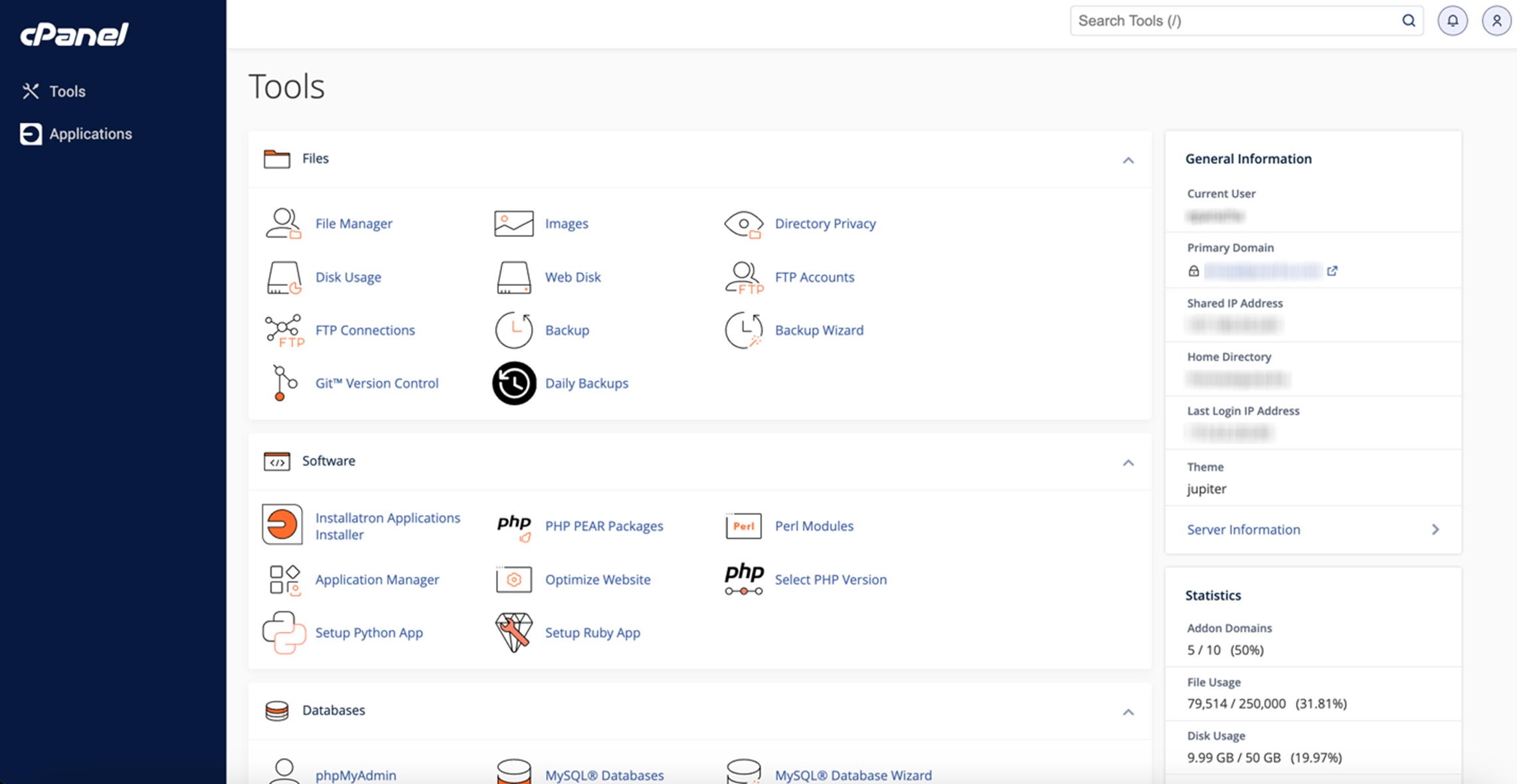
The control panel shapes the user experience on GoDaddy for WordPress hosting. A clear, simple dashboard helps users manage their sites with ease. The design focuses on making common tasks quick and straightforward. This ease of access reduces frustration and saves time.
Dashboard Features
The GoDaddy dashboard offers essential tools for WordPress users. It shows website statistics and performance at a glance. Users can access backups, security settings, and domain controls easily. The dashboard keeps important information organized in one place. This setup helps users stay on top of their website management.
Ease Of Use
GoDaddy’s control panel is friendly for beginners and experienced users. The layout is simple and intuitive. Menus are clear, and options are easy to find. Tasks like installing WordPress or updating plugins take only a few clicks. The smooth interface reduces the learning curve for new users.
WordPress Management Tools
GoDaddy includes several tools to manage WordPress efficiently. Automatic updates keep the site secure and current. Users can manage themes and plugins without leaving the dashboard. There are options for staging sites and restoring backups quickly. These tools help maintain a healthy and fast WordPress site.
Scalability And Resources
Scalability and resources are important when choosing a web host for WordPress. Your site needs room to grow. It needs enough power to handle more visitors and data. GoDaddy offers various plans that support WordPress sites as they expand. Understanding their limits and options helps you plan better.
Bandwidth And Storage Limits
GoDaddy sets limits on bandwidth and storage for WordPress hosting. Bandwidth controls how much data your site can send to visitors. Storage is the space for your files and content. Basic plans have lower limits, suitable for small sites. Bigger plans provide more bandwidth and storage for growing sites.
Upgrade Options
Upgrades are available to meet your site’s needs. You can move from shared hosting to VPS or dedicated servers. Each upgrade gives more resources and better performance. Upgrading is simple and helps your site handle more traffic and data.
Handling Traffic Spikes
Traffic spikes happen when many visitors come to your site suddenly. GoDaddy’s hosting can manage these spikes depending on your plan. Higher-tier plans offer better ability to handle large visitor numbers. You can avoid slowdowns or crashes by choosing the right plan for your traffic.
Credit: www.godaddy.com
Pros And Cons Of Godaddy For WordPress
GoDaddy is a popular web host that supports WordPress websites. Many people choose GoDaddy for its ease of use and affordable plans. Yet, it has both good and bad points. This section explores the pros and cons of GoDaddy for WordPress users.
Advantages
- Easy WordPress setup with one-click installation.
- Affordable hosting plans fit small budgets.
- Good customer support available 24/7 by phone and chat.
- Free domain name included with some plans.
- User-friendly control panel for beginners.
- Automatic WordPress updates keep sites secure.
- Built-in website builder for quick page creation.
Potential Drawbacks
- Limited storage and bandwidth on lower plans.
- Performance can slow with higher traffic volumes.
- Extra fees for backups and security add costs.
- Some users find upselling during checkout annoying.
- Less flexibility for advanced WordPress customization.
- Basic SSL certificates only on some plans.
- Customer support quality varies by issue complexity.
Alternatives To Godaddy
GoDaddy is a well-known web host that supports WordPress. Many users choose it for its ease and popular features. Still, some seek other options. Alternatives to GoDaddy offer different benefits and pricing. Exploring these choices can help find the best fit for your WordPress site.
Popular WordPress Hosts
SiteGround is famous for fast support and strong security. Bluehost is recommended by WordPress itself and is beginner-friendly. DreamHost offers flexible plans with a custom control panel. HostGator provides affordable options and easy WordPress setup. Each host serves different needs and budgets.
Comparative Benefits
SiteGround excels in speed and customer service. Bluehost has simple tools for new users. DreamHost offers a 97-day money-back guarantee. HostGator gives scalable plans for growing sites. GoDaddy provides domain management and marketing tools. Comparing features helps pick a host that fits your goals.
Frequently Asked Questions
Does Godaddy Offer WordPress Hosting Plans?
Yes, GoDaddy provides specialized WordPress hosting plans. These plans include easy installation, automatic updates, and optimized performance for WordPress sites.
Can I Install WordPress On Godaddy Shared Hosting?
Absolutely, GoDaddy’s shared hosting supports WordPress installation. Users can install WordPress with one-click through the GoDaddy control panel.
Does Godaddy Support Automatic WordPress Updates?
Yes, GoDaddy offers automatic WordPress core and plugin updates. This keeps your site secure and up-to-date without manual effort.
Is Godaddy Good For WordPress Beginners?
GoDaddy is beginner-friendly with simple setup, helpful support, and managed WordPress features. It’s ideal for new WordPress users.
Conclusion
GoDaddy offers solid support for WordPress users. It provides easy installation and reliable hosting options. Beginners can quickly set up their websites without hassle. Customer service is available to help with common WordPress issues. The platform includes tools that keep your site running smoothly.
Overall, GoDaddy makes managing a WordPress site simple. It suits people who want a straightforward hosting experience. Choosing GoDaddy can save time and reduce technical stress. So, it remains a practical choice for many WordPress users.


