
Are you looking to take your WordPress website to the next level? Creating a custom post type could be the game-changer you need.
Imagine having the flexibility to tailor your content exactly as you envision, without being confined to standard post or page formats. By crafting a custom post type, you can organize and display your content in a way that resonates with your audience, making it easier for them to find exactly what they’re looking for.
But where do you start? What theme pages are essential to make your custom post type not only functional but visually appealing and user-friendly? In this guide, you’ll discover the key theme pages you need to consider and how they can enhance your custom post type. By the end of this article, you’ll have the confidence and knowledge to implement these changes seamlessly, ensuring your WordPress site stands out in the digital landscape. Ready to unlock the full potential of your website? Let’s dive in!
Credit: www.advancedcustomfields.com
Custom Post Types Essentials
Custom Post Types let you add new content types in WordPress. They are different from posts and pages. This helps organize content better. It’s useful for portfolios, testimonials, or products. You can design the layout to fit needs.
Benefits include better content management and organization. They allow for unique styles and layouts. You can even add custom fields. This makes your site more dynamic and engaging.
Imagine a website for a photographer. Custom Post Types can be used for photo galleries. Another example is a restaurant. Create a post type for menus. These examples show how flexible Custom Post Types are.
Developers love using them in themes. They offer freedom in design. Users enjoy better navigation and organization. It’s a win-win for everyone.
Setting Up A Custom Post Type
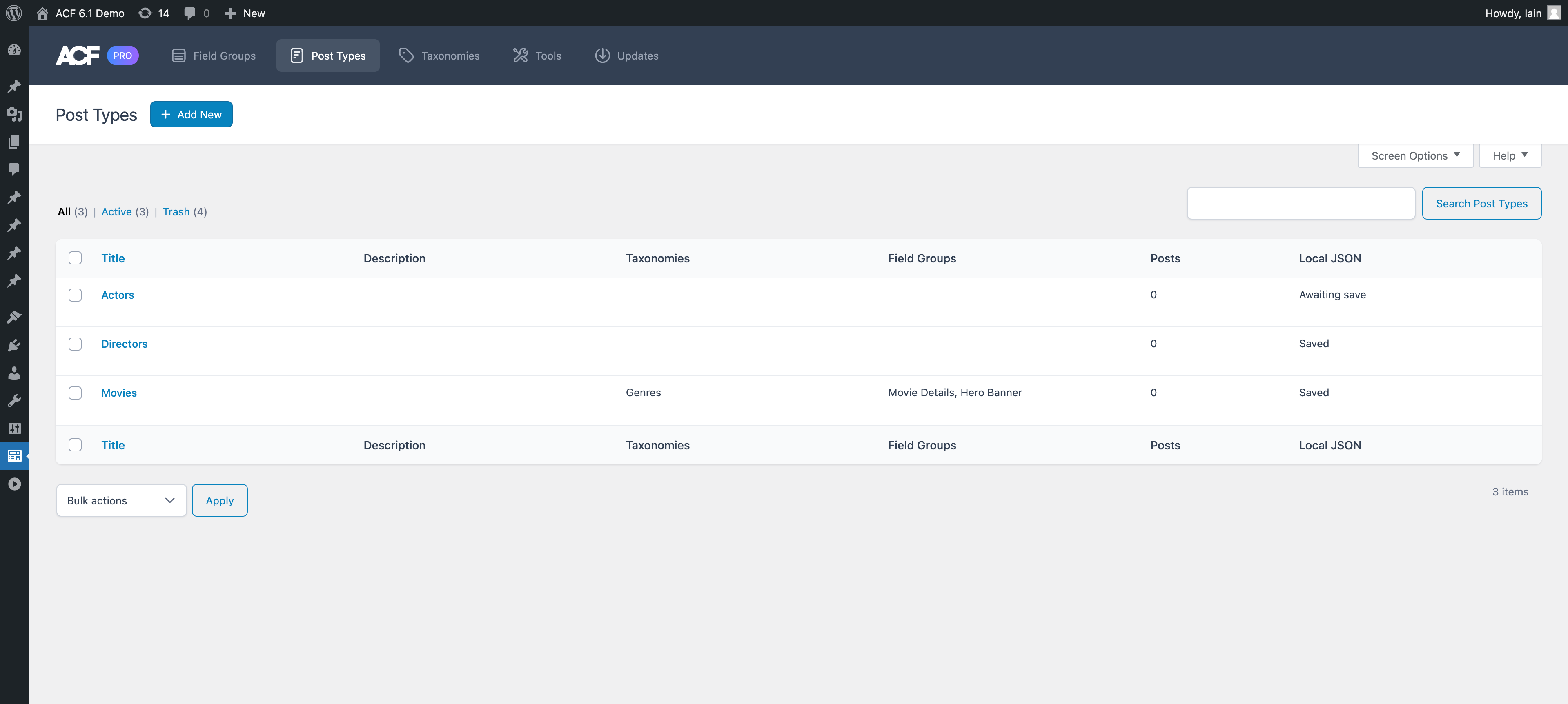
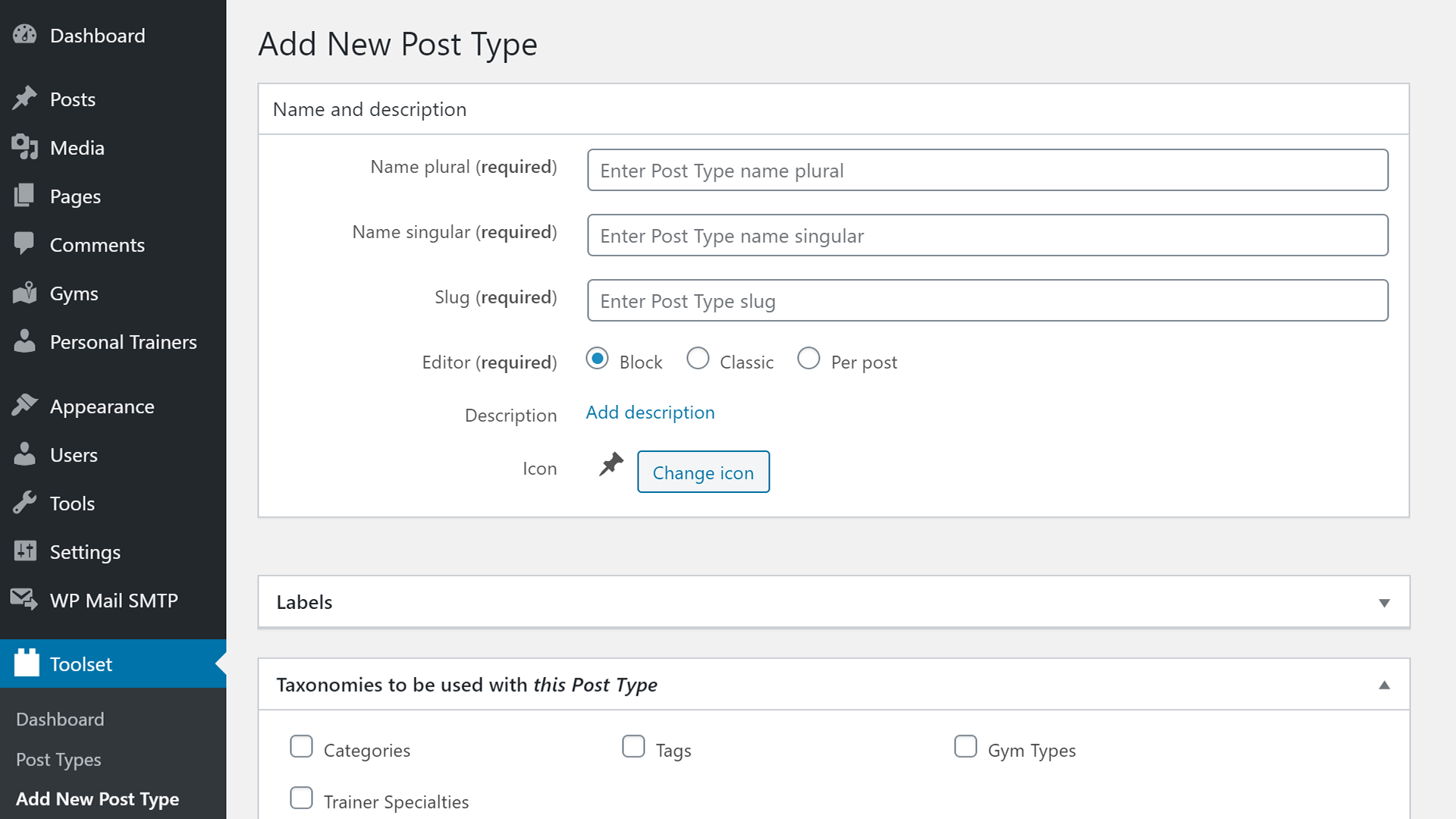
Plugins are useful for creating custom post types. They make the process easy. Popular plugins help you a lot. Custom Post Type UI is one of them. You can set up post types quickly. Another one is Pods. It gives more options. With plugins, you get a user-friendly interface. It saves time and effort. You don’t need coding skills. Just a few clicks and settings. Your custom post type is ready. Easy, right?
Coding is another way to create custom post types. It requires some skills. PHP is the language used. You need to know functions and hooks. The register_post_type function is important. It helps define your post type. Place the code in your theme’s functions file. Be careful with syntax. Wrong code can break your site. Manual coding gives more control. You decide every detail.
Essential Theme Pages
The Single Post Template shows one post at a time. This page is special. It helps users read posts easily. It can show titles, dates, and authors. You can add comments too. Each post looks clear and neat. This helps readers enjoy reading.
The Archive Template is like a book’s table of contents. It shows many posts at once. Posts are listed by date or category. This makes finding older posts easy. Readers can see a summary of each post. It helps them pick what to read next.
Custom Taxonomies organize posts. They use tags and categories. This helps group similar posts. Readers find related posts quickly. It makes the website neat. With this, browsing becomes simple and fun.
Credit: toolset.com
Enhancing Custom Post Types
Custom fields let you add extra data to your posts. This data can be anything. For example, author name, date, or location. You can use this data in your theme. It helps in making your site more dynamic. This is important for personalizing content.
You can create custom fields using plugins. A popular one is ACF. It stands for Advanced Custom Fields. It’s easy to use. You can add fields in just a few clicks.
Meta boxes are like special containers. They hold extra information. This information is related to your post type. You can add text, images, or links. Meta boxes help in organizing content. They are displayed in the post editing screen.
You can create meta boxes with code. Or use plugins. WordPress has many plugins. They make it easy to add meta boxes. Always check plugin reviews before using.
Styling And Functionality
Adding custom CSS can change how your WordPress site looks. It makes your site unique. Using custom JavaScript can add special features. It brings your website to life. These tools help make a site special and stand out.
Page builders help in creating beautiful pages. They are easy to use. Integration allows custom post types to work smoothly. It ensures everything fits well together. This makes your site look professional and neat. Page builders are handy for creating complex designs without coding.
Credit: toolset.com
Testing And Maintenance
Crafting a custom post type in WordPress requires specific theme pages. These include single-post and archive templates to ensure seamless display and functionality. Proper testing and regular maintenance guarantee smooth performance and user experience.
Debugging Common Issues
Custom post types can face problems. Sometimes, they don’t show. Other times, they show wrong content. Check your theme settings. Look at your plugins. Conflicts might happen between them. Use debug tools. They help find errors fast. Fix small issues first. They are often easier. Ask for help if needed. Forums online have many answers. Experts share tips freely. Your site should work smoothly. Users need easy access to posts. Happy users come back often.
Updating And Compatibility
Keep your WordPress updated. Updates bring new features. They also fix bugs. Compatibility is key for plugins. Old plugins might cause issues. Test before updating. Check if your theme supports new versions. Some themes need manual updates. Backup your site first. Backups save your data. Never skip this step. It avoids future headaches. Check your hosting service. They might help with updates. Ask them for advice. Their support is valuable.
Frequently Asked Questions
What Is A Custom Post Type In WordPress?
A custom post type in WordPress is a content type that allows you to create additional content structures. These are beyond the default posts and pages. They help in organizing and displaying specific content like portfolios, testimonials, or products. This enhances website functionality and user experience.
How Do I Create A Custom Post Type?
To create a custom post type, you can use a plugin or code it manually. Plugins like Custom Post Type UI simplify the process. Alternatively, you can add code to the theme’s functions. php file. This method offers more customization control for developers.
What Theme Pages Are Necessary For Custom Post Types?
For custom post types, essential theme pages include single-{post_type}. php and archive-{post_type}. php. These templates control the display of individual posts and archives. They ensure custom post types are integrated seamlessly into the site’s design, maintaining consistency and functionality.
Can I Use Plugins For Custom Post Types?
Yes, plugins like Custom Post Type UI and Toolset Types can create custom post types easily. They provide user-friendly interfaces for setup without coding. These plugins also offer additional features, such as custom taxonomies and fields, enhancing content management and organization.
Conclusion
Creating a custom post type in WordPress enhances your site. It offers flexibility and organization. You can tailor your theme pages to fit your needs. This improves user experience and engagement. Start by planning your content structure. Use plugins or code to set up your custom post type.
Ensure your theme supports your new content. Check compatibility and functionality. Test everything thoroughly. This ensures a smooth user journey. With these steps, your website can stand out. Better content management leads to better results. Happy customizing!


