
Are you wondering if you can use Google AdSense on your WordPress site? If you want to earn money from your blog or website, this question is crucial.
Knowing how to set it up the right way can make a big difference in your success. You’ll discover exactly how to get started with Google AdSense on WordPress and avoid common mistakes that could cost you time and earnings.
Keep reading to unlock the simple steps that will help you turn your site into a reliable source of income.
Google Adsense Basics
Google Adsense Basics help you understand how to earn money from your WordPress site. Adsense is a simple way to show ads and get paid. This section explains what Adsense is, how it works, and its benefits.
What Is Google Adsense
Google Adsense is an ad program by Google. It lets website owners show ads on their pages. These ads match the content of your site. Adsense helps you earn money when visitors click or view these ads.
How Adsense Works
First, you sign up for a free Adsense account. Google reviews your website before approval. After approval, you add Adsense code to your WordPress site. Google then shows ads that fit your site’s topic. You earn money for clicks or ad views.
Benefits Of Using Adsense
Adsense is easy to set up and use. It offers many types of ads, like text, images, and videos. The ads are relevant, so visitors may find them useful. It helps monetize your site without selling products. Payments are reliable and regular.
WordPress And Adsense Compatibility
WordPress and Adsense can work well together. Many website owners want to earn money with Adsense on their WordPress sites. Understanding how these two platforms fit is important for success. Not all WordPress setups support Adsense the same way. Knowing the right type and rules helps avoid problems and keeps your site running smoothly.
Types Of WordPress Platforms
WordPress has two main platforms. One is WordPress.com, a hosted service. The other is WordPress.org, a self-hosted option. WordPress.com limits direct Adsense use on free plans. You need a paid plan to add Adsense. WordPress.org allows full control and easy Adsense integration. Knowing your platform type helps decide the best Adsense approach.
Choosing The Right WordPress Version
WordPress.org requires hosting and installation. This version supports all Adsense features. You can add Adsense code anywhere on your site. WordPress.com restricts code access on free plans. Paid plans unlock plugin and code options. Choose the version based on how much control you want over ads.
Adsense Policies For WordPress
Google Adsense has rules for all websites. Your WordPress site must follow these rules to keep Adsense active. Avoid placing too many ads or misleading content. Your site should have original, quality content. Privacy policies and clear navigation are needed. Following Adsense policies ensures your WordPress site stays in good standing.
Setting Up Adsense On WordPress
Setting up Google Adsense on your WordPress site is a straightforward process. It helps you earn money by showing ads on your pages. This section explains how to start with Adsense and connect it to WordPress.
Creating An Adsense Account
First, visit the Google Adsense website. Click the sign-up button to create an account. You need a Google account to register. Provide your website URL and your contact details. Google will review your information and website. Approval can take a few days.
Verifying Your Website
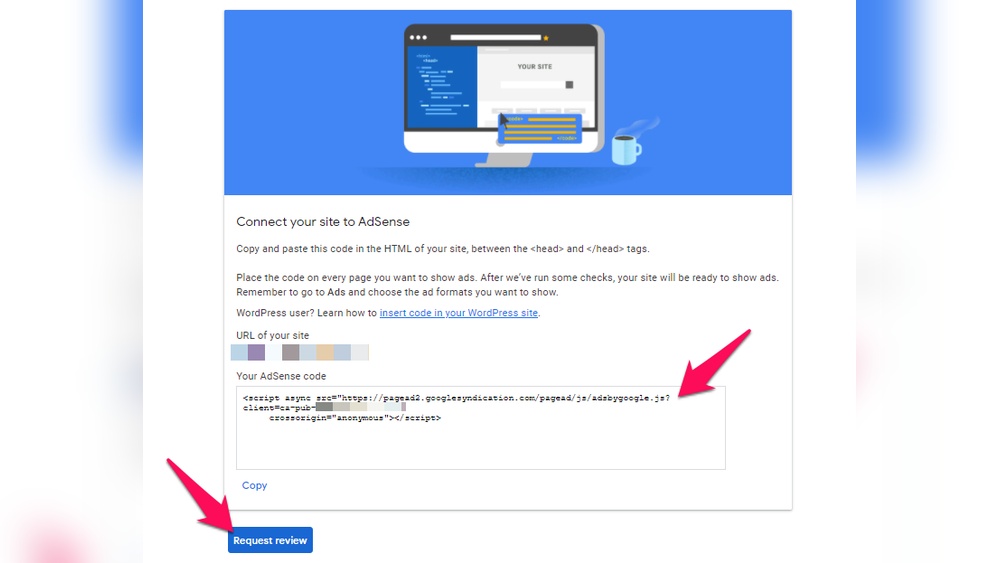
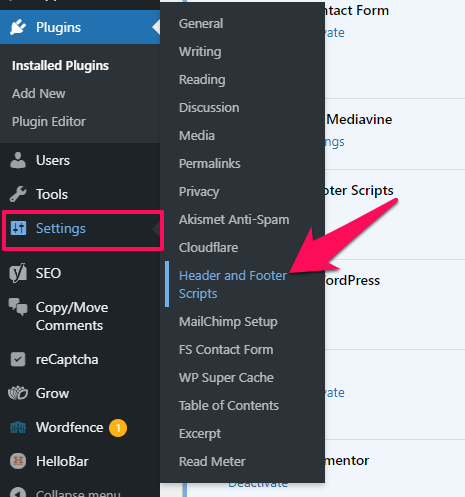
Google asks you to verify your site ownership. You get a code snippet from Adsense. Copy this code and add it to your WordPress site header. Use a plugin or edit the header.php file in your theme. Once added, return to Adsense and click “Verify.” This step confirms you control the website.
Linking Adsense To WordPress
After verification, link Adsense to your WordPress site. Use a plugin like “Site Kit by Google” for easy connection. Install and activate the plugin from your dashboard. Follow the setup wizard to connect your Adsense account. Now, you can place ads on your site and start earning.
Credit: www.wpbeginner.com
Integrating Ads On WordPress
Integrating Google Adsense on WordPress is a straightforward way to earn money from your website traffic. It lets you display ads that match your content and audience. This section covers how to add Adsense ads on WordPress efficiently.
Manual Code Insertion
Manual code insertion means adding Adsense code directly to your WordPress theme. You copy the ad code from your Adsense account. Then paste it into the HTML of your site. This method gives full control over where ads appear. It requires basic knowledge of WordPress files like header.php or sidebar.php. Be careful to place the code in the right spot. A small error can break your site’s layout.
Using Adsense Plugins
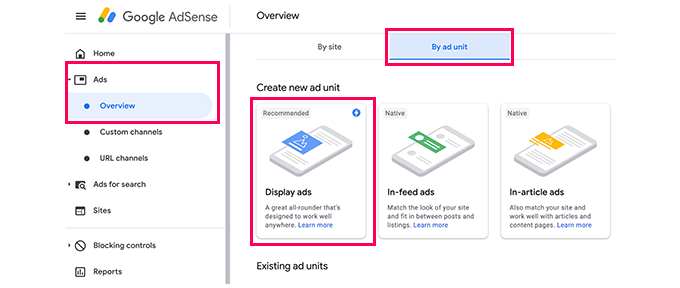
Plugins simplify the ad integration process. They help insert Adsense code without editing theme files. Popular plugins like “Ad Inserter” or “Advanced Ads” offer easy-to-use interfaces. You just enter your Adsense details and choose where ads show up. Plugins handle the code behind the scenes. This way, you avoid errors and save time. Many plugins also support ad rotation and responsive ads.
Best Ad Placement Strategies
Good ad placement increases clicks and revenue. Place ads near content, like below titles or inside posts. Avoid placing too many ads as it annoys visitors. Sidebar and footer are common spots but may get less attention. Use responsive ads to fit all screen sizes. Test different placements to see what works best for your audience. Balance user experience and ad visibility for better results.
Optimizing Adsense Performance
Optimizing AdSense performance on your WordPress site helps increase your earnings. Small changes can lead to better ad visibility and more clicks. Focus on key areas to improve user experience and ad engagement.
Improving Ad Click Rates
Place ads in visible spots where users spend time. Near content or at the end of articles works well. Use a mix of ad sizes to see what fits best. Avoid too many ads that annoy visitors. Test different colors that blend with your site but stand out.
Mobile Optimization
Most users visit sites on phones. Make sure your ads fit small screens. Use responsive ad units that adjust automatically. Check loading speed to keep users from leaving. Mobile-friendly ads improve user experience and clicks.
Tracking And Analytics
Monitor your ad performance regularly. Use Google AdSense reports to see which ads earn more. Connect Google Analytics to track visitor behavior. Look for patterns in clicks and traffic sources. Use data to make smart decisions and improve earnings.
Common Issues And Fixes
Using Google Adsense on WordPress can sometimes cause issues. These problems may stop your ads from showing or delay your earnings. Understanding common issues helps fix them faster. This section covers main problems and easy solutions.
Ad Approval Delays
Ads need approval before they appear on your site. This process can take a few days. Google checks your site for quality and policy compliance. Slow approval may happen if your site is new or has little content. Add more useful pages to speed up approval. Avoid frequent changes during the review process.
Policy Violations
Google has strict rules for Adsense users. Violating these rules can stop ads from showing or suspend your account. Common violations include copyrighted content and adult material. Check your site for any banned content. Use Google’s policy center to review all rules. Fix any issues quickly to avoid penalties.
Troubleshooting Display Problems
Sometimes ads do not display properly on WordPress. This can happen due to theme conflicts or plugin issues. Clear your cache and disable plugins one by one to find the problem. Make sure your Adsense code is correctly placed in your theme. Test your site on different browsers and devices. This helps ensure ads load correctly.
Alternatives To Adsense On WordPress
Google AdSense is a popular way to earn money from a WordPress site. Some users want other options. Alternatives to AdSense offer different ways to monetize your website. These options can fit many types of sites and audiences. Here are some good choices.
Other Ad Networks
Many ad networks work well with WordPress. Some pay better for specific niches. Networks like Media.net, PropellerAds, and Ezoic offer simple setups. They provide various ad formats, including banners and native ads. These networks have fewer restrictions than AdSense. They help diversify income sources for your site.
Affiliate Marketing Options
Affiliate marketing lets you earn by promoting products. You share links to products or services on your site. When visitors buy through your link, you get a commission. Amazon Associates and ShareASale are popular affiliate programs. Choose products related to your content. This method builds trust and can create steady income.
Sponsored Content Ideas
Sponsored content means publishing posts paid by brands. Companies pay to feature their products in your articles. You can write reviews or how-to guides with their products. This option fits sites with good traffic and niche audiences. Make sure to label sponsored content clearly. It keeps your readers’ trust and follows rules.
Credit: www.wpbeginner.com
Credit: www.crazyegg.com
Frequently Asked Questions
Can I Use Google Adsense On WordPress.com?
Yes, you can use Google AdSense on WordPress. com, but only with a Business plan or higher. Free plans do not support third-party ads.
How Do I Add Adsense To A WordPress Website?
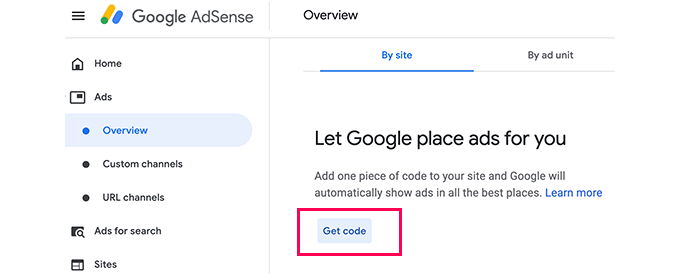
To add AdSense, sign up for an account, get ad code, then paste it into your WordPress site’s header or widget area.
Is Google Adsense Allowed On WordPress.org Sites?
Yes, Google AdSense is fully allowed on self-hosted WordPress. org sites. You have complete control to place ads anywhere on your site.
What Are The Best WordPress Plugins For Adsense?
Popular plugins like Ad Inserter and Advanced Ads help manage Google AdSense easily on WordPress sites, offering automation and flexible placement options.
Conclusion
Yes, you can use Google AdSense on WordPress sites with ease. It helps you earn money by showing ads to your visitors. Make sure your site follows Google’s rules to avoid issues. Choose the right ad placement for better results.
Keep your content original and useful for readers. Regularly check your site’s performance and update ads as needed. This way, you can create a steady income stream. Simple steps and patience bring success in using AdSense on WordPress. Give it time, and watch your site grow.


