
Are WordPress plugins safe? If you’re running a website, this question probably crosses your mind.
After all, plugins add powerful features to your site, but they can also bring risks you might not see right away. What if one plugin slows down your site or opens the door to hackers? You want your website to be fast, secure, and reliable—without hidden dangers lurking behind the scenes.
Keep reading, and you’ll discover how to choose the right plugins, spot potential threats, and keep your WordPress site safe and running smoothly. Your website’s security depends on it.

Credit: verpex.com
Risks Of Using WordPress Plugins
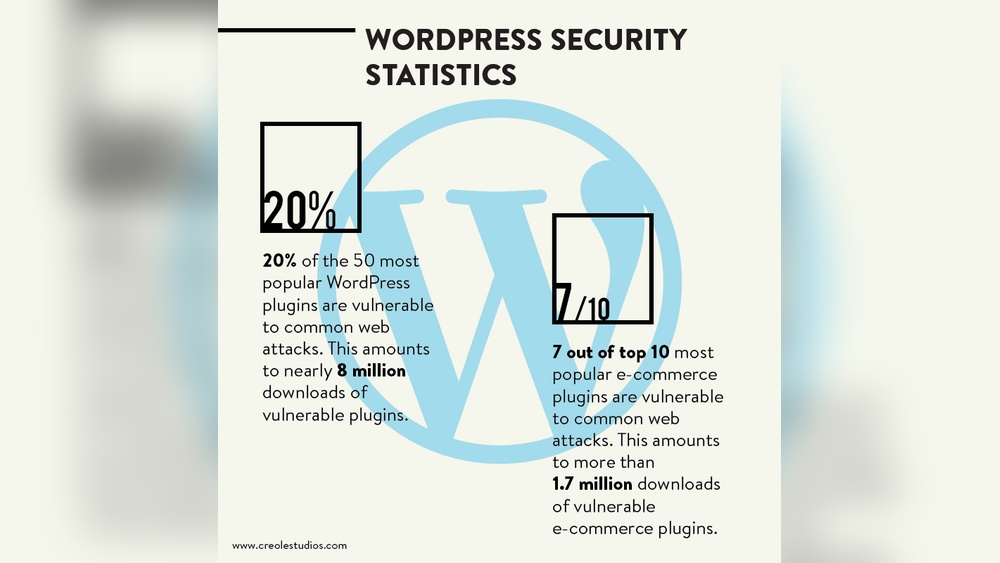
WordPress plugins add many features to websites. They make sites look better and work faster. But plugins can also bring risks. Not all plugins are safe. Some may have security holes. These holes let hackers enter your site. Using the wrong plugins can cause big problems.
Common Security Threats
Plugins can have bugs that hackers find. These bugs let attackers steal data or control the site. Some plugins have weak passwords or poor code. Others may let hackers upload bad files. Malware can hide in plugins and spread fast. Outdated plugins often have known threats. They are easy targets for hackers.
Impact Of Vulnerable Plugins
Unsafe plugins can crash your website. They can slow down your site or make it stop working. Hackers can steal user information like emails and passwords. Your site may get blacklisted by search engines. This hurts your reputation and traffic. Fixing hacked sites costs time and money. Visitors lose trust and may never return.
Examples Of Plugin Exploits
Some popular plugins have had major security issues. For example, a plugin allowed hackers to upload files. Another plugin had a bug letting hackers take over sites. Attackers used these flaws to spread spam or malware. Many sites got infected before fixes came out. These stories show why plugin safety matters.
Credit: wp-umbrella.com
Choosing Safe Plugins
Choosing safe plugins is crucial for a secure WordPress site. Plugins add features but can also bring risks. Careful selection helps avoid problems like hacks or slow sites.
Focus on reliable plugins. They keep your site running smoothly and protect your data.
Checking Plugin Ratings And Reviews
Ratings show how users feel about a plugin. High stars mean most users trust it. Reviews share real experiences. Read several to find common issues or praise. Avoid plugins with many negative comments.
Evaluating Developer Reputation
Good developers build safe, well-made plugins. Check their history and other plugins. Trusted developers fix bugs quickly and answer questions. Avoid plugins from unknown or unresponsive creators.
Verifying Update Frequency
Frequent updates mean the plugin stays secure and compatible. Old plugins may have security holes. Check the last update date before installing. Choose plugins updated within the past six months.
Securing Your Site With Plugins
Plugins add great features to your WordPress site. They can boost security and improve performance. But plugins can also introduce risks if not managed well. Securing your site with plugins means choosing the right ones and managing them carefully. This keeps your site safe from hackers and malware.
Using Security-focused Plugins
Choose plugins designed to protect your site. Look for firewalls, malware scanners, and login protection tools. These plugins help block attacks and detect threats early. Always check user reviews and update frequency before installing. A well-maintained security plugin strengthens your site’s defenses.
Limiting Plugin Permissions
Not all plugins need full access to your site. Limit each plugin’s permissions to what it requires. This reduces the risk if a plugin is compromised. Avoid plugins that ask for unnecessary data or control. Keeping permissions tight helps protect your site’s core functions.
Regular Plugin Audits
Check your plugins often for updates and vulnerabilities. Remove plugins you no longer use or trust. Review plugin settings and ensure they follow security best practices. Regular audits help spot weak points early. This keeps your site clean and secure over time.
Best Practices For Plugin Management
Managing WordPress plugins properly keeps your site safe and fast. Plugins add features but also can cause problems if not handled well. Following best practices helps avoid security risks and site issues. Regular care ensures smooth plugin use without surprises.
Removing Unused Plugins
Unused plugins can create security holes. They also slow down your website. Delete plugins you do not use. This reduces risks and improves site speed. Keep only the plugins you need active.
Backing Up Before Updates
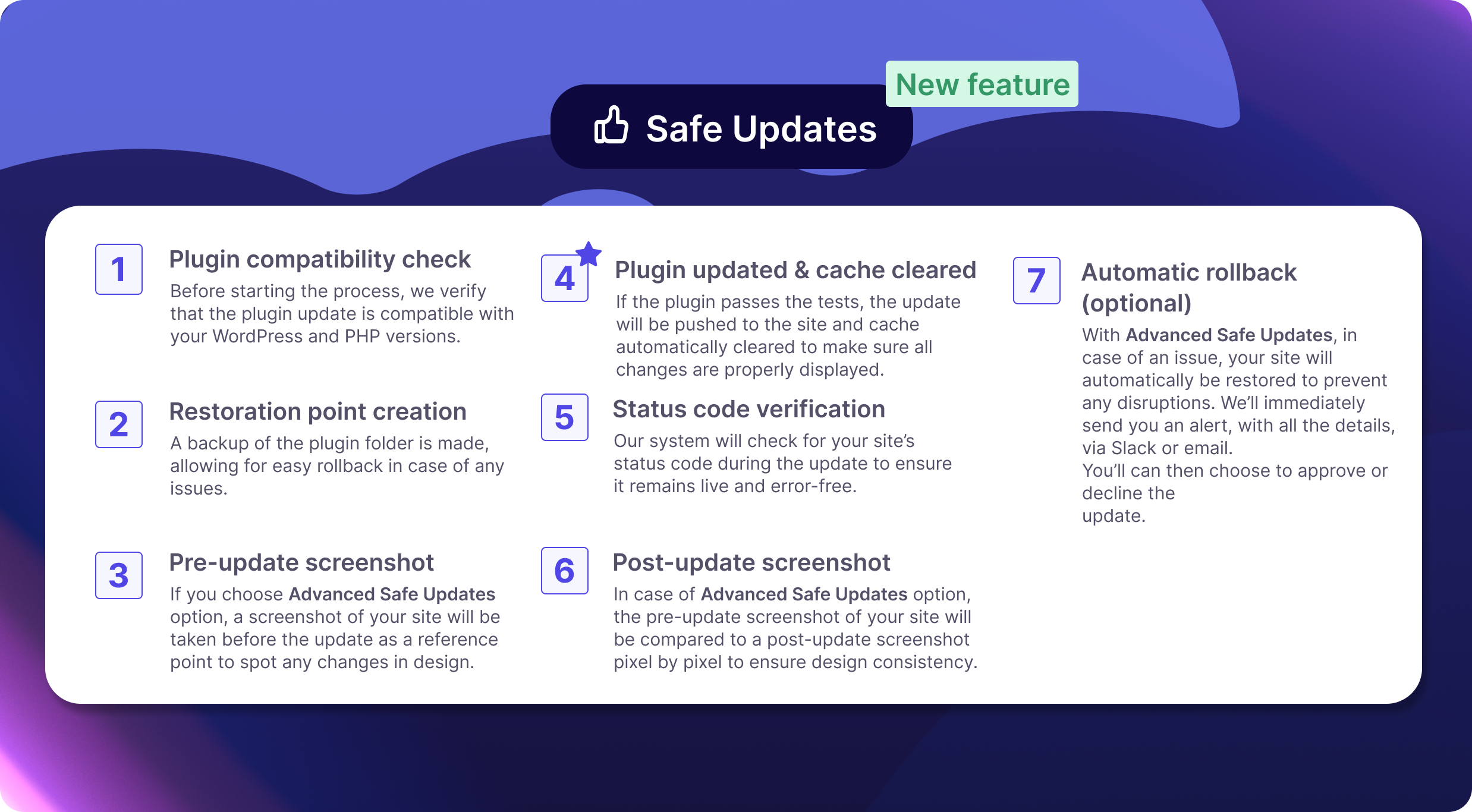
Update plugins often for security and new features. Always back up your site before updating. Backups save your data if something goes wrong. You can restore your site quickly with a backup.
Testing Plugins On Staging Sites
Test new plugins or updates on a staging site first. A staging site is a copy of your real site. This helps find problems without affecting visitors. Fix issues before applying changes to the live site.
Monitoring And Responding To Threats
Monitoring and responding to threats keeps your WordPress site safe. Plugins can have weaknesses that hackers try to use. Detecting problems early stops damage. Quick responses protect your data and visitors.
Setting Up Security Alerts
Security alerts notify you about suspicious activity. Install tools that watch your plugins and core files. Alerts come via email or dashboard messages. Check alerts daily to catch issues fast. Early warnings help prevent bigger problems.
Responding To Plugin Vulnerabilities
Vulnerabilities are weak spots in plugins. Update plugins as soon as fixes are available. Remove plugins that no longer receive updates. Use trusted plugins with good reviews. Act fast to reduce risk of attacks.
Keeping WordPress Core Updated
WordPress core updates fix security holes. Run updates regularly to stay protected. New versions improve performance and safety. Back up your site before updating. Updated core reduces chances of hacking.

Credit: risevisible.com
Frequently Asked Questions
Are WordPress Plugins Safe To Use?
Yes, most WordPress plugins are safe if downloaded from reputable sources like the official WordPress repository or trusted developers. Always check reviews, update regularly, and avoid plugins with outdated code to minimize security risks.
How Can I Check A Plugin’s Safety?
Check plugin ratings, reviews, update frequency, and active installations. Also, verify developer credibility and scan for malware using security tools before installing any plugin.
Do Outdated Plugins Pose Security Risks?
Yes, outdated plugins can have vulnerabilities that hackers exploit. Regularly updating plugins ensures you have the latest security patches and reduces risks significantly.
Can Plugins Slow Down My WordPress Site?
Poorly coded or excessive plugins can slow your site. Use only necessary, lightweight plugins and monitor site performance to maintain speed and user experience.
Conclusion
WordPress plugins can be safe when chosen carefully. Always check reviews and update plugins regularly. Avoid plugins from unknown sources. Keep your website’s security strong with good habits. Regular backups help protect your data. Trust only reliable and well-maintained plugins.
Stay alert for any unusual activity on your site. Good plugin choices keep your site fast and secure. Safety depends on careful use and smart decisions. A safe site means better experience for your visitors.


