
Imagine logging into your WordPress dashboard, ready to create a stunning website, only to be met with a theme that doesn’t quite fit your vision. Frustrating, right?
Setting a default theme in WordPress can save you time and hassle, ensuring that every time you start a new project, your favorite theme is ready to go. You might be thinking, “Why does this matter? ” Well, it’s the difference between spending hours tweaking your site to look just right and having a beautifully styled website from the get-go.
In this guide, we’ll walk you through the simple steps to set a default theme in WordPress, so you can focus on what you do best—creating amazing content. Let’s dive in and get your WordPress site looking exactly the way you want it, right from the start.

Credit: www.alphr.com
Accessing WordPress Dashboard
To set your default theme, first access the WordPress Dashboard. Start by opening your web browser. Type your website’s URL followed by /wp-admin. Press Enter. This will take you to the login page. Enter your username and password. Click Log In. You will now see the WordPress Dashboard. It’s the main area where you can manage your site.
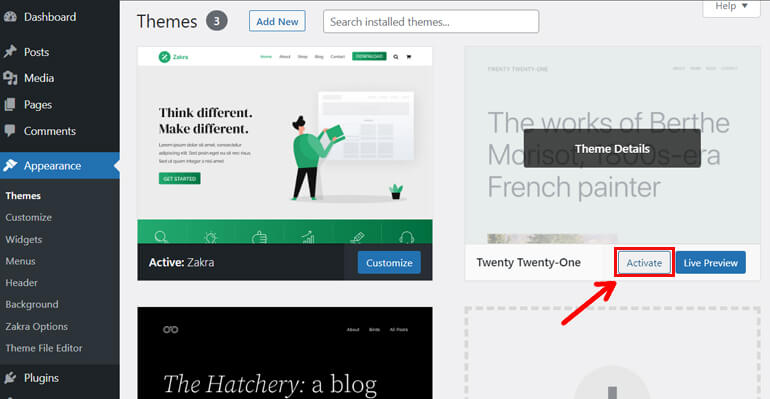
On the left side, find the Appearance menu. Click on it. A drop-down menu will appear. Choose Themes. Here, you see all available themes. To make a theme default, hover over it. Click Activate. This changes the theme for your site. The new theme is now the default.
Credit: themegrill.com
Navigating To Themes Section
First, go to your WordPress dashboard. This is where you control your website. On the left side, find the Appearance tab. Click on it. A menu will appear. Select Themes from this menu. Now, you are in the Themes section. Here, you can see all your themes. You can also add new themes here. Choose the one you like best.
To set a theme as default, find it in the list. Hover over the theme and click Activate. This makes it your default theme. Your site will use this theme now. Always check how your site looks after changing themes. It helps ensure everything is fine.
Choosing A Default Theme
WordPress offers many themes. You can find them in the theme library. Some are free, and some are paid. Each theme has a different style. Choose one that fits your needs. Look at the ratings and reviews too. This helps to pick a good theme. Themes can change your site’s look. They also change how it works.
New themes can be installed easily. First, go to the Themes section in WordPress. Click on Add New. You can search for themes here. Use the search bar. After finding a theme, click Install. Wait for it to finish. Once done, click Activate. Your new theme is now set.
Activating Your Default Theme
To manually activate your default theme, first, log into your WordPress dashboard. Click on Appearance in the sidebar. A list of themes will appear. Find the theme you want as default. Hover over the theme and click Activate. Your site will now use this theme. Ensure the theme is compatible with your site’s plugins. Also, check if the theme needs updates. Manual activation is straightforward and quick.
Automating activation can be done with plugins. Plugins help activate themes automatically. Search for theme switcher plugins. Install and activate the plugin. Configure settings to set your theme as default. This method reduces manual steps. It is useful for sites with many themes. Always keep plugins updated. They enhance your site’s functionality. Ensure the plugin is compatible with your WordPress version.
Customizing Your Default Theme
Basic customization can make your site look unique. Change colors to match your style. Pick a font that is easy to read. Add your logo to the top. These changes are simple. They make a big difference in how your site feels. Try different settings. See what looks best.
Advanced customization allows for more personal touches. Edit the CSS to change design elements. Use custom widgets to add features. Create a child theme for more changes. This keeps the original theme safe. Test your site after changes. Make sure everything works well. Taking these steps can help you create a special site.
Managing Theme Updates
Keeping your WordPress theme up to date is important. It helps keep your site safe and running well. Automatic updates make this job easier. They save time and effort. To turn on automatic updates, go to the theme page. There, you can find the option to turn on automatic updates. This way, your theme will always be the latest version. No need to worry about missing updates.
Sometimes, you might want to update your theme manually. Start by downloading the latest theme version. Then, go to your WordPress dashboard. Click on Appearance and then Themes. Find your current theme and click Update. Upload the new version file. Check your site to make sure everything looks good. Manual updates give you more control. But they need more steps. So, be careful while updating.
Troubleshooting Common Issues
Many themes may not work well with your site. Compatibility is a common issue. Some themes need special plugins. Others conflict with existing ones. Always check theme details before using. Look for updates regularly. Updates fix bugs and improve features. They help with compatibility. You can test themes on demo sites. This shows how they work. If problems arise, check forums. Many users share solutions online.
Activation errors can stop a theme from working. These errors are common. Check your WordPress version first. Older versions cause issues. Update WordPress for better performance. Some themes need certain settings. Read theme instructions carefully. They provide needed information. Permissions can also cause errors. Check your user permissions. You might need admin rights. If errors persist, contact support. They help resolve activation issues.
Credit: www.wpzoom.com
Frequently Asked Questions
How Do I Change The Default Template In WordPress?
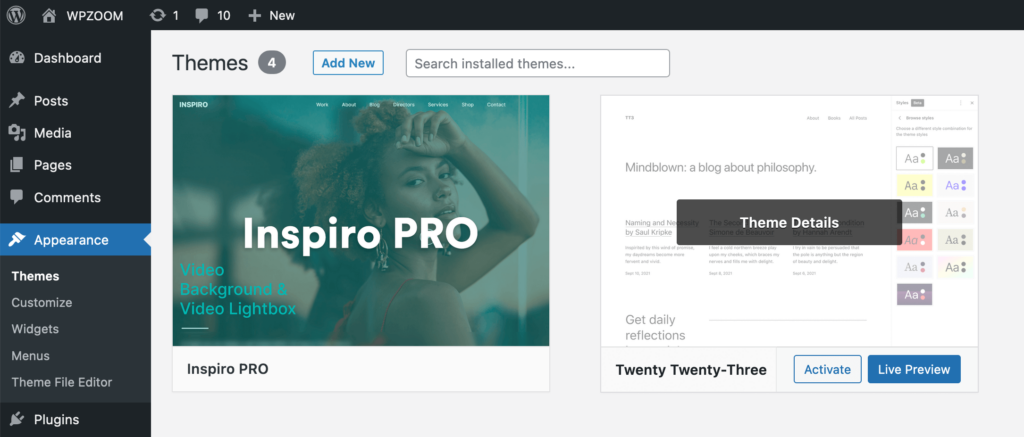
Go to WordPress Dashboard, then navigate to Appearance > Themes. Click “Activate” on your desired theme.
How Do I Reset My WordPress Theme To Original?
Go to your WordPress dashboard, navigate to “Appearance,” then “Themes. ” Activate a default theme like “Twenty Twenty-One. ” This resets your theme settings. Remember to back up your data before making changes.
How Do I Set A Default Theme?
To set a default theme, navigate to your platform’s settings. Select the theme option and choose your preferred theme. Save changes to apply it as the default. Ensure your theme is compatible with your site requirements for optimal performance.
How To Set A Default WordPress Theme?
Go to your WordPress dashboard, click “Appearance,” then “Themes. ” Activate your desired theme by clicking “Activate. ” This sets it as the default theme for your site. Make sure to customize settings for optimal performance and appearance. Regularly update the theme for security and functionality improvements.
Conclusion
Setting a default theme in WordPress is straightforward. It ensures consistency across your site. Follow the steps to make it simple. Choose a theme that fits your brand. Update your settings regularly. This keeps your site fresh and appealing. A default theme helps with design uniformity.
It also improves the user experience. Keep exploring WordPress features. They offer many customization options. Remember, a well-chosen theme enhances your website’s look. It also boosts visitor engagement. With these tips, managing your WordPress theme becomes easier. Happy blogging!


