
Are you curious if you can try WordPress for free before making any commitments? You’re not alone.
Many people want to explore WordPress without spending a dime, to see if it fits their needs. Imagine being able to build your own website, test features, and get a feel for the platform without any upfront costs. You’ll discover exactly how you can start using WordPress for free, what limitations you might face, and the best way to make the most out of your trial.
Keep reading—you’re just one step away from unlocking the power of WordPress without risking your money.
Credit: www.wpbeginner.com
WordPress Free Options
WordPress offers free options to start building websites. These options suit beginners and those with small projects. Free plans help users test WordPress without spending money. Each option has its own features and limits. Knowing these helps choose the right start.
WordPress.com Free Plan
WordPress.com provides a free plan with basic tools. It includes free hosting and a WordPress subdomain. Users get access to free themes and simple customization. The plan has storage limits and displays WordPress ads. It is easy for beginners to use without technical skills.
WordPress.org Self-hosting
WordPress.org is free software for self-hosting websites. Users download the software and install it on their servers. This option gives full control over design and features. Hosting and domain costs apply, but software use is free. It suits users ready to manage their own site.
Comparing Free Plans
WordPress.com free plan is simple with hosting included. WordPress.org requires hosting but offers more control and plugins. WordPress.com limits customization and adds ads on free plans. WordPress.org needs technical skills but offers full freedom. Choosing depends on budget, skills, and website goals.
Credit: www.wpbeginner.com
Setting Up Without Cost
Trying WordPress without spending money is easy and practical. You can start building your website without any upfront cost. There are simple ways to set up WordPress for free. This helps you learn and experiment before investing in hosting or premium plans.
Creating A Free WordPress.com Account
WordPress.com offers a free plan to start your website. Sign up with your email and create a username. You get a subdomain like yoursite.wordpress.com. It includes basic themes and essential features. No need to buy hosting or domain at this stage.
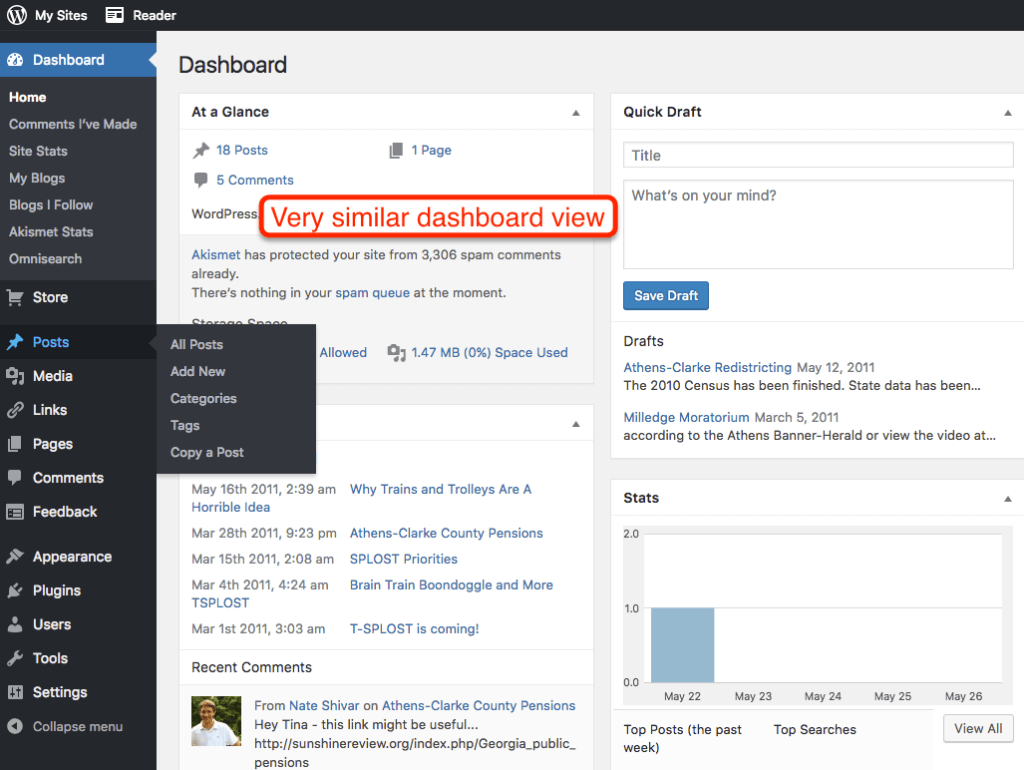
This option is perfect for beginners testing WordPress. You can publish posts, customize your site, and explore the dashboard. The free plan has some limits but is enough to learn the platform.
Using Local Development Tools
Local tools let you install WordPress on your computer. Software like Local by Flywheel or XAMPP creates a local server. You can build and test sites offline without internet.
This method is free and safe. No one else can see your site while working. It’s great for learning WordPress deeply. Once ready, you can move your site online.
Accessing Free Hosting Services
Several hosting providers offer free plans for WordPress sites. These usually include limited storage and bandwidth. Free hosting lets you publish your WordPress site on the internet.
It may have ads or restricted features but is good for simple projects. Use free hosting to experiment and understand website management. Upgrade later as your site grows or needs more resources.
Features Available In Free Versions
The free version of WordPress offers a solid start for new users. It lets you build a basic website without any cost. The features included help you understand how WordPress works. You get access to essential tools to create and manage your site. These features support simple blogs, portfolios, and small business pages.
Exploring the limits and possibilities of the free plan helps you decide if you want to upgrade later. The free version focuses on ease and simplicity. It covers key areas like themes, plugins, storage, and bandwidth. These features make it clear what you can expect without paying.
Themes And Customization
The free WordPress plan offers many themes. These themes control your site’s look and layout. You can pick from a collection of basic, clean designs. Customization options are limited but enough for simple changes. You can adjust colors, fonts, and header images. Advanced design changes require a paid plan. Still, the free themes help create a neat, professional site.
Plugins And Functionality Limits
Plugins add extra features to your WordPress site. The free version does not allow installing custom plugins. It includes built-in tools like contact forms and social sharing. These tools cover common website needs. For complex features like e-commerce or SEO plugins, upgrading is necessary. The free plan focuses on simplicity and security by limiting plugins.
Storage And Bandwidth
Storage space on the free WordPress plan is limited. You get around 3 GB for all your files and images. This limit suits small websites and blogs. Bandwidth is also capped to prevent heavy traffic use. If your site grows or gets many visitors, you may need more space and bandwidth. The free plan is designed for beginners and small audiences.
Limitations Of Free WordPress
Using the free version of WordPress is a great way to start a website without cost. It lets you explore the platform and learn how it works. Yet, this free option comes with some clear limits. Knowing these helps you decide if it fits your needs.
Ads And Branding
WordPress places ads on free sites. You cannot remove these ads. Your site will also show WordPress branding. This means visitors see that your site is on a free WordPress plan. Ads and branding may distract visitors from your content.
Domain Restrictions
Free WordPress sites use a subdomain. Your site address looks like example.wordpress.com. You cannot use a custom domain like example.com. This may affect your site’s professional appearance and branding. Custom domains require a paid plan.
Support And Resources
Support for free WordPress users is limited. You get access only to community forums. No direct customer service is available. Resources like advanced tutorials or live chat support come with paid plans. This can make solving issues slower and harder.
Upgrading From Free Plans
Starting with a free WordPress plan is great for beginners. It helps you explore the platform without any cost. But free plans have limits. Upgrading to a paid plan offers more features and control. This section explains why and when to upgrade.
Benefits Of Paid Plans
Paid plans give more space for your website files and images. You can use custom domain names like www.yoursite.com. Access to premium themes and plugins makes your site look professional. Paid plans remove WordPress ads from your site. You also get better support and security features.
When To Consider Upgrading
Choose to upgrade when your site grows beyond the free limits. You need more storage or want to use custom themes. If you want to accept payments or sell products, a paid plan is necessary. Upgrading helps build a stronger brand with a custom domain.
Cost Comparison
Free plans cost nothing but limit your website’s potential. Paid plans start at a few dollars per month. The price increases with added features and storage. Think about your needs and budget before upgrading. Paid plans offer good value for serious websites.
Tips For Maximizing Free WordPress
Using WordPress for free is a great way to start building a website. It offers many features even without a paid plan. To get the best from free WordPress, some smart choices help a lot. Simple steps improve your site’s look, speed, and usefulness. These tips guide you through the key points to focus on.
Choosing The Right Theme
Pick a theme that fits your site’s purpose. A clean, simple design works well for beginners. Make sure the theme is mobile-friendly. This helps your site look good on phones and tablets. Check for themes that load fast and have good reviews. Avoid themes with too many features you won’t use. This keeps your site fast and easy to manage.
Essential Plugins For Free Users
Plugins add extra features to your WordPress site. Choose plugins that improve security and SEO. A good SEO plugin helps your site appear in search results. Use a caching plugin to speed up your site. Limit the number of plugins to avoid slowing down your site. Only add plugins that you really need and trust.
Optimizing Site Performance
Site speed is important for visitors and search engines. Use small, optimized images to reduce loading time. Keep your pages simple and avoid too many widgets. Update WordPress and plugins regularly for better performance. Clear out unused themes and plugins to keep the site clean. A fast site keeps visitors happy and improves ranking.
Credit: larryludwig.com
Frequently Asked Questions
Can I Use WordPress For Free?
Yes, WordPress. com offers a free plan with basic features. You can create a website using free themes and limited storage. It’s ideal for beginners wanting to explore WordPress without any cost.
What Are The Limitations Of Free WordPress Plans?
Free WordPress plans have limited storage, themes, and no custom plugins. You also get WordPress. com ads on your site. Upgrading to a paid plan removes these restrictions and adds more features.
How Long Can I Try WordPress For Free?
You can use the free WordPress. com plan indefinitely with basic features. However, premium features and custom domains require a paid subscription. This allows unlimited time to explore the platform risk-free.
Can I Switch From Free To Paid WordPress Easily?
Yes, upgrading from free to paid WordPress plans is simple. You retain your content, and new features unlock immediately. This makes scaling your website smooth and hassle-free.
Conclusion
Trying WordPress for free is a great way to start. It lets you explore its features without risk. You can build a simple site and see how it works. No need to pay at first. This helps you learn and decide if WordPress fits your needs.
Many users find the free version enough to begin. So, give it a shot and take your time. WordPress offers flexibility for beginners and experts alike. Start small, grow your skills, and enjoy creating your website.


