
Are you wondering if WordPress supports JavaScript and how it can help you improve your website? If you’ve ever tried adding dynamic features or interactive elements to your site, you might have hit a roadblock or felt unsure about what’s possible.
Understanding how WordPress works with JavaScript can open up new ways to make your site more engaging and powerful. Keep reading, and you’ll discover exactly how you can use JavaScript within WordPress to take your website to the next level.

Credit: yithemes.com
WordPress And Javascript Compatibility
WordPress works well with JavaScript to create dynamic websites. It allows users to add interactive features easily. JavaScript helps improve user experience and site functionality in WordPress.
Understanding how WordPress and JavaScript fit together is important. Many themes and plugins rely on JavaScript for smooth performance. WordPress also supports custom scripts for advanced users.
Javascript Integration In WordPress
WordPress supports JavaScript by letting users add scripts to their sites. You can include JavaScript in themes, plugins, and posts. The platform has built-in tools to load scripts safely without conflicts.
Users can add JavaScript through the editor or use functions in theme files. WordPress also allows enqueuing scripts to manage dependencies and loading order. This ensures your JavaScript works correctly alongside other site features.
Core Javascript Libraries Used
WordPress uses several core JavaScript libraries to enhance site functionality. jQuery is one of the most common libraries included by default. It simplifies tasks like event handling and animations.
Besides jQuery, WordPress uses Backbone.js and Underscore.js for building complex interfaces. These libraries help developers create rich interactive experiences. They are loaded automatically when needed by themes or plugins.

Credit: pw999.wordpress.com
Adding Javascript To WordPress Sites
Adding JavaScript to WordPress sites allows you to enhance your website’s functionality and user experience. JavaScript can create interactive features like sliders, pop-ups, and animations. WordPress supports JavaScript, but it needs to be added carefully to avoid conflicts and errors. There are several ways to add JavaScript, depending on your skill level and the changes you want to make.
Using Themes And Child Themes
The easiest way to add JavaScript is through your theme files. You can place your JavaScript code directly in the header or footer of your theme. However, editing the main theme files is not recommended because updates will overwrite your changes. Instead, use a child theme. A child theme lets you add JavaScript safely without losing your work after updates. Copy the needed files to the child theme and add your scripts there.
Enqueuing Scripts Properly
WordPress has a built-in system to load JavaScript files correctly. This method is called “enqueueing.” It helps avoid conflicts and improves site speed. Use the wp_enqueue_script() function in your theme’s functions.php file. This function loads your JavaScript files at the right time. Always enqueue scripts instead of hardcoding them in templates. This way, WordPress manages dependencies and loading order efficiently.
Plugins For Javascript Management
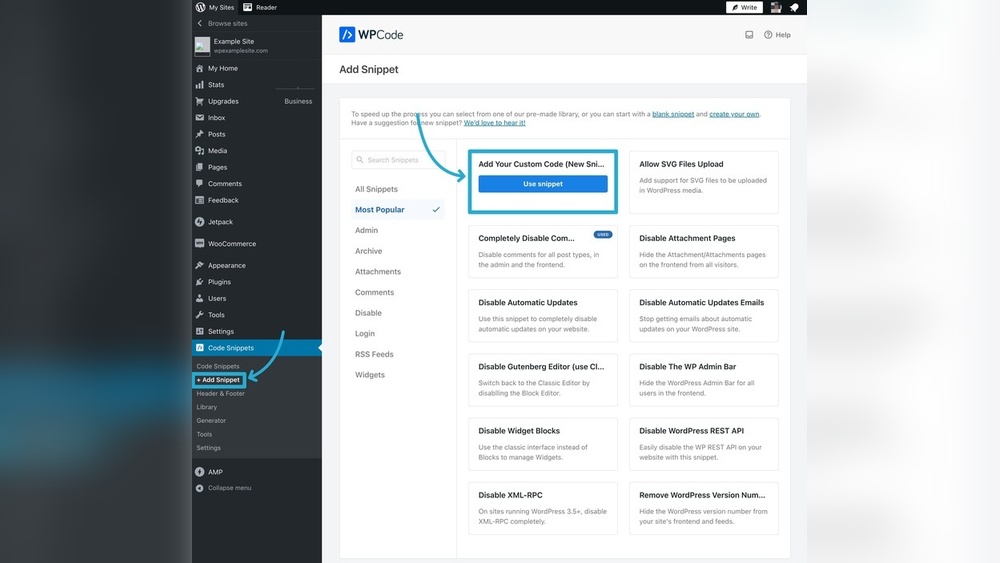
Plugins can help add and manage JavaScript without coding. Some plugins allow you to insert custom scripts in headers, footers, or specific pages. They offer simple interfaces to add code safely. Using plugins is great for beginners or those who want quick changes. Make sure to choose plugins with good reviews and regular updates. This keeps your site secure and running smoothly.
Javascript In WordPress Blocks
WordPress supports JavaScript inside its block editor, known as Gutenberg. Blocks are the building pieces for posts and pages. JavaScript makes these blocks interactive and flexible. It helps customize how blocks look and behave.
Using JavaScript in blocks allows developers to create dynamic content. This means you can add features like sliders, tabs, or animations. It also lets you update block content without reloading the page. This improves the user experience.
Gutenberg Block Development
Gutenberg block development uses JavaScript heavily. Developers write code to build custom blocks for WordPress. These blocks can do simple or complex tasks. JavaScript controls the block’s appearance and functions.
Each block has two parts: editor and save. The editor part shows the block inside WordPress. The save part controls what visitors see on the front end. JavaScript works in both parts to keep blocks interactive.
Using React And Jsx In Blocks
React is a popular JavaScript library used in WordPress blocks. It helps create user interfaces with reusable components. WordPress uses React to build its block editor.
JSX is a syntax extension for React. It looks like HTML but works inside JavaScript. Developers use JSX to write block code in an easy way. It makes the code cleaner and faster to build.
Combining React and JSX gives blocks powerful features. Blocks become easy to update and maintain. This leads to better performance and smoother editing experiences.
Best Practices For Javascript In WordPress
Using JavaScript in WordPress can enhance website features and user experience. Following best practices helps avoid common problems. It keeps your site fast, secure, and easy to maintain. Proper handling of JavaScript ensures smooth interaction with WordPress themes and plugins. Below are key tips for using JavaScript effectively in WordPress.
Avoiding Conflicts
WordPress loads many scripts from themes and plugins. JavaScript conflicts can break your site’s functions. Use wp_enqueue_script() to add JavaScript files correctly. This method prevents duplicate loading and version clashes. Avoid hardcoding scripts directly into theme files. Use unique names for your scripts to stop conflicts. Test your site after adding new scripts to catch issues early.
Optimizing Performance
Large or many JavaScript files slow down your site. Minify your JavaScript to reduce file size. Combine scripts to lower the number of requests. Load scripts in the footer to speed up page rendering. Use asynchronous or deferred loading to delay non-essential scripts. Monitor your site speed regularly and remove unused scripts.
Security Considerations
JavaScript can open security risks if not handled well. Avoid inline scripts that can lead to cross-site scripting (XSS) attacks. Validate and sanitize all user inputs before using them in scripts. Keep WordPress, themes, and plugins updated to patch security holes. Use trusted libraries and avoid downloading scripts from unknown sources.
Troubleshooting Javascript Issues
Troubleshooting JavaScript issues in WordPress can be tricky. JavaScript may not always work as expected due to conflicts or errors. These problems can break site features or slow down performance. Finding and fixing these issues helps keep your site running smoothly. This section explains common errors and tools to debug JavaScript on WordPress.
Common Errors And Fixes
JavaScript errors often come from syntax mistakes or conflicts with other scripts. Missing semicolons, wrong variable names, or unmatched brackets cause errors. Plugins and themes may load scripts that clash with each other. This can stop scripts from running.
To fix errors, check the browser console for messages. Clear cache to ensure new script versions load. Disable plugins one by one to find conflicts. Update all themes and plugins to latest versions. Use simple, clean code to avoid syntax mistakes.
Debugging Tools And Techniques
Most browsers have built-in developer tools. Use the Console tab to see error messages and warnings. The Sources tab lets you view and step through your JavaScript code. Breakpoints help pause script execution to inspect variables and logic.
Use online validators to check JavaScript syntax. Plugins like Query Monitor show script errors in WordPress. Testing scripts on a staging site avoids breaking the live site. Debugging takes time but improves site stability and user experience.
Future Of Javascript In WordPress
The future of JavaScript in WordPress looks bright and full of potential. WordPress continues to embrace JavaScript to improve site speed, user experience, and customization options. Developers and users alike will see more tools and features powered by JavaScript.
This trend supports the growing demand for interactive and dynamic websites. JavaScript helps WordPress themes and plugins become more flexible and responsive. The platform is moving towards a more modern approach to web development.
Upcoming Features And Updates
WordPress is adding new features that rely heavily on JavaScript. The block editor, known as Gutenberg, is a prime example. It uses JavaScript to let users design pages visually without coding.
Future updates will enhance this editor with more blocks and better performance. These updates aim to make site building faster and easier. JavaScript will play a key role in these improvements.
Evolving Developer Tools
Developers get better tools for working with JavaScript in WordPress. The platform supports modern JavaScript frameworks like React. This support helps create rich user interfaces and smooth interactions.
New tools simplify the development process. They allow developers to test, debug, and optimize JavaScript code efficiently. This evolution means more powerful and reliable WordPress themes and plugins.

Credit: blog.sucuri.net
Frequently Asked Questions
Does WordPress Allow Adding Custom Javascript?
Yes, WordPress supports adding custom JavaScript. You can insert scripts using plugins, theme editors, or the customizer’s additional code section.
Can Javascript Improve WordPress Site Performance?
JavaScript can enhance interactivity and features but may slow down your site if not optimized. Use efficient scripts and load them properly.
Are There WordPress Plugins For Javascript Integration?
Many plugins help add or manage JavaScript easily. Popular ones include Insert Headers and Footers, and custom code managers for seamless integration.
Is Javascript Safe To Use In WordPress?
JavaScript is safe if sourced from trusted providers. Always avoid unverified scripts to prevent security risks like cross-site scripting attacks.
Conclusion
WordPress fully supports JavaScript, making websites more dynamic. You can add JavaScript directly in posts, pages, or themes. Plugins also help include custom scripts without coding. JavaScript enhances user experience with interactive features and animations. It works well with WordPress’s flexible design and structure.
Keep scripts light for faster site performance. Always test your code to avoid conflicts. Using JavaScript wisely can improve your site’s look and function. WordPress remains a strong platform for combining content and scripts.


