
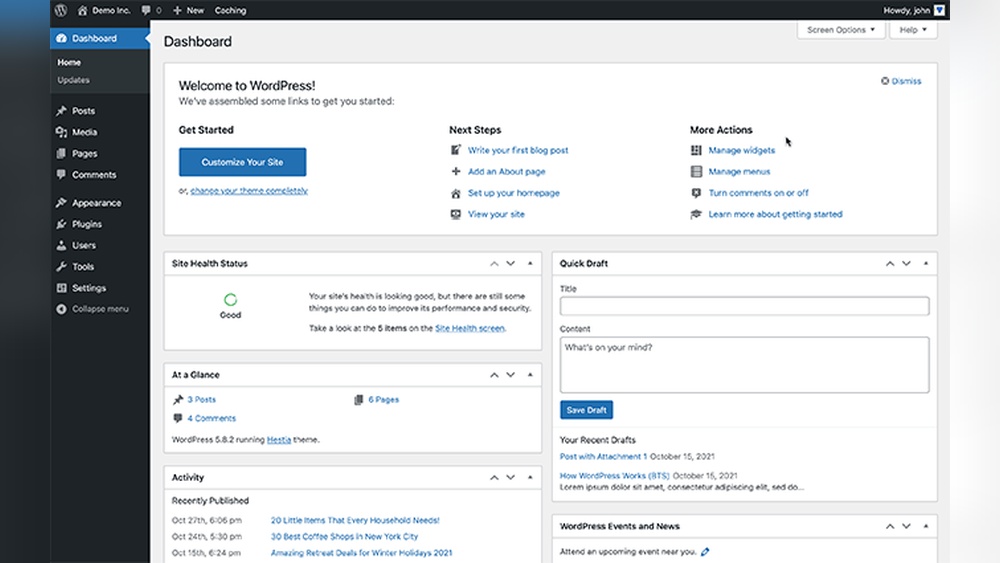
Are you curious about how WordPress can work for you? Whether you want to start a blog, build a business website, or create an online store, WordPress offers tools that make it simple and powerful.
Imagine having a platform that lets you design your site exactly the way you want, without needing to be a tech expert. You’ll discover how WordPress is used by millions to bring ideas to life, grow audiences, and boost sales.
Keep reading to unlock the potential WordPress holds for your goals.
WordPress Basics
Understanding WordPress basics helps anyone start building a website. It is one of the most popular tools for creating sites. WordPress offers flexibility and ease of use for beginners and experts.
It works for blogs, business sites, online stores, and more. Learning the basics makes managing and customizing your site easier. Let’s explore the key elements of WordPress.
What Is WordPress
WordPress is a software for building websites. It uses themes and plugins to change how a site looks and works. It started as a blog platform but grew into a full website builder.
Anyone can use WordPress to create a website without coding skills. It is open-source, which means it is free to use and change. Millions of websites rely on WordPress every day.
Types Of WordPress Platforms
There are two main types of WordPress platforms. The first is WordPress.com, a hosted service with limited control but easy setup. The second is WordPress.org, where you host your site yourself for full control.
WordPress.org requires buying hosting and a domain name. It allows more customization and access to all features. WordPress.com is better for simple blogs and small projects.
Why Choose WordPress
WordPress is user-friendly and works for many website types. It has thousands of themes and plugins to extend site features. You can build anything from a simple blog to a complex online store.
It supports SEO well, helping your site rank better in search engines. Regular updates keep WordPress secure and up to date. A large community offers help and resources for users.
Setting Up Your WordPress Site
Setting up your WordPress site is the first step to creating your online presence. This process is simple and takes only a few steps. You will need to pick a domain name and hosting service, install WordPress, and adjust some settings to get started.
Each part is important to make your website work well and look good. Let’s break down these steps.
Choosing A Domain And Hosting
The domain is your website’s address on the internet. Choose a name that is easy to remember and fits your site’s theme. Keep it short and avoid complicated words.
Hosting is where your website lives online. Select a reliable hosting provider with good speed and support. Many hosts offer special plans for WordPress sites.
Installing WordPress
Installing WordPress is usually quick. Most hosting providers offer one-click installation. This means you can set it up with just a few clicks.
Once installed, WordPress is ready for you to start creating pages and posts. You do not need technical skills for this step.
Configuring Basic Settings
After installation, adjust some basic settings. Set your site title and tagline to tell visitors what your site is about.
Choose your preferred language and time zone. This makes your site easier to use and manage.
Set up your permalink structure for clean and simple URLs. This helps search engines and visitors find your content better.
Customizing Your Website
Customizing your website lets you create a unique online space. WordPress offers many tools to change how your site looks and works. You can make it simple or complex, depending on your needs. This section explains key ways to customize your WordPress site.
Selecting Themes
Themes control your site’s overall look and style. WordPress has thousands of free and paid themes. Choose one that fits your brand and content. Themes can be changed anytime without losing your content. Many themes let you adjust colors, fonts, and layouts easily.
Using Plugins
Plugins add new features to your site. They can help with SEO, security, or contact forms. Install plugins from the WordPress directory or upload custom ones. Activate and configure plugins to suit your needs. Be careful not to use too many plugins as they may slow your site.
Creating Menus And Widgets
Menus help visitors navigate your website. Create custom menus to organize pages and links. Place menus in header, footer, or sidebar areas. Widgets add extra content blocks like recent posts or search bars. Drag and drop widgets to different areas in your theme. This makes your site easier to use and more attractive.
Credit: wpengine.com
Content Creation And Management
WordPress is a popular tool for content creation and management. It helps users create, edit, and organize content easily. The system is user-friendly and works well for beginners. It supports various types of content like blog posts, pages, images, and videos.
Managing content in WordPress does not require coding skills. The platform offers simple tools to add and update information quickly. Content creators can focus on writing and designing without technical barriers.
Adding Posts And Pages
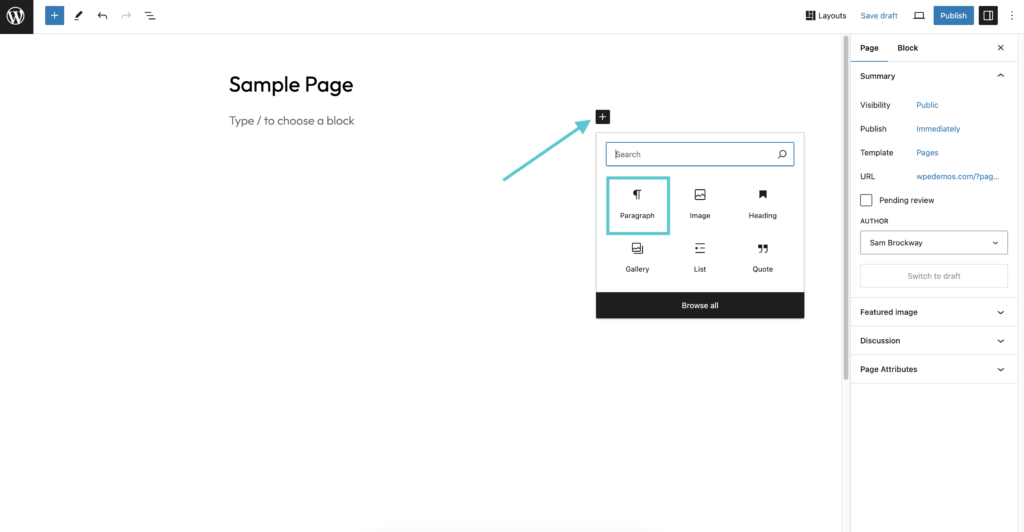
WordPress allows users to add posts and pages with ease. Posts are used for blog entries and news updates. Pages work well for static content like About or Contact information. Both can be created using the WordPress editor. It offers text formatting, image insertion, and layout options. Users can preview their work before publishing. Scheduling posts is also possible for future dates.
Optimizing Content For Seo
Good content needs to be easy to find on search engines. WordPress supports SEO-friendly features like customizable titles and meta descriptions. Users can add keywords to improve search visibility. Plugins help check content for readability and SEO best practices. Clean URLs and proper headings make content clearer for search engines. Optimizing images with alt text also enhances SEO.
Managing Media Files
Media files like images and videos enrich content on WordPress. The media library stores all uploads in one place. Users can upload, edit, and delete files easily. Files can be organized with folders or tags. WordPress supports many file types and sizes. It also offers tools to resize and crop images. Proper media management keeps the website fast and organized.
Enhancing User Experience
Enhancing user experience is key to a successful WordPress website. Visitors expect fast, easy-to-use sites that work well on any device. WordPress offers many tools to meet these needs. It helps create websites that load quickly, look good on phones, and keep users safe. These improvements keep visitors happy and encourage them to return.
Improving Website Speed
Website speed affects how long visitors stay. WordPress uses caching plugins to load pages faster. Optimizing images reduces file size without losing quality. Clean code and lightweight themes also boost speed. Fast websites keep visitors engaged and reduce bounce rates.
Ensuring Mobile Responsiveness
Many people browse on phones or tablets. WordPress themes are designed to adjust to different screen sizes. Responsive design means content fits well on any device. This makes reading and navigation easier. Mobile-friendly sites reach more users and improve search rankings.
Implementing Security Measures
Security protects both the site and its visitors. WordPress offers plugins to block hackers and malware. Regular updates fix vulnerabilities and improve safety. Strong passwords and two-factor authentication add extra protection. A secure site builds trust and keeps users coming back.
Credit: webfor99.com
Boosting Website Success
Boosting website success means making your site work better for visitors and your goals. WordPress offers many tools to help you understand your audience and improve your online presence. These tools help you see what works and what needs change.
Using WordPress smartly helps grow your site traffic and keeps visitors engaged. Simple steps like tracking data, adding social media, and using email marketing can make a big difference. Let’s explore these ways to boost your website success.
Tracking Performance With Analytics
Analytics show how people use your website. WordPress lets you add tools like Google Analytics easily. These tools collect data on visitor numbers, pages viewed, and how long visitors stay. This information helps you find popular content and fix weak spots.
Regularly checking analytics guides your decisions. You can improve your site based on real facts, not guesses. This way, your website grows stronger and meets visitor needs better.
Integrating Social Media
Social media connects your website with platforms like Facebook, Twitter, and Instagram. WordPress makes it simple to add social buttons and feeds. Visitors can share your content with their friends, spreading your reach.
Social media integration also helps build trust and community. It keeps your audience updated and encourages interaction. This creates a lively space around your website.
Utilizing Email Marketing
Email marketing keeps your visitors informed and engaged. WordPress supports many plugins for creating email lists and sending newsletters. You can share updates, promotions, or new blog posts directly to inboxes.
Consistent emails remind people about your website. This helps bring visitors back and builds loyalty. Email marketing is a simple way to keep your audience connected.
Advanced WordPress Features
WordPress is not just for simple blogs or websites. It offers many advanced features that help build complex and powerful sites. These features let users add more functions and improve their site’s performance.
Many businesses and creators use these tools to grow their online presence. WordPress makes it easy to add e-commerce, membership options, and custom code. These features help create unique and professional websites.
Setting Up E-commerce
WordPress allows users to build online stores quickly. Plugins like WooCommerce make selling products simple. You can add product pages, shopping carts, and payment gateways.
Manage orders, track inventory, and offer discounts. The system supports digital and physical products. It also includes tools for shipping and tax calculations.
Using Membership And Subscription Tools
Membership plugins help create private content areas. Users can restrict access to posts or pages. Subscriptions allow charging recurring fees for premium content.
This feature is great for online courses, clubs, or newsletters. You can control who sees what content. Automate membership renewals and manage user roles easily.
Customizing With Code
WordPress supports custom code for advanced changes. Users can add HTML, CSS, JavaScript, or PHP snippets. This helps create unique layouts and features not available in plugins.
Custom code improves site speed and design. Developers can build tailored themes and plugins. This flexibility makes WordPress suitable for almost any website need.
Maintaining Your WordPress Site
Maintaining your WordPress site is key to keeping it safe and fast. Regular care helps avoid problems and keeps visitors happy. A well-maintained site ranks better on search engines and stays reliable over time.
Regular Updates And Backups
WordPress needs frequent updates for security and new features. Update the core system, themes, and plugins often. Backups save your site data. Create backups before updates. Use trusted backup tools or hosting services.
Troubleshooting Common Issues
Errors happen. Clear caches and deactivate plugins one by one to find problems. Check error messages carefully. Use WordPress forums and support for help. Fix issues quickly to keep your site smooth.
Scaling Your Website
Growing sites need more resources. Increase hosting power or switch to better plans. Use caching plugins to speed up pages. Optimize images and databases regularly. Plan for traffic spikes and future growth early.

Credit: wordpress.org
Frequently Asked Questions
What Is WordPress Primarily Used For?
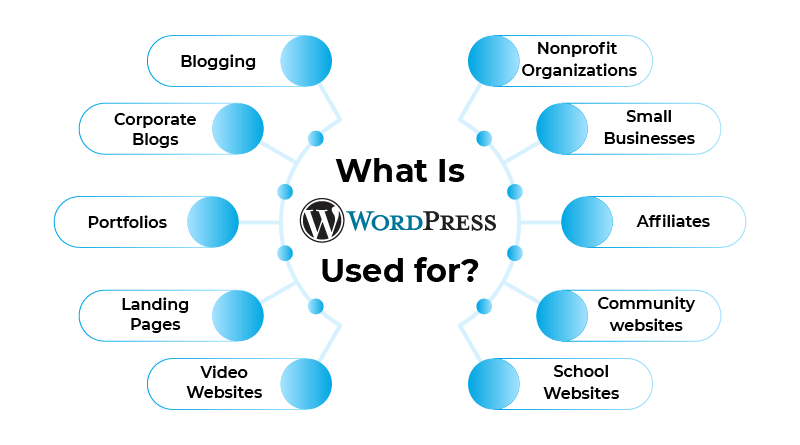
WordPress is mainly used to build websites and blogs. It offers easy content management and customization options. Users can create personal, business, or e-commerce sites without coding skills. Its flexibility and plugin support make it popular for diverse web projects.
How Does WordPress Support Website Customization?
WordPress supports customization through themes and plugins. Themes control website design, while plugins add features and functionality. Users can modify layouts, colors, and fonts easily. This flexibility allows websites to suit specific needs and branding without deep technical knowledge.
Can WordPress Be Used For E-commerce Websites?
Yes, WordPress is ideal for e-commerce using plugins like WooCommerce. It enables online store setup, product management, and payment integration. This makes WordPress a powerful platform for selling products and services online, with scalable options for small to large stores.
Is WordPress Suitable For Beginners?
WordPress is beginner-friendly with its intuitive interface and extensive tutorials. No coding is required for basic site setup and content publishing. Beginners can use pre-built themes and plugins to create professional websites quickly and efficiently.
Conclusion
WordPress helps millions build websites every day. It suits blogs, stores, portfolios, and more. Easy to use, it needs no coding skills. Themes and plugins add unique features quickly. Many choose WordPress for its flexibility and control. Anyone can create a site that fits their needs.
It keeps growing with a strong user community. WordPress truly makes website creation simple and accessible.


