
Choosing the right platform for your website can feel overwhelming. You want something easy to use, flexible, and powerful enough to grow with your needs.
That’s why you’re here—wondering how Wix compares to WordPress. Which one will give you the best results without wasting your time or money? You’ll discover the key differences between these two popular tools. By the end, you’ll know exactly which platform fits your goals, skills, and vision.
Let’s dive in and make your website decision simple and clear.
Credit: www.hostinger.com
Platform Basics
Choosing the right platform for your website is important. Wix and WordPress are two popular options. Both offer tools to build websites but differ in how they work. Understanding their basics helps you pick the best fit.
This section breaks down the core features of Wix and WordPress. It also shows who each platform suits best.
Wix Features
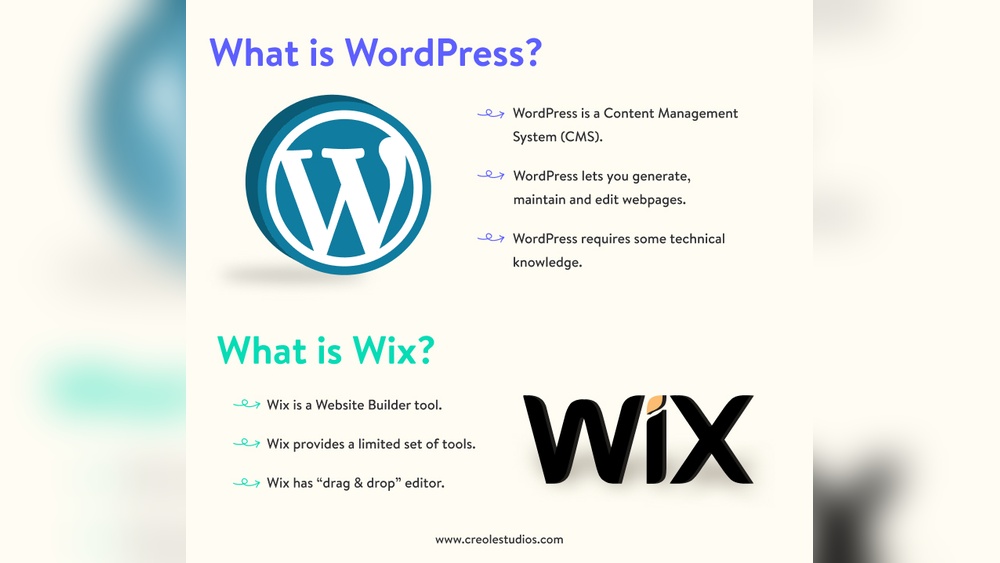
Wix is an all-in-one website builder. It provides a drag-and-drop editor. You can add text, images, and videos easily. Wix includes hosting, so no extra setup is needed. It offers many ready-made templates. You can customize these without coding skills. Wix has built-in SEO tools to help your site rank on search engines. It also supports e-commerce for small stores. The platform manages security and backups automatically.
WordPress Features
WordPress is a content management system. It requires separate hosting and domain setup. WordPress offers thousands of themes and plugins. These add design options and extra functions. It is highly flexible and can build simple blogs to complex websites. WordPress supports SEO plugins for better optimization. Users need some technical skills to manage updates and security. The platform allows full control over website code and data.
Target Users
Wix suits beginners and small business owners. It is good for quick site creation with little tech knowledge. Wix works well for portfolios, blogs, and small shops. WordPress fits users who want full control and scalability. It is ideal for bloggers, developers, and larger businesses. WordPress allows more customization but needs more time to learn.
Ease Of Use
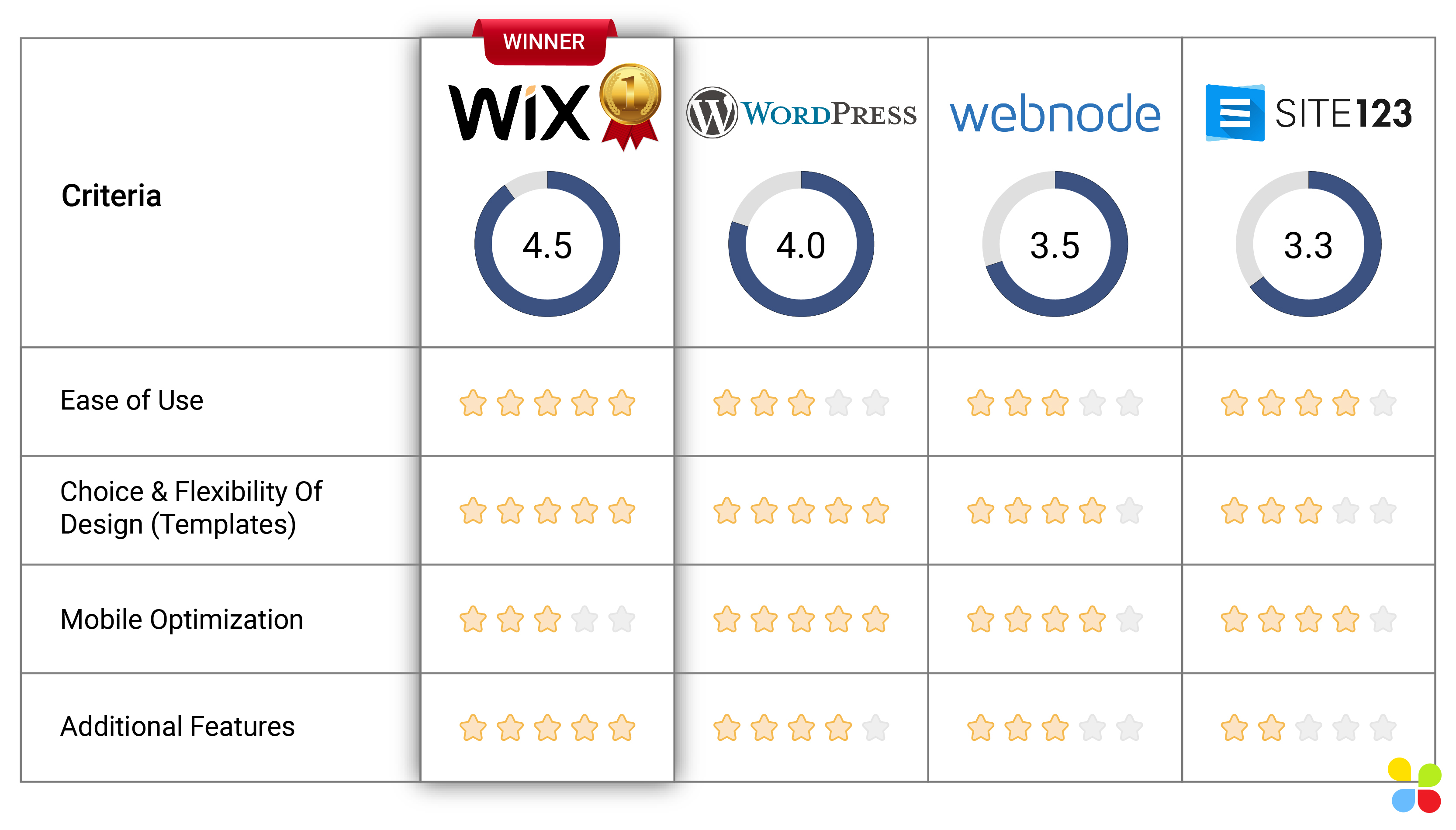
Ease of use plays a major role in choosing a website builder. It affects how fast you start and how smooth the whole process feels. Wix and WordPress offer different experiences. Understanding these differences helps pick the right tool for your needs.
Setup Process
Wix offers a quick and guided setup. You choose a template, enter basic info, and your site is ready. No technical skills are needed. The process is user-friendly and short.
WordPress setup requires more steps. You need hosting, domain, and installation. Many hosts offer one-click installs, but some manual work may be needed. Beginners might find this part tricky.
Editor Experience
Wix has a drag-and-drop editor. You see changes live as you edit. Moving elements is simple and visual. It feels like working on a design canvas.
WordPress uses a block editor called Gutenberg. It breaks content into blocks for easy editing. This allows flexibility but is less visual than Wix. Some users prefer adding plugins for advanced editing.
Learning Curve
Wix has a gentle learning curve. Most users get comfortable in a few hours. Tutorials and guides help beginners.
WordPress requires more time to learn. It has many features and options. Understanding themes, plugins, and settings can take days or weeks. This platform suits users ready to invest time.
Design And Customization
Design and customization are key for any website builder. They shape how your site looks and works. Wix and WordPress offer different tools to help you create a unique site. Both have their strengths in design options and flexibility. Understanding these can help you choose the right platform.
Templates And Themes
Wix provides hundreds of ready-made templates. These templates cover many industries and styles. Each template is modern and visually appealing. You pick a template and start editing right away. Templates are fixed after you publish your site, so choose wisely.
WordPress uses themes, which are also abundant and varied. Themes can be free or paid. Many themes offer more complex designs than Wix templates. You can switch themes anytime without losing content. This gives more freedom to change your site’s look over time.
Drag-and-drop Capabilities
Wix is known for its simple drag-and-drop editor. You move elements anywhere on the page easily. This makes design fast and fun, even for beginners. No coding is needed to adjust layouts or add features.
WordPress itself does not have a built-in drag-and-drop editor. You need to add plugins like Elementor or Beaver Builder. These plugins provide drag-and-drop tools but require installation and setup. WordPress offers more control but has a steeper learning curve.
Customization Flexibility
Wix limits deep customization to keep things easy. You can change colors, fonts, and images quickly. Advanced changes need Wix’s built-in tools or code in Wix Velo.
WordPress offers greater flexibility for customization. You can edit theme code, add custom CSS, or use plugins. This suits users with coding knowledge or those willing to learn. WordPress can adapt to complex needs and special features.
Functionality And Plugins
Functionality and plugins shape how a website performs and grows. Wix and WordPress offer tools to extend your site’s power. Each platform has a unique way to add features and integrate with other services. Understanding these differences helps in choosing the right platform for your needs.
App Market Vs Plugin Ecosystem
Wix features an App Market with ready-to-use apps. These apps are easy to install and work smoothly with Wix sites. The selection covers basics like forms, galleries, and online stores.
WordPress has a vast Plugin Ecosystem. It includes thousands of plugins for many purposes. You can find plugins for SEO, security, social media, and more. WordPress plugins often offer deeper customization options.
Third-party Integrations
Wix supports many third-party services but within limits. The platform controls which services connect to your site. This ensures stability but may restrict some tools.
WordPress allows almost any third-party integration. You can add custom code or use plugins to connect external tools. This freedom suits complex or unique needs.
Adding Advanced Features
Wix lets you add advanced features through apps and built-in tools. The process is simple and does not need coding skills. Still, options can be limited for very custom functions.
WordPress is ideal for advanced features and custom work. Developers can build or modify plugins and themes. This makes WordPress flexible for any project size or type.
Seo And Marketing Tools
SEO and marketing tools are vital for website success. They help improve visibility and attract visitors. Both Wix and WordPress offer different options to boost your site’s reach. Understanding their SEO and marketing capabilities can guide your choice.
Built-in Seo Features
Wix includes built-in SEO tools that are easy to use. It offers automated SEO plans and simple editing for meta tags, URLs, and headings. WordPress relies on plugins like Yoast SEO for advanced control. These plugins provide detailed SEO analysis and suggestions. WordPress gives more flexibility but may require technical skills.
Marketing Integrations
Wix provides native marketing tools like email campaigns and social media integration. These tools are ready to use without extra setup. WordPress supports many marketing plugins and third-party services. This allows for wider marketing options but needs manual installation. WordPress suits users wanting more custom marketing strategies.
Analytics And Tracking
Wix offers built-in analytics with clear reports on site traffic and user behavior. It supports Google Analytics integration for deeper insights. WordPress fully supports Google Analytics and many other tracking plugins. It gives detailed data but may require setup knowledge. WordPress is ideal for users needing advanced analytics.
Credit: www.contentdevelopmentpros.com
Performance And Security
Performance and security are key factors for any website. They affect user experience and search rankings. Both Wix and WordPress offer solutions, but they differ in how they handle these areas.
Site Speed
Wix uses built-in tools to optimize site speed automatically. Its servers are designed to load pages quickly for visitors. WordPress speed depends on your hosting and setup. You can use plugins and caching to boost performance. Proper optimization is crucial for WordPress sites.
Hosting And Uptime
Wix provides hosting as part of its service. It guarantees a strong uptime with minimal downtime. WordPress hosting depends on the provider you choose. This means uptime can vary widely. Selecting a reliable host is essential for WordPress users.
Security Measures
Wix manages security for you. It includes SSL certificates, backups, and threat monitoring. WordPress security depends on your efforts. You must install security plugins and update regularly. Both platforms can be secure with proper care.
Pricing And Plans
Choosing the right website builder often depends on the cost and available plans. Wix and WordPress offer different pricing structures. Understanding these helps you pick the best fit for your budget and needs.
Free And Paid Options
Wix offers a free plan with basic features and Wix ads. WordPress itself is free to use, but you must pay for hosting and domain. Paid Wix plans start with affordable monthly fees and include hosting. WordPress requires separate purchases for hosting and premium themes or plugins.
Value For Money
Wix plans bundle hosting, templates, and support. This makes it easier to manage costs. WordPress offers more flexibility but needs extra spending on hosting, themes, and plugins. For simple sites, Wix may provide better value. For complex sites, WordPress offers more control but can cost more.
Additional Costs
Wix may charge for premium apps or extra storage. WordPress users often pay for premium themes, plugins, and security tools. Domain registration is a separate cost for both platforms. WordPress hosting costs vary widely based on provider and plan. Plan for these extras to avoid surprises.
Credit: www.elegantthemes.com
Support And Community
Support and community are key parts of any website platform. They help users solve problems and learn faster. Wix and WordPress offer different types of support and communities. Understanding these can help you choose the right platform for your needs.
Customer Support Options
Wix provides direct customer support through chat, email, and phone. Their team is available during business hours. Users get quick responses to common issues. WordPress itself does not offer direct support. Support depends on the hosting provider or theme developers. Users often rely on forums or hire experts for help.
User Community
WordPress has a large, active user community worldwide. Forums, groups, and meetups are common. Users share tips, plugins, and themes freely. Wix’s community is smaller but growing. It includes forums and a blog with tutorials. WordPress’s community offers more diverse solutions.
Learning Resources
Wix offers a rich library of tutorials and guides on its website. These are easy to follow for beginners. WordPress has vast learning resources created by users. Tutorials, videos, and blogs cover every skill level. Users can find answers for basic to advanced topics.
Best Use Cases
Choosing between Wix and WordPress depends on your project type. Each platform suits different needs and goals. Understanding where each excels helps you pick the right one. Below are common use cases to guide your choice.
Small Business Websites
Wix offers easy-to-use tools for small business owners. It includes ready-made templates and drag-and-drop design. This makes website setup fast and simple. WordPress provides more flexibility and control. It suits businesses wanting unique features and growth options. Both work well, but Wix is faster for beginners.
Ecommerce Stores
Wix supports small online shops with built-in ecommerce features. It handles payments, inventory, and shipping smoothly. WordPress, paired with WooCommerce, powers larger stores with custom needs. It offers more plugins and scalability. Use Wix for small shops and WordPress for bigger, complex stores.
Blogs And Content Sites
WordPress is the best choice for bloggers and content creators. It has strong tools for managing posts and SEO. Customizable themes help create unique layouts. Wix can host blogs but lacks advanced content features. WordPress suits those who want full control over content and growth.
Frequently Asked Questions
What Are The Main Differences Between Wix And WordPress?
Wix offers an all-in-one website builder with drag-and-drop features. WordPress is a flexible, open-source platform requiring hosting and customization. Wix is easier for beginners, while WordPress suits advanced users needing more control and scalability.
Which Platform Is Better For Seo, Wix Or WordPress?
WordPress provides more SEO plugins and customization options, making it better for SEO experts. Wix has improved SEO tools but offers less flexibility. For advanced SEO, WordPress is preferred, while Wix works well for simpler needs.
Can I Migrate My Website From Wix To WordPress?
Yes, migrating from Wix to WordPress is possible but requires manual steps. Exporting content is limited, so you’ll need to rebuild your design and structure on WordPress. It’s recommended to plan carefully before switching platforms.
How Do Wix And WordPress Differ In Pricing?
Wix offers fixed monthly plans that include hosting and support. WordPress itself is free but requires paid hosting, themes, and plugins. Overall, Wix has predictable costs, whereas WordPress expenses vary based on customization and hosting choices.
Conclusion
Wix and WordPress both help you build websites. Wix is simple and good for quick setups. WordPress offers more control and custom options. Choose Wix for ease and speed. Pick WordPress if you want flexibility and growth. Think about your skills and goals first.
Both platforms have strong communities and support. Your choice depends on what fits your needs best. Either way, you can create a great site. Take time to explore each before deciding. The right platform makes your website journey easier.


