
Are you wondering if you get an email address when you create a WordPress site? It’s a common question, and the answer might surprise you.
Having a professional email linked to your website can boost your credibility and make communication easier. But does WordPress provide this for you automatically? Keep reading to find out how email works with WordPress and what options you have to get the perfect email setup for your site.
This simple guide will clear up the confusion and help you take the next step with your online presence.
Email Options With WordPress
WordPress offers several ways to use email with your website. Email is important for communication, marketing, and managing your site. You can choose free or paid plans depending on your needs. Also, you can use third-party services to get better features and reliability. Understanding your email options helps you pick the best solution for your site.
Free Vs Paid Plans
WordPress itself does not provide free email addresses with its plans. Free plans focus on basic website creation and hosting. You need to buy a paid plan or add extra services for email. Paid plans often include email hosting with your domain name. This means you get a professional email like yourname@yourdomain.com. Paid email plans offer better storage, security, and support. Free email options can work for small or personal sites. Paid plans suit businesses and users who need more features.
Third-party Email Services
Many people use third-party email providers with WordPress. Services like Google Workspace or Microsoft 365 connect easily to your domain. They offer strong security and high uptime. These services provide advanced tools like calendars, contacts, and cloud storage. Third-party email often has better spam protection and customer support. You must configure DNS settings to link your domain with these services. Using third-party email is common for professional websites. It gives you more control and reliable communication.

Credit: melapress.com
Setting Up A Custom Email Address
Setting up a custom email address helps your website look more professional. It builds trust with visitors and customers. A custom email uses your website’s domain name, like info@yourwebsite.com. This section explains how to create one easily.
Using Domain-based Emails
Domain-based emails use your website’s domain name. Most hosting providers offer this feature. Check if your WordPress host includes email services. If yes, you can create emails right from your hosting dashboard.
Log in to your hosting account. Find the email section. Enter the desired email name and password. After saving, you can access the email via webmail or email clients. This setup keeps your email and website together.
Configuring Email Forwarding
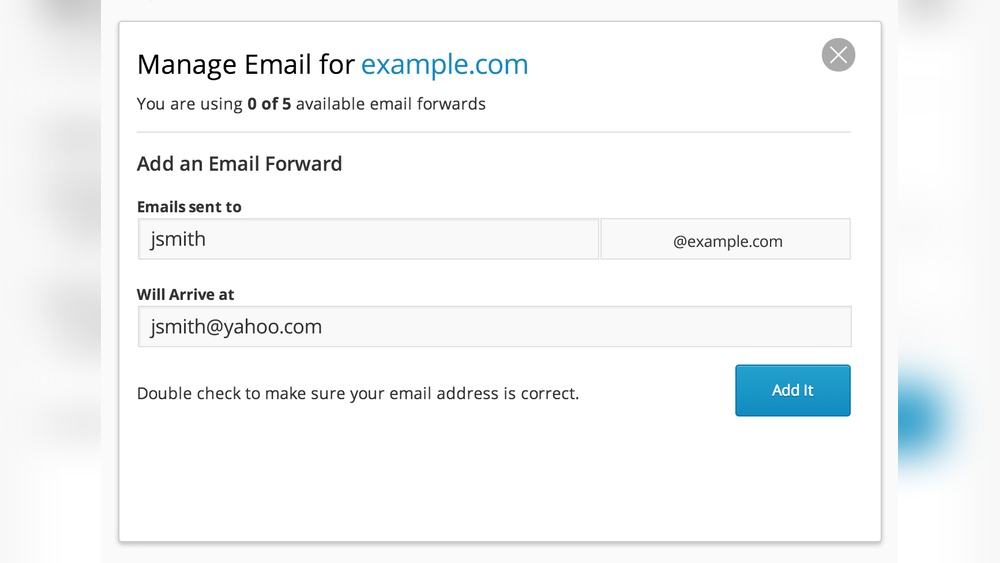
Email forwarding sends emails from your custom address to another email. This option works if your host does not provide full email hosting. Forwarding lets you use your regular email inbox.
Set up forwarding in your hosting control panel. Enter your custom email and the destination email address. All messages sent to your custom email will go to your main inbox. This keeps things simple and organized.
WordPress.com Email Features
WordPress.com offers different ways to use email with your website. Email features help you connect with visitors and manage your site better. Understanding these features helps you decide how to handle your email needs.
Available Email Services
WordPress.com does not provide free email hosting directly. It offers email forwarding for custom domains. This means emails sent to your domain can forward to your personal inbox. For full email service, WordPress.com partners with third-party providers like Google Workspace. You can buy these services through WordPress.com. They give you professional email addresses with your domain name.
Limitations And Benefits
Email forwarding is simple but has limits. You cannot send emails from your domain using forwarding alone. Using third-party email hosting costs extra money. It adds professional features like calendar and cloud storage. These services improve communication and brand trust. Email through WordPress.com is easy to set up and manage. It keeps your email linked to your website. This helps maintain a consistent online presence.
Credit: www.greengeeks.com
WordPress.org And Email Hosting
WordPress.org is a popular platform for building websites. Many users wonder if it provides email addresses. WordPress.org itself does not offer email hosting or email addresses. Instead, email services depend on your web hosting provider or separate email hosts.
Understanding how email hosting works with WordPress.org helps you set up a professional email for your site. It is important to know the role of your web host and explore common email hosting options.
Role Of Web Hosting Providers
Web hosting providers store your website files and data. They often include email hosting as part of their service. This means you can create email addresses using your domain name. For example, you can have info@yourdomain.com.
Not all web hosts offer email hosting. Some may charge extra for email services. Check what your web host provides before choosing one. Many hosts offer easy email setup with simple control panels.
Popular Email Hosting Options
Many people use third-party email hosts for better features. Google Workspace and Microsoft 365 are popular choices. They offer professional email, calendars, and storage.
Other options include Zoho Mail, ProtonMail, and FastMail. These services provide secure and reliable email hosting. You can link these accounts to your WordPress domain easily.
Choosing the right email host depends on your needs and budget. Good email hosting enhances communication and builds trust with your visitors.
Integrating Email With WordPress Plugins
Integrating email with WordPress plugins helps you stay connected with your visitors. It allows you to collect emails, send messages, and build relationships easily. WordPress offers many plugins that work well with email services.
These plugins help you manage communication without extra tools. They save time and make your website more interactive. Two main types of plugins help with email: contact form plugins and email marketing tools.
Contact Form Plugins
Contact form plugins let visitors send messages directly from your website. They collect email addresses and send notifications to your inbox. Popular plugins include WPForms, Contact Form 7, and Ninja Forms.
These plugins are easy to set up and customize. You can add fields like name, email, and message. Some plugins connect with email services to save contacts automatically.
Email Marketing Tools
Email marketing tools help you send newsletters and automated emails. They allow you to create campaigns and track results. Common tools include Mailchimp, Constant Contact, and Sendinblue.
Many email marketing plugins connect with WordPress. They sync your contacts and let you design emails inside your dashboard. This integration simplifies growing your email list and sending updates.
Managing Email Deliverability
Managing email deliverability is key for WordPress users who send emails from their website. Good deliverability means your emails reach inboxes, not spam folders. Poor deliverability can cause important messages to be missed or ignored. This section explains how to improve email delivery from WordPress sites.
Smtp Setup
SMTP stands for Simple Mail Transfer Protocol. It helps send emails through a trusted server. Using SMTP with WordPress improves email reliability and reduces errors. Many hosting servers do not send emails well by default. SMTP fixes this by using a proper mail server.
To set up SMTP, install a WordPress plugin like WP Mail SMTP. Connect it to an email provider such as Gmail or Outlook. This setup ensures your website emails have a better chance of reaching inboxes.
Avoiding Spam Filters
Spam filters block unwanted emails. They protect users from junk mail and scams. WordPress emails must avoid triggers that look spammy. Using clear subject lines and simple text helps.
Avoid using too many links or images in emails. Check the “From” address to match your domain. Always add an unsubscribe link for newsletters. These steps lower the chance of emails going to spam.
Cost Considerations For Email Services
Choosing an email service for your WordPress site depends a lot on cost. Some options come with no price. Others require monthly or yearly fees. Understanding these costs helps make the best choice for your needs and budget. It also helps avoid surprises later.
Free Solutions
Many free email services work well for small sites. They often include basic features like sending and receiving emails. Examples include Gmail and Outlook. These services do not charge for personal use.
Free options may limit storage space and email volume. Support might be slower or limited. Still, these solutions suit blogs or small businesses just starting out.
Premium Email Providers
Paid email services offer more features and reliability. Prices usually start at a few dollars per month. Services like Google Workspace and Microsoft 365 are popular choices.
These providers include extra storage, better security, and priority support. They also allow custom domain emails, like yourname@yourwebsite.com. This looks professional and builds trust.
Choosing a premium provider helps if your site grows or needs advanced email functions. Weigh the cost against the benefits carefully.
Credit: www.greengeeks.com
Frequently Asked Questions
Do You Get A Free Email Address With WordPress?
No, WordPress does not provide a free email address. You must use third-party services or upgrade hosting plans for email.
Can WordPress Hosting Include Professional Email Services?
Some WordPress hosting providers include email hosting in their plans. Check your host’s features to confirm email availability.
How To Create A Custom Email With WordPress Domain?
Use your domain registrar or hosting control panel to set up email accounts linked to your WordPress domain.
Is Gmail Integration Possible With A WordPress Email?
Yes, you can connect your custom domain email to Gmail using Google Workspace or Gmail’s mail fetcher feature.
Conclusion
WordPress does not offer a free email address by default. You need to use other services for professional emails. Many hosting providers include email accounts with your plan. Setting up email linked to your domain looks more professional. It also helps manage communication easily.
Choosing the right email service depends on your needs. Keep your website and email separate for better control. This way, you get reliable email with your WordPress site. Simple steps make the process smooth and clear.


