Are you wondering whether to create a subdomain in your hosting or through your domain registrar? Making the right choice can save you time, avoid headaches, and even improve your website’s performance.
You might think it’s a small detail, but where you set up your subdomain can impact your site’s speed, security, and ease of management. Keep reading to discover the simple steps and smart tips that will help you decide the best place for your subdomain—so you can focus on growing your online presence without unnecessary hassle.
Credit: profitserver.net
Choosing Between Hosting And Domain Registrar
Deciding where to create a subdomain can impact your website’s performance and management. Subdomains can be set up either at your domain registrar or through your hosting provider. Each choice offers different advantages and limitations. Understanding these can help you make a better decision for your website’s needs.
Key Differences
Creating a subdomain at the domain registrar means managing it through your domain control panel. This method often requires manual DNS configuration. Hosting providers usually offer easier tools to create and manage subdomains. The hosting setup links the subdomain directly to your web files and server. Domain registrar subdomains might not connect automatically to your hosting space. Hosting-based subdomains often update faster and integrate well with your website content.
Pros And Cons
Subdomains at the domain registrar give more control over DNS settings. This suits users who want to manage domain records separately. The downside is the process can be complex for beginners. It may cause delays in propagation and setup. Hosting-based subdomains are simpler to create and manage. They provide seamless integration with your existing site files. The drawback is less control over DNS details. Some hosting providers limit the number of subdomains you can create.
Setting Up Subdomains On Hosting
Setting up subdomains on your hosting platform helps organize your website. It allows you to create separate sections without buying new domains. Subdomains can host blogs, shops, or support pages under your main site. Managing subdomains on hosting gives more control over files and settings.
Many hosting providers offer easy tools to create and manage subdomains. The process usually takes just a few minutes. Understanding how to set up subdomains on hosting helps you keep your site neat and professional.
Steps To Create
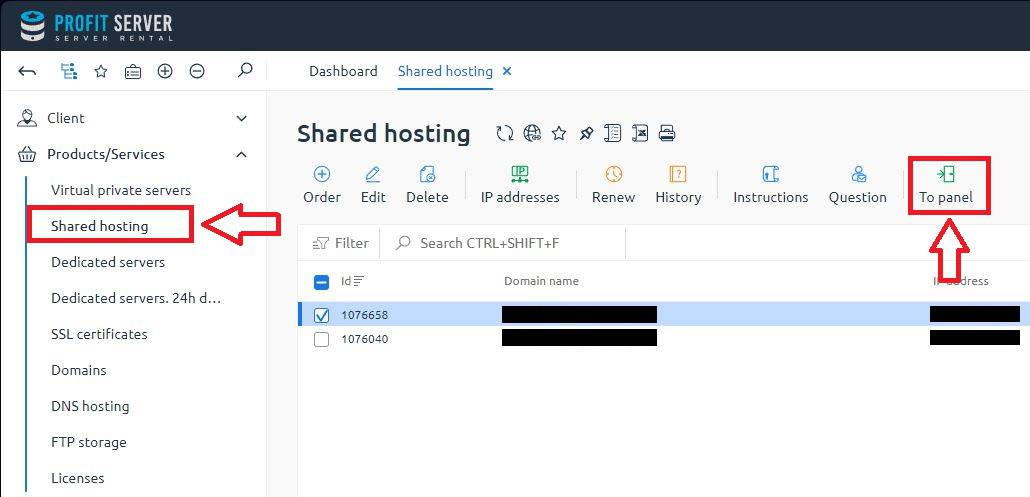
Log in to your hosting control panel. Find the section labeled “Subdomains” or “Domains.” Enter the name for your new subdomain. Choose the domain under which it will appear. Select the folder where files for this subdomain will be stored. Click “Create” or “Add” to finish. Test your subdomain by visiting its URL in a browser.
Common Tools And Interfaces
cPanel is a popular tool for managing subdomains. It has a simple interface for adding and editing subdomains. Plesk offers similar features with an easy-to-use dashboard. Some hosting providers use custom panels but keep the process simple. File managers and FTP clients help upload content to subdomain folders.
Performance Considerations
Subdomains share server resources with your main site. Heavy traffic on one subdomain can affect others. Use caching and optimization to keep performance smooth. Choose hosting plans with enough bandwidth and storage. Monitor your subdomains regularly for loading speed. Optimize images and scripts to reduce load times.
Creating Subdomains Via Domain Registrar
Creating subdomains via your domain registrar is a straightforward option. It lets you manage your domain and subdomains in one place. This method is useful if you want simple control without extra hosting setup.
You do not need to log in to your hosting account. Just access your domain registrar’s dashboard. From there, you can add and manage subdomains easily. This keeps your domain and subdomain settings organized.
Dns Management Basics
DNS stands for Domain Name System. It connects your domain name to the right server. The domain registrar controls the DNS settings by default. To create a subdomain, you add a DNS record.
Common DNS records for subdomains include A records and CNAME records. An A record points the subdomain to an IP address. A CNAME record points it to another domain. These records tell the internet where to find your subdomain.
Configuration Steps
First, log in to your domain registrar account. Find the DNS management or DNS settings section. Look for an option to add a new record.
Choose the record type, usually A or CNAME. Enter the subdomain name, like blog or shop. Then, enter the destination IP or domain. Save your changes and wait for DNS to update. This can take a few minutes to hours.
Limitations And Challenges
Domain registrars offer limited DNS tools compared to hosting. Some registrars do not support all record types. You may face delays in DNS updates.
Advanced configurations like SSL certificates need hosting access. Also, managing many subdomains can get complex in registrar settings. For larger sites, hosting control may be better.

Credit: www.hosted.com
Impact On Seo And User Experience
Choosing whether to create a subdomain in hosting or at the domain registrar affects both SEO and user experience. These choices shape how search engines view your site and how visitors interact with it. A clear understanding of these impacts helps you make the right decision for your website’s growth and usability.
Seo Implications
Search engines often treat subdomains as separate websites. This means SEO efforts on a subdomain may not benefit the main site directly. Building backlinks and authority for a subdomain requires extra work.
Using a subdomain can help organize content but may split your SEO value. It can be useful for targeting different keywords or audiences. Still, managing SEO across multiple domains takes more time and resources.
Branding And Navigation
Subdomains can clarify the structure of your website for visitors. They make it easier to separate different topics or services. This helps users find what they want faster.
On the other hand, subdomains may confuse visitors if not branded well. Consistent design and clear menus improve navigation and brand trust. Keeping your site simple helps users feel more comfortable and stay longer.
Security And Maintenance
Security and maintenance are key factors when choosing where to create your subdomain. Both affect how safe your site is and how easy it is to keep running smoothly. Proper security protects your data and visitors. Good maintenance saves time and avoids problems.
Ssl Certificates
SSL certificates secure data between users and your site. They show a padlock in the browser, building trust. Hosting providers often include free SSL certificates. Domain registrars may require separate purchases or setups. Managing SSL on your hosting can be simpler. It keeps your subdomain secure without extra steps. Renewals and updates happen automatically in many hosting plans. This reduces the risk of expired certificates.
Ongoing Management
Subdomains need regular updates and monitoring. Hosting platforms often offer tools for easy management. These tools help with backups, speed, and security scans. Domain registrars might lack these options. Updates on hosting happen in one place. This makes maintenance less confusing and faster. Managing subdomains at your hosting provider keeps everything organized. It lowers chances of errors and downtime. Good management keeps your site reliable and safe for visitors.
Cost Factors To Consider
Cost plays a key role in deciding where to create a subdomain. Understanding the fees involved helps avoid unexpected expenses. Both hosting providers and domain registrars may charge for subdomains. This section breaks down these costs clearly.
Hosting Fees
Many hosting plans include subdomains at no extra cost. Some providers limit the number of free subdomains. Extra subdomains can lead to additional monthly or yearly fees. These fees vary based on the hosting package. Shared hosting often has lower fees than VPS or dedicated hosting. Check your hosting plan details before creating subdomains.
Registrar Charges
Domain registrars usually allow subdomains without extra charges. Subdomains are part of your main domain, so no separate registration is needed. Some registrars may offer premium DNS services for a fee. These services improve subdomain management and security. Basic subdomain setup at registrars generally costs nothing. Confirm your registrar’s policy to avoid surprises.
Expert Recommendations
Experts offer clear advice on where to create subdomains. The choice depends on your needs and technical skills. Understanding each option helps you manage your site better.
When To Choose Hosting
Create subdomains in hosting if you want full control. Hosting lets you manage files and databases directly. It suits websites with specific server needs or custom software.
Use hosting for better performance and security settings. It allows easier integration with your main site. Developers prefer hosting for complex projects and testing environments.
When To Use Registrar
Use your domain registrar for simple subdomain tasks. It works well for basic redirects or pointing to other URLs. No advanced server setup is needed here.
Registrars offer easy DNS management tools for beginners. This option is faster and less technical. It fits small sites or temporary subdomains without hosting costs.

Credit: answers.netlify.com
Frequently Asked Questions
What Is A Subdomain In Hosting Vs Domain Registrar?
A subdomain in hosting is managed via your web host’s control panel. In contrast, a domain registrar allows DNS configuration but not hosting management. Hosting subdomains handle site content, while registrar subdomains mainly direct traffic through DNS settings.
Can I Create Subdomains At The Domain Registrar?
Yes, many domain registrars let you create subdomains by editing DNS records. However, these subdomains need hosting setup elsewhere to serve web content. The registrar only manages DNS, not the actual hosting environment.
Which Is Better For Managing Subdomains: Hosting Or Registrar?
Managing subdomains through your hosting provider is better for control and performance. Hosting platforms offer direct integration with site files and services. Registrars handle DNS but lack hosting features and ease of subdomain management.
How Do Subdomains Affect Seo When Created In Hosting?
Subdomains created in hosting act as separate websites for SEO. Proper setup and content relevance can boost search rankings. Avoid duplicate content and ensure each subdomain has unique, valuable content for better SEO impact.
Conclusion
Choosing where to create your subdomain depends on your needs and skills. Hosting providers often offer easier setup and better control. Domain registrars might be simpler but less flexible. Think about your budget, technical comfort, and website goals. Test what works best for you.
This small decision can affect your website’s performance and management. Take your time and choose wisely for smooth website growth.