
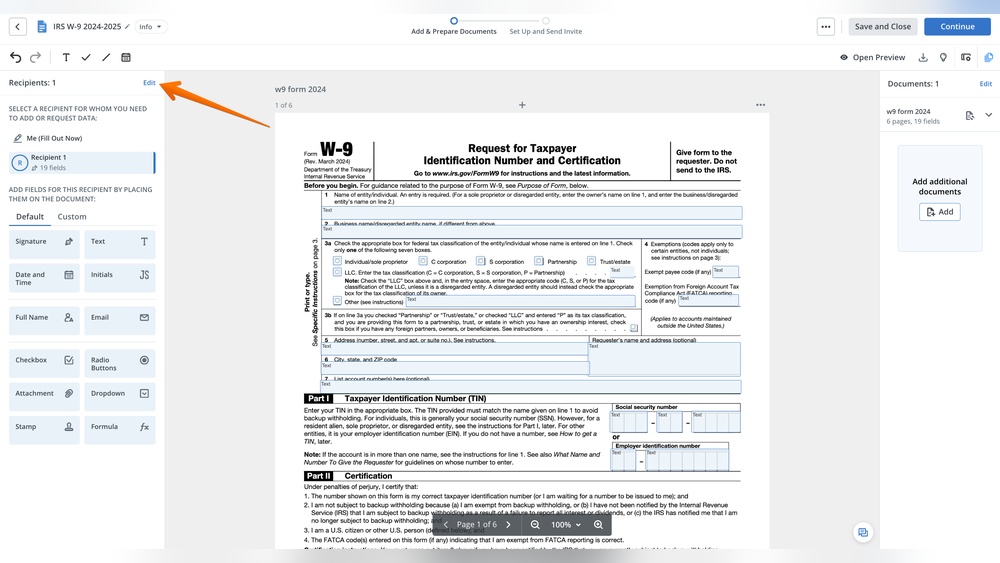
Are you unsure where to enter software expenses on your business tax forms? You’re not alone.
Many business owners find this part of tax filing confusing and worry about missing out on deductions. The good news is, understanding exactly where and how to report software can save you money and keep your taxes accurate. You’ll discover clear, simple steps to properly enter software costs in your business taxes.
Keep reading to take control of your tax filing and avoid costly mistakes.

Credit: imergeadvisors.com
Software Expenses And Business Taxes
Understanding how to report software expenses on your business taxes is important. Software costs can affect your taxable income and how much tax you owe. Properly categorizing these expenses helps you follow tax rules and maximize deductions. This section explains software expenses and how to handle them in your business taxes.
Types Of Software Costs
Software expenses can come in different forms. You may buy software outright or subscribe to it monthly. Some costs include one-time purchases, updates, and support fees. Other costs could be custom software development or cloud-based services. Each type of software cost may have different tax rules.
Capital Vs. Operating Expenses
Software expenses can be either capital or operating costs. Capital expenses are large purchases that last several years. You usually spread these costs over time through depreciation. Operating expenses are smaller or recurring costs. You can deduct these fully in the year you pay them. Knowing the difference helps you report expenses correctly on your tax return.
Reporting Software On Tax Forms
Reporting software expenses on your business tax forms is important for accurate accounting. Software costs can include purchases, subscriptions, or licenses used in your business. Knowing where to enter these expenses depends on your business type and tax form. Proper reporting helps reduce your taxable income and keeps your records clear.
Schedule C For Sole Proprietors
Sole proprietors report software expenses on Schedule C. Enter the cost under “Other Expenses” if no specific category fits. Write a brief description like “software subscriptions” next to the amount. Keep receipts and invoices as proof in case of an audit. Software used for business helps lower your net profit on Schedule C.
Form 1120 For Corporations
Corporations list software costs on Form 1120 under “Other Deductions.” Include all software expenses related to business operations. Large software purchases might be capitalized and depreciated over time. Consult instructions to decide if you deduct or depreciate software costs. Accurate reporting on Form 1120 reduces taxable income for your corporation.
Form 1065 For Partnerships
Partnerships report software expenses on Form 1065 in the “Other Deductions” section. Include costs for software used by the partnership. Like corporations, partners may capitalize or expense software depending on the cost. Clear records ensure smooth tax filing and correct income division among partners. Reporting software expenses lowers the partnership’s taxable income.
Software As A Business Asset
Software is often a key part of many businesses today. It can be a tool for daily tasks or a product you sell. When you buy or develop software, it becomes a business asset. This means you must report it properly on your taxes. Treating software as an asset helps track its value over time. It also affects how you report expenses and profits.
When To Capitalize Software
Capitalizing software means listing it as a long-term asset on your books. You do this if the software cost is above a certain limit set by tax rules. The software must provide benefits for more than one year. Costs for buying, developing, or improving software can qualify. Small expenses or regular updates usually go straight to expense accounts. Capitalizing helps spread the cost over the software’s useful life.
Depreciation And Amortization Rules
Depreciation and amortization let you deduct software costs over time. Purchased software generally uses amortization. This means spreading the expense over 36 months. Custom software development may have different rules. You must start amortization when the software is ready to use. Keep clear records of all software costs and dates. This helps you claim the right deductions and follow tax laws.
Credit: ultimatetax.com
Deducting Software Subscriptions
Deducting software subscriptions on your business taxes can save money and reduce taxable income. Software costs are common in modern businesses. Knowing where to enter these expenses is important for accurate tax filing.
Software subscriptions often qualify as deductible expenses. The tax treatment depends on how you pay for them and the type of software service used. Proper categorization helps you follow IRS rules and avoid issues.
Monthly Vs. Annual Payments
Monthly software payments are usually treated as regular business expenses. You can deduct each monthly payment in the year you pay it. This method matches expenses with the time you use the software.
Annual payments might need special handling. If you pay for a full year upfront, the IRS may require you to spread the deduction over 12 months. This approach matches the expense with the service period.
Software As A Service (saas) Treatment
SaaS means you access software online without owning it. These subscriptions are often treated as service expenses. Deduct the full cost in the year you pay for the subscription.
This treatment differs from buying software licenses. Purchased software might need to be capitalized and depreciated over time. SaaS subscriptions usually do not require this, making deductions simpler.
Recordkeeping For Software Purchases
Keeping clear records for software purchases is important for business taxes. It helps prove your expenses to tax authorities. Good records ensure you claim the right deductions. It also keeps your finances organized and easy to track.
Recordkeeping means saving all documents related to your software buys. This includes invoices, receipts, and usage logs. These papers show how much you spent and when. You need this proof if the tax office asks for it.
Invoices And Receipts
Save every invoice and receipt for software purchases. These show the price and purchase date. They also include the seller’s details and payment method. Keep digital copies if you buy online. Paper copies work fine for store purchases.
Organize these documents by date or software name. This helps you find them fast during tax time. Without these records, you may lose out on deductions.
Tracking Software Usage
Track how you use each software in your business. Note if it is for work or personal use. This helps separate business expenses from personal ones. You can claim only the business portion on your taxes.
Use simple logs or spreadsheets to record usage. Write down dates and tasks done with the software. This record proves the software is necessary for your business. It supports your tax deduction claims.
Credit: gaper.io
Common Mistakes To Avoid
Entering software costs in your business taxes can be tricky. Many business owners make common mistakes that cause problems later. These errors can lead to incorrect tax filings or missed deductions. Knowing what to avoid helps you save money and stay compliant.
Misclassifying Software Costs
Software costs fall into two main categories: expenses and assets. Expenses are deducted in the same year. Assets are capitalized and deducted over time. Mistaking one for the other can affect your tax bill. For example, buying software licenses is usually an expense. Buying software to own and use for years is often an asset. Always check the IRS rules before deciding.
Overlooking Updates And Upgrades
Many ignore the costs of software updates and upgrades. Some think these costs are part of the original software purchase. Updates and upgrades can have different tax treatments. Some updates qualify as repairs and are deductible immediately. Major upgrades might need to be capitalized. Track these costs separately to avoid mistakes. This careful tracking helps you claim the right deductions.
Tax Credits And Incentives
Tax credits and incentives can reduce your business tax bill. They reward companies that invest in software and new technologies. Understanding these benefits helps you save money and grow your business. Many small and medium businesses miss out on these valuable opportunities.
Research And Development Credits
Research and Development (R&D) credits reward spending on innovation. If your business creates or improves software, you may qualify. Keep detailed records of costs like salaries and software purchases. These credits lower your tax liability dollar for dollar. Claiming R&D credits requires filling out specific tax forms. Consult with a tax professional to ensure accuracy.
Technology Investment Incentives
Technology investment incentives encourage buying new software and equipment. Some states offer tax breaks for technology upgrades. The federal government may allow immediate expensing of software costs. These incentives reduce taxable income or provide direct credits. Document all technology purchases and installation expenses. Check eligibility rules before claiming these benefits on your tax return.
Consulting A Tax Professional
Consulting a tax professional can simplify how you enter software expenses in your business taxes. Tax rules often change, and software deductions can be tricky. A tax expert understands the current laws and can guide you through the process. This helps avoid errors and possible audits. It also saves time and stress, letting you focus on running your business.
When To Seek Expert Advice
Seek a tax professional if your software expenses are large. Complex software purchases may require special tax treatment. If you are unsure how to report these costs, ask for help. Changes in tax law can affect how you deduct software expenses. A tax advisor can explain updates and apply them correctly. If you want to avoid mistakes or penalties, getting advice is wise.
Choosing The Right Tax Advisor
Find a tax advisor with experience in small business taxes. Look for someone who knows software expense rules well. Check their qualifications and client reviews before deciding. Choose a professional who communicates clearly and answers your questions. A good advisor makes tax filing easier and more accurate. Trust and knowledge are key when picking your tax expert.
Frequently Asked Questions
Where Do I Report Software Expenses On Business Taxes?
Software expenses are reported under business expenses on your tax return. For most small businesses, this falls under “Office Expenses” or “Software and Subscriptions” on Schedule C or relevant tax forms.
Can I Deduct Software Purchases On My Taxes?
Yes, you can deduct software purchases as a business expense. The IRS allows immediate deduction or amortization depending on the software type and cost.
Should Software Be Capitalized Or Expensed On Taxes?
Software costing less than $2,500 is usually expensed immediately. Higher-cost software may need to be capitalized and amortized over time according to IRS rules.
Where To Enter Software Subscription Fees On Taxes?
Enter software subscription fees as recurring business expenses. They are typically listed under “Office Expenses” or “Subscriptions” in your tax filings.
Conclusion
Entering software costs correctly on your business taxes saves money and avoids trouble. Usually, software expenses go under “business expenses” or “depreciation,” depending on the type and cost. Keep good records and receipts to support your claims. Check IRS rules or ask a tax expert if unsure.
Doing this right helps your business stay legal and financially healthy. Don’t skip this step—it matters more than you think.


