
Imagine waking up one morning to find your WordPress site hacked. It’s a nightmare scenario that sends a chill down your spine.
Your hard work, your online presence, and your reputation are suddenly under threat. But don’t panic. You’re not alone, and you can fix this. You’ll discover exactly what steps to take when your WordPress site is hacked. By the end, you’ll feel empowered with the knowledge to protect your website and regain control.
Keep reading, because this could be the most crucial guide to safeguarding your online world.
Credit: theadminbar.com
Identify The Hack
Check for Unauthorized Changes: Look at your website’s pages. Are there any changes you didn’t make? Check for new users. Verify changes in your site’s settings. Hackers often leave signs, such as altered content.
Analyze Site Activity Logs: Review your site’s logs. Find login attempts that look suspicious. Look for unusual traffic spikes. Logs can show you when the hack occurred.
Utilize Security Plugins: Use plugins to scan your site. They help find malware. These tools can spot vulnerabilities. Many plugins offer real-time protection. They alert you to new threats.

Credit: kinsta.com
Isolate The Website
Disable access quickly to prevent more damage. This stops hackers from causing more harm. Use your control panel to do this. Change permissions if needed. Keep your website safe.
Tell users about the hack. They need to know their data is safe. Share updates with all stakeholders. Keep them informed. Let them know what steps you’re taking. This builds trust and keeps everyone calm.
Backup The Site
Making a full backup of your site is crucial. This protects your data in case of emergencies. Use tools like UpdraftPlus or BackupBuddy. These help save every part of your site. It’s important to do this regularly. Don’t wait until something bad happens.
Keeping your backup safe is important. Use cloud services like Google Drive or Dropbox. You can also store it on an external hard drive. Make sure your backup is always protected. This keeps your data safe from hackers. Never store your backup in the same place as your site.
Remove Malicious Code
Find the bad code in your site files. Check each file carefully. Look for strange scripts or codes. They can hide in theme or plugin files. Sometimes, they are in wp-config.php or .htaccess files. Remove any suspicious code. Use a clean backup to compare the files. It helps to know what is wrong. A clean copy can be your guide.
Use tools to find and remove malicious software. Some tools scan your site. They find bad codes quickly. Wordfence and Sucuri are good choices. They can clean your site. These tools save time. They make your site safe again. Always update them. Updated tools work better.
Update And Strengthen Security
Update Core, Themes, and Plugins
Always check for updates. Outdated themes can make sites unsafe. Update your WordPress core. Update your plugins too. This helps keep hackers away. Regular updates fix bugs. They also close security holes.
Strengthen Passwords
Use strong passwords. Weak passwords are easy to guess. Combine letters and numbers. Include symbols too. Avoid using common words. Change passwords often. Make sure passwords are long. This keeps accounts safe.
Implement Two-Factor Authentication
Two-factor authentication adds extra security. It needs two steps to log in. First, enter your password. Next, enter a special code. The code comes to your phone. This keeps hackers out. It makes sites safer.
Restore And Monitor
Re-enable Site Access: First, regain control of your website. Check your admin login. Change your passwords immediately. Use strong passwords. Contact your hosting provider. They might help you. Secure your admin panel with two-factor authentication. This keeps hackers away.
Set Up Monitoring Tools: Install security plugins. They watch your site for threats. Use tools like Wordfence or Sucuri. They alert you about suspicious activity. Keep them updated. Regular updates fix security holes. Monitoring tools are like your site’s bodyguards.
Conduct Regular Security Audits: Check your site often. Look for changes in files. Ensure your themes and plugins are clean. Run security scans. Remove any malware found. Audits help find problems early. A secure site is a happy site.
Educate And Prevent Future Hacks
Protecting your WordPress site is crucial to prevent future hacks. Regular updates and strong passwords help guard against threats. Install security plugins for added protection and monitor your site for any suspicious activity.
Train Team On Security Practices
Teaching your team about security practices is very important. Everyone should know how to make strong passwords. Never share these passwords. Tell them to recognize phishing emails. These emails often look real. But they are not. Always check links before clicking. Hackers use these tricks a lot. Simple steps can keep your site safe.
Regularly Review Security Policies
Check your security policies often. Make sure they work well. Update them if needed. Policies should include backup plans. Backups help if things go wrong. Ensure antivirus software is active. It should be updated too. These small actions protect your site. They keep hackers away. Safety first!
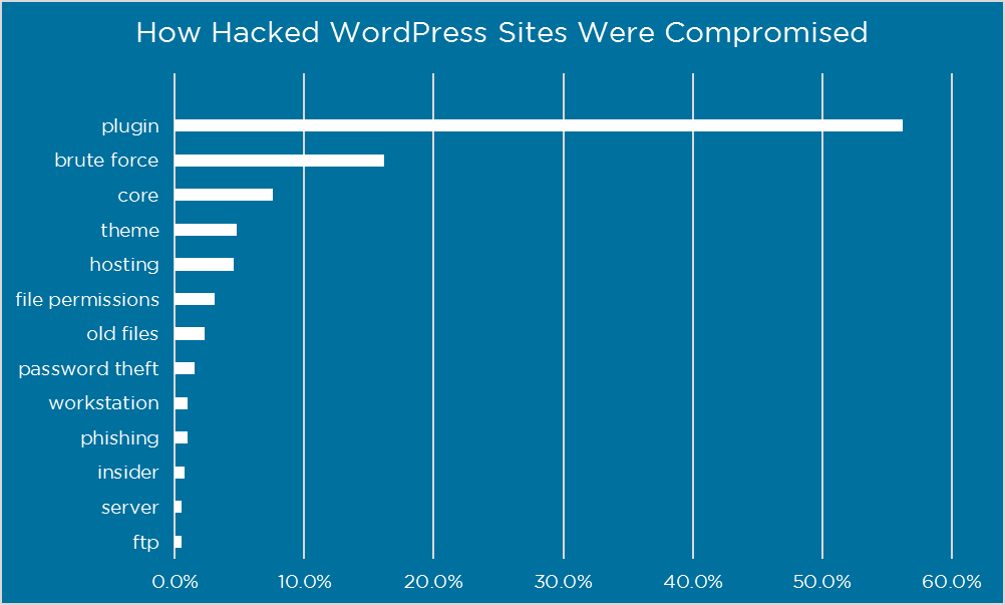
Credit: www.wordfence.com
Frequently Asked Questions
How Do I Know If My WordPress Site Is Hacked?
If your WordPress site is hacked, you’ll notice unusual activity. This includes unexpected redirects, slow loading, or unauthorized content. You might also find that you can’t log in or receive warnings from your hosting provider. Regularly checking for these signs can help identify issues early.
What Are Immediate Steps To Take Post-hack?
Immediately change all passwords, including admin and database passwords. Scan your site using security plugins like Wordfence or Sucuri. Restore a clean backup if available. Notify your hosting provider for assistance. These steps help contain damage and begin the recovery process.
Can A Hacked WordPress Site Affect Seo?
Yes, a hacked WordPress site can significantly impact SEO. Search engines might blacklist your site, leading to loss of traffic. Malware can inject spammy content or links, damaging your site’s reputation. Addressing hacks quickly is essential to minimize SEO damage and maintain your site’s integrity.
How To Prevent Future WordPress Hacks?
To prevent future hacks, regularly update WordPress, themes, and plugins. Use strong, unique passwords and enable two-factor authentication. Install security plugins like Wordfence for additional protection. Regularly back up your site to recover quickly if needed. These measures strengthen your site’s defenses.
Conclusion
Protecting your WordPress site requires vigilance and quick action. Regular backups can be a lifesaver. Always update plugins and themes promptly. Strong passwords are essential for security. Use a reliable security plugin to monitor threats. Remove any suspicious users immediately.
Reinstalling WordPress files can fix corrupted code. Keep calm and follow these steps carefully. Your site can recover from a hack. Stay informed to prevent future attacks. Remember, a secure site builds trust with your visitors. Stay proactive and safeguard your online presence.


