
Have you ever found yourself knee-deep in WordPress customization, only to stumble over the mysterious jargon of CSS code? If you’ve ever asked yourself, “What is the header bar called in CSS code?” you’re not alone.
Navigating through the world of web design can sometimes feel like deciphering a foreign language. But don’t worry; you’re in the right place. We’ll break down the terminology, unravel the mystery, and empower you to take control of your WordPress site.
Imagine the satisfaction of seamlessly customizing your header bar, making your website stand out with just a few lines of code. Stay with us as we guide you through this process, ensuring you not only understand what the header bar is called in CSS but also how you can use this knowledge to enhance your site’s aesthetic appeal. Ready to become the master of your WordPress domain? Let’s dive in!
Header Bar In WordPress Css
The header bar in WordPress is a key part of any website. It is styled using CSS code. In CSS, the header bar is often called header or .site-header. These names are used to target the header section.
CSS can change the header’s color, font, and size. It controls how the header looks. You can also add background images to make it unique. Many themes have their own CSS rules for headers. Customizing these rules can make your site stand out.
Common Names For Header Bar
The header is the top part of a webpage. It usually has a logo and menu. In CSS, it is called “header“. This name is common.
Site Header is another name. This name shows the header is part of the site. It helps users know where they are.
Top Bar is simple. It is at the top. It often has links. These links go to important pages.
Locating The Header Bar In Css
WordPress uses many files. These files have different purposes. The header bar is often in the style.css file. This file is in the theme folder.
To find it, go to the WordPress dashboard. Click on Appearance. Then click on Theme Editor. Look for style.css.
CSS selectors help in styling. The header bar might use .header or #header selector. These selectors are in the style.css file.
Open the file. Use Ctrl + F to search for “header”. This helps in finding the exact line. Look for styles like background-color or font-size.

Credit: docs.themeisle.com
Customizing The Header Bar
Use CSS to change the header bar colors. Select a color that fits your style. The font can also be changed. Choose a font that is easy to read. This makes your website look better. Use the color and font-family properties. These properties help change how things look. Make sure the text is clear and easy to read.
The layout of the header can change. Use CSS properties to adjust its look. The header can be on the left, right, or center. Use the position property for this. A good layout makes the site look neat. Ensure the header does not cover other content. This helps users find information easily.
Troubleshooting Header Bar Issues
CSS errors can make your header bar look odd. Sometimes, the header bar may not show up. This can happen if the code is broken. Missing brackets or semicolons are common mistakes. They stop the CSS from working right. Another error is using the wrong selector. Make sure to use the right class or ID.
Display problems can make a header bar look bad. Text might overlap or be cut off. Check if you have set the right width and height. Sometimes, you need to adjust the padding or margin. Use developer tools in your browser. They help find what is wrong. Change your CSS and see if it works better.
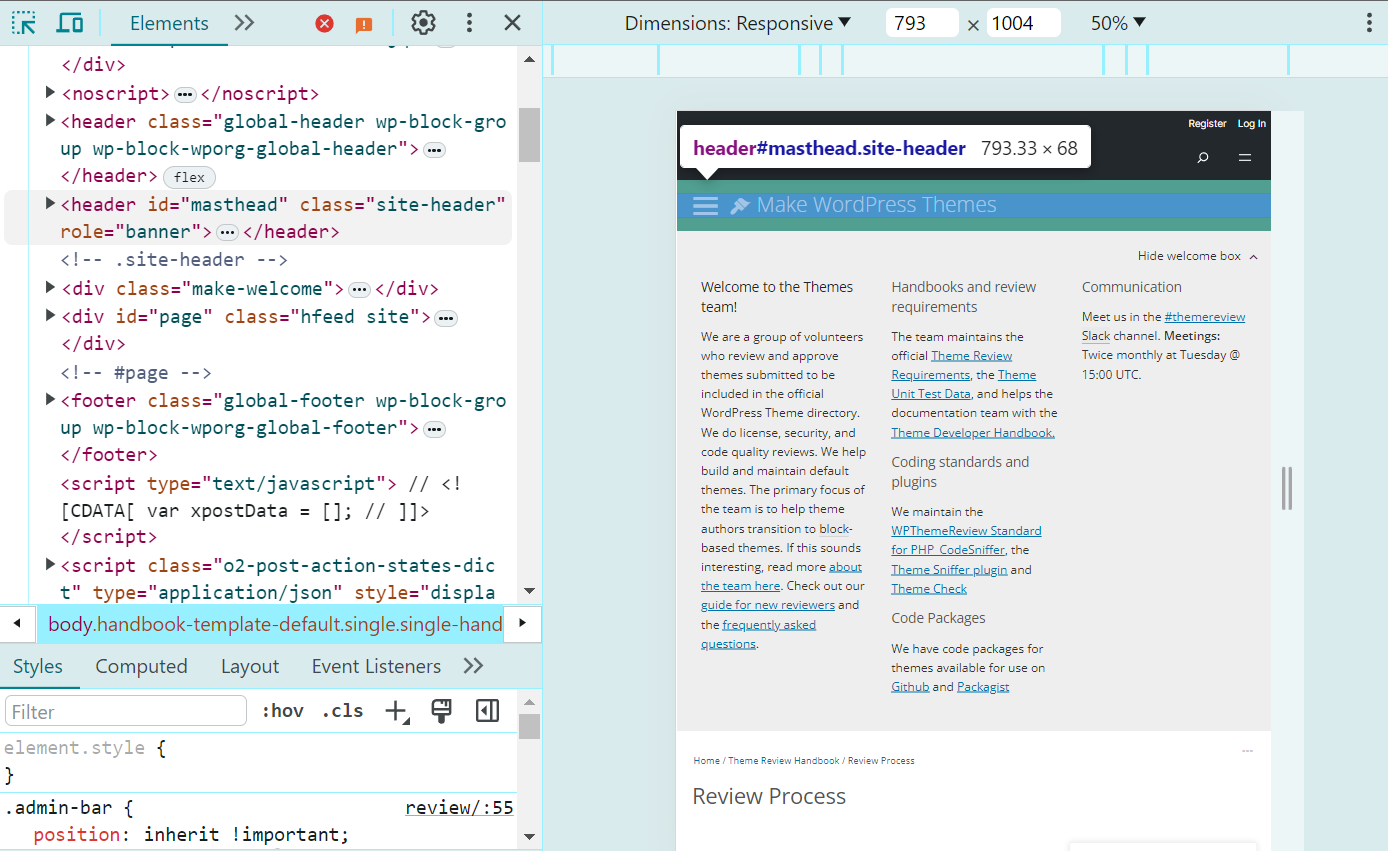
Credit: www.hostinger.com
Tools For Editing WordPress Css
Explore tools for editing WordPress CSS to enhance your site’s design. The header bar in CSS is often called “header” or “. site-header”. These tools help tweak styles effortlessly, making your website look polished and professional.
Using WordPress Customizer
The WordPress Customizer is a helpful tool. It lets you change how your site looks. You can edit colors, fonts, and layouts. It shows changes instantly. The Customizer is easy for beginners. You don’t need to write code. Just click and select options. It is found in the WordPress dashboard. Look for ‘Customize’ under ‘Appearance’. This tool helps make your site look nice. It’s a good place to start for simple changes.
Employing Css Plugins
Many CSS plugins are available for WordPress. They help change your site’s style. One popular plugin is Simple Custom CSS. It lets you add custom styles easily. Another is SiteOrigin CSS. It offers a visual editor. This editor makes CSS changes simple. Plugins can be installed from the dashboard. Go to ‘Plugins’ and click ‘Add New’. Search for the plugin name and install it. They provide more control without needing deep coding skills.
Credit: happyaddons.com
Frequently Asked Questions
What Is The Header Bar In WordPress?
The header bar in WordPress is called “header” in CSS code. It is a container at the top of a webpage. It often includes elements like navigation menus, logos, and titles. Customizing it enhances site aesthetics and user experience.
How Do I Style The WordPress Header?
To style the WordPress header, use CSS targeting the “header” element. Customize background colors, fonts, and spacing. Access the WordPress Customizer or add custom CSS via the theme editor. Enhancing the header improves branding and navigation.
Why Is The WordPress Header Important?
The WordPress header is crucial for branding and navigation. It provides a consistent look across pages and houses important links. A well-designed header enhances user experience by making navigation intuitive. It also reinforces brand identity with logos and taglines.
Can I Customize The WordPress Header Bar?
Yes, you can customize the WordPress header bar. Use the theme customizer or custom CSS to change its appearance. Modify colors, fonts, and layout to match your brand. Customization improves aesthetics and user interaction, making your website more engaging.
Conclusion
Understanding the header bar in WordPress CSS is crucial. It helps in customizing your site’s appearance effectively. With this knowledge, you can tweak your header to fit your brand. Learning these basics makes your website stand out. It’s essential for creating a unique online presence.
Knowledge of CSS terms boosts your web design skills. Practice regularly to enhance your abilities. Experiment with different styles and codes. This hands-on approach leads to better results. Your website’s look and feel will improve significantly. Keep exploring and learning more about CSS.
Your effort will pay off in the long run.


