
Have you ever found yourself lost in the vast sea of content on your WordPress website, struggling to keep everything organized and easy to navigate? If so, you’re not alone.
Many website owners face the challenge of managing their content effectively. This is where WordPress categories come to the rescue. Understanding what a category is and how it can transform your website’s structure is crucial for keeping your audience engaged and coming back for more.
We’ll dive into the world of WordPress categories, unraveling their importance and showing you how to use them to boost your site’s usability and SEO performance. Stick with us, and you’ll discover how this simple tool can make a world of difference for you and your readers.

Credit: wordpress.org
Understanding Categories In WordPress
Categories help organize your posts. They make it easy for users to find content. Imagine them as labels for your blog. They group similar posts together. This helps readers find what they like. Categories improve your site’s structure. It makes navigation simple.
Each post can have one or more categories. Choose wisely to keep things tidy. Adding too many can confuse readers. It’s best to use fewer but meaningful labels. Categories are different from tags. Tags are more specific. WordPress lets you manage categories easily. You can add, edit, or delete them anytime.
A well-structured site looks professional. It attracts more visitors. Using categories is a smart way to enhance your blog. Keep your site organized and user-friendly. Make sure your categories fit your content well.
Purpose Of Categories
Categories help organize blog posts. They make content easy to find. Readers enjoy organized blogs. It helps them find topics quickly. Categories group similar posts together. Blogs without categories can confuse readers. A well-organized blog attracts more visitors. Categories also help search engines understand your blog. They improve SEO. Each category should be clear. Use simple names for categories. A blog can have many categories. Think about your blog’s topics. Choose categories wisely. Each post should fit into a category. Categories guide readers through your blog. They make navigation easier.
Creating A New Category
Open your WordPress dashboard. Look for the “Posts” option on the left. Click it, and you’ll see “Categories”. Click “Categories” to go to the page. Here, you can manage your categories.
Choose a simple name for your category. It should tell what the category is about. Write a brief description. This helps others understand the category better. Keep descriptions short and clear.
You can organize categories by setting parent categories. A parent category holds other categories. This makes your site neat. Choose a parent from the dropdown menu. Now, your category is under another category.

Credit: wpsites.net
Managing Categories
Editing a category is easy. Go to your WordPress dashboard. Click on “Posts” then “Categories”. Find the category you want to edit. Click “Edit” under the category name. Change the name or description as needed. Be sure to save your changes. Now, your category has a new look or name.
Deleting a category is simple. But be careful. Click “Posts” then “Categories” in the dashboard. Find the category you want to delete. Click “Delete” under the category name. Deleted categories cannot be undone. Ensure all posts are moved to a new category. This keeps your blog organized.
Categories Vs Tags
Categories are like folders. They organize posts into broad topics. This helps readers find related content easily. On the other hand, tags are more specific. They describe details within a post. Think of them as labels. Both are useful for site navigation. But they serve different purposes.
Categories group similar posts together. They help in creating the site’s structure. Tags provide more detailed information. They highlight key points or themes. Use categories for main topics. Use tags for finer details. This way, readers can explore content efficiently.
Best Practices For Using Categories
WordPress categories help organize posts, making it easy for users to find related content. Properly utilizing categories improves site navigation and enhances user experience. Assign posts to relevant categories to maintain a clean and efficient website structure.
Keeping Categories Organized
Categories help your site look neat. Use clear names for each category. This helps users find what they need. Try to keep the number of categories small. Too many can confuse visitors. Always check your categories regularly. Remove or merge ones not needed. Keeping categories tidy makes your site easy to use.
Avoiding Category Overlap
Each category should be unique. No two categories should cover the same topic. This helps users find content faster. Plan your categories well from the start. Think about the main topics of your site. Avoid adding a new category unless it’s necessary. This prevents confusion and keeps your content organized. Remember, a clear site helps everyone.
Seo Benefits Of Categories
Categories help organize your blog. They make it easy to find topics. This improves the user experience. Better user experience means more time on your site. Search engines like this. They may rank your site higher.
Categories also help search engines understand your content. They show what your site is about. Proper use of categories can boost your site’s visibility. This means more visitors to your blog.
Using categories can help with internal linking. This links related posts together. It helps both readers and search engines. This can improve your site’s SEO.
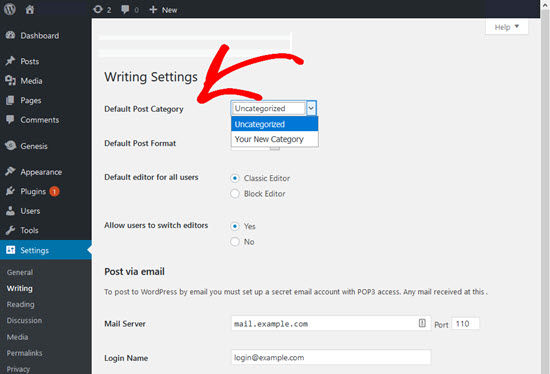
Credit: www.wpbeginner.com
Common Mistakes To Avoid
Many people use too many categories on their WordPress site. This can make it confusing for users. It’s better to keep it simple. Choose a few main categories. It helps users find content easily.
Some forget to assign a post to a category. This leaves posts in the default “Uncategorized”. Always assign a meaningful category to each post. It makes your site look well-organized.
Another mistake is using the same name for different categories. This can confuse both users and search engines. Use unique and clear names for each category. It improves site navigation.
Plugins For Enhanced Category Management
Managing categories can be easy with the right plugins. Category Order and Taxonomy Terms Order helps to arrange categories. Drag and drop feature makes it simple. WP Custom Category Pages allows custom layouts for each category. Users can add unique styles. Category Sticky Post lets you pin a post to the top. Good for important updates. Sub Category Manager helps create subcategories. Organize your content better.
Advanced Category Excluder hides unwanted categories. Clean up your site. Enhanced Category Pages offers more design options. Make each page stand out. Category Colors lets you add colors to categories. Visual distinction helps users. These plugins can enhance your WordPress site. Use them for better organization.
Frequently Asked Questions
What Is A Category In WordPress?
A category in WordPress helps organize your content by topic. It allows users to easily navigate related posts. Categories can be hierarchical, meaning they can have subcategories. Using categories improves site structure, making it easier for search engines and users to find relevant content.
How Do I Add A Category In WordPress?
To add a category, go to the WordPress dashboard. Navigate to Posts > Categories. Enter the category name, slug, and description. Finally, click the “Add New Category” button. The category will be available to assign to posts.
Why Use Categories In WordPress?
Categories improve content organization and user navigation on your WordPress site. They help search engines understand your site’s structure. Using categories can enhance your site’s SEO. They also make it easier for visitors to find related content.
Can Categories Have Subcategories?
Yes, WordPress allows categories to have subcategories. This creates a hierarchical structure for better content organization. Subcategories help refine content classification, enhancing site navigation. They provide additional layers for organizing posts by more specific topics.
Conclusion
Categories in WordPress help organize your content efficiently. They make your site user-friendly and easy to navigate. Visitors find information faster with clear categories. This enhances their experience and keeps them engaged. Proper use of categories improves your site’s SEO.
Search engines understand your content better. So, always plan your categories wisely. Keep them relevant and concise. This aids both users and search engines. With well-thought-out categories, your WordPress site becomes more effective. Organize well, and your site will thrive.
Happy blogging!


