
Have you ever found yourself puzzled over the terms “filters” and “actions” while navigating your WordPress site? You’re not alone.
Understanding the difference between these two can feel like unraveling a mystery, but it’s simpler than it seems—and crucial for anyone looking to tap into the full potential of WordPress. Imagine having the power to customize your website precisely how you want it, without unnecessary complications.
That’s what mastering filters and actions can offer you. They’re the key tools that give you control over how your site looks and functions. By the end of this article, you’ll not only grasp these concepts but also feel confident in using them to enhance your site. Ready to unlock the secrets of WordPress customization? Let’s dive in and transform the way you manage your website!
WordPress Hooks Explained
Hooks are special tools in WordPress. They help you change things without touching the core code. Two main types exist: filters and actions. Filters change data before it is shown. Actions let you add new features at certain points. Both make WordPress flexible and powerful. Filters and actions save time. They help avoid errors.
Filters focus on content. They change text or images. You can use filters to make words bold or change colors. Actions do not change content. They make things happen. For example, they run a function after a post is saved. Actions and filters are easy to use. They are perfect for beginners.
Understanding Actions
Actions in WordPress are special functions. They let you add code. This happens at specific spots on a website. They help in making changes. These changes are often site-wide. Actions do not return any data. They only perform tasks. The main goal is to add new features. You can do this without changing core files.
WordPress calls actions at specific times. These times are called hooks. A hook is like a signal. It tells WordPress to run certain functions. You can create a function. Then, attach it to an action hook. WordPress will run your function at the right time.
Actions help in adding new menus. They are useful for adding widgets. You can also use actions to send emails. They are helpful in setting up custom post types. Actions are often used to load scripts. These are just a few examples. There are many more ways to use actions.
Exploring Filters
Filters in WordPress let you change data. They do this before it is shown or saved. Filters help in making text look different. They also help in changing numbers or dates. Filters are important for developers. They allow custom changes without changing core files.
Filters use hooks to change data. A filter waits for a specific event. Then it changes the data. You can add or remove filters as needed. Filters are easy to use. Just write a function and link it to a filter hook.
Filters are used in many ways. You can change the content of a post. Filters can also change email text. They help in modifying titles or tags. Developers use filters for custom themes and plugins. They make WordPress more flexible and powerful.

Credit: www.toptal.com
Key Differences
Actions run at specific times. They are like signals. When something happens, actions run. Filters change data at specific times. They adjust content before it shows. Each has its own moment to work.
Filters can change data. They adjust words or numbers. This makes them flexible. Actions do not change data. They perform tasks. Actions might send an email or save a file. Actions do things. Filters change things.
Both are tools for developers. Actions help create features. They can add new functions. Filters make content better. Developers use them to refine data. Each is important in WordPress development. They make websites work well.
Practical Examples
Actions in WordPress let you add or change code. This happens at specific times. For example, you can send an email after a post publishes. You use a function to do this. First, define the function. Then, hook it to the action. The hook name is often clear. It tells what the action does. Actions run at key moments. They don’t return data. They only perform tasks. This makes them different from filters.
Filters change data as it passes through. You can use them to change a title before it shows. First, write a function to change the title. Then, connect this function to a filter hook. Filters must return data. This is because they change data. Filters are all about data transformation. They are useful for making small changes.
Choosing Between Actions And Filters
Actions help you add or change things. They let you run code at certain times. Actions do not change data. They just add tasks. Use actions for custom features. Like sending emails after a user registers. Or adding custom scripts. They are great for extra steps. Actions are easy to manage. They keep your website dynamic.
Filters change data. They let you edit text, images, or numbers. Filters adjust data before it shows on the website. For example, you can change a post title. Or modify a product price. Filters are useful for personalizing content. They help make your website unique. Filters work well with existing data. They do not add new tasks. They just change what is already there.
Best Practices
Filters allow developers to modify data before it is displayed on a site. Actions, on the other hand, execute specific functions at certain points during WordPress operations. Understanding these concepts helps improve customization and functionality in WordPress development.
Optimizing Performance
Filters and actions can slow down your site. Use them wisely. Too many can cause issues. Always test your site speed. Check it after adding new code. Remove unused filters and actions. Aim for simple code. Simple code runs faster. Fast sites are good for users. They also rank better in search engines.
Ensuring Compatibility
Compatibility is key for a smooth site. Use filters and actions that follow standards. Update your WordPress regularly. New versions fix bugs. They also add features. Test new plugins with your site. Some might not work well. Check if they follow WordPress rules. This helps avoid conflicts. Backup your site often. Backups save your data. They are helpful if something breaks.
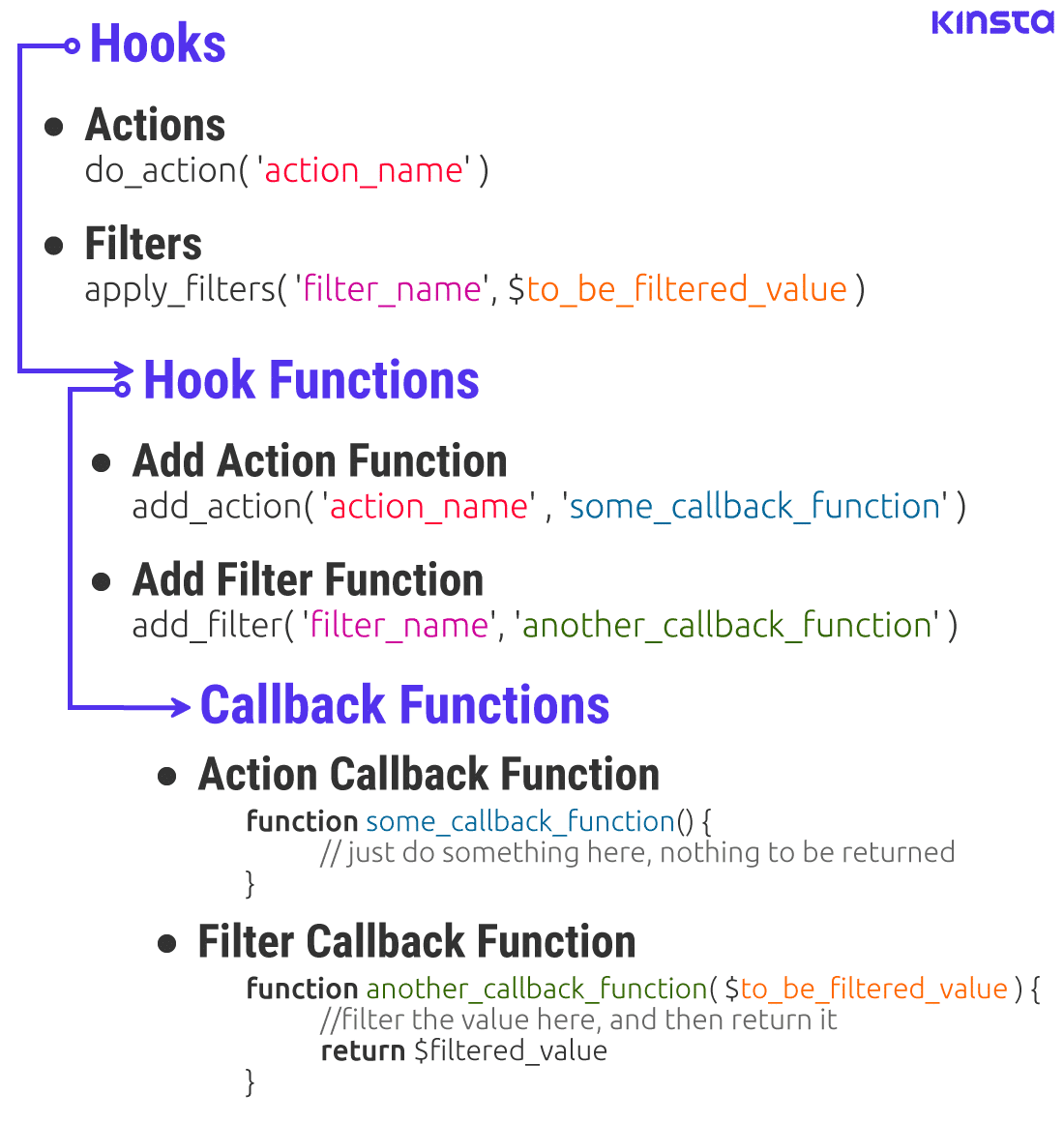
Credit: kinsta.com

Credit: stackoverflow.com
Frequently Asked Questions
What Are WordPress Filters And Actions?
Filters and actions are hooks in WordPress. Filters modify data during execution, while actions execute custom code at specific points. They allow developers to customize functionality without altering core files. Both enhance flexibility and extend WordPress’s capabilities, offering a seamless user experience.
How Do Filters Work In WordPress?
Filters in WordPress modify data before it’s displayed or saved. They apply custom functions to WordPress content, altering text, images, or metadata. By using filters, developers can change outputs, ensuring content fits specific needs. They enhance customization without changing the core code, maintaining stability.
How Do Actions Differ From Filters?
Actions execute custom code at specific points, without modifying data. Filters change content before it’s displayed or saved. Actions are used for tasks like sending emails or enqueuing scripts. They extend WordPress functionality, triggering code execution during events like post publication.
Why Use Actions And Filters In WordPress?
Actions and filters provide customization without altering core files. They enhance theme and plugin development. By using them, developers achieve flexibility, ensuring updates don’t overwrite changes. They improve functionality, allowing tailored user experiences while maintaining WordPress’s integrity and security.
Conclusion
Understanding filters and actions in WordPress is essential. Filters modify data before saving or displaying. Actions execute custom code at specific points. Both enhance WordPress functionality. Developers can tailor their website’s behavior easily. They ensure efficient customization without altering core files.
This flexibility keeps WordPress sites secure and up-to-date. Choosing the right hook depends on your goal. Filters for data manipulation. Actions for executing code. Experiment with both to improve your site’s performance. Mastering these tools leads to a more dynamic WordPress experience.
Happy coding!


