
Are you struggling to find the perfect size for your WordPress featured images? You’re not alone.
Many website owners grapple with this common dilemma. Choosing the right image size isn’t just about aesthetics; it’s a powerful factor that can influence your site’s performance, speed, and ultimately, your visitor’s experience. Imagine your carefully crafted content getting overshadowed by a poorly displayed image.
Nobody wants that, right? In this guide, we’ll reveal the ideal dimensions for your WordPress featured images and explain how the right size can enhance your website’s appeal. Stick with us, and you’ll soon master the art of captivating your audience with perfectly sized visuals.
Credit: enginescout.com.au
Importance Of Featured Images
Featured images are key for any blog or website. They grab attention quickly. Good images can make a visitor stay longer. They tell a story fast. They show what your content is about. People like seeing pictures more than reading words.
Images help in SEO too. Search engines love images. They improve your ranking. Good images bring more visitors. Always use high-quality images. Make sure they fit well on your page. A blurry image looks bad. Choose the right size for your featured image. It should be clear and not take too long to load.
Most websites use images that are 1200 x 628 pixels. This size looks great on most screens. It won’t slow your page down. Use this size for best results. Your readers will thank you.
Standard Image Dimensions
Images must fit well on your website. This makes the site look better. Featured images often need to be 1200 x 628 pixels. This size works on most screens. It also loads quickly.
Some websites use a different size. 800 x 450 pixels is also common. This is smaller. It may be faster to load. But it may not fill large screens.
Large images may slow down your site. This makes people leave. Keep images small but clear. Use good quality images. They should not be blurry.
Some themes have their own size rules. Check your theme settings. Follow the size it suggests. This helps your site look its best.
Impact Of Image Size On Load Speed
Big images can slow down your website. Slow websites make people leave. Smaller images help pages load faster. Fast websites keep visitors happy. Image size matters for this reason. It affects how quick your site is.
Choose the right size for your featured images. A good size is around 1200×628 pixels. This size is large enough for most needs. But not too big to slow down pages. You can also use tools to compress images. This makes them smaller without losing quality.
Always test your site speed after adding new images. Adjust the size if needed. Keeping your site fast is important. It helps with better user experience and can improve your SEO.
Optimizing Images For Seo
Using the right image size helps your site. Faster load times are important. Google loves speed. Users do too. Too big images slow your site. Too small images look blurry. This frustrates users. The best size for featured images is 1200×628 pixels. This size looks good on all devices. It’s also good for social media sharing.
Make sure images have descriptive file names. Use names like “sunset-beach.jpg”. This helps search engines. Alt text is also key. It tells what the image is about. Write simple alt text. Like “sunset on a beach”. This helps visually impaired users.
Responsive Design Considerations
Choosing the right image size is important. Large images can slow down your site. Slow sites can lose visitors. Small images might look blurry. Blurry images don’t look nice. Balance is key. A good size is 1200 x 628 pixels. This size works well on many screens. It loads quickly. It looks clear. Always test images on different devices. Images can appear differently. Check on phones, tablets, and computers. Adjust as needed. Keep the file size small. Use JPEG or PNG formats. They compress well. They keep good quality.

Credit: wpindigo.com
Choosing The Right File Format
Picking the right format for images is important. Formats like JPEG are best for photos. They keep the image size small. PNG is good for images with text or graphics. It keeps details clear. GIF works for simple animations. It makes the image move. Each format has its own use. Choosing the wrong one can make images look bad or load slowly.
JPEG compresses images well. This helps in loading faster. PNG supports transparency. This is useful for logos. GIF is ideal for animations. Each type has strengths and weaknesses. Pick wisely for better results.
Utilizing WordPress Image Settings
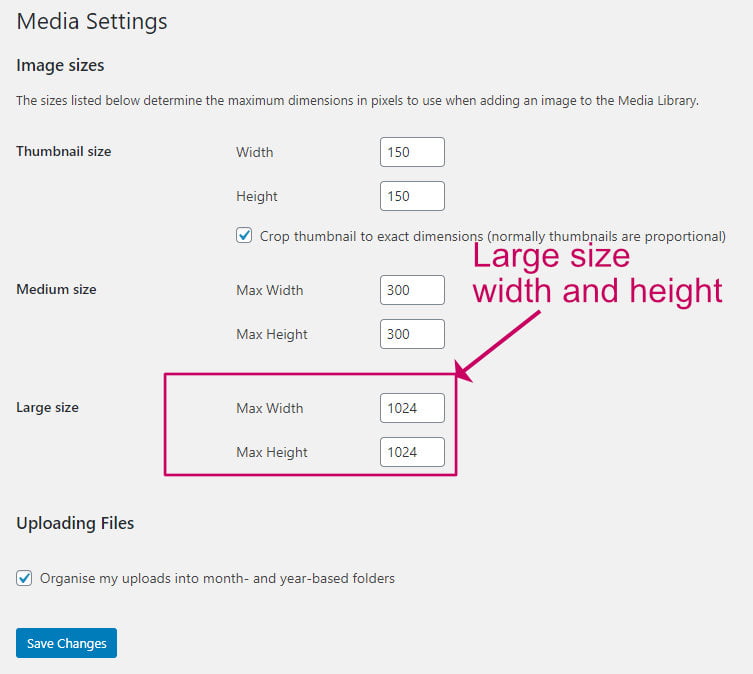
WordPress makes it easy to set image sizes. The right size is important. Big images can slow down a site. Small images may look blurry. Featured images should be clear and sharp. They usually appear at the top of posts. The recommended size for featured images is 1200 x 628 pixels. This size fits well on most screens. This ensures the image looks good and loads fast.
Images should be in JPEG or PNG format. JPEG is good for photos. PNG works well for graphics and logos. Images must not exceed 200 KB in size. This helps with faster loading times. Always check how the image looks on different devices. This makes sure all users see the best version.
Plugins For Image Optimization
Choosing the right plugin is important. Some plugins make images smaller. This helps your site load faster. A fast site makes users happy. Smush is a popular choice. It compresses images well. Another option is ShortPixel. It works with many file types. EWWW Image Optimizer helps too. It makes images smaller without losing quality. Each plugin has its features. Check what suits your needs. Plugins can save space. They help with SEO too. A faster site ranks better in search results. Try a few plugins. See what works best for you.
Common Mistakes To Avoid
Choosing the wrong image size can slow your website. This mistake affects your site’s loading speed. Many users don’t know about image compression. Uncompressed images take up too much space. Large images can make your page load slowly. Fast loading is important for user experience. Some people use images that are too small. Small images can look blurry on screens. This mistake makes your site look unprofessional.
Another mistake is using the wrong format. JPEG, PNG, and GIF have different uses. Each format is best for different types of images. Using the wrong format can affect the quality. Poor quality images can drive visitors away. Always choose the right format for your image type.
Credit: wpkind.com
Frequently Asked Questions
What Is The Ideal Size For WordPress Featured Images?
The ideal size for WordPress featured images is 1200 x 628 pixels. This size ensures optimal display across devices and platforms. It balances quality and loading speed, enhancing user experience. Always check your theme’s documentation for specific size recommendations.
How Do I Optimize Images For WordPress?
To optimize images, compress them using tools like TinyPNG or ImageOptim. Use the JPEG format for photos and PNG for graphics. Ensure image dimensions match display requirements. This improves page speed and user experience.
Why Are Featured Images Important In WordPress?
Featured images represent your post visually on your site and social media. They attract readers and improve engagement. Properly sized featured images enhance your site’s aesthetic and SEO performance.
Can I Use Different Sizes For Mobile Devices?
Yes, responsive design allows different image sizes for mobile. Use CSS media queries to adjust image display. This ensures images look good on all devices, improving user experience.
Conclusion
Choosing the right image size enhances your WordPress site’s appeal. It ensures faster loading times, which keeps visitors happy. The recommended size for featured images is 1200×628 pixels. This size works best for most themes and platforms. Always compress images before uploading.
This practice saves space and boosts site speed. Remember, clear and relevant images attract more viewers. They improve your site’s look and feel. Experiment with different sizes to find what suits your needs. Ultimately, proper image sizing is key to a successful WordPress site.
Stay consistent for the best results.


